Apps

See All Stories

Learn about the latest news for iOS, Mac, Apple Watch, and Apple TV apps

Apps for iOS, macOS, tvOS, and watchOS power our modern world. 9to5Mac will update you on the latest news, review, and updates for all types of apps. “There’s an App for that”.

The term came became part of our vocabulary when Steve Jobs announced The App Store as part of the iPhone 2.0 software update in 2008.

Over the years, the term has become as common as kleenex for describing applications on all of our devices. Apple’s platforms have apps for just about anything from finance, banking, sports, social media, podcasting, music, and more. We have a guide for helping you discover the best ones as well. Apps are now on everything from our TV, to our smartphones, on our laptops, and all the way down to our wrists.

As new ones are released or existing ones have major updates, the team here at 9to5Mac will bring you the latest news and reviews. If you want to follow along with video footage, be sure to follow 9to5Mac on YouTube. Scroll down below our latest updates on all things relating to applications on iPhone, iPad, Mac, Apple TV, and Apple Watch.


Site default logo image

Backblaze launches free update, potentially increasing speed of Mac backups more than five-fold

Backblaze is today launching version 4.0 of its Mac backup app, potentially allowing file uploads to happen five times faster. This will primarily be of benefit for the initial backup, which can take several weeks. Faster downloads will also be available when restoring from a backup.

Although you’ve always been able to choose how much of your upload bandwidth the app uses, latency issues meant that the app didn’t always take advantage of higher speeds. You can now assign multiple processes (or threads, in Backblaze’s terminology) to the job. The company says those more than 500 miles from its California data center should see the greatest benefit.

It won’t magically add extra bandwidth out of thin air, and the company suggests limiting usage to two or three threads, but if you’ve told the app to use a decent chunk of your upload capacity and it isn’t doing it, adding an extra thread or two should help. The update is free to all users.

Backblaze costs $5/month for unlimited backup per Mac, including any connected external drives.

Review: Filters, a new photo editor for iPhone with over 800 image effects and a stunning design

http://www.youtube.com/watch?v=dCwIycCsNiE

Mike Rundle, an independent designer and developer, is today releasing Filters for iPhone ($0.99), a visual effects photo editor. Rundle’s integrated development workflow, both writing the code and designing the interface, shows through in his work. This is how Filters describes itself.

You don’t take photos with Filters. You transform them. Filters has over 800 ways to transform your photographs including fully adjustable authentic vintage film recreations, hand-painted textures, vibrant colored gel overlays, special multi-effect adjustments (Shine, Luna, Color Boost, Intimidate and Smart Fade) as well as standard image adjustment tools like brightness, contrast, color temperature, exposure and more. All features are included with nothing extra to purchase.
The app features over 800 different image effects presented with some of the best UI design I’ve seen. However there’s no getting away from the fact Filters enters a crowded market with stiff competition. It’s interesting to see how Rundle has tried to differentiate his app from the rest. Read on for our full review of the iPhone’s newest image app.


Expand
Expanding
Close

Facebook unveils platform to integrate third-party apps, customer support for businesses into Messenger

Site default logo image

During its F8 Developer Conference today, Facebook announced a new Facebook Messenger Platform that will allow third-party apps to integrate with its popular Messenger app.
Expand
Expanding
Close

9to5Toys Last Call: 49-inch LG 4K Smart UHDTV $660, 2K iOS game sale, discounted Xbox Live/PS Plus, more

Keep up with the best gear and deals on the web by signing up for the 9to5Toys Newsletter. Also, be sure to check us out on: TwitterRSS FeedFacebookGoogle+ and Safari push notifications.

Today’s can’t miss deals:

Last Call Updates:

2K’s best iOS games are on sale from $3 ea: BioShock, XCOM, Civilization Revolution 2, NBA 2K15, more

The ultimate lifeline: this $60 power bank can jump start your car and charge your iPhone

Xbox Live Gold $36 (Reg. $60), PlayStation Plus $40 (Reg. $50)

iPad Air 2 Wi-Fi in all colors: 16GB $400 (Reg. $499), 128GB $600 (Reg. $699)

JBL Spark Bluetooth Speaker $35 shipped (Reg. $130)

The software used by Pixar to create visual effects for movies like Toy Story, Up, and WALL-E is now free

Small States Review: Grado’s GR10e in-ear headphones hit every note, $299 giveaway

More new gear from today:

More deals still alive:

GoPro HERO4 Black 4K Action Cam $399 shipped ($100 off)

Free money! Save up to 20% on gift cards from Staples, Lowe’s, Applebee’s, Facebook, more

New products & more:

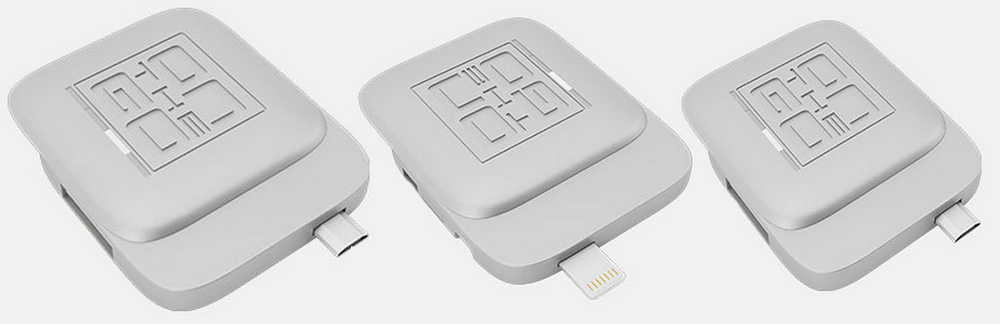
InfiniteUSB cables offer an endless supply of USB ports for your laptop

Review: Fantastical 2 for Mac graduates to a full calendar replacement w/ Yosemite widget+extension, much more

Site default logo image

Fantastical’s ability to parse natural language input and create detailed appointment entries on your calendar has always been the primary reason to use it instead of or in addition to Apple’s own Calendar app on the Mac. Apple Calendar has picked up some language parsing smarts in recent updates, too, but it still doesn’t match Fantastical’s control and real-time appointment preview.

Still, I say in addition to because Fantastical for Mac has lived in the menu bar next to your clock, WiFi status, and other utilities where you can quickly access it for reference or adding an appointment from anywhere in the OS. The menu bar app includes a compact month view calendar above a streamlined, scrollable list view of appointments and reminders, but sometimes it’s nice to stretch out and view your schedule in a different context.

So when Fantastical first debuted on iPad almost a year ago putting the efficient list view next to a larger full calendar, I wrote optimistically that “the iPad’s app design could spill over into a future version of the Mac app (maybe as a dock app rather than a menu bar app).”

What Fantastical 2 for Mac actually became is even better: the same menu bar calendar users know and love (but new and improved!), and a full-sized calendar app with an optional dock icon. Both have been designed with the aesthetics of OS X Yosemite in mind and loads of under-the-hood features and improvements including the ability to actually change which calendars you see based on your location.
Expand
Expanding
Close

Inklet plug-in adds pressure-sensitive drawing on new Force Touch MacBook trackpad

Site default logo image

Ten One Design has released an updated version of its drawing plug-in, Inklet, adding pressure-sensitive drawing on the new Force Touch trackpad in all Mac drawing apps, including Photoshop, Lightroom, Aperture and Illustrator. The new trackpad was introduced by Apple on the 12-inch MacBook and 13-inch MacBook Pro with Retina display.

This means MacBook owners with the new trackpad will enjoy enhanced, highly-accurate pressure sensitivity when drawing on the trackpad whether drawing with a stylus or with a finger.

Inklet for Mac adds an icon to your menubar that you click when you want to draw on your trackpad in your chosen app … 
Expand
Expanding
Close

Site default logo image

Pro Tools 12 now available with new subscription models

After first announcing and showing off new licensing plans with Pro Tools 12 in January, today the latest version of Pro Tools has arrived at last alongside the new subscription plans on Avid’s online store.

Highlights for Pro Tools 12 include a new “Avid Cloud Collaboration” feature that lets users collaborate in real-time from different locations using built-in chat and other collaboration features, and a new “Avid Marketplace” for finding talent and accessing apps, plug-ins and third-party content.

For the first time, Avid is making Pro Tools, with version 12, available through license subscriptions starting at $29.99/month. An annual update is available for $199 (the one-time price of Apple’s competitive Logic Pro X), while the annual subscription plan will go for $299. Lastly, Avid has perpetual licenses starting at $899.

(via The Loop)

Apple and IBM rolling out MobileFirst iOS enterprise apps localized for Japan

Site default logo image

Following the release of the MobileFirst suite of iOS enterprise apps last year, the result of a new partnership between Apple and IBM, today the companies are rolling out the apps to the Japanese market.

The companies haven’t made an official announcement yet, but sources close to the situation say seven apps are arriving for Japanese customers today.
Expand
Expanding
Close

9to5Toys Last Call: Time Capsule 3TB refurb $299, iPad mini 2 128GB LTE $430, JayBird Bluetooth in-ears $119, more

Keep up with the best gear and deals on the web by signing up for the 9to5Toys Newsletter. Also, be sure to check us out on: TwitterRSS FeedFacebookGoogle+ and Safari push notifications.

Today’s can’t miss deals:

Last Call Updates:

Apple’s refurbished 3TB Time Capsule drops to $299 shipped (25% off original)

Daily Deals: iPad mini 2 128GB LTE $430, ZAGGkeys iPad Air keyboard case $29, Toshiba Canvio 1TB HDD $50, more

JayBird BlueBuds X Sport Bluetooth Headphones $119 shipped (Reg. $170)

Exclusive: Incase 13-inch MacBook Air Hardshell Cases for $25 shipped (50% off)

Small States Review: Grado’s GR10e in-ear headphones hit every note, $299 giveaway

More new gear from today:

Amazon’s best selling HDTV: LG Electronics 55-Inch 1080p 120Hz LED for $500 shipped (Reg. $800)

More deals still alive:

Modern Combat 5: Blackout for iOS goes free for the first time (Reg. $4+)

iTunes Free App of the Week: Dark Echo ($2 value)

Apple extends deeper discounts to its refurbished store: AirPort Extreme $129, 13″ MacBook Air from $719, more

Apple laptops up to 25% off: MacBook Air from $750 w/ .edu, Pro w/ Retina display from $1,100 w/ .edu

Updated Apple TV pricing gets passed down as players refurbished by Apple hit a new low of $59

New products & more:

Atari’s new Fit app for iOS and Android rewards users w/ classic arcade games

Site default logo image

Google’s iOS app Field Trip now features notable women from history

[youtube=https://www.youtube.com/watch?v=BXxfhBbt3eY]

Google’s iOS app Field Trip, a cool background app that alerts you to interesting things around you as you travel, now features notable women from history. If you check the Spark: Women on the Map option in the app, it will point out sites where women have played an important role in our past.

Google worked with gender equality campaign group SPARK to add the feature, reports TNW, after it pointed out to Google that its doodles featured women only 17% of the time. Google has also promised to do better there.

Field Trip so far features only 100 women, but anyone can nominate someone they feel should be included, suggesting that it may quickly grow.

iOS 8.3 includes settings to download free apps and iTunes content without requiring a password

Site default logo image

A reader has spotted that iOS 8.3 includes some new configuration options for password entry in the iTunes and App Store. Labelled as ‘Password Settings’, the new view allows users to configure how frequently Apple should ask for the user’s iTunes Store password for purchases. This includes allowing users to choose to allow free apps to be downloaded, no password necessary.

The first option allows users to require passwords immediately or expire after fifteen minutes. This option has existed in previous versions of iOS, under the Restrictions settings. However, the toggle below — ‘Require Password’ for free downloads is an altogether new option. It allows users to download free apps (and other iTunes content) with no need to type a password. Paid content still requires authentication based on the options above.

The setting is currently disabled on iOS 8.3 devices we tested, although presumably it will activate by the time iOS 8.3 is released to the public.


Expand
Expanding
Close

9to5Toys Last Call: iPad mini 2 $250, LG 50″ 4K UHDTV $1299, Kensington lock $17, more

Keep up with the best gear and deals on the web by signing up for the 9to5Toys Newsletter. Also, be sure to check us out on: TwitterRSS FeedFacebookGoogle+ and Safari push notifications.

Today’s can’t miss deals:

Last Call Updates:

Best Buy 2-Day Sale: iPad mini 2 $250, iMac from $1,000, Pebble Steel $170, much more

HDTVs: LG 50″ WebOS 4K UHDTV $1,299 (Reg. $1,499), Haier 58″ 1080p 120Hz $629 (Reg. $749), more

Kensington ClickSafe Keyed Laptop Lock $17 Prime shipped (orig. $40+)

iTunes Free App of the Week: Dark Echo ($2 value)

You’re going to want this $8 iPhone 6 armband if you plan to workout with Apple Watch

Exclusive: Incase 13-inch MacBook Air Hardshell Cases for $25 shipped (50% off)

More new gear from today:

Headphones: ATH-M50X Professional Over-Ears $129 (Reg. $169), Philips Over-Ears $63 (Reg. $75+)

  • New! Daily Deals: Motorola Moto G $160, Seagate Expansion 5TB External HDD $130, more
  • New! Games/Apps: The Order 1886 $40, Battlefield Hardline $54, Xbox One bundle $349, iOS freebies, more

More deals still alive:

WD Elements 1TB Portable USB 3.0 Hard Drive: $50 shipped (orig. $70)

Apple extends deeper discounts to its refurbished store: AirPort Extreme $129, 13″ MacBook Air from $719, more

Apple laptops up to 25% off: MacBook Air from $750 w/ .edu, Pro w/ Retina display from $1,100 w/ .edu

Updated Apple TV pricing gets passed down as players refurbished by Apple hit a new low of $59

New products & more:

Bosch’s new REAXX table saw uses advanced sensors to protect your hands and its blade

Site default logo image

Google Maps iOS app adds full-screen maps, improved voice search & transit directions

Google Maps for iPhone and iPad has received an update to version 4.4.0 bringing a new full-screen map view, improved transit directions and voice search, and the ability to filter search results for Zagat-reviewed restaurants.

Google notes that the new full-screen mode can be activated by “tapping an empty spot on the map,” while improved voice search brings the ability to “type, or tap the mic and say, “directions to” a place for faster results.”

The update also includes new transit line colors on maps when viewing transit directions and a Zagat filter for restaurants in search results.

The updated Google Maps app for iOS, version 4.4.0, is available on the App Store now.

What’s New in Version 4.4.0

• View a full-screen map by tapping an empty spot on the map
• See transit line colors on the map when you get transit directions
• Filter search results for Zagat-rated restaurants (where available)
• Type, or tap the mic and say, “directions to” a place for faster results
• Bug fixes

Apple reportedly cracks down on antivirus apps from iOS App Store, many apps pulled

Site default logo image

Searching for ‘antivirus’ now only shows games or Find My iPhone-esque apps.

Apple has seemingly decided to crack down on antivirus and antimalware apps, removing them from the App Store. Although there has been no official statement from Apple on a policy change, Apple’s loose guidelines allow them to pull pretty much anything at any time, particularly something like antivirus which has questionable utility within the sandboxed iOS environment of iPhones and iPads.

One casualty of the removal is Intego’s VirusBarrier, which claims that this takedown was not specific to its product with Apple deciding the entire category of antivirus products is now off-limits.


Expand
Expanding
Close

CARROT Weather’s forecast includes a 100% chance of snark

Site default logo image

You all remember CARROT, right? The sadistic, sarcastic artificial intelligence that powers a collection of productivity and fitness applications has returned for a fifth app. The latest piece of software to join the CARROT family is CARROT Weather.

As you may have gathered from the title, this new app helps you track current and upcoming weather conditions with the snark that only CARROT can really nail. The Weather app is much simpler in presentation than its predecessors, but it’s just as robust as you’ve come to expect from this line of apps.


Expand
Expanding
Close

9to5Toys Last Call: Incase MacBook cases $25, iTunes Free App of the Week, GoPro HERO4 Black $400, more

Keep up with the best gear and deals on the web by signing up for the 9to5Toys Newsletter. Also, be sure to check us out on: TwitterRSS FeedFacebookGoogle+ and Safari push notifications.

Today’s can’t miss deals:

Last Call Updates:

Exclusive: Incase 13-inch MacBook Air Hardshell Cases for $25 shipped (50% off)

Amazon Gold Box – Canon imageCLASS D530 Monochrome Laser Printer/Scanner/Copier $69 shipped (Reg. $100)

GoPro HERO4 Action Cameras: Silver w/ accessory bundle $400 ($535 value), Black 4K edition $400 (Reg. $500)

Modern Combat 5: Blackout for iOS goes free for the first time (Reg. $4+)

Nomad launches two Apple Watch power accessories, save 22% on your preorder

Small States Review: Carved’s Live Edge iPhone 6 cases ensconce your device in one-of-a-kind raw wood, multiple giveaways

More new gear from today:

WD Elements 1TB Portable USB 3.0 Hard Drive: $50 shipped (orig. $70)

More deals still alive:

Samsung 850 EVO 500GB 2.5-inch Internal Solid State Drive $180 (Reg. $270)

iTunes Free App of the Week: 8bit Doves ($3 value)

Apple extends deeper discounts to its refurbished store: AirPort Extreme $129, 13″ MacBook Air from $719, more

Apple laptops up to 25% off: MacBook Air from $750 w/ .edu, Pro w/ Retina display from $1,100 w/ .edu

Updated Apple TV pricing gets passed down as players refurbished by Apple hit a new low of $59

New products & more:

Sony’s PlayStation Vue is now available, but how does it compare to Sling?

Site default logo image

Atari’s new gamified fitness app lets you unlock classic arcade games by working out

Atari is releasing a new fitness app today called Atari Fit that lets users unlock classic Atari arcade games by working out.

The app acts as a personal trainer of sorts with over 100 exercises and fitness routines as well as integration with Apple’s Health app and fitness tracking wearables like Fitbit and Jawbone.

It also has a few interesting gaming features including multiplayer, online leaderboards, and the ability unlock classic Atari games like Pong, Super Breakout, and Centipede:

Multiplayer – Play with friends all over the world anytime. Join a team and workout together or race against each other. Track your stats as a group and encourage each other to workout. Compete to become the fittest team of gamers worldwide!

In addition to unlocking games using points earned by working out, Atari is teaming up with Walgreens to offer Walgreens Balance Rewards loyalty program points as in-game rewards.

The Atari Fit iPhone app is available for free on the App Store.

Pixelmator 1.1 for iPad adds realistic watercolor painting, new Color Picker, more

Site default logo image

Pixelmator has today released a new update for the iPad version ($9.99) of its popular image editor. Version 1.1 includes a brand new watercolor painting feature, which can be used to create brand new pieces of art from a blank canvas or add stylistic additions to existing images and photos. Brushes overlay new colors additively with soft radiuses to create beautiful blends and shading. Pixelmator says they spoke to real artists to help design the brush strokes. It feels really nice to use.

Although watercolor painting is the headline addition, Pixelmator 1.1 also includes a new Color Picker with a swatch of previously selected colors, an updated rendering engine for better performance and much more. You have to see it in action … (video below)


Expand
Expanding
Close

Most Nintendo iOS games will be developed in-house, will be different to console games, may include freemium

Site default logo image

Nintendo CEO Satoru Iwata has told TIME magazine that most Nintendo “smart device” games will be developed in-house, rather than by partner DeNA. The company announced on Tuesday that it would finally start making games for smartphones and tablets.

Development of smart device games will be mainly done by Nintendo […] DeNA has extensive know-how in developing the “service” side of things, and will be primarily responsible for the service-oriented operations. We will be able to greatly leverage strengths of each party.

Iwata also confirmed Jeremy’s view that we’re unlikely to see classic Nintendo games like Mario, Donkey Kong and Zelda come to iOS and Android devices in their original forms … 
Expand
Expanding
Close

Site default logo image

Flexibits teases upcoming Fantastical 2 for Mac app

Flexibits just released the first teaser for the upcoming Fantastical 2 for Mac app. The teaser includes new iconography matching OS X Yosemite’s aesthetics similar to the iOS 7 and later versions of Fantastical 2 for iPhone and iPad. Fantastical 2 for Mac will obviously be the sequel to the popular language parsing calendar utility for Mac.

The new version of the smart calendar app is due out in one week on March 25th, the teaser reveals, and we’ll have a full, hands-on review at launch so stay tuned. Until then, check out the Fantastical 2 for Mac teaser here (it has a cool 1984 Macintosh Super Bowl ad vibe to it) and catch up on our review coverage of Fantastical 2 for iPhone and iPad.
Expand
Expanding
Close

Tumult releases Hype 3 and Hype Professional with new HTML5 physics, responsive design tools

Site default logo image

Tumult, developer of the user-friendly HTML5 web site and animation builder Hype, today announced two major updates to the powerful OS X application.

Hype 3 ($49.99) is a free upgrade for Hype 2 owners, refreshing the app with a new user interface — notably with a Yosemite-matching Light color theme — while making improvements to HTML accessibility, timing functions and timeline adjustments. Using Hype, even amateur designers can create interactive HTML5 web sites that work perfectly on desktop, laptop, tablet, and smartphone screens; no coding is required.


Expand
Expanding
Close

9to5Toys Last Call: LG 40″ 4K UHDTV $499, iPad Air 128GB LTE $529, Modern Combat 5 goes free, more

Keep up with the best gear and deals on the web by signing up for the 9to5Toys Newsletter. Also, be sure to check us out on: TwitterRSS FeedFacebookGoogle+ and Safari push notifications.

Today’s can’t miss deals:

Last Call Updates:

Amazon Gold Box: LG 40-inch 4K 60Hz Smart UHD HDTV/Monitor: $499 shipped

128GB iPad Air w/LTE (silver): $529 shipped, tax in NY (orig: $929)

Also Best Buy has some deals if you are quick.

[tweet https://twitter.com/9to5toys/status/578225173670707200]

Modern Combat 5: Blackout for iOS goes free for the first time (Reg. $4+)

Nomad launches two Apple Watch power accessories, save 22% on your preorder

pebble_watch_trio_group_04

Thinking Apple Watch? Pebble’s original timepiece might be a better buy for iOS users

Small States Review: Carved’s Live Edge iPhone 6 cases ensconce your device in one-of-a-kind raw wood, multiple giveaways

More new gear from today:

RAVPower 10400mAh Power Bank w/ dual USB ports: $17 Prime shipped (Reg. $25)

More deals still alive:

Caseology iPhone 6/Plus cases (multiple colors/styles) from $3 w/ free shipping

iTunes Free App of the Week: 8bit Doves ($3 value)

Apple extends deeper discounts to its refurbished store: AirPort Extreme $129, 13″ MacBook Air from $719, more

Apple laptops up to 25% off: MacBook Air from $750 w/ .edu, Pro w/ Retina display from $1,100 w/ .edu

Updated Apple TV pricing gets passed down as players refurbished by Apple hit a new low of $59

New products & more:

Sling TV hits Xbox One with free one month trial for Live users, additional channels announced

Launcher returning to the App Store after controversial Today widget rejection last year

Site default logo image

Launcher is coming back to the App Store, after a fracas with Apple late last year over the rules regarding widgets in the Today view of Notification Center. According to the developer, Greg Gardner, Apple has changed its mind on how widgets in Notification can function—something we’ve seen before. Launcher will be back in the App Store tomorrow.

It’s worth noting that the app was originally pulled because Apple said apps were not allowed to have widgets that launched other applications. Apple has seemingly had a change of heart, because the application is returning with the exact same features as six months ago. Read on for the full rundown on what happened.


Expand
Expanding
Close