iPad (2021)

See All Stories

Apple's tablet debuted in 2010. Since the original version, it's expanded into multiple screen sizes and Pro and non-Pro options.

The iPad is Apple’s base tablet model. In its ninth generation, the iPad focuses on being the perfect tool for education and people who seek a bigger screen to read and surface the web compared to the iPhone. With Apple Pencil and Smart Keyboard support, the iPad has never been better.

History

Site default logo image

The iPad is a line of tablets designed and developed by Apple. It was originally announced in 2010, three years after the first iPhone was introduced. With a 9.7-inch screen and with iPhone OS 3.2 the iPad was a success, hitting 1 million tablets sold in over three months, half the time the first iPhone took to reach this mark.

Steve Jobs then unveiled the iPad 2 in March of 2011. About 33% thinner than its predecessor and 15% lighter, the second generation used the A5 chip, twice as faster as its predecessor. The iPad 2 also introduced front and back cameras that supported FaceTime video calls.

The successor of the iPad 2 wasn’t a success at all. The third generation was introduced in March of 2012 with a Retina display and the A5X processor. The problem with this tablet it was too heavy and the battery didn’t last long enough. In October of the same year, Apple announced the fourth generation with the A6X processor, HD FaceTime camera, improved LTE capabilities, and the Lightning connector.

At this October event, Apple also introduced the first iPad mini. In 2013, Apple went with the first iPad Air and the iPad mini 2. In 2015, the company introduced the first Pro model, with two different sizes.

Site default logo image

In March of 2017, Apple announced the fifth-generation iPad with the A9 processor. It was a budget option compared to the other tablets. It was in 2018 that the company brought expressive news to the base iPad line. The sixth-generation had the A10 Fusion processor and fully supports the first-generation Apple Pencil.

A year later, the seventh generation was announced with a larger 10.2-inch display and support for the Smart Keyboard as well. It retained most of the specs of the previous model.

In September of 2020, the eighth generation was introduced alongside the fourth-generation iPad Air model. The eighth generation received an upgraded processor, now with the A12 Bionic, while keeping the same storage options: 32GB and 128GB.

In September of 2021, the ninth generation was introduced alongside a redesigned iPad mini. This iPad now features the A13 Bionic processor, True Tone support, and new storage options: 64GB and 256GB while keeping the same price.

iPad 9 Specs

Site default logo image

The ninth-generation iPad launched in September of 2021. Available in two colors, Silver and Space Gray, this tablet is made of 100% recyclable aluminum, and supports the first-generation Apple Pencil and Smart Keyboard.

With thinner bezels, the product comes with a 10.2-inch Retina display with a fingerprint-resistant oleophobic coating, and True Tone support for the first time, which adjusts screen content to the color temperature of a room.

This tablet uses the A13 Bionic chip, the same available on the iPhone 11, 11 Pro, and 11 Pro Max. It has an “all-day” battery with up to 10 hours of surfing the web on Wi-Fi or watching videos.

The iPad also comes in 64GB and 256GB storage options and Wi-Fi and Wi-Fi + Cellular versions.

Revamped cameras

Site default logo image

For the first time, this iPad shares the same FaceTime camera as the M1 iPad Pro with the Center Stage experience. With a new 12MP Ultra Wide front camera and Neural Engine, users can enjoy even more engaging video calls.

As users move around, Center Stage automatically pans the camera to keep them in view. When others join in, the camera detects them too, and smoothly zooms out to include them in the conversation. Center Stage makes video calls more natural in FaceTime as well as third-party video-calling apps.

Its main camera is the same: 8MP, f/2.4 aperture, and digital zoom up to 5x.

iPadOS 15

Site default logo image

The ninth-generation iPad comes with the iPadOS 15. Previewed during the WWDC21 keynote, the new operating system brings a redesigned Home Screen with widgets and App Library support.

On iPadOS 15, FaceTime group calls can finally appear in a grid, so it’s easier to see everyone. It’s also possible to share your screen, listen to Apple Music songs together, or watch Apple TV+, HBO Max, Disney+, and others while in a call.

In the productivity section, Apple, unfortunately, didn’t bring all the features pro users wanted to take full advantage of their new M1 iPad Pro, even though Apple made it easier to rely on multitasking features.

There’s a new multitasking menu on the top of the screen. When you click there, it’s possible to see what configurations you can use on Split View or just go to Slide Over with just a tap.

The experience with an external keyboard allows users to get more done with all-new keyboard shortcuts and a redesign of the menu bar.

With the Quick Note feature, users can use the Apple Pencil to add a quick note. They just need to slide the pencil through the bottom right corner to the center of the screen and start writing.

iPadOS 15 launched on September 20. Learn more about it here.

iPadOS 15.1 features

One month after releasing iPadOS 15, Apple released iPadOS 15.1 More notable, the company finally brought SharePlay support for the iPhone, iPad, and Apple TV. Unfortunately, Universal Control wasn’t one of the features added with this new version. Here’s what else is new:

Translate

  • Mandarin Chinese (Taiwan) support in the Translate app and for system-wide translation

Home

  • New automation triggers based on the current reading of a HomeKit-enabled humidity, air quality, or light level sensor

Shortcuts

  • New pre-built actions let you overlay text on images or gifs, plus a new collection of games lets you pass the time with Siri

iPadOS 15.2 features

apple-music-hey-siri-plays-voice-plan-9to5mac-2

Five weeks after releasing iPadOS 15.1, Apple is releasing iPadOS 15.2. It brings more features that were expected to launch alongside iPadOS 15 but, unfortunately, Universal Control is still nowhere to be seen. Here are the top features of this version:

  • Apple Music Voice Plan is a new subscription tier that gives you access to all songs, playlists, and stations in Apple Music using Siri
  • App Privacy Report in Settings lets you see how often apps have accessed your location, photos, camera, microphone, contacts, and more during the last seven days, as well as their network activity
  • Communication safety setting gives parents the ability to enable warnings for children when they receive or send photos that contain nudity
  • Digital Legacy allows you to designate people as Legacy Contacts so they can access your iCloud account and personal information in the event of your death
  • Apple TV app: Store tab lets you browse, buy, and rent movies and TV Shows all in one place

iPadOS 15.3 features

Six weeks after releasing iPadOS 15.2, Apple is releasing iPadOS 15.3. This update foregoes new features in favor of under-the-hood bug fixes and improvements. One of the most notable changes here is a fix for a Safari vulnerability that may have been leaking your browsing history and Google ID data to the websites you visited.

iPadOS 15.4 features

iPadOS 15.4 finally brings one of the most important features expected from iPadOS 15 and that got delayed: Universal Control. Here’s everything new with iPadOS 15.4:

  • Universal Control: This feature allows you to control your Mac and iPad using the same keyboard and mouse/trackpad. Universal Control needs iPadOS 15.4 and macOS Monterey 12.3;
  • New Siri voice: Siri has a fifth American voice. Apple says a member of the LGBTQ+ community recorded the voice and it’s non-binary;
  • More emoji: iPadOS 15.4 also brings new emojis. You can discover all of the new characters here;
  • Shortcuts automation: Adds support for running Personal Automations in the background without requiring a pesky banner notification.

You can learn everything new with this update here.

iPadOS 15.5 features

Different from other software updates, iPadOS 15.5 only improves the Podcast app experience, as Apple focused on Wallet changes for the iPhone this time:

  • Apple Podcasts includes a new setting to limit episodes stored on your iPhone and automatically delete older ones

iPadOS 15.6 features

iPadOS 15.6 is yet another small update for iPad users. Here’s what’s news:

  • TV app adds the option to restart a live sports game already in progress and pause, rewind, or fast-forward.
  • Fixes an issue where Settings may continue to display that device storage is full even if it is available.
  • Fixes an issue that may cause Braille devices to slow down or stop responding when navigating text in Mail.
  • Fixes an issue in Safari where a tab may revert to a previous page.

iPadOS 15.7 features

iPadOS 15.7 only brings bug fixes and some security improvements as the company readies the iPadOS 16 release.

Education

Site default logo image

Apple describes this iPad as the go-to tablet for education. For several years the company discounts this tablet up to 10%.

Apple is always promoting ways students can use the iPad to learn new things: using Augmented Reality, the Apple Pencil, and how to code with Playgrounds.

The company says the “App Store is the best place to discover apps” for education purposes:

Let your curiosity run wild with iPad. The App Store is the best place to discover apps that let you get a leg up in geometry, learn a new language, and attend virtual classes. You can even use augmented reality to learn something exciting, like watching the history of spaceflight unfold in your living room or making characters from your favorite book literally leap off the page.

Release date: When Apple will launch the ninth-generation iPad?

Apple launched the iPad 9 on September 24, 2021.

Pricing

iPad (2021) pricing starts at $329 for the 32GB storage option with Wi-Fi only. The prices can go up to $559 with the 128GB storage option and WI-Fi + Cellular. Here are the full prices of the ninth-generation tablet:

  • 32GB with Wi-Fi: $329
  • 32GB with Wi-Fi + Cellular: $459
  • 128GB with Wi-Fi: $429
  • 128GB with Wi-Fi + Cellular: $559
  • Apple Pencil (1st generation): $99
  • Smart Keyboard: $159

Lower prices may be available from Apple’s official Amazon store.

iPad (2021) Review

Site default logo image

Soon, we’ll review the ninth-generation iPad. As for now, you can watch our video review of the eighth-generation iPad, as we described it as the “best value tablet you can buy:”

“The iPad 8 was never meant to be a huge update. But even still, I think this is easily the best value tablet you can buy. For $329, this tablet has so much to offer: The performance, the great battery life, and the Apple pencil functionality. I’d highly recommend you pick up this tablet if you simply need an inexpensive tablet today that’s going to last you for three to four years with no trouble.”

iPad Deals

Over at 9to5Toys, you can find the best deals on the iPad and other Apple products. Download the 9to5Toys iPhone app to receive push notifications for new deals as well.

Rumors

As of now, Bloomberg‘s Mark Gurman said in his Power On newsletter by the end of 2021 that Apple plans a new entry-level iPad for 2022. In June 2022, 9to5Mac exclusively reported the details of the tenth-generation iPad model.

According to Filipe Espósito, this new entry-level tablet will pack the A14 Bionic chip, 5G compatibility, and, for the first time, USB-C connectivity, unlocking new experiences with the second-generation Apple Pencil. Its display will also increase, although it’s unclear whether it will have the same design as the M1 iPad Air.

This iPad could be released in October of 2022.

Video: Connect your iPad to the Internet via Ethernet cable with this easy hack

Site default logo image

iPad connected to the Internet via Ethernet only

After seeing an eager Redditor discuss their setup for deploying iPads online with just an Ethernet connection, I was curious myself to see if I could get my iPad Air to be wireless-less as well.

It’s obviously not an ideal way to use a tablet in 2014, as it’s probably easier and cheaper to travel with an inexpensive router than the equipment required to get your iPad wired in. But if you have the equipment lying around or just want to experience the proof-of-concept for yourself, it’s certainly a strange thing to witness.

Check below for the setup I used as well as my video experience.
Expand
Expanding
Close

Site default logo image

Spotify for iOS updated w/ previously announced free option for mobile and tablet users

Last month Spotify announced new ad-supported streaming options for mobile and tablet users without paid subscriptions, and today that update has rolled out for iPhone, iPad, and iPod touch users.

To recap, iPhone users can now play a particular playlist they create or their friends share, but the tracks will be shuffled. iPad users have an experience like desktop users where you can build specific playlists and list to music on demand.

The update is available now for iPhone, iPad, and iPod touch in the App Store.
Expand
Expanding
Close

Site default logo image

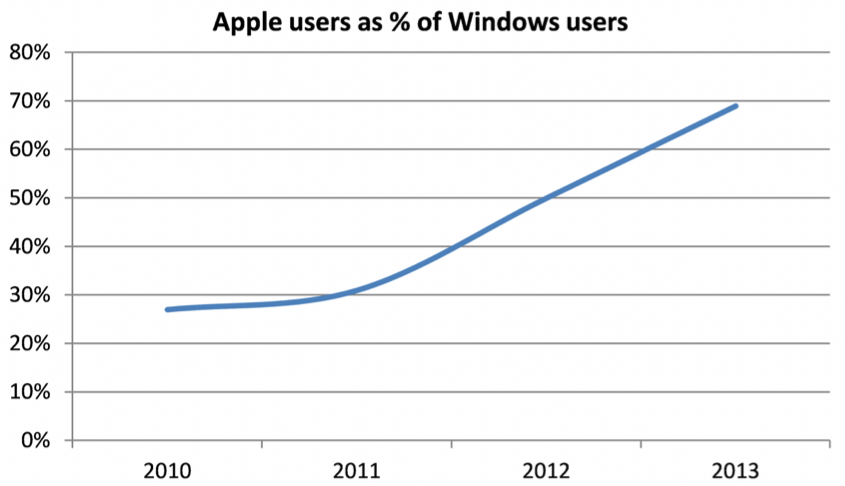
How badly Microsoft missed the mobile ship: 70 percent of Windows users own an Apple product

If ever there was a simple visual to illustrate just how slow Microsoft was to wake up to the shift into mobile, it’s this one: a full 70 percent of Windows users also own at least one Apple product.

While there will be some joint Windows/OS X users in there, the majority of them will be people with Windows PCs and either an iPhone, iPad or iPod.

Via Business Insider

Signal announces first full-size MFi Bluetooth games controller

Site default logo image

iOS gamers are not going to be short of options when it comes to choosing a games controller for their iPhone, iPad or iPod Touch. After earlier dock-based controllers from Logitech and Moga, and Monday’s announcement by SteelSeries of the first Bluetooth controller, Signal has just announced the first full-size Bluetooth controller in the shape of the RP One … 
Expand
Expanding
Close

2014: The year of the iPhone-controlled everything

Site default logo image

There are some technologies that happened way earlier than they had any right to. Frankly, putting a man on the moon in the days when the Apollo Guidance Computer really did have less power than a pocket calculator was an insane achievement.

And then there are those technologies that have taken way, way longer than they should have done – with home automation heading the list. The main reason it was such a slow-burn was the lack of a standard interface (X.10 never really established itself in the home).

2014, however, looks set to be the year in which all that changes, with the iPhone the new standard interface. Steve Jobs once said that the Mac was the hub at the center of our digital lives; this year, it looks like the iPhone is taking over the crown …


Expand
Expanding
Close

SteelSeries announces the first MFi Bluetooth game controller for iPhone, iPad, & iPod touch

Site default logo image

Today we get a look at the first Apple authorized Bluetooth game controller for iOS devices with the Stratus Wireless Controller announced today by SteelSeries.

We’ve already reviewed the first two Apple authorized game controllers to hit the market since it introduced its controller MFi program alongside iOS 7 earlier this year: Logitech’s PowerShell and Moga’s AcePower. Those two controllers used Apple’s form-fitting design, which lets an iOS device dock directly into a recess in the controller and connect via a built-in Lightning connector. The new controller from SteelSeries is the first standalone controller that connects to any iOS device over Bluetooth, which means it will also support iPads. It uses Apple’s extended layout, which gives you dual analog joysticks and an extra set of shoulder triggers on top of the d-pad, face buttons and single set of triggers on Apple’s standard layout.


Expand
Expanding
Close

Review: StorySkeleton, an iPad story-planning app and Scrivener companion

Site default logo image

As you doubtless gathered from my recent Scrivener review, I’m a massive fan of the best Mac app I’ve ever used for creative writing. The TL;DR version is that I wouldn’t dream of attempting to write a novel in anything else. My only real grumble is that we’ve as yet seen no sign of the long-promised iPad version of the app.

I’ve used PlainText with a Dropbox sync as a way of working on Scrivener projects on my iPad, and that works well enough at the writing stage. At the planning, stage, though, I love the corkboard interface. I was thus really interested to see an iOS app that not only provides a very similar corkboard view, but which can export and import to and from Scrivener … 
Expand
Expanding
Close

Site default logo image

Birdwatchers twitchy about ‘unethical’ and ‘dangerous’ use of iPhone apps

Screengrab: http://blog.nature.org

If you were to pick a hobby likely to generate confrontations and harsh words between participants, birdwatching probably wouldn’t spring immediately to mind. Yet the WSJ reports that the use of iPhone apps by birders is doing just that, as a new breed of birders use iPhone apps playing birdsong to persuade birds to come out of hiding.

An otherwise peaceful pastime has been roiled by conflict as digital field guides, and the song recordings they include, have made birding easily accessible for anyone with a smartphone and, sometimes, a portable speaker. In a hobby where reward has come from years of quietly, patiently waiting outdoors and diligently studying technical tomes, there is deep resentment of birders who are relying on these easy-to-use—or abuse—apps.

The American Birding Association is apparently considering “a major revision to its oft-cited Code of Birding Ethics to address smartphone use,” with the National Audubon Society also planning a “comprehensive policy” on the issue.

Some say it can get stressed if it thinks the playback is a territorial threat. A predator may even be lying in wait. The bird could also leave its habitat or stop responding to the calls, realities scientists say make them nervous.

“The I-gadgets are incredibly dangerous to people who know nothing about birds,” said avid birder Heidi Trudell.

I’m now expecting to hear tales of pitched battles with knitting needles between those who are for or against the use of iPads for knitting patterns …

Site default logo image

Scanner Pro for iOS available for free as the first iTunes App of the Week in 2014

Scanner Pro, the document-scanning app for iPhone and iPad created by Readdle, is available for free this week as part of Apple’s “App of the Week” promotion. The app uses an iOS device’s camera to scan documents, complete with real-time border detection for perfectly-sized scans, and stores them as PDFs in a variety of cloud services, including iCloud and Google Drive.

The app also supports outgoing faxes directly from the app, in case you need to fax a signed document back to someone. Outgoing fax credits are available as in-app purchases.

You can grab your free copy of Scanner Pro on the App Store for this week only. After that the price goes back to the regular $6.99.

CES 2014 to host iBeacon scavenger hunt w/ official mobile apps

Site default logo image

Today, the Consumer Electronics Association announced that it will be using Apple’s new iBeacon technology to host a unique scavenger hunt of sorts at its International CES event scheduled for next week. Using the official CES mobile apps for iOS or Android, attendees will be able to collect badges for encountering the location-aware Bluetooth iBeacons placed throughout the CES showfloor. CEA is using a Bluetooth iBeacon development kit from  Radius Networks (pictured above) and Texas Instruments’ SensorTag technology. It hopes the scavenger hunt will encourage attendees to explore more areas of the show.
Expand
Expanding
Close

Site default logo image

No Bible available? NY swears in politician with iPad Bible app

NewsDay reports Republican Nassau County Executive Edward Mangano was sworn in for his second term today using an iPad and Bible app when officials were unable to locate a physical copy of the Bible:

Addressing a standing room audience at Bethpage High School, where he graduated in 1980, Mangano took the oath of office on an iPad featuring a text of the Bible when a printed copy could not be located.

Not surprisingly there is much debate heating up online over whether or not an iPad and Bible app should qualify as a replacement for the real thing. Video from the ceremony is available here.

Site default logo image

iPad takes top spot in 2013 tablet market, but MacBooks lose out to Google-powered Chromebooks

Editor’s note: As noted in the graph above, the numbers in this article refer only to the commercial channel, as NPD does not measure direct sales. Some of the language below has been updated to clarify this point.

A new release from the NPD Group indicates that notebooks running Google’s Chrome OS have gained significant ground in the past year, with Google’s free operating system managing to overtake Apple’s entire lineup of MacBooks for the first time. According to the statistics, Chromebooks outsold Apple’s notebooks in the consumer channel at an over five-to-one margin.

Of course, it should be noted that the numbers presented don’t take built-to-order machines into account, instead relying on sales of pre-configured options, but even with custom orders included the numbers indicate a significant shift in consumer notebook selection. Luckily for Apple, the biggest hit seems to be to Microsoft, whose notebooks lost a significant 8% of the market to Google.


Expand
Expanding
Close

How to spend your iTunes credit this holiday season — the best apps and games for iPhone and iPad

Whether you are just unwrapping a new iPhone or iPad or have received stacks of iTunes gift cards this holiday season, you are undoubtedly on the hunt for the best apps to fill up your shiny iOS devices. Read on for my recommendations of the best apps and games for iPhone, iPad and iPod touch for 2013.


Expand
Expanding
Close

Cydia app for jailbroken devices updated with iOS 7 look and feel

Site default logo image


Jailbreaking may be for those who want the freedom to step outside of what Apple has decided iOS devices should do, but even jailbreakers are not immune to the influence of the company’s design guidelines, it seems.

The Cydia app, which allows users of jailbroken iPhones and iPads to install software not available on the App Store, has been updated with a flat look, bright colors and translucent overlays in line with iOS 7. This follows the surprise release of an iOS 7-compatible untethered jailbreak by the Evasi0n team.

There’s perhaps a small amount of rebellion in the fact that the app’s icon has not yet been updated to an iOS 7 look.

A thank-you for help with the new look was tweeted by @saurik. Video of the new app below the break …


Expand
Expanding
Close

12.9-inch iPad rumor is back with launch date, early launch for larger size iPhone included

Site default logo image

Mockups: T3

Rumors of a larger iPad have been bouncing around since May (complete with the world’s silliest name). They gained credibility (minus the name) when reported by the WSJ in July, and our poll certainly suggests there would be demand for it, with 24 percent of 9to5Mac readers declaring that they love the idea. There have, however, so far been few supporting specifics.

Digitimes is not always the most credible of sources, but it is today suggesting that the 12.9-inch iPad will be manufactured by Quanta Computer, launched in October and targeted at the education market, citing its usual anonymous “supply chain sources” … 
Expand
Expanding
Close

Tim Cook tells employees Apple has ‘big plans’ for 2014 that ‘customers are going to love’

Site default logo image

This morning, Apple CEO Tim Cook sent a lengthy memo to employees as a reflection of the soon-ending 2013 and the upcoming year of 2014, according to multiple sources. In the letter, Tim Cook discusses people experiencing Apple products this holiday season, the Apple products launched throughout 2013, and corporate initiatives. “This holiday season, tens of millions of people around the world, from all walks of life, are experiencing Apple products for the first time. Those moments of surprise and delight are magical, and they’re all made possible by your hard work,” Cook says in the beginning of the email.

Cook notes Apple’s new manufacturing process for the Assembled in the USA Mac Pro and calls iOS 7 an “extraordinarily ambitious project.” “We extended our lead in the smartphone market with iPhone 5s; launched iOS 7, an extraordinarily ambitious project; released OS X Mavericks for free to our customers; introduced the iPad Air and the iPad mini with Retina display; and this week began shipping the Mac Pro from a manufacturing facility in Austin, Texas,” Cook told employees. Cook also notes his pride over Apple reaching 50 billion App Store app downloads this year. Apple reached this milestone in approximately five years…


Expand
Expanding
Close

App Santa is coming to town with big discounts on fifteen popular iOS apps

Site default logo image

Santa’s coming a little early this year for App Store shoppers. App Santa, collaborative campaign between a group of award-winning app developers, launched today with deep discounts on fifteen of the most popular iOS apps from ten different developers.

Bring a little holiday cheer to your iOS devices by grabbing these apps while they’re on sale, or spread some joy to the world by gifting your favorites to your friends and family. You can find the full list of participating apps below.

Keep reading for more deals

Site default logo image

Google’s Zagat app makes its way to the iPad, complete with ratings for shops and hotels

Earlier this year, Google launched Zagat for iPhone and iPod touch. The application is Google’s form of allowing users to discover new places, such as restaurants, across many cities in the United States. Today, Google has updated the application with support for the iPad’s larger display. Also in the mix is support for ratings and reviews for shops and restaurants. Support for Charleston, South Carolina and Nashville, Tennessee has also been added. The 2.0 update is free on the App Store.


Expand
Expanding
Close

9to5Mac’s biggest stories of 2013: ‘All the leaks were…’

Site default logo image

Just like in 2011 and 2012, 2013 was an exciting year for 9to5Mac in terms of leaks, exclusive stories, and breaking news. This year was interesting however because there was considerable doubt cast at many of the stories we’d broke which added some entertainment into the mix. Below, we break down our biggest stories of the year by product type:


Expand
Expanding
Close

Site default logo image

IMDb iOS app gets iOS 7 redesign, improved navigation & filters, Oscars section, more

The IMDb iOS app for iPhone and iPad gets a nice update today that finally introduces an iOS 7 style redesign for the app. On top of the new look and feel, the app also adds a bunch of new features that improve navigation and make it easier to track people and release dates using filters and wish lists:

What’s New in Version 4.0

– New iOS7 look and feel!
– New navigation and homepages for iphone, including a sleek dropdown menu, accessible from every page.
– Name lists! Finally, you can keep track of your favorite people!
– New list sorts and filters (including the much requested Release Date sort for Watchlists).
– Vote on interesting name trivia, title trivia, quotes, and goofs.

The updated app also includes a new section dubbed “Road to the Oscars” that includes “all your nominations and award season photos leading up to The Academy Awards®, including live results during both the Golden Globes and The Academy Awards® broadcasts.”

Version 4.0 of the IMDb app for iPhone and iPad is available on the App Store now.

Site default logo image

Tears everywhere: Apple features its new holiday commercial on its homepage

Apple clearly loves its new holiday ad: it has now featured it on the Apple.com homepage, with links to both the ad and the ‘full home movie.’

The ad has been generally well-received, with most describing it as endearing – replacing Apple’s usual product-focused approach with story-telling based on how the phone might be used. Apple used a similar approach with a recent iPad Air commercial, shown below.

[youtube=http://www.youtube.com/watch?v=B8Le9wvoY00]

Two of Apple’s most active Twitter users, CEO Tim Cook and SVP Marketing Phil Schiller have also tweeted out the YouTube link.

https://twitter.com/pschiller/status/412798014835535872

It is clearly something Apple is proud of and maaaybe its ad of the year?

Comparing the newest Apple, Nokia marketing spots makes us weep for humanity

[youtube=https://www.youtube.com/watch?v=Q7xVrI-tUIQ]

There’s been no shortage of debate regarding Apple’s latest holiday commercial as some have found it inspiring and emotional as others find it ridiculous and lacking a clear message. There will be debate in the coming weeks over Apple’s intentions with the message and whether or not they succeeded in tugging at our heartstrings. That being said, Apple looks like a gem, an angel, a bright light on a dark road compared to Nokia’s newest ad for the Lumia 2520. It’s true that Apple may have paused its traditional product-first advertising angle and replaced it with an arguably emotional holiday spot for the iPhone 5s, but it works leaps and bounds better than Nokia’s latest embarrassing excuse for advertising.


Expand
Expanding
Close

iPhones and iPads make up three-quarters of mobile devices used in small & medium businesses

Site default logo image

Apple has a 76 percent share of the mobile device market among small to medium businesses (SMBs), according to SMB cloud services company Intermedia. Samsung took second place with 12 percent.

The company also reported seeing spikes in new device activations when Apple launched the new iPhones and iPads. Unsurprisingly, most businesses opted for the iPhone 5s over the 5c … 
Expand
Expanding
Close