Latest

Site default logo image

Adobe Photoshop Express for iOS adds WhatsApp sharing and premium feature trial


Adobe Photoshop Express iPhone

Adobe is out with an update to its Photoshop Express photo editing app for iPhone and iPad today. The latest release of Photoshop Express for iOS, version 3.5, adds integration with the WhatsApp Messenger app for sharing edited photos directly to the chat service. The update also includes the usual bug fixes including some for issues for iOS 8 users specifically.

Adobe is also giving Photoshop Express users access to some premium features within the app for free. Photoshop Express users with a free Adobe ID (you can sign up here) can use paid features like Premium and Custom Looks as well as noise reduction without paying. Adobe says this promotion will only be available for a short time.


Expand
Expanding
Close

Site default logo image

Twitter adds new ‘while you were away’ recaps to iOS app

phone_timeline_1_0

Twitter this evening has announced in a blog post that it is rolling out a new “While you were away” recap feature to its mobile apps. Starting today on iOS and “soon” on Twitter.com and Android, a “While you were away” banner will appear in your feed, showing you the top tweets that you missed since you last opened the app. The company initially announced plans for a feature like this in November.


Expand
Expanding
Close

Logic Pro X 10.1 arrives w/ tons of new sounds, AirDrop sharing, redesigned plug-ins, & editing improvements

Site default logo image

Logic Pro X 10.1

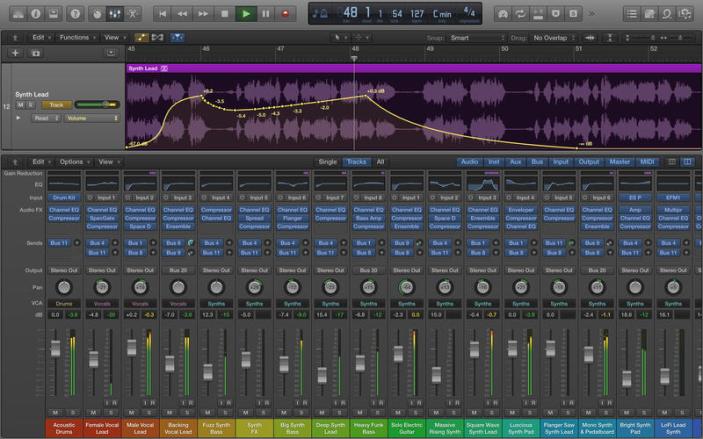
Apple today released a new version of Logic Pro X, its professional audio editing software, bringing the current version to 10.1 and adding a long list of new features. Among the new additions to Logic Pro X in version 10.1 includes 10 new Drummers, the intelligent beat profile feature, focused on hip hop and electronic styles. OS X Yosemite users will appreciate the ability to share projects from Logic Pro X to other users using both Mail Drop, which lets you send large files over email using iCloud storage, and AirDrop, which lets you share files wirelessly between nearby Macs.

In addition to updating Logic Pro X, Apple released version 1.2 of its Logic Remote iPad app with a new plug-in view for remotely controlling parameters and adding or rearranging plug-ins. The new version also allows you to adjust mic and input settings with compatible audio interfaces from the app. Apple’s MainStage 3 Mac app ($29.99) updated to version 3.1 as well. You can read our full review of Logic Pro X here, and see the full change log of new features below:


Expand
Expanding
Close

You can now unlock Google Docs, Slides and Sheets for iOS with Touch ID

Site default logo image

Google is on a roll this week with updating its iOS apps. Yesterday we saw Chrome for iPhone and iPad pick up a big update bringing Material Design to the browser and adopting Handoff support with OS X Yosemite. Following Chrome’s release, Google today shared new versions of its Docs, Slides, and Sheets apps for iPhone and iPad taking advantage of another Apple technology: Touch ID.

Beginning with Docs version 1.2.6448, Slides version 1.0.5754, and Sheets version 1.1.7297, iPhone and iPad users can now lock and unlock each app using the Touch ID fingerprint scanner as an alternative to the passcode lock screen.
Expand
Expanding
Close

Dropbox will no longer support OS X 10.5 or older starting May 18th

Site default logo image

Dropbox-Pro-Logo

Dropbox has announced through an email to users on older versions of OS X that it will soon be discontinuing support for computers running Leopard or other older versions of the operating system. Users still running anything older than OS X 10.6 will need to upgrade in order to continue using future versions of the Dropbox app.

Users who don’t upgrade will still be able to use the web-based Dropbox manager, but will be automatically signed out of the Mac app. From that point forward, they will not be able to login back into the Mac client until they are on a newer version of OS X.

The changes will go into effect on May 18th, so users still have plenty of time to upgrade their software (or hardware, if necessary). The full email is included below:


Expand
Expanding
Close

Chrome for iOS gets Material redesign, OS X Handoff support, iOS 8/iPhone 6 optimizations

Site default logo image

Google is today rolling out Chrome 40 for iOS and with it introducing a redesigned UI, OS X Handoff support, and optimizations for iOS 8 and the new iPhone 6 and 6 Plus.
Expand
Expanding
Close

LastPass password manager debuts on Mac w/ offline support, security check feature, more

Site default logo image

LastPass Mac

Smart password and security techniques are becoming increasingly important in our digital lives as new hacks seem to appear all the time, and having a unique and secure password (unlike these) helps ensure that your online identity is safe in the event of such a compromise.

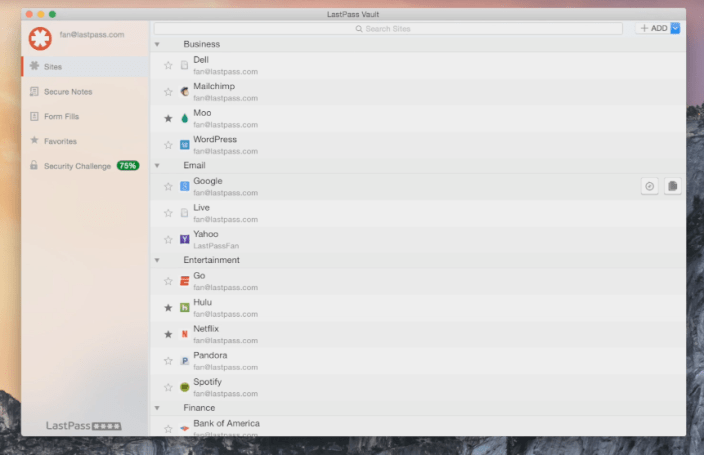
LastPass, a cross platform secure digital vault app, is helping Mac users tackle the password management problem with the debut of its new Mac app. Previously only available for Mac as a browser extension and web portal, the new LastPass for Mac app brings new features to the desktop including quick search, security check, and more.
Expand
Expanding
Close

Site default logo image

Screenshots show Google’s upcoming Calendar iPhone app w/ Gmail, Photos, & Maps integration

New Google Calendar iOS

It appears that Google could soon release its promised redesigned Calendar app for iPhone after first making the announcement and releasing the app for Android last November. The Next Web this morning shared a handful of leaked screenshots that provide a first look at Google Calendar for iOS, including info cards that indicate Gmail, Photos and Maps integration will be key features of the app.
Expand
Expanding
Close

Site default logo image

Sid Meier’s Starships, a new interstellar strategy game, heads to Mac & iPad early this year

[youtube=https://www.youtube.com/watch?v=CgCt3zWkxCg]

2K and developer Firaxis today announced Sid Meier’s Starships, a new interstellar strategy game arriving early this year on Mac, iPad and PC. The game extends the sci-fi universe introduced last year in Civilization: Beyond Earth, the latest title in Sid Meier’s Civilization series.

The Starships press release describes gameplay as taking “the role of a fleet commander after the age of the Seeding, and tasking them to lead their starships across the universe to defend planets against various enemies, grow their empire, and usher in a new age of peace in the galaxy.” That includes turn-based combat with customizable starships and dynamically generated missions.

Not only will Starships borrow from the universe of Civilization: Beyond Earth, but players with both games will also find integration between the two that 2K says “will enhance and expand the depth of both game experiences.”

“When designing Starships, I was intrigued by the idea of exploring the next chapter in the story of Civilization: Beyond Earth. What happens after we colonize our new home and eventually build starships to take to the stars? What has become of our long-lost brothers and sisters from the planet Earth?” said Sid Meier, director of creative development at Firaxis Games. “My goal was to create an experience that focuses on starship design and combat within a universe filled with interstellar adventure, diplomacy, and exploration.”

2K says the game will arrive sometime in early 2015 for Mac, PC and iPad. Screenshots are below:

Kickstarter iOS app updated w/ new design and iPad support

Site default logo image

Almost a year after shipping its iPhone app, Kickstarter has released version 2.0 which includes full iPad support for the crowdfunding service’s app as well as a new design using a card interface for projects. As with the iPhone version, Kickstarter says its iPad app helps users find new projects to back and keep up with updates on projects you follow, now only bigger with the tablet…
Expand
Expanding
Close

Site default logo image

Amazon renames Cloud Drive Photos app, adds iPhone 6/6+ support, full-res downloads, more

Amazon-Photo-iOS-app-01

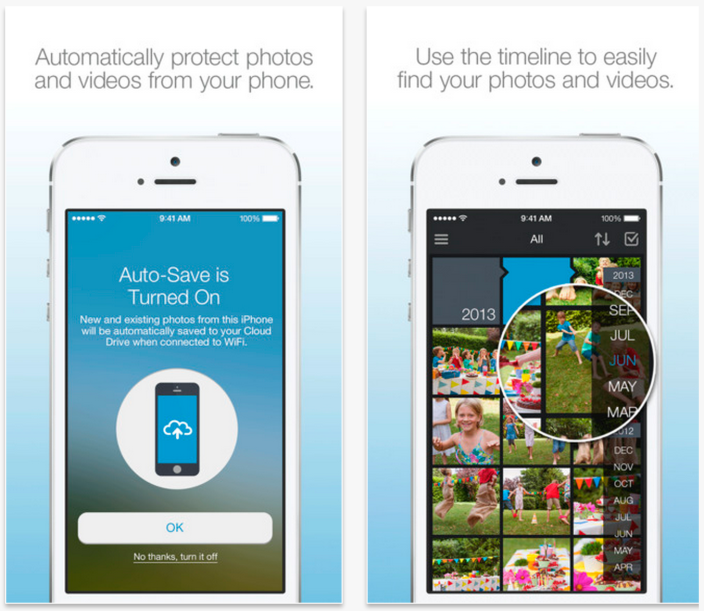
Amazon has released an update to its Cloud Drive Photos app introducing a new name alongside iPhone 6/6 Plus support and new features. The updated, now called “Amazon Photo,” also includes support for full resolution photo downloads, iPad landscape support, and more.

Full resolution photo downloads – You can now download your photos to your device in full resolution so you no longer have to worry about losing details when you print your downloaded photos or display them on a larger screen… Improved iPad Landscape support – Navigate through the app without ever needing to switch back to Portrait mode.

In addition, version 3.3.0 of the app includes duplicate photo detection that will detect matches and avoid uploading duplicates, and a new “report problems” feature directly through the app.

The updated Amazon Photo app is available on the App Store now.

Site default logo image

Things for iOS updated with Notification Center widget, improved inter-app functionality

Cultured Code released an update for its Things to-do list manager on iPhone and iPad today that added support for a Notification Center widget. The new plugin allows users to keep a list of reminders in the Today view, mark off completed tasks, or quickly access a shortcut for creating new to-dos.

The widget pulls its data from the app’s Today list, and can also let you know which items will be due soon so you can prioritize your activities.

The update also adds a new URI scheme that enables developers working on other apps to integrate their software easily with Things.

You can grab the iPhone version of Things for $9.99 on the App Store. The iPad version is available separately for $19.99.

Parallels Access gains new file manager, iPhone 6 support & web version

Site default logo image

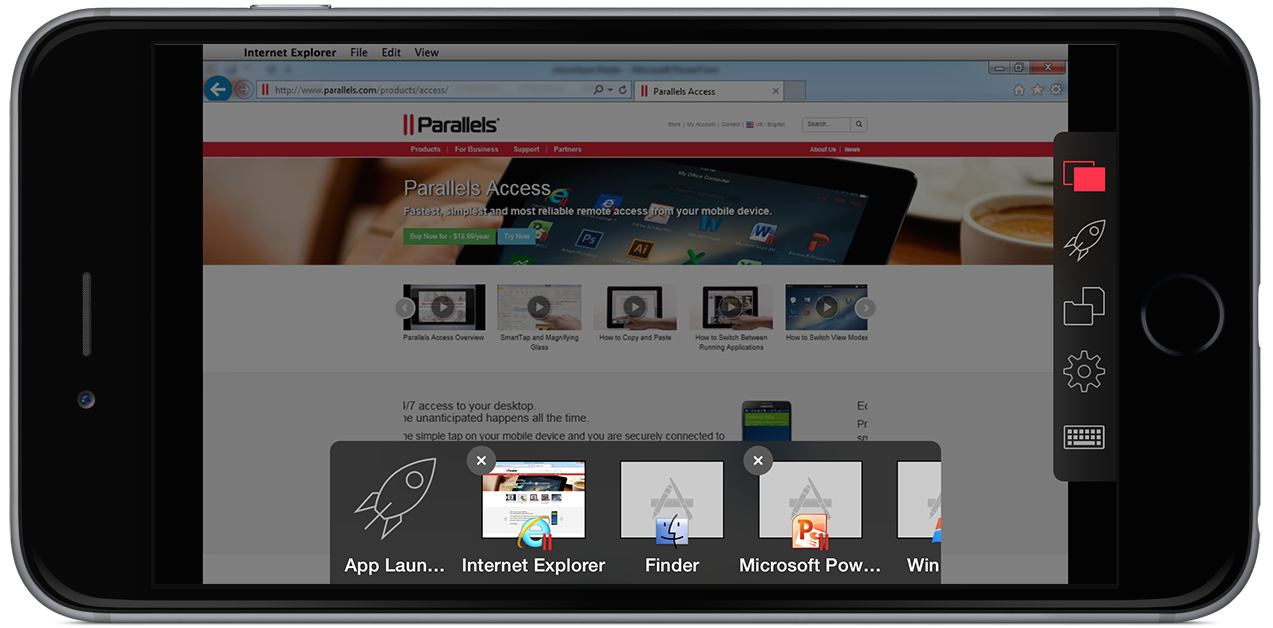
iPhone_6_Plus_AppSwitcher

Parallels Access today received a significant version 2.5 update with support for the iPhone 6 & iPhone 6 Plus, a new file managing system, improved audio controls, and a new web browser-based version. Parallels Access, as we covered upon its launch for the iPhone last year, is a robust remote computing application that allows you to view and control multiple Macs or Windows PCs via an iPhone, iPad, iPod touch, or Android device.

Besides support for the larger, higher-resolution iPhone 6 and iPhone 6 Plus displays, this new version introduces an improved file management system. The new file picker leverages the new tools in iOS 8 to better work with other applications like Dropbox and Google Drive. Parallels shares the list of enhancements to the feature:


Expand
Expanding
Close

Site default logo image

Google Maps for iOS gains restaurant filters, weather info, and more in new update

Google today released an update for its iOS mapping application. The latest build, version 4.2.0, allows users to filter their restaurant searches by the type of food offered, get global weather reports, and add transit directions to your phone’s calendar. You can also add pins to the origin and destination during navigation.

There are, of course, other miscellaneous “bug fixes” that have been applied. The free update is available from the iOS App Store.

What’s New in Version 4.2.0
• Filter searches for restaurants by cuisine type
• See current weather information for cities around the world
• Drop a pin for your starting and destination points in directions and navigation
• Add transit directions to your calendar
• Bug fixes

Google rolling out updated Drive app for Mac w/ new status menu & bandwidth control

png;base6472d8f9a601a3d9ce

Google is rolling out an updated version of its Google Drive app for Mac and PC this week with a few handy new features. First, you’ll find (as you can see above) that Google has updated the status menu to show much more information than before. Now, you can see the files that are being synced up to the cloud as well as a check mark next to them that will appear as they do so. The app will also make it clear which files are currently syncing and which files are yet to be synced. Additionally, hovering over an item will let you share it straight from the menu.


Expand
Expanding
Close

Site default logo image

Google releases Classroom mobile app for iPhone and iPad

[youtube=https://www.youtube.com/watch?v=C2fC7yrj984]

Google announced today that it’s releasing mobile apps for its Google Classroom service for both Android and iOS devices. The company officially launched Classroom to its Apps for Education customers in the US during the summer offering them a web-based platform for planning lessons, handing out assignments, and working alongside students. Teachers and students will now be able to access those features from mobile devices through the new apps and Google is also adding a could of new features to the platform.

In addition to a new teacher assignments page and archiving functions for Classroom, Google notes that the mobile apps will let users snap a photo to share or attach to assignments, share content from other apps, and access content cached for offline viewing.

Snap a photo: Right from the assignment page in the mobile app, students can snap a photo and attach it to their assignment — whether it’s the experiment they just did for a science class, or a drawing they made of their family tree. And if they’ve forgotten their homework, they can ask someone at home to snap a photo, text it and then turn it in with the app. Of course, if the dog has actually eaten it, Classroom can’t help you.

The new Google Classroom apps are available on Google Play and the App Store now as well as on the Google Play for Education store.

Skype for iPhone updated with UI improvements, limited pre-release program now available

Site default logo image

Microsoft is rolling out a new version of Skype for iPhone today, version 5.9, which brings enhancements to the user interface making communicating faster and easier. The latest version adds contact suggestions to the dial pad when entering a number making the process of finding the right person to dial quicker. The update also adds shortcuts for starting video or audio calls from Skype’s chat picker window.

In addition to introducing the latest Skype for iPhone user interface improvements, Microsoft announced a limited pre-release program for testing early versions of Skype in exchange for sharing feedback and ideas…
Expand
Expanding
Close

Facebook adding AMBER Alerts to its mobile apps and web

Site default logo image

Facebook AMBER Alert

Facebook shared its latest safety initiative today with a new feature focused on rescuing missing children. Through a partnership with the National Center for Missing and Exploited Children, Facebook will now include AMBER Alerts in the timeline of its users boosting exposure of the critical information needed in such cases.
Expand
Expanding
Close

British prime minister says he’ll ban encrypted chat apps if he can’t see your messages

Site default logo image

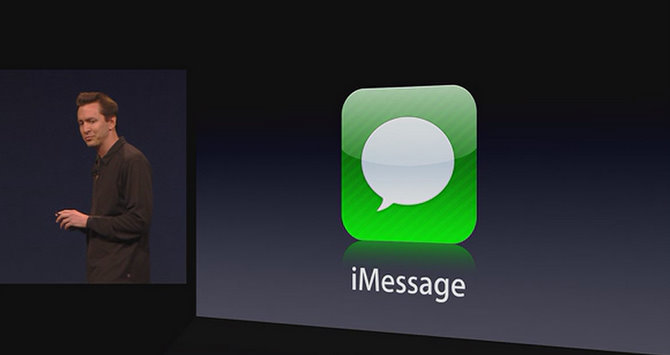
Image (1) WWDC-2011-keynote-Scott-Forstall-iOS-5-iMessage-logo-slide.jpg for post 72528

For several months we’ve followed the U.S. government’s attempts to work around encryption in chat apps, even taking the hyperbole to an illogical extreme at one point, but we haven’t yet seen similar threats from other nations… or at least, we hadn’t until today.

British prime minister David Cameron said today that unless the government is given backdoor access to encrypted messaging services, he’s just going to outlaw them:


Expand
Expanding
Close

Site default logo image

CBS News app for iOS overhauled with 24/7 streaming live video

Screenshot 2015-01-12 16.35.44

CBS News today released an overhauled version of its iPhone, iPad, and iPod touch application. Besides the new, starker design, there are some notable additions like 24/7 streaming video via CBSN and push notifications. Here are all of the release notes:

• CBS News has been completely redesigned and is now a single iOS 8 compatible universal app for iPhone, iPad and iPod Touch.
• Now featuring CBSN: a 24/7 streaming video news channel that features original CBS News reporting, live anchored coverage and on-demand news segments.
• Easy to use, customizable pop-out navigation, bigger story headlines, adjustable font sizes in news stories and better support for related stories, videos and galleries within the story view.
• Categorized news headline lists now include the “Quick Read” feature allowing users to read more than the headline before deciding to tap on the full article.
• Expanded video offering from the CBS News programs, now includes more show subcategories and complete 60 Minutes segments and 48 Hours episodes from the current week’s shows.
• New, gorgeous full screen photo galleries.
• Expanded In-Depth coverage for large, complex, or constantly evolving stories.
• Latest business headlines and market info from CBS MoneyWatch.
• Share interesting stories with your friends and family via email, Facebook, or Twitter.
• Breaking news push notifications.

CBSN, the aforementioned streaming network, was added to the Apple TV back in November. The app update is free on the App Store.


Expand
Expanding
Close

Everyone’s favorite sadistic artificial intelligence is back to shame your diet with Carrot Hunger

Site default logo image

You all remember Carrot, right? The sadistic, sarcastic artificial intelligence that powers a series of productivity and fitness applications? Well, Carrot’s back with a few new tricks up her sleeve (and possibly some deadly neurotoxin, but who knows?) in a brand new calorie-tracking app called Carrot Hunger.


Expand
Expanding
Close

Site default logo image

Finish to-do list manager updated to version 3.0, drops in-app cost and goes completely free

Apple Design Award-winning to-do list manager Finish was updated to version 3.0 today, and while the new version doesn’t introduce any additional functionality to the app, it will enable several existing features for even more users. In the previous version of the app, limits were placed on which features were available for free, with a $1.99 in-app purchase unlocking the rest.

With today’s update, Finish has gone fully free. The in-app “Finish More” purchase has been removed and the entire feature set is available for all users to take advantage of. App designer Ryan Orbuch says he’s hoping the change will allow more high school students to get things done.

You can grab Finish from the iOS App Store. (Note: The app is rolling out slowly but should be available soon.)

Site default logo image

Yahoo Mail iOS app now lets you track packages, customize Today view

Yahoo-Mail-track-packages

Yahoo has released an updated version of its Yahoo Mail app for iPhone and with it comes the ability to track packages for online purchases without leaving the app. The feature arrives as the latest addition in Yahoo’s mission to integrate some of its other key services— news, weather, magazines— as features in its Mail app.

The package tracking feature works for online purchases through a long list of popular retailers (but not all) and appears in the app’s Today view:

Tracking online shopping purchases can be tricky. To make your life a little bit easier, we’re adding package notifications to the latest release of the Yahoo Mail app for iOS in the U.S. Now, you can view and track shipped packages in the “Yahoo Today” section of the app from sites including Amazon, eBay, Zappos, Target, Best Buy, Macys.com and more. We’ll notify you when your package has shipped, when it’s scheduled to arrive, and what’s in your shipment.

In addition, the updated app gains the ability to customize the Today view, horoscopes, flight notification support from Orbitz and CheapTickets, and more:

We even added the much-requested ability to sort and select the type of content in your “Today” section to make it even more personalized. By clicking on the gear icon on the top left corner, you will see a new “Edit Yahoo Today” option for you to pick and choose what you’d like to see, including News Digest, Sports, Weather, Horoscope, Finance, Screen and Flickr.

The updated Yahoo Mail app, version 3.2.12, is available on the App Store now

Site default logo image

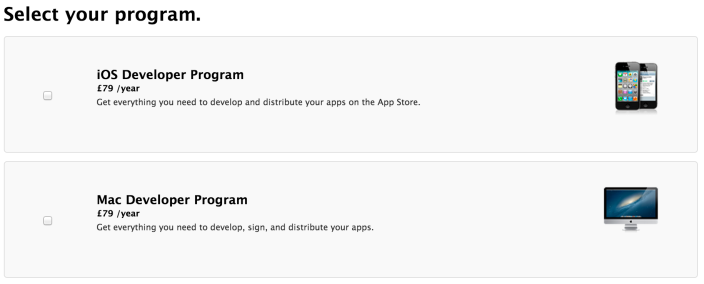
Apple increases iOS and Mac Developer Program pricing in EU countries to £79/€99

Apple-developer-program-pricing-01

Apple has quietly increased the cost of its iOS & Mac Developer Programs in some EU countries with price hikes confirmed for at least the UK and Germany. In Germany, the programs are up from the previous €80/year to €99/year, while in the UK pricing has been adjusted from £60/year to £79/year.

While the price increase is already live in at least the UK and Germany, pricing for the program in the US remains at $99/year.
Expand
Expanding
Close