Apple Health

See All Stories
Dear Tim letters

Apple's next big thing

When the Apple Watch was originally released in 2015, it was pitched as a great watch, an intimate way to communicate, and a comprehensive fitness device. While the original Apple Watch (later renamed Series 0) lacked GPS and was generally a slow device, it has shown dramatic improvements year over year particularly for Apple’s health initiatives.

When Apple released the Series 1 and Series 2 Apple Watches, it added heart rate monitoring for Apple Health. When you enable heart rate monitoring, you  can also turn on heart rate notifications, so you know if your heart rate remains above or below a chosen beats per minute (BPM), or to occasionally check for an irregular heart rhythm. Irregular rhythm notifications are available only with watchOS 5.1.2 or later in certain countries.

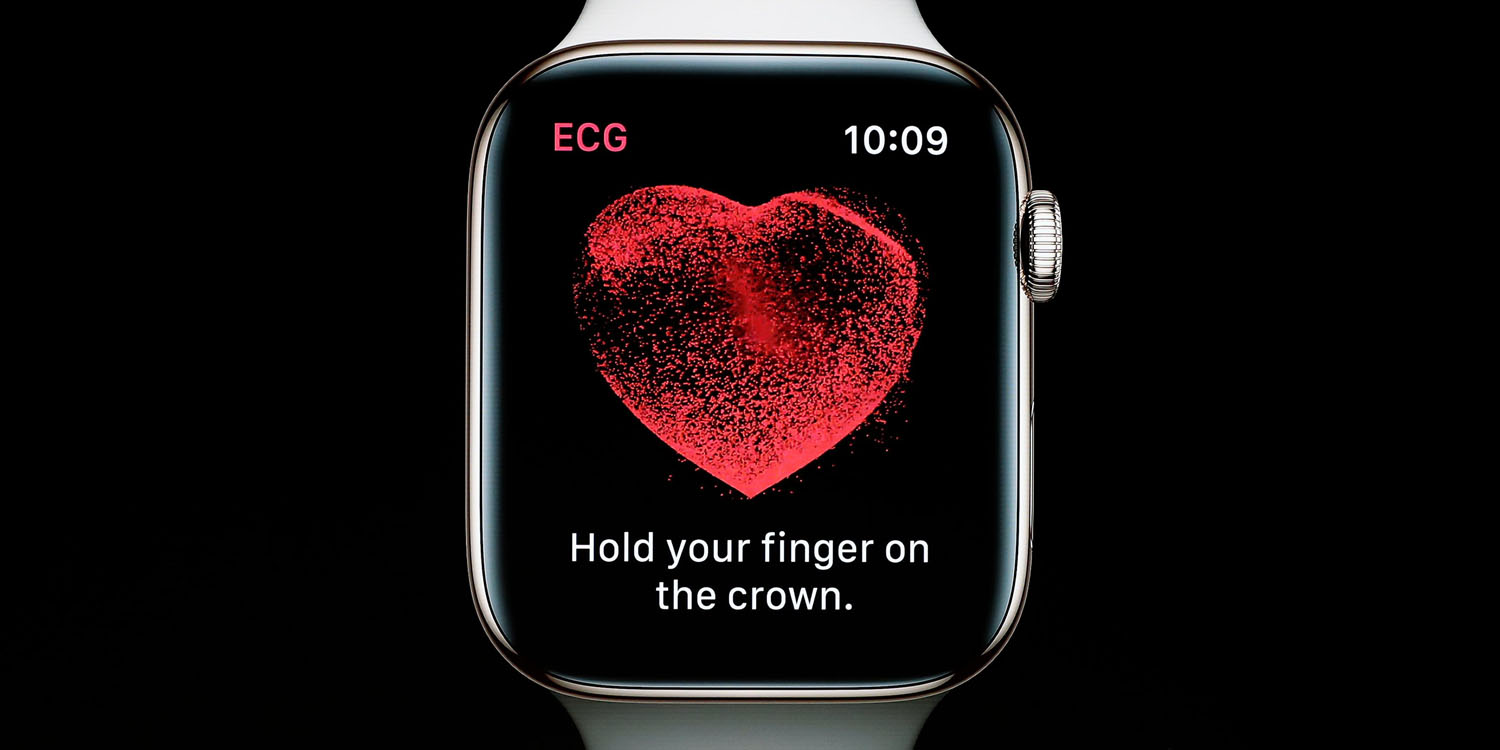
With Apple Watch Series 4, Apple added a electrocardiogram monitoring (also known as ECG and EKG). The ECG app on Apple Watch (Series 4 or newer) can record your heartbeat and rhythm using the electrical heart sensor and then check the reading for atrial fibrillation (AFib). It then records that information into the Apple Health app.

Since the release of Apple Watch, there have been countless stories of people’s lives being saved by the health advancements in Apple Watch and Apple’s Health initiatives.

If you have an Apple Watch Series 4 or newer, here’s a how to guide on how to take an ECG.

Apple also includes a Health app on the iPhone where it easy to learn about your health and start reaching your goals. It consolidates data from iPhone, Apple Watch, and third-party apps in one place.

Top Stories on Apple Health

9to5Mac Happy Hour 202: Apple Music coming to Echo, iPhone XR clear case, Apple Watch ECG launch

9to5mac happy hour

This week Benjamin and Zac share a quick review of the Smart Folio cover for the new iPad Pro, talk about Apple Music coming soon to Amazon’s Echo speakers, recent iPhone XR discounts and Apple’s marketing strategies, the launch of the Apple Clear Case for iPhone XR, the 18W USB-C charger, and lots of software updates and new features including iOS 12.1.1 and FaceTime fixes, HomePod in China, dual SIM in the US, and the new ECG app on Apple Watch Series 4, plus much more.

9to5Mac Happy Hour is available on iTunes and Apple’s Podcasts app, Stitcher, TuneInGoogle Play Music, or through our dedicated RSS feed for Overcast and other podcast players.

Sponsored by ZUGU Case: Check out ZUGU’s new Muse case for Apple’s 2018 iPad Pro and enter our 12.9-inch iPad Pro giveaway below.

Sponsored by Atlassian’s OpsGenieOpsgenie empowers Dev & Ops teams to plan for service disruptions and stay in control during incidents. Get a free company account for up to 5 team members, forever.


Expand
Expanding
Close

Review: Apple Watch Series 4 — beautiful design, invisible features

When people ask me what’s different about the new Apple Watch Series 4, my immediate answer is simply the design. There’s way more to Apple Watch Series 4 than its appearance, but the way it looks is arguably the one difference that anyone can appreciate.

The design isn’t so different that Series 4 feels like something different than the Apple Watch on your wrist though. It’s absolutely the biggest external change to Apple Watch since the original, but I’ve encountered a number of existing Apple Watch users who can’t immediately pinpoint what’s different.

I think that’s partly because the first three Apple Watches pulled off a great illusion: blending a thick black bezel with deep black elements using the OLED display. If you’re very familiar with the actual confines of the previous screen, the new rounded corner-to-corner display feels like a serious breakthrough.

While design is a major advancement on Apple Watch Series 4, it’s the features that you can’t see and may never need that matter the most.

Expand Expanding Close

watchOS 5.1.2 for Apple Watch now available with ECG app, new Infograph complications, more

Dear Tim letters

watchOS 5.1.2 for Apple Watch is now available. For Apple Watch Series 4 customers, the update unlocks the promised ECG app that captures a live electrocardiogram using the Apple Watch heart rate sensor and Digital Crown. The new watchOS update also includes new Apple app complication options on the new Infograph and Infograph Modular watch faces and more.


Expand
Expanding
Close

Apple Watch Series 4 getting the ECG app today with watchOS 5.1.2

Apple Watch ECG readings

Apple Watch Series 4 is getting the hotly anticipated ECG feature today. The ECG app will appear for customers using Apple Watch in the United States, after updating to watchOS 5.1.2 (releasing later today). The 5.1.2 update will also include irregular heart rate notifications for Apple Watch Series 1 through Series 4.

To take an ECG, users simply place their finger on the digital crown and wait for 30 seconds whilst the Watch scans the electrical impulses in your finger.


Expand
Expanding
Close

[Update: Rollout details] Pokemon Go will soon use Apple Health and Google Fit data to hatch eggs and earn candy

Niantic has announced a new feature called Adventure Sync that’s coming soon to Pokemon Go on iOS and Android. Adventure Sync will use Apple Health and Google Fit activity data to credit players with distance traveled in the real world for hatching eggs and earning candy — even when Pokemon Go is not running.


Update 11/1: This post has been updated with information about the Adventure Sync feature rollout and how it works.


Expand
Expanding
Close

Quick-thinking Apple intern uses Apple Watch as logging tool during in-flight emergency

An Apple Watch can often provide useful heart-rate data on its owner, but one quick-thinking Apple intern actually strapped his watch onto a fellow passenger when she collapsed during an airline flight …

The incident actually persuaded the intern that he wanted to go to medical school – where he went on to create an ebook for brain tumor patients …


Expand
Expanding
Close

Have an old Apple Watch? Here’s how to use it for sleep tracking

sleep tracking

It’s Apple Watch upgrade season for a lot of people which means deciding what to do with old models. Should you resell, gift, throw it in a drawer, or repurpose it?

Turning your old Apple Watch into a dedicated sleep tracker is a great way to get a little more mileage out of your original purchase. Take these steps to make sure the experience isn’t a nightmare.


Expand
Expanding
Close