Mac

See All Stories

Apple’s Mac lineup consists of MacBook, MacBook Air, MacBook Pro, iMac, Mac Pro, and Mac Mini. The Mac runs macOS for its operating system.

Mac lineup

History

The Mac is Apple’s lineup of computers, and it can be considered the company’s oldest product. The name “Mac” comes from the original Macintosh, which was introduced in 1984 and is also considered the first personal computer for the masses to have a graphical user interface. The first Macintosh hit the stores on January 24, 1984, costing $2,945.

Among all these years, Apple has introduced many different Mac models, ranging from desktops to laptops to professional tower machines. The current lineup consists of the MacBook Air, MacBook Pro, Mac mini, iMac, and Mac Pro. However, there have been other Mac models were discontinued, such as the eMac, MacBook, and iMac Pro.

The history of modern Macs began in 1998, a year after Steve Jobs returned to Apple. Apple had dozens of Macintosh computers at that time, but Steve decided to rethink the entire lineup. In 1998, Apple announced the iMac G3, which ditched the floppy disk and serial ports in favor of USB connectors.

Macintosh and iMac G3.

Unlike the Macintosh, the first iMac was considered a huge success — not only for its technology, but also for its unique design with colorful translucent plastic. Apple quickly expanded the Mac lineup with other models, which included the iBook and PowerBook (which became the MacBook and MacBook Pro) and the PowerMac, which is now the Mac Pro.

macOS

What makes a Mac the Mac is the macOS operating system, which has also had a long history since the introduction of the first Macintosh. Initially called Mac OS, the operating system was rebuilt when Steve Jobs returned to Apple.

The first version of Mac OS X was released on March 24, 2001 with a new interface that is still present in some ways in current versions of macOS. Apple’s desktop operating system comes with many free applications such as Pages, Keynote, Numbers, iMovie, and GarageBand.

With macOS, users also have access to deep integrations with other Apple devices. For instance, you can answer calls and send SMS from your iPhone using your Mac. Handoff lets you switch from one device to the other and pick up where you left off. Apple Watch users can unlock their computer without entering a password, and you can even copy and paste between devices.

macOS Sonoma

Apple’s desktop operating system is also integrated with services offered by the company, such as iCloud, Apple Music, and Apple TV+.

The current version of macOS is Sonoma (version 14), which features new slow-motion screen savers, widgets on desktop, camera effects on FaceTime and other apps, web apps, passkey sharing, improved PDF support, and Game Mode. The update also comes with a new API that lets developers easily port Windows games to macOS.

Architecture Transitions

The Mac has had three major architecture transitions in its history. Apple’s first computers ran on Motorola processors, but the company decided to migrate to the new PowerPC platform in 1994. While this brought benefits at the time, the PowerPC processors were not delivering what Apple expected.

It was in 2005 that Apple confirmed the transition from PowerPC to Intel. Intel processors had become faster and more efficient than PowerPC, which enabled the development of new Mac computers that were more powerful and also more compact. Developers have been given access to a Developer Transition Kit running Mac OS X Tiger with Intel Pentium 4 to update their apps before the transition begins.

Power PC, Mac OS X, and Intel processor.

Apple said that the transition would begin in June 2006 and be finished by the end of 2007. However, the transition to Intel was fully completed in August 2006 when the company replaced the PowerMac with the new Intel Mac Pro.

As the years went by, Apple once again felt the need to have more powerful and efficient processors for its computers. This time, the company was already working on its own chips for the iPhone and iPad. In June 2020, Apple confirmed that it was changing the architecture of the Mac, now from Intel to ARM chips, which are called Apple Silicon.

Apple offered a Mac mini DTK running on the same A12Z Bionic chip as the 2020 iPad Pro. This way developers could once again update their apps ahead of the transition. In addition to being more powerful and energy efficient, the ARM architecture of Apple Silicon chips has enabled Macs to run iOS apps for the first time.

Apple M1 chip | Mac

The first Apple Silicon Macs were released in November 2020 with the M1 chip. The company later introduced more powerful variants of the M1 chip, called M1 Pro, M1 Max, and M1 Ultra. Macs with Apple Silicon have become known for being more powerful while consuming much less power, which has resulted in MacBooks with extended battery life.

In June 2022, Apple introduced the M2 chip, which is around 20% faster than the M1 and also supports more RAM. M2 also has more powerful variants: M2 Pro, M2 Max, and M2 Ultra.

Apple unveiled the M3, M3 Pro, and M3 Max chips in October 2023. The main highlight of this generation is the 3 nanometer technology, the same as the A17 Pro chip. The M3 family also features better GPUs with support for hardware-accelerated ray-tracing.

Current Mac lineup

Apple currently sells a variety of Mac computers, which includes MacBooks, Mac mini, iMac, and Mac Pro. While some of the Macs have already been updated with an Apple Silicon chip, others remain with Intel processors.

MacBook Air

The MacBook Air is Apple’s most affordable laptop and it has become popular for its light, compact design. The 2022 version is powered by the M2 chip and is offered with 8GB, 16GB, or 24GB of RAM. Plus, it has a new, edge-to edge 13.6-inch Retina display.

The laptop features Touch ID and has two Thunderbolt 3 compatible USB-C ports, a MagSafe connector for charging, and a headphone jack. Prices start at $1099 in the US. It’s offered in silver, space gray, starlight, and midnight.

M2 MacBook Air.

A year later, Apple introduced the first 15-inch MacBook Air. It has essentially the same hardware as the smaller version with a similar design, but with a larger display. Prices start at $1299 in the US.Apple is still selling the M1 MacBook Air for prices starting at $999.

MacBook Pro

The 2023 MacBook Pro is available in multiple versions, and customers can choose between 14-inch and 16-inch screen sizes. For the first time, Apple has introduced a less expensive version of the 14-inch MacBook Pro with the base M3 chip. This version has the same design and display as the high-end versions, except that it only has two USB-C ports instead of three.

M3 MacBook Pro

The most expensive versions of the MacBook Pro are equipped with the more powerful M3 Pro and M3 Max chips. The laptop can be configured with up to 128GB of RAM and 8TB SSD. These versions also come in a new Space Black color.

Unlike the MacBook Air, the MacBook Pro comes with an HDMI port and an SD card reader. It also features MagSafe and Touch ID on the keyboard. Apple no longer sells MacBooks with the Touch Bar. Prices start at $1,599 in the US.

Mac mini

Mac mini is the cheapest Mac currently available since it’s basically a desktop without a built-in display or other peripherals. The base model with the M2 chip features one Ethernet port, two USB-C/Thunderbolt 4 ports, HDMI 2.0, two USB-A ports, and a headphone jack.

Apple sells a more powerful version of the Mac mini with the M2 Pro chip, which also comes with four USB-C ports instead of two. Mac mini can be configured with up to 32GB of RAM and up to 8TB of storage. Customers can also opt for a 10 Gigabit Ethernet port. The Apple Silicon Mac mini is only available in silver, while the now discontinued Intel model was available in space gray.

Apple Silicon Mac mini.

Prices for the Mac mini start at $599 in the US. Again, it’s worth noting that it doesn’t come with a keyboard or mouse in the box – you need to buy them separately or use your current ones.

Mac Studio

Mac Studio represents a new category between Mac mini and Mac Pro. It features a design based on the Mac mini, but with a taller body to support the more powerful hardware and also a better cooling system.

The new Mac Studio is targeted at professional users who work with demanding tasks such as video editing, 3D rendering, and machine learning. 

Embraced by creative pros everywhere, Mac Studio now delivers next-generation power in the form of the lightning-fast M2 Max and the boundary-breaking M2 Ultra. It packs outrageous performance and extensive connectivity in an unbelievably compact form, putting everything you need within easy reach and transforming any space into a studio.

By default, Mac Studio already comes with the M2 Max chip, 32GB of RAM, and 512GB SSD storage. A more expensive option lets users customize Mac Studio with M2 Ultra. While M2 Max has a 12-core CPU and a 30-core GPU, M2 Ultra doubles all of those specs. The new chip has a 24-core CPU and a 60-core GPU.

Mac Studio can also be configured with up to 192GB of RAM and 8TB of SSD storage. The machine offers up to six Thunderbolt ports, 10 Gigabit Ethernet, headphone jack, two USB-A ports, and one HDMI port.

Mac Studio

Apple has been rumored to be working on new versions of this machine with the M3 Max and M3 Ultra chips. However, these versions may not be ready until 2025. Bloomberg’s Mark Gurman said in November last year that the M3 Ultra chip “hasn’t yet gone into broad testing” inside Apple.

In the US, prices for the Mac Studio with M2 Max chip start at $1999. The M2 Ultra chip version starts at $3999. Just like the Mac mini, Mac Studio doesn’t come with a keyboard and mouse in the box. You can find accessories for your Mac Studio here.

iMac

iMac is Apple’s most popular desktop computer with an all-in-one construction. It features a 4.5K display in its 24-inch version and a 5K display in the 27-inch version. At the same time, Apple still sells an entry-level iMac with a regular 1080p display.

The 24-inch iMac is the first to feature the M1 chip, the same as in the Mac mini, MacBook Air, and MacBook Pro. This allowed Apple to introduce a completely redesigned model with a slimmer design, which is also offered in seven new colors. Customers can customize the new 24-inch iMac with up to 16GB of RAM and 2TB of storage.

Site default logo image

The company ships the 24-inch iMac with Magic Mouse and Magic Keyboard, plus a Lightning cable for recharging accessories. Prices in the US start at $1299. Apple has discontinued its old 21.5-inch iMac and the 27-inch iMac 5K.

Mac Pro

Mac Pro is a computer built for professional users who depend on extremely powerful hardware. Available in tower and rack versions, it has a completely modular design. That means users can replace RAM, SSD, GPU, and other internal components.

By default, it features four USB-C/Thunderbolt 3 ports, two USB-A ports, and two 10Gb Ethernet ports. However, the ports can be expanded using the PCI Express slots. Apple also ships the computer with a Magic Mouse and Magic Keyboard, but it does not come with an external monitor included.

All models feature Intel Xeon W processors, which are the most powerful processors offered by Intel. Consumers can configure Mac Pro with up to 28-core processor, 1.5TB RAM, and 8TB of SSD storage. In addition to supporting multiple dedicated GPUs, Apple also offers the Afterburner card — which accelerates the decoding of ProRes videos.

The company recently updated the Mac Pro with new graphics card modules, which include Radeon Pro W6800X and Radeon Pro W6900X.

Site default logo image

Mac Pro prices start at $5999 in the US.

Rumors about upcoming Macs

Top stories about the Mac

Roundup: Find all of 9to5Mac’s CES 2015 coverage in one place

If you’ve somehow missed the overflow of coverage from CES 2015 last week, don’t worry, we’ve got you covered. During the show we took a look at the latest devices and accessories that are expected to be released throughout 2015. The show was packed with new smartphones, home automation tools, cases, and some unexpected surprises. If you didn’t catch all of the coverage from the show, check out the roundup below with links to everything that we found interesting…


Expand
Expanding
Close

OS X Yosemite Spotlight search ignores Mail content setting posing potential security risk

Site default logo image

Apple’s Mac operating system is generally considered to be secure, but German security researchers have discovered what appears to be an oversight in how OS X 10.10 Yosemite’s overhauled search feature, Spotlight, handles remote content loading in messages through the default Mail app.

As Ars Technica reports, Spotlight search on OS X Yosemite appears to be overriding Mail’s security feature that prevents content stored on remote servers like images from being loaded which spammers can use to track personal information including IP address and more.
Expand
Expanding
Close

Site default logo image

Judge dismisses lawsuit against Apple over MacBook logic board failures

A district judge dismissed a lawsuit against Apple today in which the plaintiffs alleged that the company had willingly sold MacBooks with logic boards that were known to fail after two years. The judge said that Benedict Verceles and Uriel Marcus failed to show that Apple knew the boards were defective.

The plaintiffs have made a few big claims, including an assertion that Tim Cook was notified about the defective logic boards and did nothing to fix the issue. The judge said that since both plaintiffs were able to use their computers without issue for at least a year and a half, there was no reason to believe the boards were defective.


Expand
Expanding
Close

Site default logo image

Apple releases new pre-release OS X Yosemite 10.10.2 beta (build 14C94b) w/ focus on WiFi, Mail, & VoiceOver

Apple has released an updated build of the pre-release OS X 10.10.2 software update. The new build, 14C94b, continues to focus on fixes for WiFi, Mail, and VoiceOver. The update is available through the Updates tab of the Mac App Store for users on the pre-release version of OS X Yosemite; as with previous pre-release builds, the update does require a reboot and comes in at 561MB. We’ll check out the new build and update with any notable changes.
Expand
Expanding
Close

The best iPad, iPhone + Mac accessories at the 2015 CES

Site default logo image

There are thousands of new Apple accessories at the 2015 CES – so many that it’s hard sometimes to separate what’s truly cool from everything else. Starting with HomeKit-integrated accessories, here’s our running list of the best new iPad, iPhone, and Mac products 9to5Mac has seen at the show. We updated this article on January 9, 2015 – the final day of CES – to include our last batch of top picks.


Expand
Expanding
Close

Opinion: Does the minimalist 12-inch MacBook Air design represent the future of MacBooks?

Site default logo image

While we’ve been expecting the 12-inch MacBook Air for quite some time and some of the details have long been rumored, the design exclusively revealed in Mark Gurman’s report has raised eyebrows throughout the tech world. Especially the most dramatic element: the reduction of the ports to just one multifunction USB-C socket, a headphone socket and a pair of microphones.

The $64,000 questions are: will this ruthlessly cut-down approach prove workable—and is this a design unique to this one machine, or does it represent the future of all MacBooks … ?


Expand
Expanding
Close

Braven announces $99 Fuse wireless audio mixer that pairs with your Bluetooth devices & speakers

Site default logo image

There are a lot of audio mixers and DJ controllers on the market specifically for iPad and iPhone users, but so far most require you to run cables or dock your device in a rather large unit. The latest option that we got a chance to try during CES today is Braven’s new Fuse Bluetooth audio mixer, a lightweight wireless option that lets you connect two audio sources and your output all through Bluetooth:
Expand
Expanding
Close

Apple’s next major Mac revealed: the radically new 12-inch MacBook Air

Site default logo image

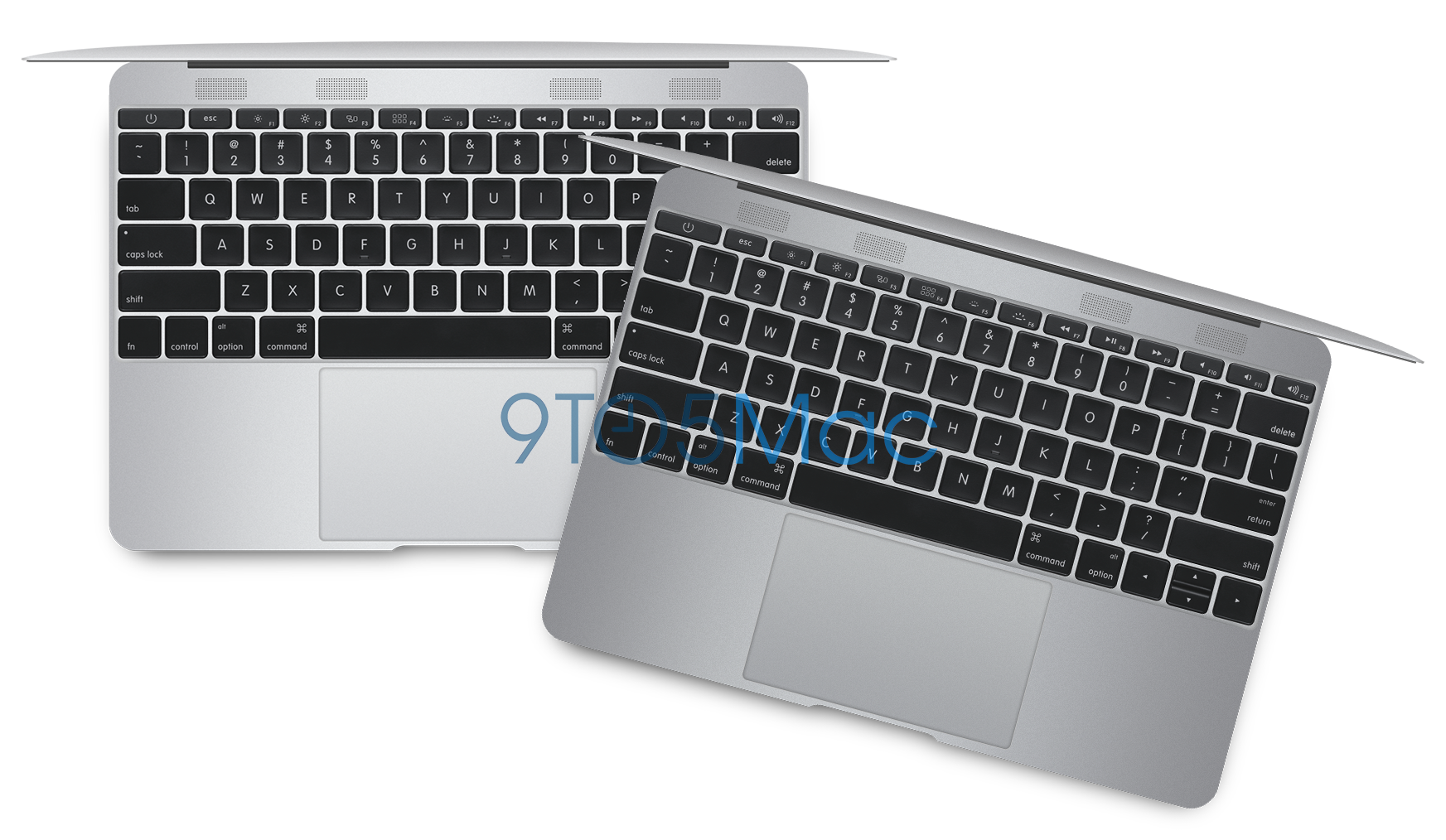
Apple is preparing an all-new MacBook Air for 2015 with a radically new design that jettisons standards such as full-sized USB ports, MagSafe connectors, and SD card slots in favor of a markedly thinner and lighter body with a higher-resolution display. Sources within Apple, who have used internal prototype versions of the upcoming computer, have provided in-depth details about the machine, and our exclusive artist renditions of the revamped MacBook Air provide the first close look at Apple’s first major step in mobile Mac computing since the Retina MacBook Pro launch in 2012.


Expand
Expanding
Close

Site default logo image

CES 2015: Moshi launches chic new AirPlay speaker Spatia

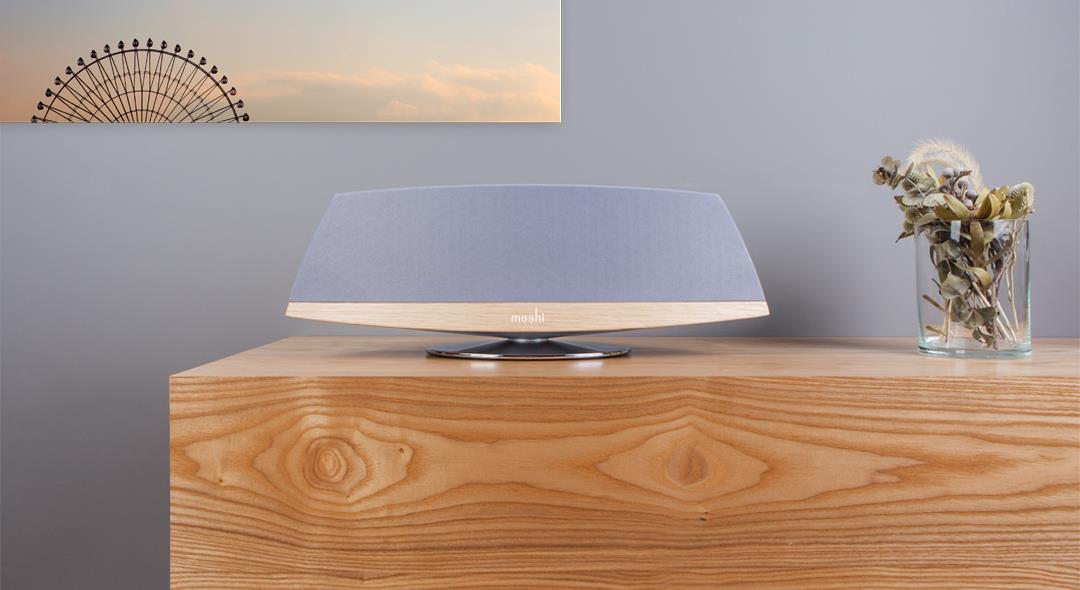
Although Apple’s AirPlay wireless speaker technology has pretty much faded out of public view, there are still companies producing new designs to support the standard. Moshi today announced Spatia, a particularly attractive design combining respectable speakers, amplifiers, and fancy external materials including metallic and fabric accents. Standard AirPlay features such as lossless audio streaming and router-free Wi-Fi Direct are included, enabling Spatia to operate independently or on an existing Wi-Fi network.

The all-in-one system contains twin 1-inch tweeters, two 2.75-inch drivers, and a 4-inch downward-firing subwoofer, notably in a housing with a stand that keeps all of the speakers floating above the surface of a table. Moshi hasn’t compromised on the audio processing hardware, either, as it includes two DSP chips and two Class-D amplifiers to separately drive the high/mid and low frequencies. Audio can be adjusted by a Spatia speaker app, downloaded for free from the App Store. Moshi has not yet announced pricing or an availability date for the speaker.

9to5Mac’s CES 2015 coverage brought to you by:

Site default logo image

Apple’s marketing aims given priority over software quality, says Instapaper developer Marco Arment [Poll]

Apple is now so focused on marketing-driven goals that its software quality has “taken a nosedive” in the last few years, argues a blog post by Instapaper creator and former Tumblr lead developer Marco Arment.

[OS X is] riddled with embarrassing bugs and fundamental regressions [and] I fear that Apple’s leadership doesn’t realize quite how badly and deeply their software flaws have damaged their reputation

People are sticking with OS X not because they love it, he suggests, but because Windows is worse and desktop Linux is too much hassle.

The issue, believes Arment, is that Apple is so focused on releasing a major new version of OS X each year that it is making it impossible for engineering teams to maintain quality.

We don’t need major OS releases every year. We don’t need each OS release to have a huge list of new features. We need our computers, phones, and tablets to work well first so we can enjoy new features released at a healthy, gradual, sustainable pace.

Twitter commentators seem largely in agreement. What are your views? Would you like to see a slower pace of development in order to have greater reliability? Or do the new features make any glitches worthwhile? Take our poll, and let us know your views in the comments.

Seagate and LaCie debut fashionable/wireless hard drives for iOS and Mac ahead of 2015 CES

Seagate and its LaCie subsidiary have announced five new hard drives just ahead of this week’s 2015 CES, including two new iOS-compatible wireless models and three new Mac-only disks. All except one will be available in January from the company’s web sites.

For iOS, the 500GB Seagate Wireless ($130) is an economical and portable, battery-powered hard disk designed to compete with G-Technology’s G-Connect and Western Digital’s My Passport Wireless. Just under 4″ on each side and less than an inch thick, Seagate’s version is designed to look fun, with your choice of green, blue, gray, red, or white matte housings, and uses integrated Wi-Fi to connect with iOS devices and Macs for media playback as well as Android/Windows/Chrome. It runs for nine hours between charges and can connect to 3 devices simultaneously.

[youtube=http://www.youtube.com/watch?v=6qVU2eWvmg8&w=704&h=396]

Seagate Seven ($100) is a Mac-only alternative that promises to be the world’s thinnest portable hard drive. Made from 100% stainless steel, the enclosure is only 7mm thick and includes a USB 3.0 cable for connecting to a computer, giving up wireless in order to achieve its small size. In a break from traditionally boxy or rounded hard drives, Seven is actually slim enough to let you see the contours of the traditional hard disk mechanism inside. Three additional drives are discussed below…


Expand
Expanding
Close

Apple’s unreleased iBeacon hardware exposed in user manual published by FCC

Site default logo image

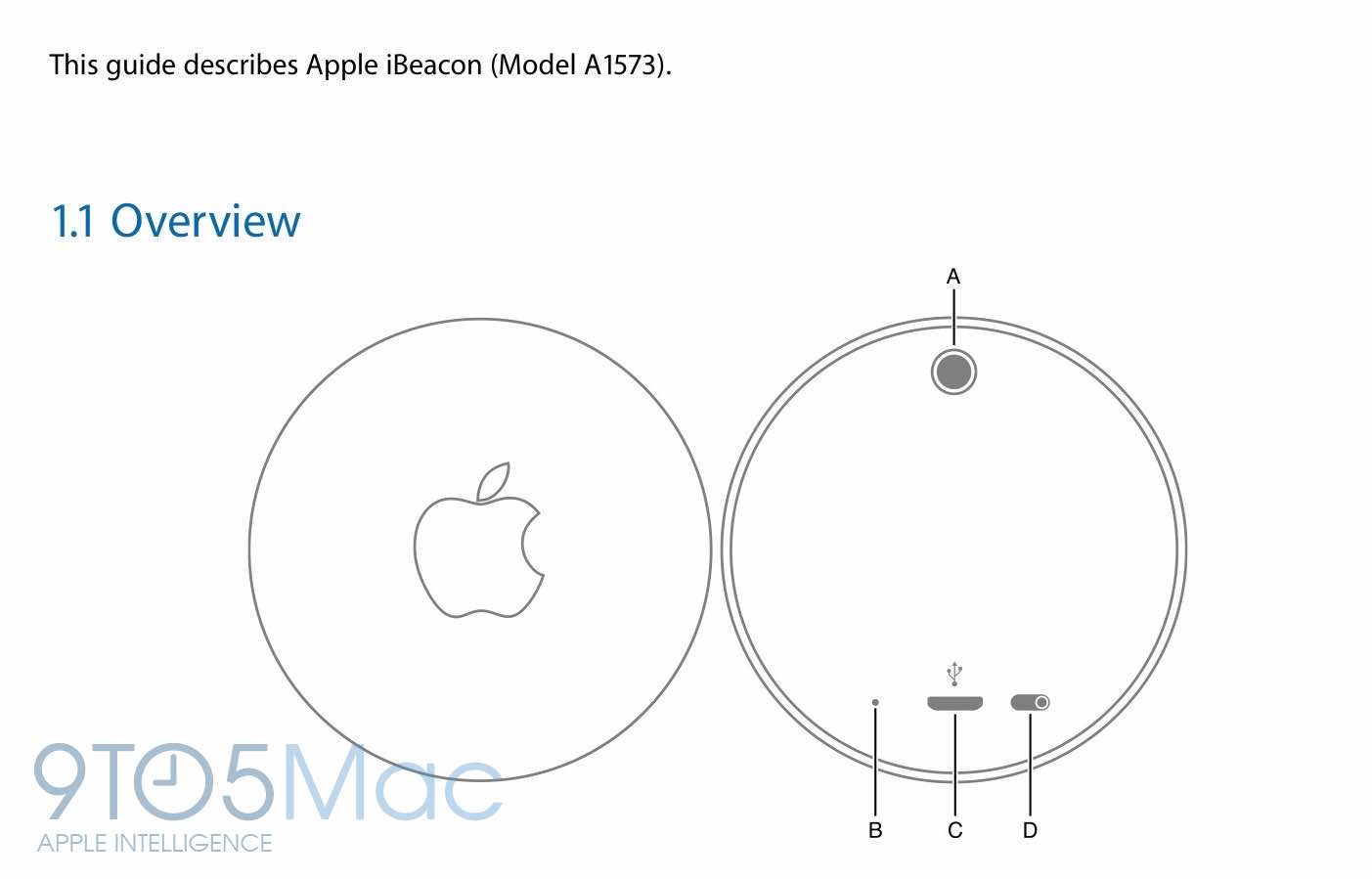
Way back in July, Apple registered FCC certification for a new piece of iBeacon Bluetooth hardware. Naturally, 9to5Mac covered the release of wireless certification documents for the hardware. It was unclear by those filings the nature of the product, whether it was targeted at use in Apple Stores, some form of developer testing equipment or something else entirely. The product was never made publicly available for purchase, for unknown reasons.

However, time has elapsed such that the rest of Apple’s submitted documents are now available to the public. Vitally, this includes a user manual which immediately signals that this iBeacon hardware was meant for developers, presumably to test iBeacon integration in their own apps. It’s unclear, though, if this is meant to be used ‘in the wild’. Read on for an exposition on the workings of this mysterious device.


Expand
Expanding
Close

Site default logo image

Photos app mysteriously vanishes from iCloud.com (Update: Back for some, Apple says fixed)

Update: Some users are once again reporting the availability of the beta Photos web app on iCloud.com (although not everyone just yet). Let us know if you’re still seeing issues.

Update 2: Apple has acknowledged the outage on its system status page and says the issue is resolved.

The Photos app has been mysteriously pulled from the iCloud.com site, in the last few days. The app, which shows pictures stored in iCloud Photo Library, is now no longer listed on the iCloud.com homepage when logged in … with no comment from Apple to explain the disappearance.


Expand
Expanding
Close

Site default logo image

New fanless 12-inch laptop from Samsung foreshadows rumored Retina MacBook Air


Ahead of CES, Samsung has pre-announced the Ativ Book 9, via The Verge. Interestingly, this laptop features many of the technical specifications that have been rumored for the future 12-inch Retina MacBook Air. The announcement of the Ativ Book 9 validates that a fanless high-resolution ultrabook is indeed possible in the short term.

The Book 9 laptop features a 12.2 inch screen with a 2600×1600 resolution, implying a 250 PPI. At normal viewing distances, Apple could easily describe the display as ‘Retina’. For comparison, the ‘Retina’ 15 inch MacBook Pro has 216 pixels-per-inch. The Book 9 is powered by a next-generation Broadwell CPU, which has drastically lower power consumption and heat dissipation enabling the product to be fanless.


Expand
Expanding
Close

GoodReader app forced to remove some iCloud Drive features to comply with App Store policies (update: reversed!)

Site default logo image

Update: GoodReader 4.8.1 has now been released and the iCloud functionality has returned without explanation. It is unclear what prompted the reversal, although it is likely that Apple has once again backtracked on a public App Store decision.

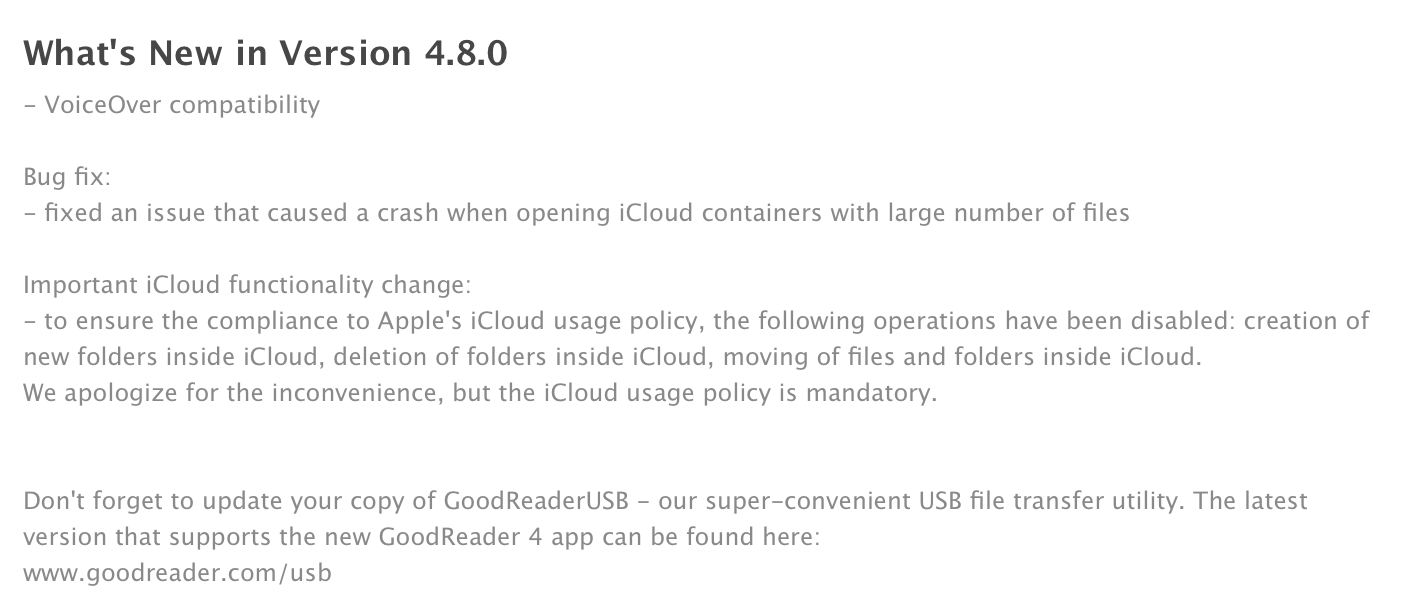
Continuing the string of controversy regarding App Store approval in recent weeks, an update pushed through by GoodReader ($4.99, iPhone and iPad) earlier today shows that the company has been forced to remove some significant iCloud Drive features, in order to comply with iCloud Drive usage guidelines and remain in the App Store.

Specifically, the GoodReader update removes the ability to add folders, remove folders or move files around the iCloud Drive storage location. The update notes reference a ‘usage policy’, although it is unclear what document the company is referring to.


Expand
Expanding
Close

Review: G-Technology’s G-Drive USB is a pro-grade Mac hard drive at consumer prices, in 2TB-6TB sizes


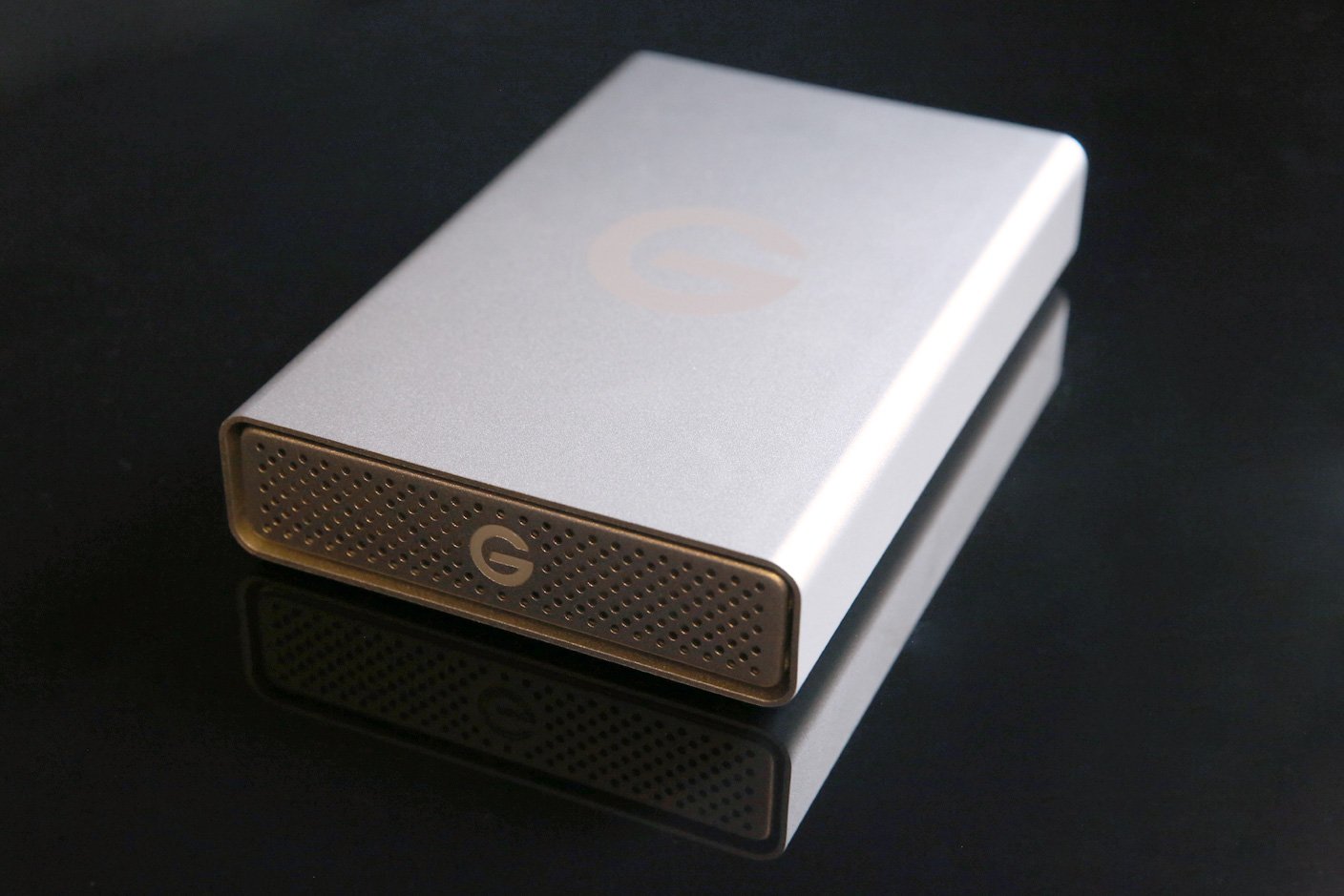
Professional video editors and filmmakers have raved about G-Technology’s hard drives for over a decade. These users — day-one adopters of Apple’s Mac Pro and MacBook Pro computers — need a lot of hard disk space, fast interfaces, and above all else, reliability. Losing part or all of a project can kill a movie, so nothing is left to chance on the storage side. I’m not a video professional, but as a father, my family photos and home videos are some of my most valuable possessions, and I don’t want to lose them to a hard drive failure. Numerous recommendations led me to Hitachi GST subsidiary G-Technology’s G-Drives years ago, and now there’s a new entry-level model that’s affordable enough for everyone: G-Drive USB ($160-$400, available here for $150 and up).

G-Drive USB offers all the capacity, speed and reliability G-Tech drives are known for, but in a smaller enclosure with fewer ports on the back. I’ve been testing one for the past month, and it’s as excellent as the five earlier G-Tech drives I’ve used since 2006. G-Drive USB isn’t the cheapest hard drive around, but when you care about long-term reliability, it’s worth paying a premium for peace of mind.


Expand
Expanding
Close

Security researcher rewrites Mac firmware over Thunderbolt, says most Intel Thunderbolt Macs vulnerable

Site default logo image

A security researcher speaking at the Chaos Computer Congress in Hamburg demonstrated a hack that rewrites an Intel Mac’s firmware using a Thunderbolt device with attack code in an option ROM. Known as Thunderstrike, the proof of concept presented by Trammel Hudson infects the Apple Extensible Firmware Interface (EFI) in a way he claims cannot be detected, nor removed by reinstalling OS X.

Since the boot ROM is independent of the operating system, reinstallation of OS X will not remove it. Nor does it depend on anything stored on the disk, so replacing the harddrive has no effect. A hardware in-system-programming device is the only way to restore the stock firmware.

Apple has already implemented an intended fix in the latest Mac mini and iMac with Retina display, which Hudson says will soon be available for other Macs, but appears at this stage to provide only partial protection… 
Expand
Expanding
Close

Site default logo image

Just like its phones, tablets and set top boxes, ‘leaked’ Xiaomi laptop looks exactly like an Apple MacBook Air (Updated)

Xiaomi has definitely been growing fast in emerging markets, but until now the company has focused mostly on stealing as much of Samsung’s Chinese smartphone market share as it can. According to Gartner’s most recent numbers, the company rose in Q3 to take a spot in the world’s top 5 smartphone manufacturers. But the company has other products beyond just smartphones, and now it has apparently begun working on a new Mi-branded laptop—and, to no one’s surprise, it looks just like a MacBook Air.

Update: a Mi spokeperson has refuted that the image in question is a Xiaomi laptop. This appears to be the original. 


Expand
Expanding
Close

Site default logo image

Overheating MacBook fixed by drilling 60 holes in casing for increased airflow

This is an interesting story from an iFixit programmer who attempted to fix his overheating MacBook Pro—an issue that many users have—by drilling a ring of holes in the MacBook’s body to increase airflow under its fans.

With a 1/16” bit, we drilled holes in the bottom case, under the fans (we figured out where the blades of the fan were exposed based on the dust pattern stuck to the inside of the bottom case). The speed holes worked: The boot chime rang. The screen glowed. The fans blew.

It’s too early to know if the fix will help long term, but initially the holes have decreased temperatures to an average in the 40s and 50s opposed to an average between 80º and 90º C and as high as 100º C before the modification.

The holes came only after trying a number of methods of fixing the dead MacBook, including baking the logic board in an oven, which temporarily provided some relief: “I cracked open the back of my laptop, disconnected all eleven connectors and three heat sinks from the logic board, and turned the oven up to 340º F. I put my $900 part on a cookie sheet and baked it for seven nerveracking minutes… After it cooled, I reapplied thermal paste, put it all back together, and cheered when it booted. It ran great for the next eight months. Temperatures averaged in the 60s and 70s C—although recently, they began creeping up again.”

The full story of how the overheating MacBook Pro was saved is on iFixit’s blog here.

Mac Starter Pack: unleash your iTunes gift card and upgrade your Mac with these great apps

Site default logo image

Let’s assume you unwrapped a brand new Mac this year (awesome!) or scored a ton of iTunes/iBooks/App Store credit (still awesome!) and you need ideas for awesome apps to buy and check out for your new MacBook or iMac. Tons of new apps have launched on the Mac this year and even more have added new features and remain essential. Below are some of my favorite Mac apps that I’ve used needed from time to time or even use daily and should give you a solid place to start whether your a brand new Mac user or Mac veteran looking to do more with your machine.
Expand
Expanding
Close

Mac Pro monitor review: The best 4K & UHD monitors for Mac

Site default logo image

Check out our updated roundup of the best 4K and 5K displays for Mac for 2016.

So Apple didn’t release a 4K (or 5K) standalone Retina display alongside the new 5K iMac, but you can’t hold off any longer on a shiny new display for your Mac Pro. I found myself in the same predicament not too long ago and decided to put a number of displays to the test in recent months. 4K might offer 4x the resolution of your standard 1080p display, but for the short time they’ve been around, they’ve also cost about 4x as much as the alternatives. The good news: There are a few Mac Pro compatible 4K displays (and UHD alternatives) finally starting to hit more reasonable price points just as recent OS X updates fix some issues early adopters first had with the higher resolution displays.

I’ve been testing Mac Pro compatible displays from Dell, Sharp, Samsung, LG, and others that are officially supported by Apple, and put together a list of my thoughts and top picks for those planning on picking up a new Mac Pro this holiday season. Despite my tests being done mostly on a new, stock Mac Pro, these picks stand for Thunderbolt-equipped MacBook users as well.


Expand
Expanding
Close

Site default logo image

Apple releases critical NTP Security Update for OS X Yosemite, Mavericks, & Mountain Lion

Apple today released an OS X NTP Security Update for Mac users running 10.10 Yosemite, 10.9 Mavericks, and 10.8 Mountain Lion. The update is recommended for all users and fixes a “critical security issue with the software that provides the Network Time Protocol service for OS X,” according to Apple. Check the Updates tab of the Mac App Store to grab the security update. More details regarding the security update for OS X are able through this support document.