Mac

See All Stories

Apple’s Mac lineup consists of MacBook, MacBook Air, MacBook Pro, iMac, Mac Pro, and Mac Mini. The Mac runs macOS for its operating system.

Mac lineup

History

The Mac is Apple’s lineup of computers, and it can be considered the company’s oldest product. The name “Mac” comes from the original Macintosh, which was introduced in 1984 and is also considered the first personal computer for the masses to have a graphical user interface. The first Macintosh hit the stores on January 24, 1984, costing $2,945.

Among all these years, Apple has introduced many different Mac models, ranging from desktops to laptops to professional tower machines. The current lineup consists of the MacBook Air, MacBook Pro, Mac mini, iMac, and Mac Pro. However, there have been other Mac models were discontinued, such as the eMac, MacBook, and iMac Pro.

The history of modern Macs began in 1998, a year after Steve Jobs returned to Apple. Apple had dozens of Macintosh computers at that time, but Steve decided to rethink the entire lineup. In 1998, Apple announced the iMac G3, which ditched the floppy disk and serial ports in favor of USB connectors.

Macintosh and iMac G3.

Unlike the Macintosh, the first iMac was considered a huge success — not only for its technology, but also for its unique design with colorful translucent plastic. Apple quickly expanded the Mac lineup with other models, which included the iBook and PowerBook (which became the MacBook and MacBook Pro) and the PowerMac, which is now the Mac Pro.

macOS

What makes a Mac the Mac is the macOS operating system, which has also had a long history since the introduction of the first Macintosh. Initially called Mac OS, the operating system was rebuilt when Steve Jobs returned to Apple.

The first version of Mac OS X was released on March 24, 2001 with a new interface that is still present in some ways in current versions of macOS. Apple’s desktop operating system comes with many free applications such as Pages, Keynote, Numbers, iMovie, and GarageBand.

With macOS, users also have access to deep integrations with other Apple devices. For instance, you can answer calls and send SMS from your iPhone using your Mac. Handoff lets you switch from one device to the other and pick up where you left off. Apple Watch users can unlock their computer without entering a password, and you can even copy and paste between devices.

macOS Sonoma

Apple’s desktop operating system is also integrated with services offered by the company, such as iCloud, Apple Music, and Apple TV+.

The current version of macOS is Sonoma (version 14), which features new slow-motion screen savers, widgets on desktop, camera effects on FaceTime and other apps, web apps, passkey sharing, improved PDF support, and Game Mode. The update also comes with a new API that lets developers easily port Windows games to macOS.

Architecture Transitions

The Mac has had three major architecture transitions in its history. Apple’s first computers ran on Motorola processors, but the company decided to migrate to the new PowerPC platform in 1994. While this brought benefits at the time, the PowerPC processors were not delivering what Apple expected.

It was in 2005 that Apple confirmed the transition from PowerPC to Intel. Intel processors had become faster and more efficient than PowerPC, which enabled the development of new Mac computers that were more powerful and also more compact. Developers have been given access to a Developer Transition Kit running Mac OS X Tiger with Intel Pentium 4 to update their apps before the transition begins.

Power PC, Mac OS X, and Intel processor.

Apple said that the transition would begin in June 2006 and be finished by the end of 2007. However, the transition to Intel was fully completed in August 2006 when the company replaced the PowerMac with the new Intel Mac Pro.

As the years went by, Apple once again felt the need to have more powerful and efficient processors for its computers. This time, the company was already working on its own chips for the iPhone and iPad. In June 2020, Apple confirmed that it was changing the architecture of the Mac, now from Intel to ARM chips, which are called Apple Silicon.

Apple offered a Mac mini DTK running on the same A12Z Bionic chip as the 2020 iPad Pro. This way developers could once again update their apps ahead of the transition. In addition to being more powerful and energy efficient, the ARM architecture of Apple Silicon chips has enabled Macs to run iOS apps for the first time.

Apple M1 chip | Mac

The first Apple Silicon Macs were released in November 2020 with the M1 chip. The company later introduced more powerful variants of the M1 chip, called M1 Pro, M1 Max, and M1 Ultra. Macs with Apple Silicon have become known for being more powerful while consuming much less power, which has resulted in MacBooks with extended battery life.

In June 2022, Apple introduced the M2 chip, which is around 20% faster than the M1 and also supports more RAM. M2 also has more powerful variants: M2 Pro, M2 Max, and M2 Ultra.

Apple unveiled the M3, M3 Pro, and M3 Max chips in October 2023. The main highlight of this generation is the 3 nanometer technology, the same as the A17 Pro chip. The M3 family also features better GPUs with support for hardware-accelerated ray-tracing.

Current Mac lineup

Apple currently sells a variety of Mac computers, which includes MacBooks, Mac mini, iMac, and Mac Pro. While some of the Macs have already been updated with an Apple Silicon chip, others remain with Intel processors.

MacBook Air

The MacBook Air is Apple’s most affordable laptop and it has become popular for its light, compact design. The 2022 version is powered by the M2 chip and is offered with 8GB, 16GB, or 24GB of RAM. Plus, it has a new, edge-to edge 13.6-inch Retina display.

The laptop features Touch ID and has two Thunderbolt 3 compatible USB-C ports, a MagSafe connector for charging, and a headphone jack. Prices start at $1099 in the US. It’s offered in silver, space gray, starlight, and midnight.

M2 MacBook Air.

A year later, Apple introduced the first 15-inch MacBook Air. It has essentially the same hardware as the smaller version with a similar design, but with a larger display. Prices start at $1299 in the US.Apple is still selling the M1 MacBook Air for prices starting at $999.

MacBook Pro

The 2023 MacBook Pro is available in multiple versions, and customers can choose between 14-inch and 16-inch screen sizes. For the first time, Apple has introduced a less expensive version of the 14-inch MacBook Pro with the base M3 chip. This version has the same design and display as the high-end versions, except that it only has two USB-C ports instead of three.

M3 MacBook Pro

The most expensive versions of the MacBook Pro are equipped with the more powerful M3 Pro and M3 Max chips. The laptop can be configured with up to 128GB of RAM and 8TB SSD. These versions also come in a new Space Black color.

Unlike the MacBook Air, the MacBook Pro comes with an HDMI port and an SD card reader. It also features MagSafe and Touch ID on the keyboard. Apple no longer sells MacBooks with the Touch Bar. Prices start at $1,599 in the US.

Mac mini

Mac mini is the cheapest Mac currently available since it’s basically a desktop without a built-in display or other peripherals. The base model with the M2 chip features one Ethernet port, two USB-C/Thunderbolt 4 ports, HDMI 2.0, two USB-A ports, and a headphone jack.

Apple sells a more powerful version of the Mac mini with the M2 Pro chip, which also comes with four USB-C ports instead of two. Mac mini can be configured with up to 32GB of RAM and up to 8TB of storage. Customers can also opt for a 10 Gigabit Ethernet port. The Apple Silicon Mac mini is only available in silver, while the now discontinued Intel model was available in space gray.

Apple Silicon Mac mini.

Prices for the Mac mini start at $599 in the US. Again, it’s worth noting that it doesn’t come with a keyboard or mouse in the box – you need to buy them separately or use your current ones.

Mac Studio

Mac Studio represents a new category between Mac mini and Mac Pro. It features a design based on the Mac mini, but with a taller body to support the more powerful hardware and also a better cooling system.

The new Mac Studio is targeted at professional users who work with demanding tasks such as video editing, 3D rendering, and machine learning. 

Embraced by creative pros everywhere, Mac Studio now delivers next-generation power in the form of the lightning-fast M2 Max and the boundary-breaking M2 Ultra. It packs outrageous performance and extensive connectivity in an unbelievably compact form, putting everything you need within easy reach and transforming any space into a studio.

By default, Mac Studio already comes with the M2 Max chip, 32GB of RAM, and 512GB SSD storage. A more expensive option lets users customize Mac Studio with M2 Ultra. While M2 Max has a 12-core CPU and a 30-core GPU, M2 Ultra doubles all of those specs. The new chip has a 24-core CPU and a 60-core GPU.

Mac Studio can also be configured with up to 192GB of RAM and 8TB of SSD storage. The machine offers up to six Thunderbolt ports, 10 Gigabit Ethernet, headphone jack, two USB-A ports, and one HDMI port.

Mac Studio

Apple has been rumored to be working on new versions of this machine with the M3 Max and M3 Ultra chips. However, these versions may not be ready until 2025. Bloomberg’s Mark Gurman said in November last year that the M3 Ultra chip “hasn’t yet gone into broad testing” inside Apple.

In the US, prices for the Mac Studio with M2 Max chip start at $1999. The M2 Ultra chip version starts at $3999. Just like the Mac mini, Mac Studio doesn’t come with a keyboard and mouse in the box. You can find accessories for your Mac Studio here.

iMac

iMac is Apple’s most popular desktop computer with an all-in-one construction. It features a 4.5K display in its 24-inch version and a 5K display in the 27-inch version. At the same time, Apple still sells an entry-level iMac with a regular 1080p display.

The 24-inch iMac is the first to feature the M1 chip, the same as in the Mac mini, MacBook Air, and MacBook Pro. This allowed Apple to introduce a completely redesigned model with a slimmer design, which is also offered in seven new colors. Customers can customize the new 24-inch iMac with up to 16GB of RAM and 2TB of storage.

Site default logo image

The company ships the 24-inch iMac with Magic Mouse and Magic Keyboard, plus a Lightning cable for recharging accessories. Prices in the US start at $1299. Apple has discontinued its old 21.5-inch iMac and the 27-inch iMac 5K.

Mac Pro

Mac Pro is a computer built for professional users who depend on extremely powerful hardware. Available in tower and rack versions, it has a completely modular design. That means users can replace RAM, SSD, GPU, and other internal components.

By default, it features four USB-C/Thunderbolt 3 ports, two USB-A ports, and two 10Gb Ethernet ports. However, the ports can be expanded using the PCI Express slots. Apple also ships the computer with a Magic Mouse and Magic Keyboard, but it does not come with an external monitor included.

All models feature Intel Xeon W processors, which are the most powerful processors offered by Intel. Consumers can configure Mac Pro with up to 28-core processor, 1.5TB RAM, and 8TB of SSD storage. In addition to supporting multiple dedicated GPUs, Apple also offers the Afterburner card — which accelerates the decoding of ProRes videos.

The company recently updated the Mac Pro with new graphics card modules, which include Radeon Pro W6800X and Radeon Pro W6900X.

Site default logo image

Mac Pro prices start at $5999 in the US.

Rumors about upcoming Macs

Top stories about the Mac

The Logic Pros: How to customize Logic’s Drummer, beat-by-beat

In this week’s episode of The Logic Pros, we wanted to dive deeper into Logic Pro X’s Drummer. Considered by many to be a tool for kids, amateurs and even the lazy, Drummer is a much more versatile and customizable feature than you may think. In fact, I would argue it might be one the most interesting and powerful additions to LPX, not to mention one that Apple just hands out for free.

Whether its the slightly embarrassing drummer names or the preset stigma that surrounds it, Drummer tends to be overlooked and, in my opinion, quite underrated. Today we will be taking a closer look at what this feature has to offer, along with how to customize the drummers and the parts they play to work with our original compositions and ideas:
Expand
Expanding
Close

Review: Maclocks’ The Blade secures MacBooks without security slots

The antitheft Kensington Security Slot has been gone from all MacBooks aside from the classic 13-inch model for years now as Apple’s notebook designs have gotten increasingly thinner. Without that slot making a return, third party solutions like Maclock’s The Blade are needed to secure an unattended MacBook and prevent theft. Today we’re taking a look at The Blade and how it can secure even Apple’s thinnest notebook, the 12-inch MacBook with Retina display.
Expand
Expanding
Close

Review: Akitio’s Thunder2 Dock fits a 7-port Thunderbolt 2 hub in your favorite MacBook bag

Up until recently, Thunderbolt 2 docks could mostly be described as “seen one, seen them all.” I’ve continued to like the idea of docks that fuse Thunderbolt 2, USB 3.0, and other peripherals together in a single Thunderbolt-to-Mac connection, but the docks I’ve seen from Belkin, Elgato, and Kanex are so similar in looks and features that they’d be hard to tell apart in a lineup. CalDigit’s dock looked very different from the rest, but functioned almost exactly the same. No Thunderbolt 2 dock has been small enough to consider “portable,” and CalDigit’s design is downright bag-defiant in shape.

That’s why it’s great to see Akitio take a different path with the $279 Thunder2 Dock (available through Amazon for $230), a Thunderbolt 2 dock with a smaller form factor and focus. Roughly as thin as a MacBook Pro and made from a nearly-matching aluminum, Thunder2 Dock manages to include seven high-speed data ports even though it’s roughly the size of a portable hard drive. Since it requires wall power, it’s not completely portable, and just like its rivals, you give up certain features to gain others. But it’s definitely the first Thunderbolt dock I’d carry around if I needed multi-device support in the field…


Expand
Expanding
Close

The best Mac desk, chair, decor, and peripherals for your home office

Like Apple Watches, home offices are “personal” — the look and furniture that work well for one person might not seem “right” to another. But the unified metal and glass aesthetic of Apple products works really well with modern office furniture, and there are also some iconic decor items Apple lovers can incorporate into a home office.

I spend a lot of time working from my home office, and have considered it a work in progress ever since I started building it around an aluminum PowerBook many years ago. Below, you’ll find a collection of items that will help you build a beautiful, practical home office that really spotlights your Apple gear, based on a mix of affordable and small investment-worthy choices…


Expand
Expanding
Close

Site default logo image

Review: blueLounge’s Posto is the handsome headphone stand you can still afford after buying Beats

When the iPod was surging, full-sized headphones were flailing. For decades, big “cans” were the only proper way to quietly listen to the massive audio players stored in home A/V cabinets. But by 2006, portable audio devices were king, and their pocketable little white earbuds were everywhere. Then Beats by Dre came along and convinced people that big headphones were worth buying again, even for portable media players. Beats’ signature Studio headphones aren’t as easy to carry around as little earbuds, but as their growing popularity demonstrates, people haven’t seemed to mind.

blueLounge’s new Posto ($20) is the latest in a series of “big headphone” stands made by Apple accessory companies. I’ve previously tested heavy, all-metal options such as Just Mobile’s HeadStand, which hover around the $50 price point and — to their credit — try to do one or two nice little things to justify that sort of price point. There are also cheap headphone stands that tend to look… cheap. Posto is clearly the result of a different theory of design. The black version is made from several different materials that somehow look nearly indistinguishable from one another, reducing the cost, weight, and assembly challenges found in other headphone stands. (A white and silver version uses different-looking parts.) Consequently, Posto works much the same as HeadStand, but costs less than half the price. If you’ve just dropped $250 or more on a pair of big headphones, Posto lets you manage them without breaking the bank…


Expand
Expanding
Close

Changing the conversation: How Apple could modernize iMessage to be more powerful and easy to use

Site default logo image

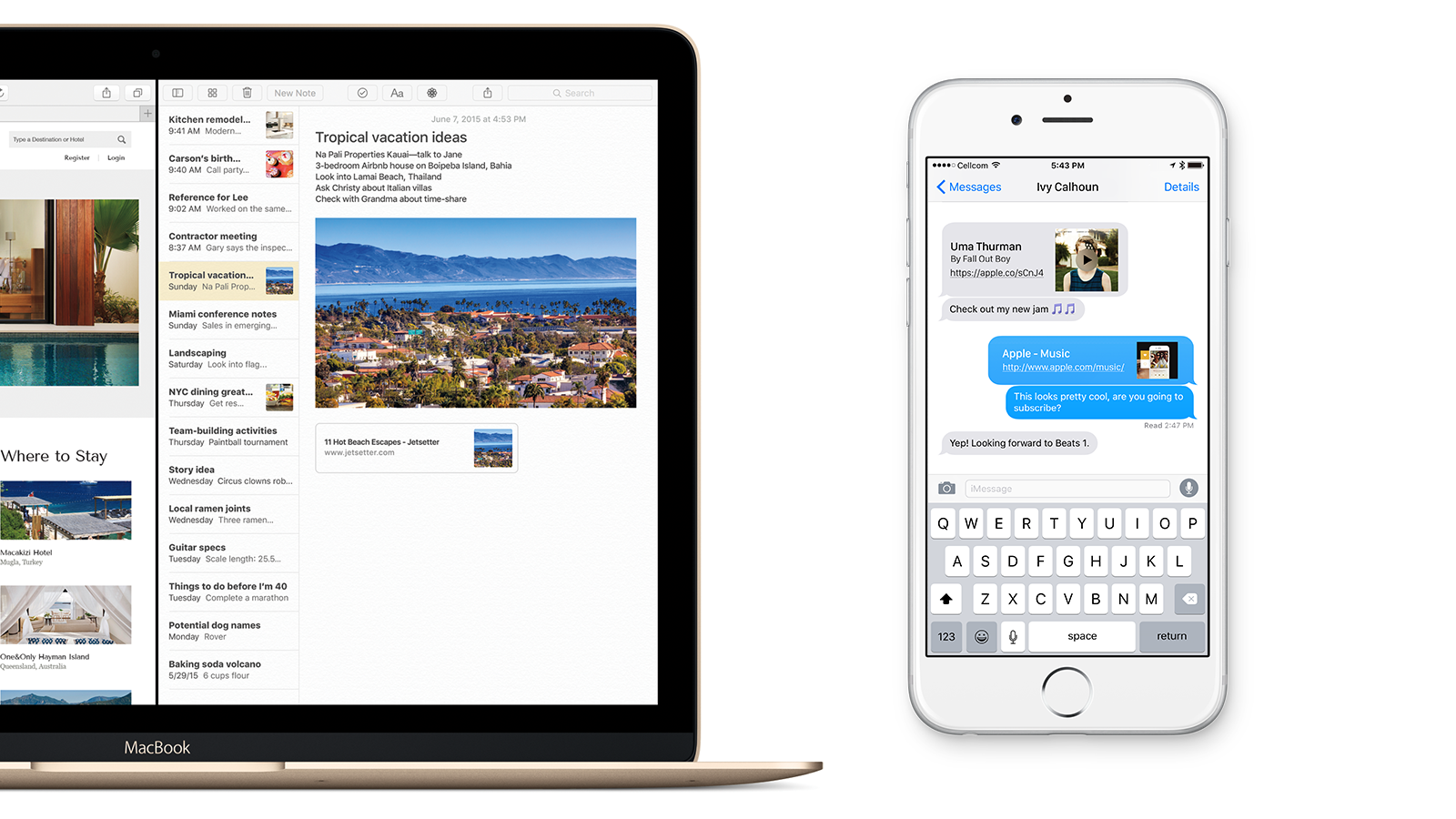
At this year’s WWDC, Apple devoted a lot of onstage attention to a revamp of the Notes app in both iOS 9 and OS X El Capitan. One of my favorite additions is inline web link previews. Just paste a URL, and Notes will turn the link into a preview bubble with a thumbnail for the page, as well as a title and description.

This got me thinking about the possibility of applying the same functionality to other apps. The most obvious place to start, in my opinion, is Messages. I’m constantly sending and receiving links through iMessage throughout the day, whether it’s to a web page, an image, or even just a tweet. Having to flip back and forth between Safari and Messages just to see what the link I’ve been sent is removes me from the conversation and slows down my workflow.


Expand
Expanding
Close

Two weeks with iOS 9 and El Capitan: Which new features stand out and which ones fall short

Site default logo image

It’s been two full work weeks since Apple released the first betas of iOS 9 and OS X El Capitan, and I’ve been using the software since day one. With a ton of new features from a revamped Notes app to a completely new Search system and new multitasking tools, both operating systems promise to make your life much, much easier.

But how much of an impact on your daily life can these new features have? I’ve compiled some thoughts after using them to help you get an idea.

Before we jump into anything, I want to point out that the purpose of this article isn’t to focus on the bugs or problems that (obviously) plague beta software, but rather to examine the usefulness of the features added in the most recent updates. For that reason, there won’t be much discussion of stability or other potential issues unless they directly relate to how the features work, and the impact they’ve had on my day-to-day usage.


Expand
Expanding
Close

MacPhun’s new Tonality 1.2 brings beautiful black & white photo tools to Apple Photos, Adobe Lightroom CC

Even though it’s known as “black and white photography,” balanced grays are what make monochrome images striking or flat. Today, MacPhun released Tonality 1.2 ($18) and Tonality Pro 1.2 ($70), tools designed specifically for making the best possible black and white images from color photos. Both versions work with popular photo library management tools, newly including the Mac version of Apple Photos. The Pro version now plugs into Adobe’s new Lightroom CC, and adds RAW support for both new cameras and Lightroom.

Like MacPhun’s excellent noise-removing app Noiseless, Tonality uses a super-simple interface to let you preview potential changes to your images. The window’s bottom initially scrolls across 13 “Basic” presets, ranging from the intelligent “Adaptive Exposure” to the simpler “Underexposed;” 10 different categories collectively contain 150 different presets. Each preset effect starts at maximum, but can be muted using a single slider. Power users can access a right-side pane with controls for exposure, contrast, clarity, structure/micro-structure, color and tone filters, split-toning, glow, blur, vignette, and grain. Additionally, masking tools and a gradient filter let you alter specific areas of your images while leaving others untouched. The differences are so dramatic that you’ll never feel satisfied with a one-step “apply B&W filter” button again.

Tonality is currently being offered at an introductory price of $13 through the Mac App Store, with Tonality Pro at $60 through the company’s web site. Additional photo galleries of the app in action are below…


Expand
Expanding
Close

Major zero-day security flaws in iOS & OS X allow theft of both Keychain and app passwords

Site default logo image

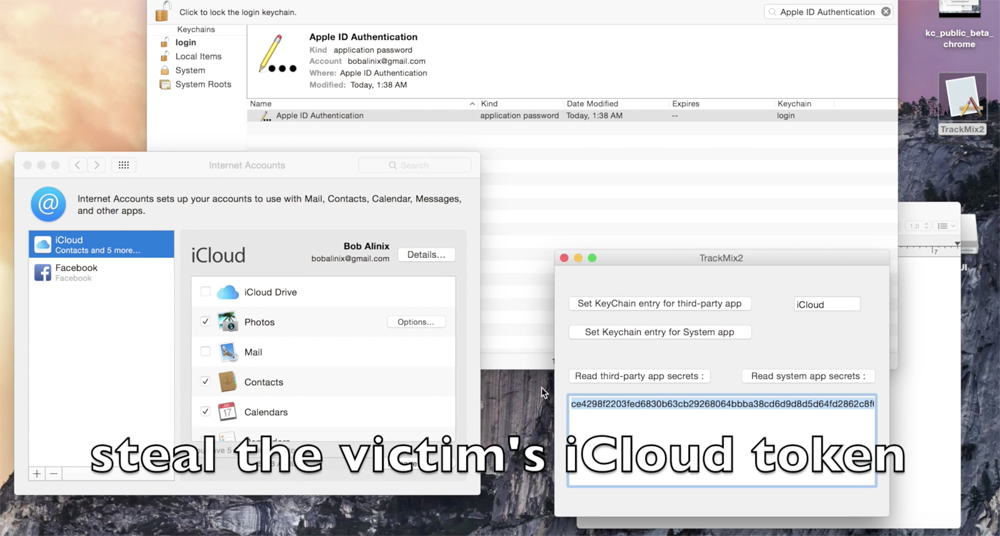
Researchers from Indiana University and the Georgia Institute of Technology said that security holes in both iOS and OS X allow a malicious app to steal passwords from Apple’s Keychain, as well as both Apple and third-party apps. The claims appear to have been confirmed by Apple, Google and others.

We completely cracked the keychain service – used to store passwords and other credentials for different Apple apps – and sandbox containers on OS X, and also identified new weaknesses within the inter-app communication mechanisms on OS X and iOS which can be used to steal confidential data from Evernote, Facebook and other high-profile apps

The Register says the team reported the flaws to Apple in October of last year. At that time, Apple said that it understood the seriousness of the flaws and asked the researchers to give it six months to address them before the exploit was made public. In February, Apple requested an advance copy of the paper, yet the flaws remain present in the latest versions of both operating systems … 
Expand
Expanding
Close

Apple releases OS X 10.10.4 build 14E36b to public beta testers and developers

Site default logo image

Apple today has released a new beta of OS X 10.10.4 to both developers and public beta users. Last week, Apple released the fifth OS X 10.10.4 beta, as well as the first beta of OS X 10.11 El Capitan. Today’s new OS X 10.10.4 beta carries the build number 14E36b and is available through the Mac App Store and Mac Developer Center.


Expand
Expanding
Close

Site default logo image

Apple highlights upcoming GarageBand update w/ new synths & ‘Transform Pad’ feature

Amid the WWDC announcements last week including previewing iOS 9, OS X 10.11 El Capitan, and watchOS 2, Apple has pre-announced a small update coming to GarageBand for Mac at the end of the month. German site Apfelpage noticed the webpage that promises “new features coming June 30” above a description of additional virtual session drummers.
Expand
Expanding
Close

Popular podcast app Instacast now discontinued as parent company Vemedio runs out of money

Site default logo image

Popular podcasting app Instacast for iOS and Mac is shutting down as the founders can no longer fund it or any of Vemedio’s other projects.

In an email sent to paid members, Martin Hering says that all of Vemedio’s products will be ‘discontinued’, with Instacast being the most well known app affected by this. The company says they will keep the servers up for as long as possible so current users will not be left with non-functional apps immediately.


Expand
Expanding
Close

Review: blueLounge’s Portiko + Pixi bring elegance to Mac / iOS / Apple Watch charging + cable management

blueLounge isn’t a typical Apple accessory maker. If you look through its 15-year backcatalog of releases, you’ll notice that its products are markedly different from somewhat overlapping alternatives produced by rivals — intensely practical and cleanly-designed, yet sometimes so conceptually minor that they’re hard to review. Take CableDrop and CableDrop Mini, for instance, circular adhesive pads that each do nothing more than hold one cord in a fixed position wherever you want it. I use CableDrop Mini every day with my MacBook Pro’s power cable, but can’t justify a full review of something so utterly basic.

The simultaneous release of two new blueLounge accessories — Portiko ($25) and Pixi ($10) — gives me the rare opportunity to cover one of the company’s minor but practical items alongside one that’s more gadget-like. Portiko (shown above) is a wall- or table-mountable power source attractive enough to put on display between the four devices it can charge at once. It has enough USB and AC power outlets to handle a MacBook, iPad, iPhone, and Apple Watch at the same time, or other combinations of devices. Pixi is blueLounge’s latest cable management solution, a set of elegantly-built elastic and plastic bands that wrap around bunches of cables, tidying up your desk. Read on for more details and pictures…


Expand
Expanding
Close

Site default logo image

Third-party SSDs to get TRIM support in OS X El Capitan, possibly Yosemite 10.10.4

Apple appears ready to allow third-party solid state drives (SSDs) to use TRIM, an OS-level tool for reclaiming unused space, as a new report claims that an at-your-own risk TRIM tool will debut in either OS X Yosemite 10.10.4 or OS X El Capitan 10.11. TRIM keeps SSDs running quickly as they get filled up with and purged of content, automatically reallocating deleted file space to be used by new files.

According to the report, MacRumors forum users experimenting with El Capitan’s new Rootless security system have discovered a new built-in tool called “Trimforce,” which force-enables TRIM for SSDs even if they weren’t “validated for data integrity while using that functionality.” The tool’s language suggests that the feature can be enabled at the user’s own risk: “By using this tool to enable TRIM, you agree that Apple is not liable for any consequences that may result, including but not limited to data loss or corruption.” Users of excellent third-party SSDs haven’t reported any issues with data loss or corruption under OS X.

Although a third-party app from Cindori called TRIM Enabler has enabled third-party SSDs to work properly under OS X, Apple partially blocked the app last year, forcing users to disable a new Yosemite security feature if they wanted TRIM support. In El Capitan, Trimforce can apparently be enabled without permanently disabling Rootless security. Cindori notes that “Apple has done a full 180 and opened up parts of their driver that allows you to access Trim functionality,” so updates will be coming soon to TRIM Enabler “to take advantage of the Apple sanctioned way of enabling Trim.”

There is some debate as to whether the Trimforce tool will make it into a late version of Yosemite or arrive first in El Capitan. A reader tip suggested that Trimforce is also found in the beta version of OS X Yosemite 10.10.4, but the aforementioned report claims that it is not yet in the beta code. In either case, easier third-party TRIM support is coming soon, a boon for Mac users interested in replacing their old iMac hard drives with SSDs for up to 5X speed increases.

How-To: Prepare your iPhone, iPad or Mac for iOS 9 + OS X El Capitan public betas

Up until recently, unfinished “beta” versions of iOS and OS X were only officially available to registered Apple developers, enabling companies to make their apps compatible before the operating systems were publicly released. But to increase openness and expand its pool of beta testers, Apple decided to offer “public betas” of both iOS and OS X to interested users, starting with iOS 8.4 and OS X Yosemite. Very soon, both iOS 9 and OS X El Capitan will become available as public betas under the Apple Beta Software Program, which you can sign up for here.

Should you install these new and unstable betas on your iPad, iPhone, or Mac? What can you really expect after doing so? Below, I’ll provide you with some guidance so you can make an informed decision to participate in the public betas, or hold off…


Expand
Expanding
Close

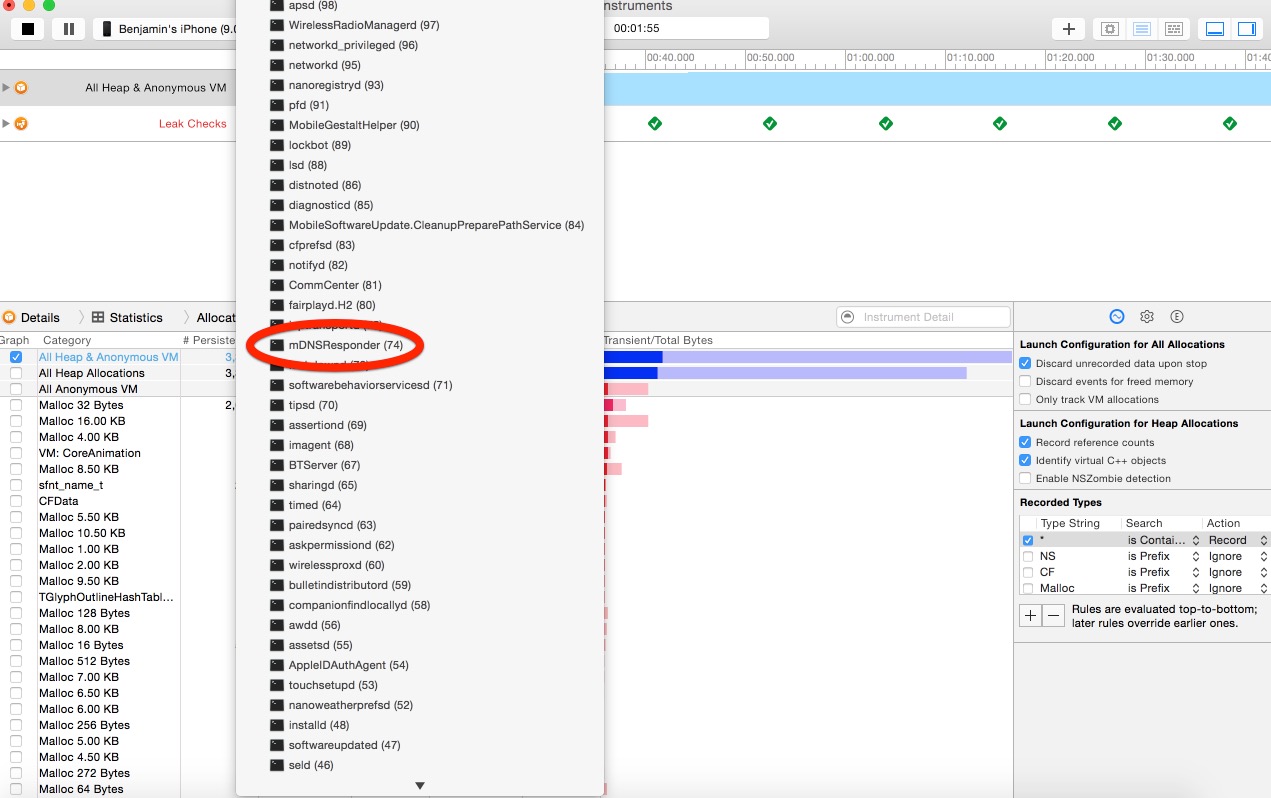
iOS 9 follows OS X in dropping discoveryd for mDNSResponder to improve network stability

Site default logo image

Xcode listing running processes on an iOS 9 iPhone.

When OS X 10.10.4 betas dropped discoveryd a couple of weeks ago before iOS 9 and OS X 10.11 were announced, there was some speculation about whether it was just a temporary intermediate fix until Apple reworks discoveryd for the next generation operating systems. Using Xcode’s Instruments developer tools for iOS and Activity Monitor on the Mac, we can confirm that Apple has also dropped discoveryd on iOS 9 and OS X 10.11 El Capitan.


Expand
Expanding
Close

Opinion: These were the 10 game-changing WWDC 2015 announcements

There were so many announcements during the WWDC keynote yesterday that even people who follow Apple for a living (and expected most of the details) were overwhelmed. New versions of iOS, OS X, and watchOS were only three of the biggies, alongside the official debut of Apple Music and a lot of small but interesting new details.

Since the keynote ended, I’ve been sorting through all of the stories, as well as all three new operating systems. What follows are my picks for the ten most game-changing WWDC 2015 announcements, some of them requiring more explanation than others. They’re not in rank order, but there’s definitely one that I thought was the biggest of the bunch. Share your picks in the comments section below…


Expand
Expanding
Close

This song is actually a pretty good roundup of the WWDC keynote (Video)

Jonathan Mann has been running his “Song a Day” YouTube channel for quite some time now, and without fail, you can navigate to his channel on the day of an Apple event and find yet another song-ified version of Apple’s announcements. He’s a self-proclaimed Apple fanboy, and he was the guy that wrote the song played during the opening to the Antennagate press conference.
Expand
Expanding
Close

These 12 iOS & Mac apps are the 2015 Apple Design Award winners from WWDC

Site default logo image

Apple’s Worldwide Developers Conference is taking place this week following the company’s kickoff keynote presentation yesterday where it introduced the future of iOS, OS X, and its new Apple Music service, among other updates. As is tradition, one of the first presentations after the keynote was to announce this year’s Apple Design Award winners, a small-scale award show of sorts where Apple honors select app developers by recognize their work and success over the last year.

This year’s 12 winners range from games to education and stock trading apps. Head below for the full list of 2015 winners.
Expand
Expanding
Close