Latest

Facebook Messenger and Heads Up take top slots in Apple’s most popular iOS app lists

Site default logo image

Screen Shot 2014-12-23 at 5.19.06 PM

Apple has released the list of this year’s most popular iOS apps, with Facebook’s Messenger app and Warner Bros.’ Heads Up! game taking the top spots on the free and paid charts, respectively. The freemium Clash of Clans was the top grossing app of 2014.

Social networks claimed all of the top five free spots, with Snapchat, YouTube, Facebook, and Instagram coming in behind Messenger. Between the main Facebook client, Messenger, and Instagram, the social networking company managed to capture the majority of the top five slots.


Expand
Expanding
Close

Facebook launches ‘Stickered’ companion app for Messenger on iOS

Site default logo image

After moving the messaging component of its iOS client out into a separate app, Facebook has continued its pattern of breaking up the functionality of its software today by launching a new iOS application called Stickered.

The app launched a few days ago on Android, but only became available today for iOS users. It allows users to add stickers to photos from their camera roll, or overlay them directly on a live camera view before snapping a photo.


Expand
Expanding
Close

Apple Pay in-app checkout added to Ticketmaster, LoungeBuddy, more

Site default logo image

While retailers and venues have steadily been rolling out Apple Pay support for buying goods in the real world, Apple Pay is possibly even more popular with checking out for physical goods and services within apps. This week’s additions include Apple Pay in-app checkout support on iOS with Ticketmaster, LoungeBuddy, and more.
Expand
Expanding
Close

Site default logo image

Google+ iOS app adds higher resolution experience for iPhone 6/6 Plus Retina screens, more

google-plus-iOS8-extensionGoogle today updated its Google+ app for iPhone and iPad adding support for the higher resolution screens on the iPhone 6 and 6 Plus.

In addition to the Retina imagery for the new iPhones, the app gains a few new features for both iPhone and iPad users in addition to the usual performance improvements and bug fixes.

Other features in version 4.8.0 include the ability to “vote on polls from people and brands” and an option to share to Google+ through an iOS 8 extension (pictured right).

The updated Google+ app for iPhone and iPad is available on the App Store now.

A full changelog is below:

What’s New in Version 4.8.0

What’s New
• Retina HD resolution on iPhone 6 and 6+
• Vote on polls from people and brands
• Easily share to Google+ from your device
• Performance improvements and bug fixes

Savage Interactive debuts Procreate Pocket, bringing iPad illustration tools to larger-screened iPhones

Site default logo image

Demonstrating the types of apps that will increasingly migrate from Apple’s tablets to its larger iPhone 6 models, Savage Interactive has released Procreate Pocket ($3), a shrunken-down version of its signature iPad app Procreate. Widely admired for its professional-grade drawing tools, Procreate previously enabled tablet users to compose multi-layer illustrations using numerous brushes and a mistake-friendly, multi-layer Undo tool.
Expand
Expanding
Close

Amazon’s Prime Now same-day delivery service arrives today via new iOS app

Introducing Amazon Prime Now - YouTube 2014-12-18 11-02-11

Amazon has launched a new service called Prime Now which, as its title suggests, hopes to bring products from Amazon to your door faster than ever. The service currently offers “tens of thousands” of items spanning a wide variety of categories, is available now in parts of Manhattan for Amazon Prime members, and users have the option of going with either one or two hour delivery.


Expand
Expanding
Close

Site default logo image

Adobe Illustrator Line & Photoshop Sketch iPad apps gain Pencil/Wacom stylus support, auto save, more

Adobe updated two of its creative iPad apps today with new features and additional Bluetooth stylus support. Both Illustrator Line and Photoshop Sketch were updated to version 2.1 and picked up support for FiftyThree’s Pencil Bluetooth stylus and Wacom’s Intuos Creative Bluetooth stylus when drawing in each app. Both new app versions also added the ability to auto save sketches to Projects and your usual performance improvements.
Expand
Expanding
Close

Site default logo image

Yahoo iOS app adds local news, comments, & new side-swipe navigation

Yahoo announced an update to its Yahoo iOS app today that adds local news, commenting, and UI tweaks to the company’s app for accessing news and other Yahoo services.

Want to know more about what’s going on around you? Today we’re bringing local news to your fingertips with the Yahoo App. As you move around the country, you’ll be able to see what’s going on in your area.

In addition to local news stories for users in the US, readers now have the ability to comment on articles:
Expand
Expanding
Close

Algoriddim releases djay Pro for Mac w/ Spotify integration, 4 deck support, iCloud syncing, more

Site default logo image

djay Pro

Algoriddim is ending the year with a bang with the launch of djay Pro for Mac — its most powerful version of the popular music mixing app.  Spotify integration added access to over 20 million songs for djay users in May, and Algoriddim released djay for Android for the first time this part October. With the release of the professional version of djay for the desktop, Algoriddim is adding access to your Spotify library for mixing right in the DJ app and highlighting ‘pro’ features and capabilities with this brand new version.
Expand
Expanding
Close

Drafts for iOS regains Notification Center widget in latest update

Site default logo image

A few weeks ago, the popular note-taking app Drafts for iOS was updated at Apple’s request to remove its Notification Center widget, which the company said violated the rules for extensions. Now, it seems the tech giant has reversed its decision. Today’s 4.0.6 update to Drafts re-introduces the widget, which has gained additional functionality since the previous version.


Expand
Expanding
Close

Emoji Type keyboard brings predictive emoji typing to iOS

Site default logo image

Screen Shot 2014-12-17 at 12.45.46 PM

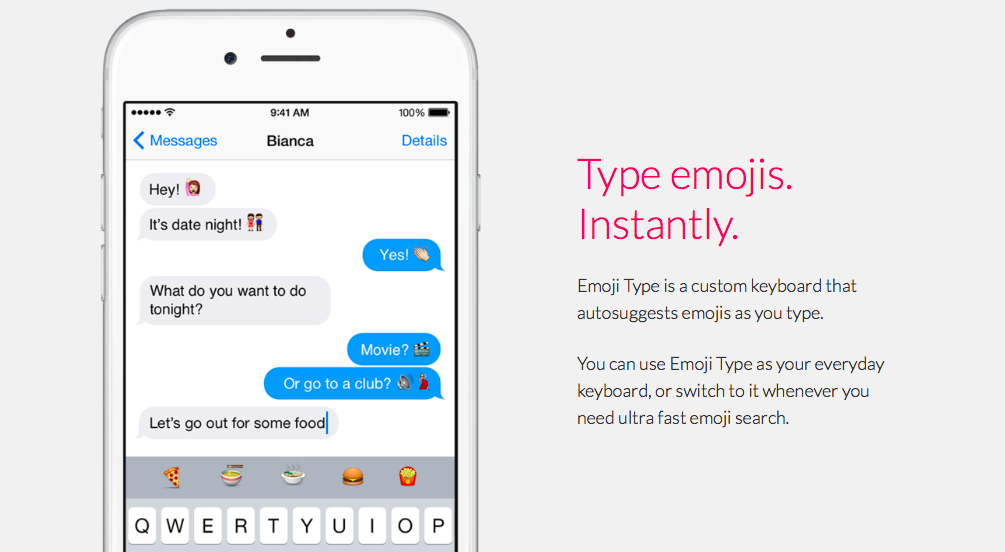
If you’re a fan of emoji, you’ll want to 👀 at Emoji Type, a new third party predictive keyboard for the 📱. Emoji Type comes from the iOS developer of Product Hunt. Like with any iOS 🎹, installing the Emoji Type app prompts you to enable the keyboard in Settings. Once you’ve done that, you can switch to Emoji Type by hitting the 🌐  icon on the keyboard.


Expand
Expanding
Close

Site default logo image

Yahoo Weather iOS app adds new animated effects for weather conditions, updated design for iPhone 6/6Plus

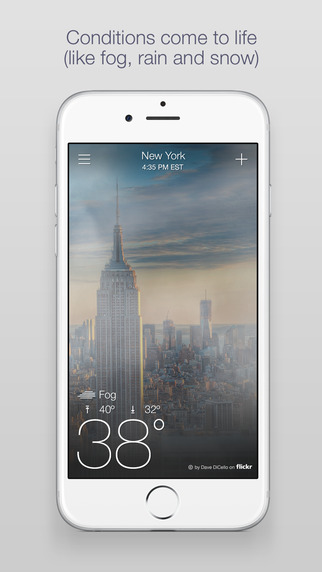
Yahoo-weather-01Yahoo announced an update to its Weather app today that brings more of the high-quality animations for weather conditions it first launched in its iOS app earlier this year. The update also adds a revamped design that offers a better experience on the iPhone 6 and iPhone 6 Plus.

The new animated effects include visuals for lightning and frost, which come in addition to the fog, rain, heat, and snow effects the app had previously. Yahoo’s announcement says the effects utilize “bleeding-edge graphics technology typically only seen in video games.”

We’re excited to take your weather experience to the next level, as we make it even more delightful… So, instead of reading about the stormy conditions, you’ll actually see lightning flash across your screen.

The animations and updated design that takes advantage of the new larger iPhones are are available in the latest version of the Yahoo Weather app for iPhone and iPad.

What’s New in Version 1.6.5

– Updated designs for iPhone 6 and iPhone 6 Plus
– Added animated effects for lightning and frost
– Bug fixes and performance improvements
– Updated Privacy Policy

Orlando Magic teams up w/ Chase for special promos for Apple Pay launch this Friday

Site default logo image

We heard earlier this week that the Orlando Magic would become the first NBA team to offer Apple Pay to fans through a partnership with Chase. Today we get the official announcement from the team confirming an Apple Pay launch at the Amway Center for this Friday, Dec. 19 and some other details regarding special promos:
Expand
Expanding
Close

Site default logo image

Microsoft’s Xim photo app updated with support for Apple TV streaming over AirPlay

[youtube https://www.youtube.com/watch?v=sHAyOKtyjhs&feature=youtu.be]

Microsoft updated its Xim photo sharing application today with support for viewing photos over AirPlay on an Apple TV. The instructions for setting up AirPlay streaming (demonstrated in the video above) are relatively simple: just pull up Control Center and activate the AirPlay mirroing function that’s built into iOS. After that, you’ll see your slideshows on your TV in real time.

Xim allows users to create shared photo slideshows that stay in sync across multiple devices. Whenever a user changes the slideshow by zooming in, switching photos, or changing something else, all users currently viewing that slideshow will see the change in real time.

The Xim app is free for all users on the iOS App Store.

Fleksy keyboard for iOS updated with GIF support, extensions, and new themes

Site default logo image

A major update to the Fleksy keyboard for iOS was released today, adding several big new features and a handful of new themes to the popular app. Most of the new features are added through a framework called Extensions.

Extensions allow the user to specify certain optional features to be included on the keyboard. Some of the extensions that come with the new app include a fifth row on the keyboard for numbers, the aforementioned GIF keyboard, and even a one-handed typing mode on newer iPhones. Several others are also included.


Expand
Expanding
Close

Pixelmator for Mac gets pinch-to-zoom support and a bevy of other improvements

Site default logo image

screen800x500

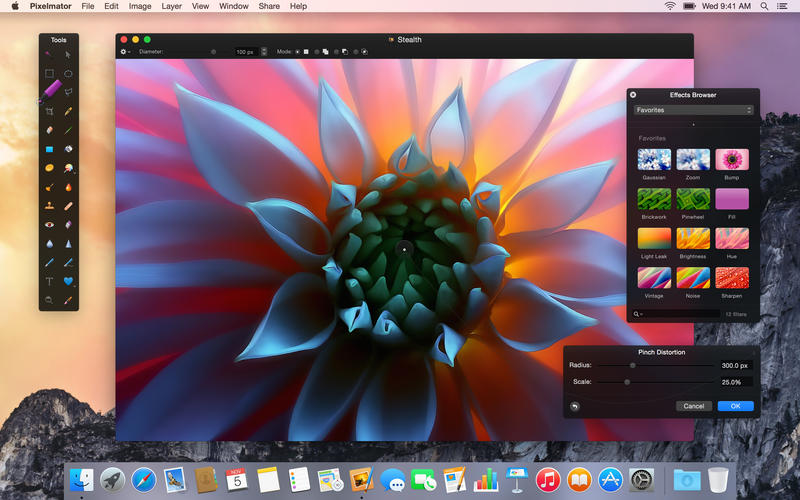
Popular image editor Pixelmator has been updated today with a whole host of new features, fixes, and improvements. First on the list is something many users (myself included!) have been hoping to see for quite a while now: full support for Apple’s pinch-to-zoom gesture. The update also makes the Shapes, Gradients, and Styles palettes capable of scrolling and being resized.


Expand
Expanding
Close

Site default logo image

Waze mapping app updated with iOS 8 widget, improved traffic data, and more

Popular mapping application Waze was updated today to version 3.9.2. According to the app’s change log (below), it’s gotten several design tweaks to areas, including the location sharing interface and quick-messaging screen, which allows you to quickly notify friends that you’re on the way.

The app also gained a Today view widget that displays the estimated travel time to your home or work addresses, and allows you to quickly get directions to either location by tapping on them. You can also send your ETA to friends from the widget while navigating to your destination.

Traffic data is now improved when changing a route to avoid slowdowns, and a new setting allows the map to automatically swap between 2D and 3D styles. Of course, the usual miscellaneous bug fixes are also included.

You can grab the updated Waze app for free on the App Store.

What’s New in Version 3.9.2

– Sending “I’m on my way” message is simpler than ever! With a new design and layout, you can easily keep your friends & family posted on the progress of your drive.
– New Waze Today Widget for iOS 8! Quickly view your ETA for Home or Work, navigate with one tap, and easily send your current drive & ETA (when navigating). Pull down your Notification Center and tap Edit to add the extension.
– Updated look and function for sending a location.
– ETA & route changes now include richer traffic information.
– New map display setting automatically switches between 2D and 3D view.
– Bug fixes and performance enhancements.

Site default logo image

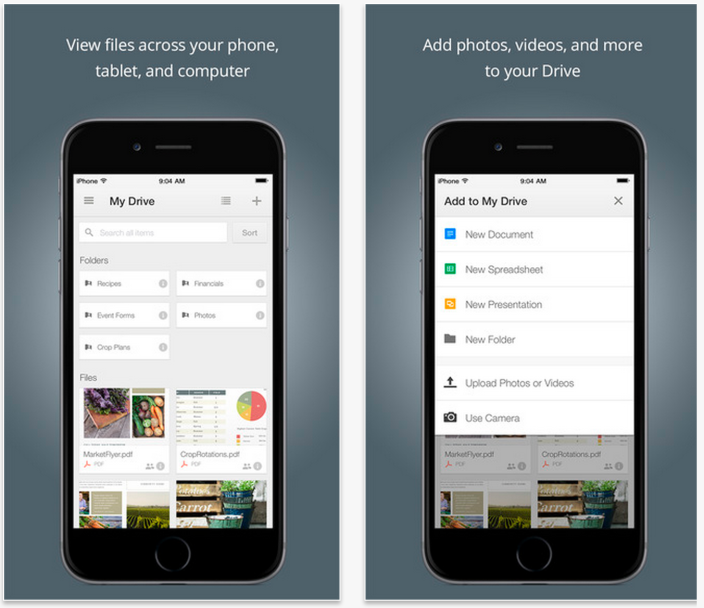
Google Drive for iOS now lets you upload files from other apps, view & share My Maps

Google-Drive-iOS-app

Google announced today that an update rolling out to its Google Drive iOS app will allow users to upload files from other apps as well as access custom made maps through Google’s My Maps feature.

The ability to upload files from other apps into Drive is limited to iOS 8 users, and the Google My Maps integration is limited to viewing and sharing the custom maps currently.

For creating custom maps with Google My Maps, you’ll still need the desktop app. Earlier this month Google integrated the My Maps custom maps creation tool into the web version of Drive.

The updated Google Drive app for iPhone and iPad, version 3.4.0, is available on the App Store now.

What’s New in Version 3.4.0

• Upload files to Drive from other sources (iOS 8 only)
• Bug fixes and performance improvements

Site default logo image

Instagram gets 5 new filters, slo-mo video uploads, real-time commenting, more

Instagram-new-filters-01

Instagram announced a few new features rolling out today including the addition of five new filters, slo-mo video uploads, and real-time comments.

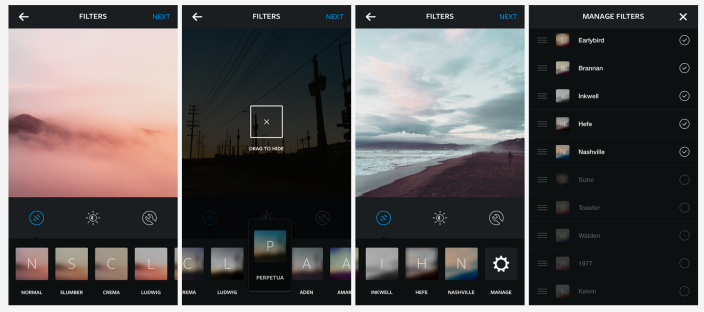
The five new filters arriving today include Slumber, Crema, Ludwig, Perpetua, and Aden (pictured below). Instagram said the new filters are “more subtle” and take advantage of “higher image quality, while still giving you a simple way to capture the mood, tone and feelings of the moment.”

Inspired by the photography, art, fashion and design of the global Instagram community, we’re releasing five new filters that we believe are our best yet… They soften and subtly shift colors to achieve the look and feel you want for your each photo… To make it easier to choose between filters, we’ve updated how they’re displayed. When you go to apply a filter to your photo, each filter icon on the bottom now displays a blurred preview of your photo with its effect applied. This lets you see at a glance how your photo will appear with each filter applied.

In addition to the ability to upload slo-mo videos shot on your iPhone, you’ll also no longer need to refresh to see new comments as Instagram said they will now appear in real-time following today’s update.

Instagram-new-filters-02

Other new features arriving today include “the option to adjust your photo’s perspective using the adjust tool” and the ability to customize the app’s filters tray based on your preferences via a new manage button.

The new features will arrive for users today in the latest version of the Instagram mobile apps.

Site default logo image

Google’s Photo Sphere Camera app adds library privacy tabs, improved image capture for iPhone 6/6 Plus, more

Google released its Photo Sphere Camera app for iPhone users a few months back with the ability to capture 360º images right from your device and share them over social media or even Google Maps.

Photo Sphere Camera can also be used without ever publishing images anywhere or sharing photo spheres with anyone, so today Google added tabs to the app’s library separating public and private photos.
Expand
Expanding
Close

Launch Center Pro makers debut Group Text+ and Email+ for iOS

Site default logo image
Group Text+ for iPhone & iPad

Group Text+ for iPhone & iPad

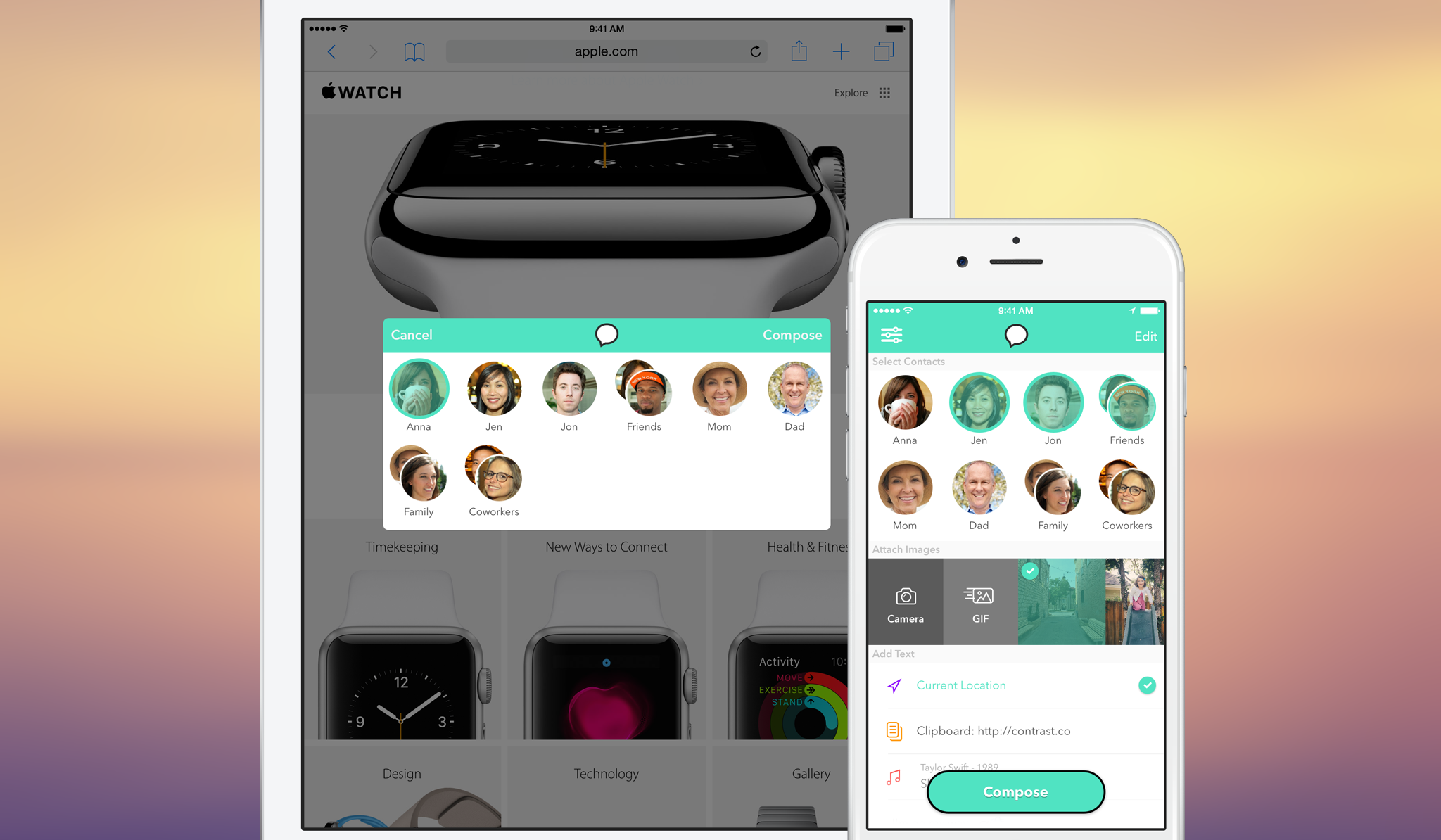
Contrast, the makers of the popular iOS automation app Launch Center Pro, released two new apps today that hope to “speed up tedious tasks on iOS.” Group Text+ and Email+ each include features that make texting (iMessage and SMS) and emailing your favorite contacts or groups of contacts easier and quicker.
Expand
Expanding
Close

Site default logo image

You can now control your Nest with Google Now voice commands

Google Now Nest

It was only a matter of time following Google’s acquisition of home automation company Nest earlier this year that users would begin receiving the best of both worlds. One of the first marriages of each company’s products and services is Google Now integration with Nest, allowing for users to control the smart thermostat using voice commands.
Expand
Expanding
Close

Site default logo image

Foursquare’s location discovery app lands on the iPad

Foursquare for iPad

Earlier this year, Foursquare pulled a Facebook and split its mobile app in half with check-ins moving to a new app branded as Swarm and location discovery and recommendations becoming the sole focus of its Foursquare-branded app.

Both apps were iPhone-only for iOS users as Foursquare relied on a mobile site for iPad users wanting to check-in from a tablet, but now that Foursquare has become a full-fledged Yelp competitor with its own dedicated app to finding new places to travel and venues to review, Foursquare is giving users a native iPad app as well.
Expand
Expanding
Close

Amazon’s Kindle for iOS app updated w/ Goodreads integration, Audible progressive play, more

Site default logo image

Amazon pushed out an updated version of its Kindle for iOS app today bringing a list of new features to the reading app.

Kindle for iOS now includes integration with Goodreads, the social cataloging service it bought last year, allowing readers users to share book progress and completion status, quotes, and more Kindle to Goodreads. iPad Kindle app users now have access to Amazon’s Book Browser to view book descriptions and customer ratings; Kindle Unlimited customers (30-day free trial) can download books directly from the Book Browser. The new version also adds a feature called Audible Progressive Play, which allows audiobook listeners using the Amazon-owned Audible service to play content as it downloads.

The update also adds new ways for users to access information and details about Kindle books. Check the extensive change log of the latest version below for more information:

Expand
Expanding
Close