
HomeKit

See All Stories

HomeKit is Apple's home automation framework that lets you control connected accessories from your iPhone, iPad, Apple Watch, HomePod, and Siri.
Your home at your command.

What is HomeKit / Apple Home?

Along with several other new APIs for developers, Apple announced HomeKit in June 2014, which allows all home automation accessories/devices to work together in harmony with iOS. The API allows home automation developers to centralize all home automation without needing separate apps to access each device’s specific features. These devices include locks, lights, cameras, doors, thermostats, plugs, switches, and more.

HomeKit allows for secure pairing with devices and the ability to control individual devices. It also makes it possible to group several home automation devices into scenes that allow for easier control of any automation device in specific situations. One of the coolest features available with HomeKit is the ability to control any home automation accessory with Siri based on certain commands or scenes previously configured with these devices.

In 2016, Apple introduced a new Home app that came with a modern look, relatively easy-to-use controls, and access to accessories and scenes from anywhere on iOS 10. Apple’s new built-in Home app arrived on the iPhone’s Home screen, plus you can access a ton of functions from the Lock screen or anywhere on iOS from the new Control Center once you have a HomeKit accessory set up.

In 2018, Apple released the HomePod. It was a way to interact with your connected home devices through Siri using a standalone device.

In 2020, Apple announced that tvOS 14 would gain access to the Home app. iOS 14 is also bringing improvement to the Home app UI.

HomeKit Secure Video
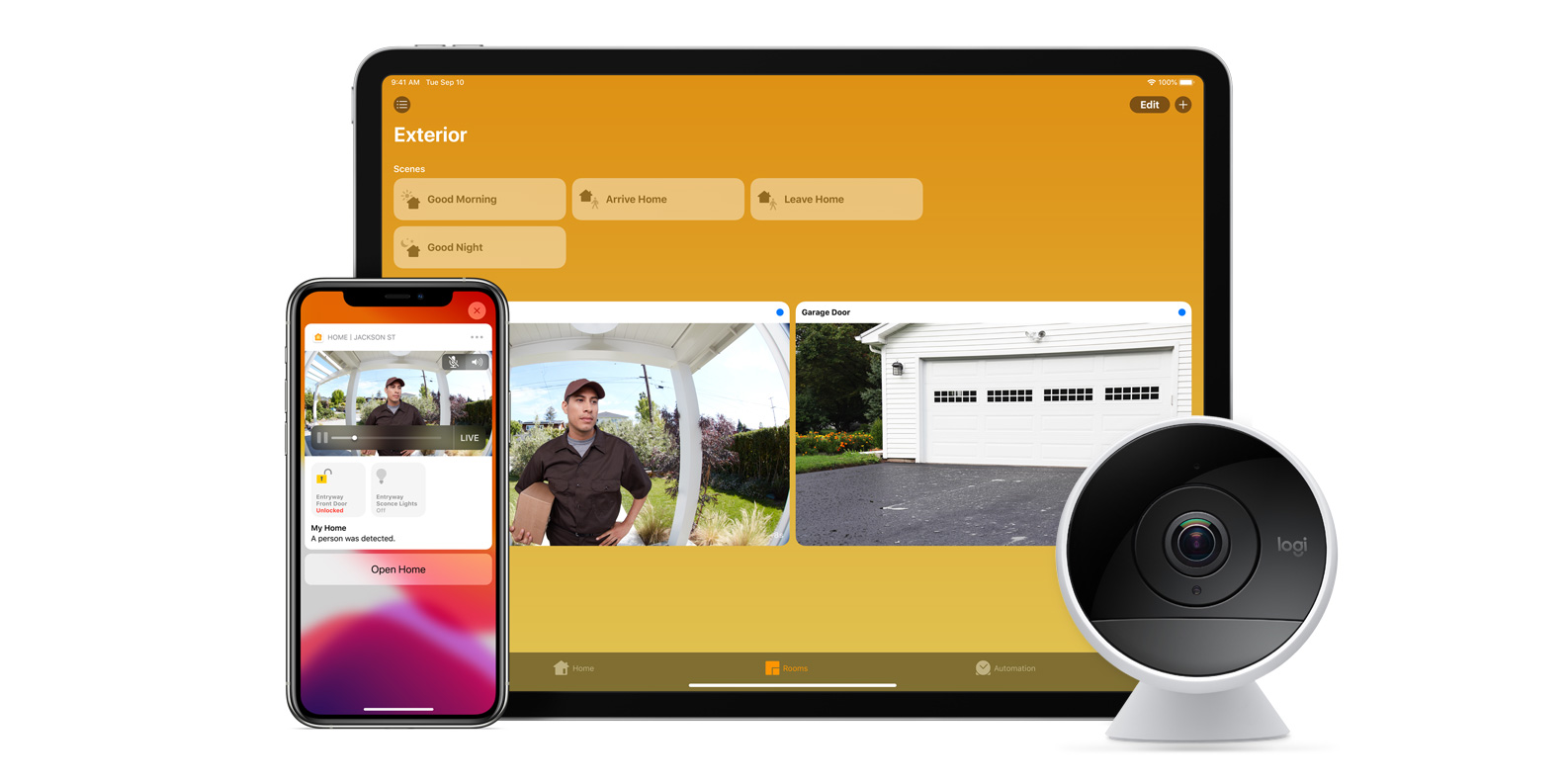
With iOS 13, Apple announced HomeKit Secure Video.

Footage from home security cameras contains your most personal and sensitive data. With HomeKit Secure Video, activity detected by supported cameras is privately analyzed by your home hub using on‑device intelligence to determine if people, pets, or cars are present. When important activity is detected, you and anyone you share your Home app with will receive a rich notification that lets you view the clip right from the Lock Screen. Recorded video is available to view for ten days from the Home app. It’s securely stored for free in supported iCloud accounts and doesn’t count against your storage limit.

While the rollout has been slow, Logitech, Arlo, Netatmo, and Eufy are among the early standouts. With recent privacy issues with Ring, HomeKit Secure Video is likely to continue to grow in popularity. One key benefit with Secure Video is that it works with your existing iCloud storage (200GB and up plan), so you don’t have an extra monthly fee for storage.

HomeKit Router
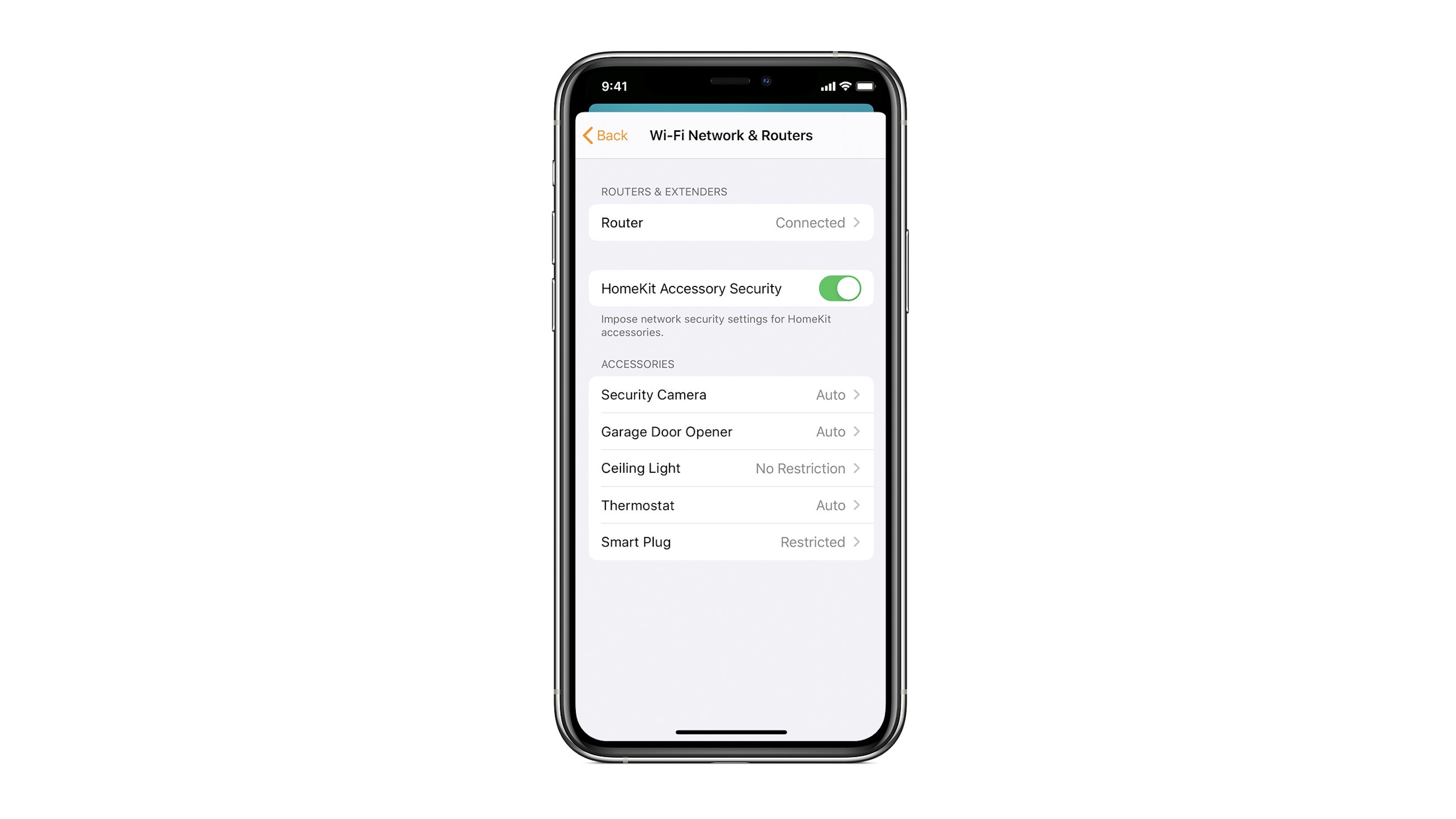
HomeKit Router was also announced with iOS 13, but it wasn’t released until early 2020. The idea behind the feature is you can give granular control to smart home enabled devices to control where on the internet they can reach.

eero was the first company to roll out support in for HomeKit Router.

With Apple HomeKit, eero gives you even more protection of your HomeKit accessories and an easy way to manage what they are allowed to communicate with in your home and through the internet.

There are three levels of security Apple offers for accessories paired with HomeKit routers:

  • Restrict to Home: Most secure. Your accessory can interact only with HomeKit through your Apple devices. The accessory won’t connect to the Internet or any local devices, so any third-party services, like firmware updates, might be blocked.
  • Automatic: Default security. Your accessory can communicate with HomeKit and connections recommended by its manufacturer.
  • No Restriction: Least secure. This setting bypasses the secure router and allows your accessory to interact with any device in your network or Internet-based service.

How Do You Use HomeKit?
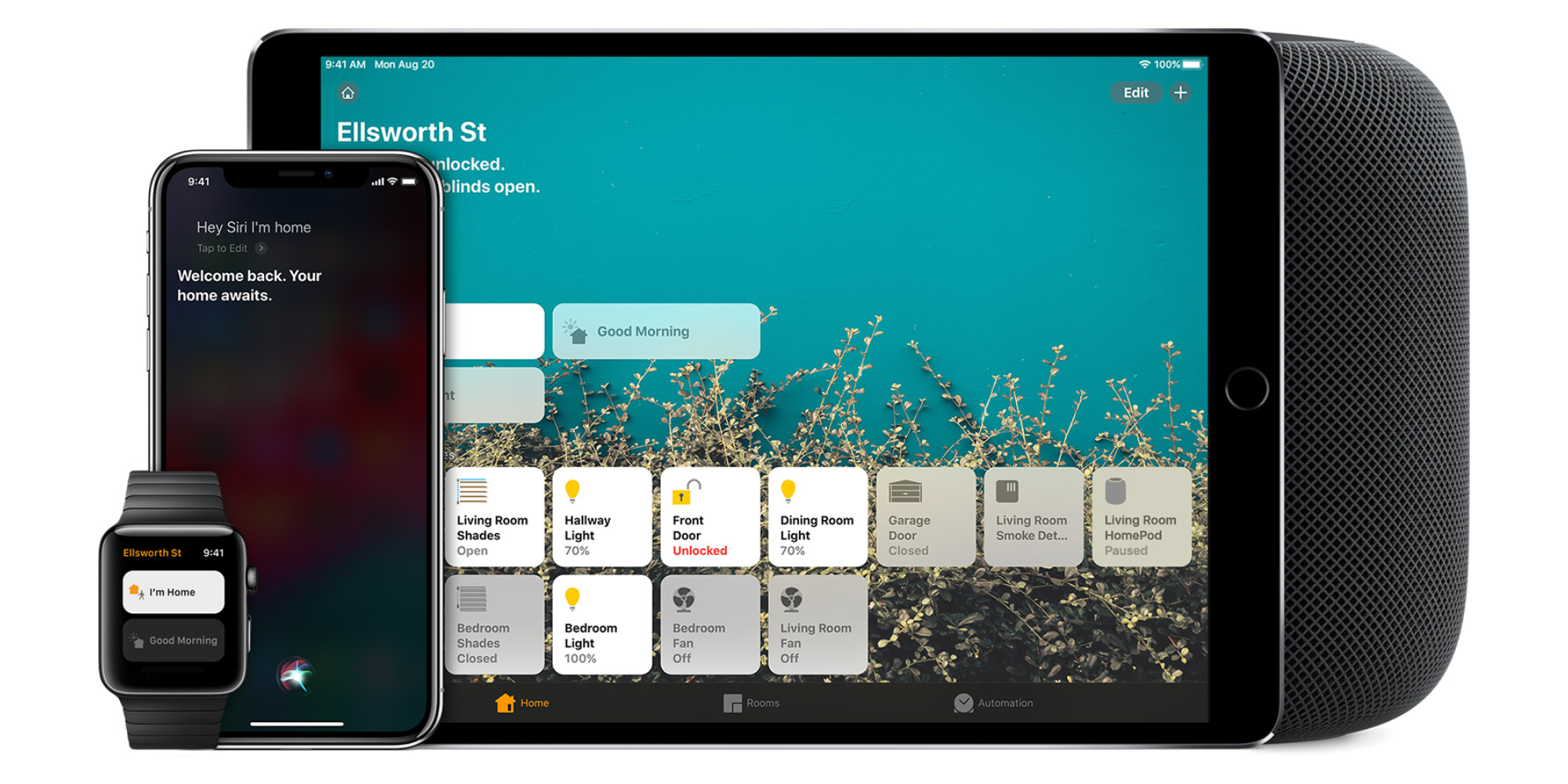
Homekit app

HomeKit devices can be controlled from iPad, iPhone, Mac, Apple Watch, and HomePod. A 4th generation Apple TV (or newer) is an essential Apple smart home device as it acts as a bridge over iCloud to allow access to your devices when away from home.

9to5Mac’s Bradley Chambers does a regular column about the “Apple Home” lifestyle in his HomeKit Weekly column.

Smart Home Diary: Getting started with HomeKit

Site default logo image

London is my favorite place in the world, but there are a few downsides to living here – and one of those is that some tech takes a while to cross the Atlantic. HomeKit was one example. Different plug sockets and using 240v instead of 110v means that we needed to wait for UK-specific versions of HomeKit-compatible kit.

I also had various items of non-compatible Smart Home technology that made it a little financially painful to go all-in on HomeKit. I was, for example, an early adopter of WeMo, with a socket switch for each of my standard lamps, all of which needed to be replaced.

But no self-respecting gadget lover could pass up the opportunity for voice-control – and that, plus the greater capabilities, eventually made the switch to HomeKit irresistible. This piece doubles as a diary of my own experiences and a how-to guide to getting started with HomeKit …


Expand
Expanding
Close

Hands-on: Philips Hue Lightstrip Plus gives you iPhone-controlled dynamic accent lighting with ease [Video]

Site default logo image

I’ve been a big fan of Philips Hue lights since the very first Hue Starter Kit was released back in 2012. I’ve been using that same initial set of bulbs ever since then, and have been largely happy with the experience.

Thanks to the success of that initial release, Philips has added many more Hue products to the lineup. It also produced a new second-generation HomeKit-enabled Bridge, which allows you to control your Hue lights directly from Siri or via the Home app features found in iOS 10.

But there’s one particular Hue product that I see utilized more than any other, and that’s Philips’ Hue Lightstrip. You’ve likely seen the $90 Lightstrip utilized in photos or on YouTube videos, and that’s because they’re a wonderful way to make practically any environment more interesting with minimal effort.
Expand
Expanding
Close

Best HomeKit security cameras, lights, outlets & more coming in 2017

Site default logo image

Apple’s HomeKit home automation feature can be super convenient when you have the right accessories in place, but finding compatible hardware isn’t always the easiest. That finally started to change last year with the introduction of lots of new HomeKit-enabled smart home products.

That trend appears to be continuing based on new HomeKit accessories we saw at CES 2017 last week. HomeKit works best in my experience when you have lots of accessories like bulbs, plugs, thermostats and locks, and there is plenty of new hardware on the rise.

These are the best new HomeKit products hitting the market this year:


Expand
Expanding
Close

9to5Mac Best of CES 2017 Awards

Site default logo image

While Apple doesn’t have an official presence at the Consumer Electronics Show, CES 2017 has been packed with new and innovative technology that takes advantage of Apple’s hardware and software.

9to5Mac has been on the ground in Las Vegas all week tracking down the best and most interesting new technologies to come out of the big show. This year we’re highlighting our favorite new products with the first-ever 9to5Mac Best of CES Awards.

And the winners are…


Expand
Expanding
Close

Focalcrest announces Mixtile Hub to bridge existing ZigBee and Z-Wave smart home products into HomeKit + Siri control

Site default logo image

The Mixtile Hub is the first smart home hub that can bridge existing smart accessories from other popular home automation protocols, like ZigBee and Z-Wave, and bring them into the HomeKit ecosystem. This means customers will be able to view various accessories in the Home app and control them with Siri voice commands, even if they weren’t designed for HomeKit originally.

The hub, announced at CES, appears to be the first of its kind consumer product although Focalcrest didn’t announce when the product would actually go on sale. The current workaround solution involves running a hacky network server whereas the Mixtile is MFi-licensed and should be as easy to setup as any other HomeKit product.


Expand
Expanding
Close

Honeywell extends Lyric Platform with Lyric Cameras & HomeKit-compatibility for Lyric Security system

Site default logo image

Honeywell has announced today their first-ever Lyric Cameras and eventual software upgrade for Lyric Security systems, which will make the system compatible with Apple’s HomeKit. Honeywell’s two new Wi-Fi indoor cameras, the Lyric C1 and C2, pair with the Lyric app to access live streaming, recorded events, and alerts for when something is seen or analyzed like a smoke/CO detector going off.


Expand
Expanding
Close

Chamberlain is bringing Apple’s HomeKit to MyQ garage door openers this year

Site default logo image

Chamberlain was one of the original companies committed to HomeKit when Apple introduced the smart home framework a few years ago, and this year Chamberlain is finally delivering with two new HomeKit-enabled products for its line of MyQ garage door openers. The first is an upcoming bridge hub that will work with HomeKit for future installations, and the second is a bridge that will upgrade current MyQ Garage installations to work with HomeKit.


Expand
Expanding
Close

Review: Nanoleaf’s Aurora smart lighting panels match modular customization with HomeKit control [Video]

Site default logo image

I’ve tried a few different HomeKit lighting solutions but nothing quite like Nanoleaf’s Aurora smart lighting panels. These modular tiles probably won’t replace traditional lamps or ceiling bulbs, but the customizable LED lights provide visually impressive colorful (and pricey) accent lighting. See it in action below:


Expand
Expanding
Close

Site default logo image

Upcoming Sylvania Bluetooth Multicolor bulb will offer Apple HomeKit-support without a hub

The new Sylvania Smart Multicolor A19 bulb announced today will be one of the first Bluetooth light bulb products we’ve seen that will communicate with Apple’s HomeKit platform without the need for a separate Wi-Fi hub. That means you’ll simply screw in the lightbulb and connect it via Bluetooth to enable control using Apple’s Home app and Siri voice commands.


Expand
Expanding
Close

New developer solution aims to help companies bring HomeKit accessories to market faster

Site default logo image

HomeKit-connected accessories have gradually become more affordable and plentiful since the technology was first introduced, but there’s still room for improvement. Looking to remedy some of the problems with Apple’s connected home platform, Silicon Labs is today announcing a new initiative that it hopes will make it both cheaper and easier for developers to create HomeKit accessories.


Expand
Expanding
Close

How to upgrade your holiday lights with HomeKit for Siri control and automation

Site default logo image

Apple’s HomeKit feature makes automating and remotely controlling your holiday lights super simple, and iOS 10’s new Home app makes setting it all up this year easier than ever before. With one or two affordable accessories and an iPhone or iPad, you can put HomeKit and Siri to work and forget about fiddly timers or unplugging and plugging lights back in for a month.


Expand
Expanding
Close

Review: Honeywell Lyric T5 brings HomeKit and touchscreen control to an entry-level smart thermostat

Site default logo image

Honeywell Lyric T5 is the company’s second take at a Wi-Fi thermostat with support for Apple’s HomeKit framework for smart homes. The latest member of Honeywell’s Lyric family of smart thermostats introduces a new design that now includes a touchscreen.

Priced at $149.99, Lyric T5 is currently $50 cheaper than Honeywell’s Lyric Round HomeKit thermostat and $20 under ecobee’s budget version of its HomeKit thermostat. Read on for our full review of Honeywell’s new Lyric T5 Wi-Fi thermostat to see how it compares…


Expand
Expanding
Close

Great Christmas gift: Koogeek Smart Plug is a simple, inexpensive, Wi-Fi HomeKit device to get started with Siri home automation

The Koogeek plug is a simple way to add smart HomeKit functionality to ‘any’ device you own with a plug (buy it for $34.99). The idea of a HomeKit plug outlet is by no means new — there are plenty available on the market — but the Koogeek stood out for its simplicity, form factor and WiFi connectivity (see below for full review of how to set it up and how well it works).

It also works flawlessly with the iOS 10 Home app which means the switch can be controlled via Siri or via the Control Center pane. There are some caveats to be aware of, but it’s a simple, straightforward and inexpensive HomeKit smart plug option …


Expand
Expanding
Close

New $49 Elgato Eve Light Switch adds smart HomeKit features to your house’s existing lighting, no bridge/hub required (update: Eve Motion available too)

Update: The Eve Motion is also available now for $49. It’s a Bluetooth HomeKit motion sensor that can work in combination with the Eve Light Switch to create motion-controlled lighting. It will integrate with the Apple Home app and does not require a bridge or additional accessories, so the motion sensor can slot into to an existing smart home setup.

Elgato is expanding its range of Bluetooth HomeKit devices with a new standalone smart light switch, available from today for $49.95. The Eve Light Switch replaces the wall switches you already have in your house, to make the lighting in the room accessible to HomeKit without changing bulbs or buying bridges and other accessories.

The lights are then exposed to HomeKit via Siri or the iOS 10 Home app; simply use your voice to turn them and off. The lights are also controllable away from home if you have a third-generation or fourth-generation Apple TV to act as a hub for Remote Access.


Expand
Expanding
Close

