Mac

See All Stories

Apple’s Mac lineup consists of MacBook, MacBook Air, MacBook Pro, iMac, Mac Pro, and Mac Mini. The Mac runs macOS for its operating system.

Mac lineup

History

The Mac is Apple’s lineup of computers, and it can be considered the company’s oldest product. The name “Mac” comes from the original Macintosh, which was introduced in 1984 and is also considered the first personal computer for the masses to have a graphical user interface. The first Macintosh hit the stores on January 24, 1984, costing $2,945.

Among all these years, Apple has introduced many different Mac models, ranging from desktops to laptops to professional tower machines. The current lineup consists of the MacBook Air, MacBook Pro, Mac mini, iMac, and Mac Pro. However, there have been other Mac models were discontinued, such as the eMac, MacBook, and iMac Pro.

The history of modern Macs began in 1998, a year after Steve Jobs returned to Apple. Apple had dozens of Macintosh computers at that time, but Steve decided to rethink the entire lineup. In 1998, Apple announced the iMac G3, which ditched the floppy disk and serial ports in favor of USB connectors.

Macintosh and iMac G3.

Unlike the Macintosh, the first iMac was considered a huge success — not only for its technology, but also for its unique design with colorful translucent plastic. Apple quickly expanded the Mac lineup with other models, which included the iBook and PowerBook (which became the MacBook and MacBook Pro) and the PowerMac, which is now the Mac Pro.

macOS

What makes a Mac the Mac is the macOS operating system, which has also had a long history since the introduction of the first Macintosh. Initially called Mac OS, the operating system was rebuilt when Steve Jobs returned to Apple.

The first version of Mac OS X was released on March 24, 2001 with a new interface that is still present in some ways in current versions of macOS. Apple’s desktop operating system comes with many free applications such as Pages, Keynote, Numbers, iMovie, and GarageBand.

With macOS, users also have access to deep integrations with other Apple devices. For instance, you can answer calls and send SMS from your iPhone using your Mac. Handoff lets you switch from one device to the other and pick up where you left off. Apple Watch users can unlock their computer without entering a password, and you can even copy and paste between devices.

macOS Sonoma

Apple’s desktop operating system is also integrated with services offered by the company, such as iCloud, Apple Music, and Apple TV+.

The current version of macOS is Sonoma (version 14), which features new slow-motion screen savers, widgets on desktop, camera effects on FaceTime and other apps, web apps, passkey sharing, improved PDF support, and Game Mode. The update also comes with a new API that lets developers easily port Windows games to macOS.

Architecture Transitions

The Mac has had three major architecture transitions in its history. Apple’s first computers ran on Motorola processors, but the company decided to migrate to the new PowerPC platform in 1994. While this brought benefits at the time, the PowerPC processors were not delivering what Apple expected.

It was in 2005 that Apple confirmed the transition from PowerPC to Intel. Intel processors had become faster and more efficient than PowerPC, which enabled the development of new Mac computers that were more powerful and also more compact. Developers have been given access to a Developer Transition Kit running Mac OS X Tiger with Intel Pentium 4 to update their apps before the transition begins.

Power PC, Mac OS X, and Intel processor.

Apple said that the transition would begin in June 2006 and be finished by the end of 2007. However, the transition to Intel was fully completed in August 2006 when the company replaced the PowerMac with the new Intel Mac Pro.

As the years went by, Apple once again felt the need to have more powerful and efficient processors for its computers. This time, the company was already working on its own chips for the iPhone and iPad. In June 2020, Apple confirmed that it was changing the architecture of the Mac, now from Intel to ARM chips, which are called Apple Silicon.

Apple offered a Mac mini DTK running on the same A12Z Bionic chip as the 2020 iPad Pro. This way developers could once again update their apps ahead of the transition. In addition to being more powerful and energy efficient, the ARM architecture of Apple Silicon chips has enabled Macs to run iOS apps for the first time.

Apple M1 chip | Mac

The first Apple Silicon Macs were released in November 2020 with the M1 chip. The company later introduced more powerful variants of the M1 chip, called M1 Pro, M1 Max, and M1 Ultra. Macs with Apple Silicon have become known for being more powerful while consuming much less power, which has resulted in MacBooks with extended battery life.

In June 2022, Apple introduced the M2 chip, which is around 20% faster than the M1 and also supports more RAM. M2 also has more powerful variants: M2 Pro, M2 Max, and M2 Ultra.

Apple unveiled the M3, M3 Pro, and M3 Max chips in October 2023. The main highlight of this generation is the 3 nanometer technology, the same as the A17 Pro chip. The M3 family also features better GPUs with support for hardware-accelerated ray-tracing.

Current Mac lineup

Apple currently sells a variety of Mac computers, which includes MacBooks, Mac mini, iMac, and Mac Pro. While some of the Macs have already been updated with an Apple Silicon chip, others remain with Intel processors.

MacBook Air

The MacBook Air is Apple’s most affordable laptop and it has become popular for its light, compact design. The 2022 version is powered by the M2 chip and is offered with 8GB, 16GB, or 24GB of RAM. Plus, it has a new, edge-to edge 13.6-inch Retina display.

The laptop features Touch ID and has two Thunderbolt 3 compatible USB-C ports, a MagSafe connector for charging, and a headphone jack. Prices start at $1099 in the US. It’s offered in silver, space gray, starlight, and midnight.

M2 MacBook Air.

A year later, Apple introduced the first 15-inch MacBook Air. It has essentially the same hardware as the smaller version with a similar design, but with a larger display. Prices start at $1299 in the US.Apple is still selling the M1 MacBook Air for prices starting at $999.

MacBook Pro

The 2023 MacBook Pro is available in multiple versions, and customers can choose between 14-inch and 16-inch screen sizes. For the first time, Apple has introduced a less expensive version of the 14-inch MacBook Pro with the base M3 chip. This version has the same design and display as the high-end versions, except that it only has two USB-C ports instead of three.

M3 MacBook Pro

The most expensive versions of the MacBook Pro are equipped with the more powerful M3 Pro and M3 Max chips. The laptop can be configured with up to 128GB of RAM and 8TB SSD. These versions also come in a new Space Black color.

Unlike the MacBook Air, the MacBook Pro comes with an HDMI port and an SD card reader. It also features MagSafe and Touch ID on the keyboard. Apple no longer sells MacBooks with the Touch Bar. Prices start at $1,599 in the US.

Mac mini

Mac mini is the cheapest Mac currently available since it’s basically a desktop without a built-in display or other peripherals. The base model with the M2 chip features one Ethernet port, two USB-C/Thunderbolt 4 ports, HDMI 2.0, two USB-A ports, and a headphone jack.

Apple sells a more powerful version of the Mac mini with the M2 Pro chip, which also comes with four USB-C ports instead of two. Mac mini can be configured with up to 32GB of RAM and up to 8TB of storage. Customers can also opt for a 10 Gigabit Ethernet port. The Apple Silicon Mac mini is only available in silver, while the now discontinued Intel model was available in space gray.

Apple Silicon Mac mini.

Prices for the Mac mini start at $599 in the US. Again, it’s worth noting that it doesn’t come with a keyboard or mouse in the box – you need to buy them separately or use your current ones.

Mac Studio

Mac Studio represents a new category between Mac mini and Mac Pro. It features a design based on the Mac mini, but with a taller body to support the more powerful hardware and also a better cooling system.

The new Mac Studio is targeted at professional users who work with demanding tasks such as video editing, 3D rendering, and machine learning. 

Embraced by creative pros everywhere, Mac Studio now delivers next-generation power in the form of the lightning-fast M2 Max and the boundary-breaking M2 Ultra. It packs outrageous performance and extensive connectivity in an unbelievably compact form, putting everything you need within easy reach and transforming any space into a studio.

By default, Mac Studio already comes with the M2 Max chip, 32GB of RAM, and 512GB SSD storage. A more expensive option lets users customize Mac Studio with M2 Ultra. While M2 Max has a 12-core CPU and a 30-core GPU, M2 Ultra doubles all of those specs. The new chip has a 24-core CPU and a 60-core GPU.

Mac Studio can also be configured with up to 192GB of RAM and 8TB of SSD storage. The machine offers up to six Thunderbolt ports, 10 Gigabit Ethernet, headphone jack, two USB-A ports, and one HDMI port.

Mac Studio

Apple has been rumored to be working on new versions of this machine with the M3 Max and M3 Ultra chips. However, these versions may not be ready until 2025. Bloomberg’s Mark Gurman said in November last year that the M3 Ultra chip “hasn’t yet gone into broad testing” inside Apple.

In the US, prices for the Mac Studio with M2 Max chip start at $1999. The M2 Ultra chip version starts at $3999. Just like the Mac mini, Mac Studio doesn’t come with a keyboard and mouse in the box. You can find accessories for your Mac Studio here.

iMac

iMac is Apple’s most popular desktop computer with an all-in-one construction. It features a 4.5K display in its 24-inch version and a 5K display in the 27-inch version. At the same time, Apple still sells an entry-level iMac with a regular 1080p display.

The 24-inch iMac is the first to feature the M1 chip, the same as in the Mac mini, MacBook Air, and MacBook Pro. This allowed Apple to introduce a completely redesigned model with a slimmer design, which is also offered in seven new colors. Customers can customize the new 24-inch iMac with up to 16GB of RAM and 2TB of storage.

Site default logo image

The company ships the 24-inch iMac with Magic Mouse and Magic Keyboard, plus a Lightning cable for recharging accessories. Prices in the US start at $1299. Apple has discontinued its old 21.5-inch iMac and the 27-inch iMac 5K.

Mac Pro

Mac Pro is a computer built for professional users who depend on extremely powerful hardware. Available in tower and rack versions, it has a completely modular design. That means users can replace RAM, SSD, GPU, and other internal components.

By default, it features four USB-C/Thunderbolt 3 ports, two USB-A ports, and two 10Gb Ethernet ports. However, the ports can be expanded using the PCI Express slots. Apple also ships the computer with a Magic Mouse and Magic Keyboard, but it does not come with an external monitor included.

All models feature Intel Xeon W processors, which are the most powerful processors offered by Intel. Consumers can configure Mac Pro with up to 28-core processor, 1.5TB RAM, and 8TB of SSD storage. In addition to supporting multiple dedicated GPUs, Apple also offers the Afterburner card — which accelerates the decoding of ProRes videos.

The company recently updated the Mac Pro with new graphics card modules, which include Radeon Pro W6800X and Radeon Pro W6900X.

Site default logo image

Mac Pro prices start at $5999 in the US.

Rumors about upcoming Macs

Top stories about the Mac

Site default logo image

Apple releases OS X 10.10.4 build 14E33b to developers and public beta testers

In addition to releasing an updated build of iOS 8.4 beta today, Apple has seeded out a new build of OS X 10.10.4 to developers and public beta testers. The updated build is labeled 14E33b and highlights stability, compatibility, and security. Apple has been seeding builds of OS X 10.10.4 to testers since late April.

Apple also released the first beta preview of OS X 10.11 El Capitan at WWDC yesterday with new stability and performance improvements alongside improved window management features and an updated system font.

OWC’s upcoming MacBook USB-C desktop dock provides 10 ports in one color-matched unit

Site default logo image

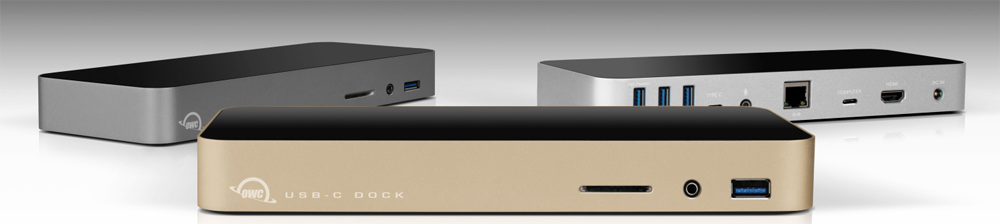
The 12-inch MacBook is the ultimate portable Mac, but that single USB-C port feels a lot less convenient when you want to connect to a bunch of devices at home or in the office. We covered a $79 portable hub yesterday, and now OWC has announced its $129 desktop model, available for pre-order today for delivery in October.

Available in silver, space gray and gold, to match your MacBook, the OWC USB-C Dock provides a total of 10 ports in a unit designed to remain on your desk, allowing you to instantly connect and disconnect via a single USB-C cable … 
Expand
Expanding
Close

Apple providing retail employees with OS X 10.11 El Capitan beta for testing

Site default logo image

At WWDC earlier today, Apple revealed Mac OS X 10.11 El Capitan with a handful of new features, including improvements to Safari, new Spotlight capabilities, side-by-side window functionality, performance improvements, and more. Apple released a developer beta of El Capitan today via its developer portal, while also noting that a public beta will come in July. We have learned this evening, however, that Apple has also seeded a beta version of El Capitan to retail employees for testing.


Expand
Expanding
Close

Site default logo image

OS X El Capitan can remember your password for free app downloads

With the release of OS X El Capitan later this year, Apple will bring a setting that has been part of iOS for some time over to the Mac. The setting allows users to determine whether they want to enter their password every time they download a paid app or in-app purchase, or if they would rather only have to enter it once for a given 15-minute window.

A second setting will also allow users to permanently save their password for free downloads, ensuring that you never have to login to download another free app. Of course, both of these settings can be configured to require your password every time.

Apple announced OS X El Capitan earlier today alongside iOS 9.

Apple combines iOS and Mac developer programs into single Apple Developer Program

Site default logo image

Apple has ended its separate iOS and Mac developer programs that required software makers to buy two different memberships in order to publish across the company’s various platforms and replaecd them with a single combined Apple Developer Program.

The $99 program will allow developers to have access to the SDKs for (and prerelease builds) of OS X, iOS 9, and watchOS 2. Apps can be distributed in App Stores across all platforms through this new program. A support page detailing the transition process for existing members has been created but is currently unavailable.


Expand
Expanding
Close

Apple introduces split view for full screen apps on Mac in OS X El Capitan

Site default logo image

Apple has just announced a new feature as part of the El Capitan software update that will allow Mac users to use multiple applications simultaneously using a split view. The new feature will let users run two Mac apps side-by-side and share content between them. Users can create new split views by dragging apps onto each other in the Mission Control view.


Expand
Expanding
Close

Apple announces revamped Spotlight search in OS X El Capitan

Site default logo image

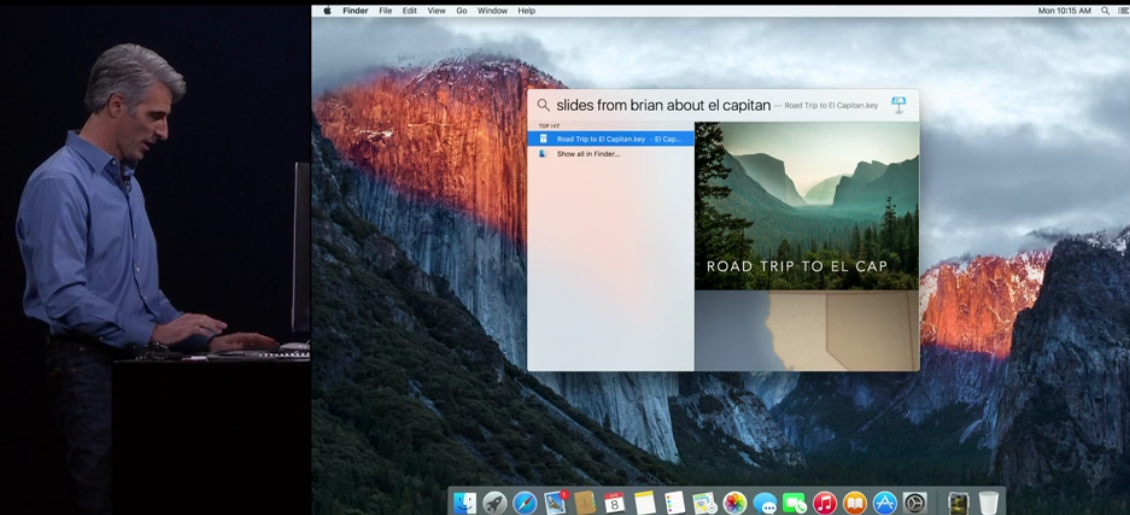
As first predicted by 9to5Mac, Apple today announced a revamped version of ts Spotlight search software that will be included in OS X 10.11, called “El Capitan.” The new search system allows users to resize and move the Spotlight window, which presents new types of content.

Sports scores and other Siri data will be suppoted, and natural language search allows users to track down mail messages and documents easily. The search upgrades are also available in apps like Mail and Finder.

Keep reading for a full feature list of the new Spotlight

Apple reveals OS X 10.11 El Capitan with refinements to performance and stability at WWDC

Site default logo image

Keeping with its recent annual update cycle, Apple showed off the next version of the Mac desktop operating system at WWDC today. OS X 10.11, the latest system version, carries the name El Capitan following Apple’s pattern of using names of prominent locations across California including Yosemite and Mavericks in years prior. Full details below:
Expand
Expanding
Close

Site default logo image

Hub+ Kickstarter project providing neat hub solution for 12-inch MacBook owners hits $670k

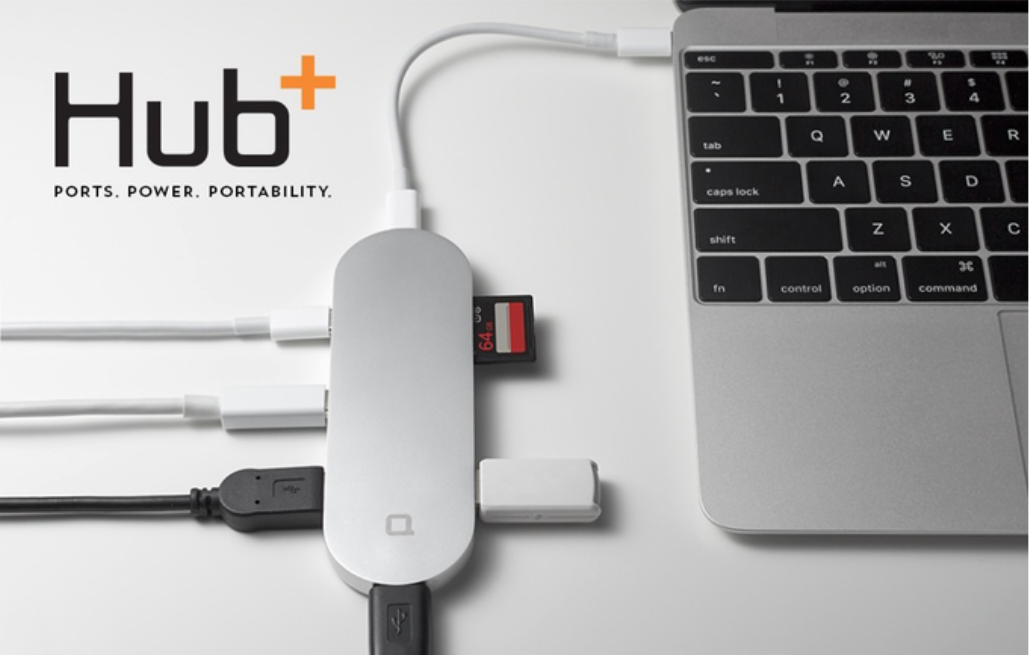
A neat hub designed to provide 12-inch MacBook owners with a useful way to connect existing devices has just hit $670k on Kickstarter – somewhat in excess of its modest $35,000 goal.

The Hub+ plugs into the single USB-C port of the MacBook and turns that into two USB-C ports, 3 conventional USB-A sockets, a mini DisplayPort and an SDXC card slot. The sleek device offers a choice of silver, space gray and gold to match your MacBook … 
Expand
Expanding
Close

WWDC News Hub/Live Blog: Apple announces iOS 9, OS X 10.11, Apple Watch SDK & Apple Music

Site default logo image

It’s Monday, June 8th and nearly time for Apple’s annual Worldwide Developers Conference. We’ve already run down what we’re expecting from the conference, ranging from a significant iOS 9 update for iPads, iPhones, and iPod touches with a focus on quality, an upgraded version of OS X with the same core focus, the new Apple Music streaming service along with the new iTunes Radio, and the native software development kit (SDK) for the Apple Watch. We’ll be following the news closely from before the keynote, during the event, and after the event, and we’ll be live updating this post with the latest information out of the WWDC Keynote.

You can find our live updates and analysis below, as we get closer to show time.


Expand
Expanding
Close

Site default logo image

WWDC jackets leave little doubt about Apple’s adoption of San Francisco system font

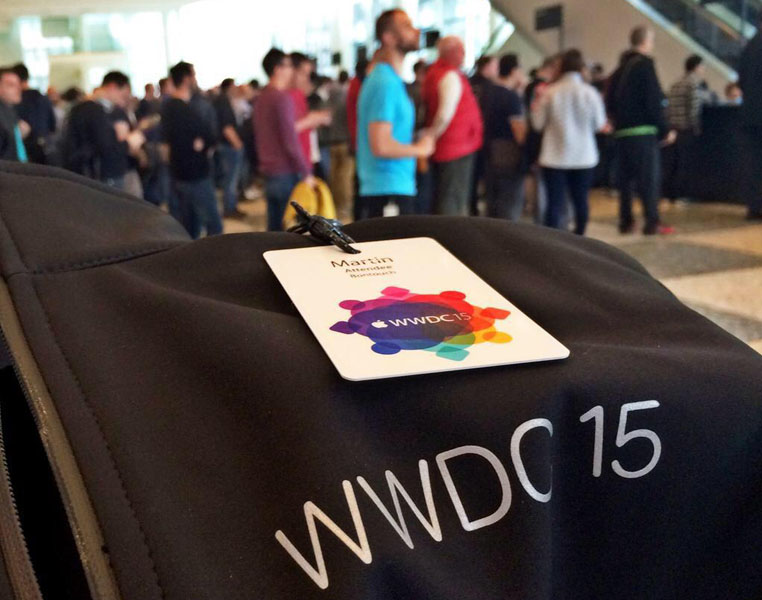
The jackets Apple is handing out to WWDC attendees appear to leave little doubt about our exclusive report that the company plans to adopt San Francisco as the new system font in iOS and OS X. As one of our readers tweeted, Apple has used San Francisco for the jacket lettering.

There’s also a little in-joke in the jacket labels, Apple using its Swift programming language to indicate the size and country of manufacture.

We reported that Apple plans to replace Helvetica Neue with San Francisco in iOS 9 and OS X 10.11. The new font is already used in watchOS.

[tweet URL align=’center’ https://twitter.com/Apple4Persian/status/607882699651596288]

Review: SanDisk Dual USB Drive connects with the 12-inch MacBook’s USB-C port & traditional USB

Cloud syncing services like Dropbox and iCloud Drive connect most of our devices nowadays, and AirDrop offers fast data transfer between Macs for smaller files… when it works. Physically moving files from one machine to another using a drive in the middle, or sneakernet, remains the most reliable way to quickly move files between Macs for many. Without a proper adapter, Apple’s 12-inch MacBook doesn’t fit into this workflow though. That’s where SanDisk’s Dual USB Drive ($49.99), comes into play.

Dual USB Drive conveniently works with both USB-C MacBooks and traditional USB ports on other Macs or PCs, all in a tiny package with plenty of storage…


Expand
Expanding
Close

Simple geometric banners depicting iOS, OS X and ‘watchOS’ spotted at WWDC

Site default logo image

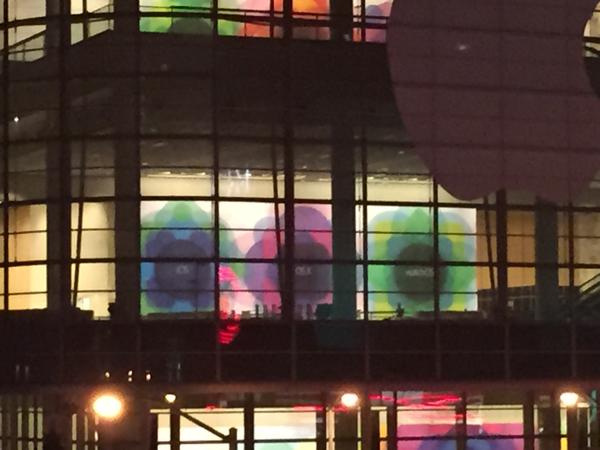
MacStories’ Federico Viticci has posted an interesting image of WWDC banners from the second-floor of Moscone West, the WWDC event venue.

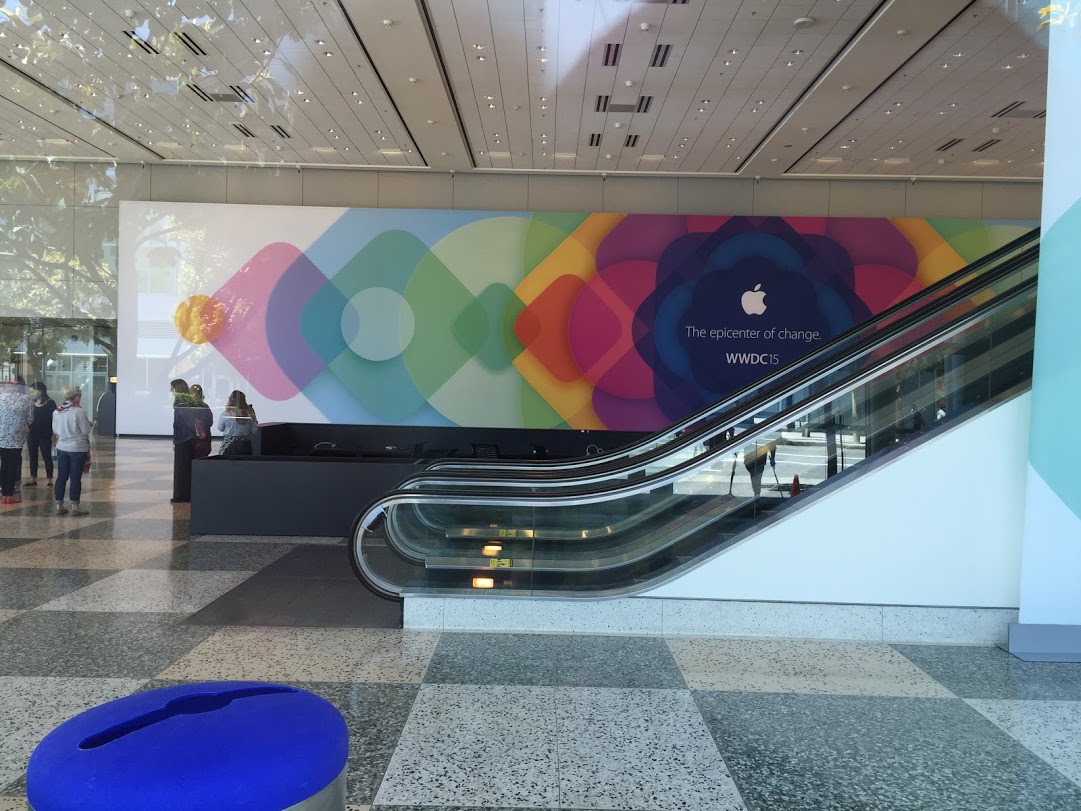
These images show Apple highlighting its three platforms: iOS, OS X and watchOS. These banners do not follow the same pattern as previous years with dramatic photography in rectangular banners. These are more like full-height wall posters with simpler geometric logos. Each image has the name of Apple’s OS written in a light font-face (the image is not clear enough to see whether this is Sans Francisco) on a simple background of multicoloured translucent shapes.

What’s particularly striking about this photo is that it confirms a rebranding of Apple’s smartwatch operating system. On Apple’s current public marketing, the Apple Watch is described as running ‘Watch OS’. By these banners, it can be seen that the new name for this platform is actually ‘watchOS’.
Expand
Expanding
Close

Review: Incase’s DSLR Sling and Pro Packs are durable, versatile MacBook/camera bags

Eventually, pocket-sized cameras will compare in low-light performance to today’s large and expensive DSLRs. Although pro photographers will have moved on by then to even more powerful large cameras, the vast majority of people will see no need to carry big, heavy lenses and camera bodies around. The iPhone’s ascendance demonstrates that “eventually” is at least foreseeable, even though it’s not happening in the near term.

Serious photographers won’t be giving up their DSLRs any time soon, and in fact will be toting plenty of camera hardware — many times, along with a laptop — to any event or destination important enough to photograph properly. Over the years, I’ve learned that the “ideal bag” for my personal needs is one that can hold my camera, several lenses, and whichever MacBook I’m using. Having hunted for the ultimate carrying solution for both computer and photo gear, the best solutions I’ve found are made by Incase.

The bag I’ve used actively for the last three years is Incase’s DSLR Sling Pack ($90, above left), and incredibly, it looks virtually identical today to when I first started using it. The DSLR Sling Pack is perfect for 11″ MacBook Airs and 12″ MacBooks, plus a big camera body with three lenses. But since my 13″ MacBook Pro barely fits inside its zippered compartment, I’ve been struggling with whether to replace the bag. That’s why I’m checking out two larger models today: the DSLR Pro Sling Pack ($170, middle), and traditional DSLR Pro Pack ($150, right). They’re large enough for up to 15″ MacBook Pros and have more room for DSLR gear, as well. Which is right for you?…


Expand
Expanding
Close

Coming at WWDC 2015: New Apple Watch SDK, Quality-focused/refreshed iOS 9 & OS X 10.11, Apple Music

Site default logo image

Apple’s annual Worldwide Developers Conference is about to kick off. On Monday, June 8th, company executives will take the stage at San Francisco’s Moscone Center to provide their annual roadmap for Apple’s software, services, and devices.

Traditionally, Apple has used the conference to introduce major upgrades to the iPhone, iPad, and iPod touch operating system iOS, as well as the Mac operating system OS X, along with new services. Of course, 2015 will be no different. Apple has been preparing a new version of iOS 9 codenamed “Monarch,” a release of OS X 10.11 codenamed “Gala,” a new streaming Apple Music service based on Beats Music, and updates for the Apple Watch.

Over the last several years, we have provided advance reports on the lion’s share of announcements that will be made at WWDC, as well as a comprehensive roundup ahead of the event. Read on for our roundup of what’s coming, along with fresh new details not found in our earlier reports.


Expand
Expanding
Close

Site default logo image

Yahoo ending support for mail & contact syncing on older Macs and iOS devices

Yahoo announced today that a few of its services will no longer be support on older Macs and iOS devices. The changes will impact Yahoo Mail with Apple’s built-in Mail app on older iPhones, iPads, and iPod touches, and Yahoo Contact syncing on Macs running older versions of the desktop operating system. The changes will take place later this month on June 15th.
Expand
Expanding
Close

Roundtable: What we want to see at Apple’s WWDC conference next week

We’ve already run down much of what can be expected from iOS 9, OS X 10.11 and Apple Music at the 2015 Worldwide Developers Conference, and now it’s time to run down what 9to5Mac’s editors want to see at the conference. You can find our hopes below, and stay tuned for our comprehensive roundup of what to expect at WWDC.


Expand
Expanding
Close

How-To: Build a $150-$300 iTunes video + music server for your home

In May 2005, iTunes evolved from a music player into a video library manager, paving the way for video iPods (October 2005), Apple TV (March 2007), and AirPlay video streaming (September 2010). Since then, iTunes libraries have become bigger and more central in homes, as users now stream content stored in iTunes — sometimes called a media “server” — to “clients” including Apple TVs, iPads, iPhones, and iPod touches. Unless you stream all of your content from the iTunes Store, you probably have some space-consuming videos sitting in your computer’s iTunes library, where they can be accessed by client devices so long as both the server computer and iTunes are turned on.

Apple has resisted calls to release a standalone, inexpensive iTunes home media server for years: 2008’s release of Time Capsule came tantalizingly close, but couldn’t act as a standalone streamer. So when my video library became too large to keep on my iMac, I bit the bullet and bought a used Mac mini to serve as an iTunes server. It works well, and consumes a lot less power than keeping my iMac on all the time, but it’s still a full-fledged $700 computer — overkill for streaming videos to the Apple devices in my home.

Today, I’m going to help you build a small, inexpensive, and ultra energy-efficient iTunes media server. Depending on the size of your iTunes library, it could cost as little as $150, or as much as $300, in either case much less expensive than a Mac mini. The key component is Intel’s new Compute Stick, a tiny basic Windows PC that can plug directly into an HDTV, run iTunes, and stream videos across your network. For around $130, you can now get an iView-branded Compute Stick with a CPU similar to the 12″ Retina MacBook, bundled with a wireless keyboard and trackpad. Although there are some important caveats you should understand up front, the Compute Stick can become a ~3-Watt video server using a $20+ microSD card, radically reducing the energy required to stream iTunes content in your home. If you need more storage and power, you can easily add a near-silent $90+ hard drive with 2TB-5TB of capacity…


Expand
Expanding
Close

Nasty Mac vulnerability allows remote attack, survives OS X reinstallation & even drive format

Site default logo image

A serious vulnerability in Macs more than a year old would allow an attacker to take permanent control of the machine, retaining control even if the user reinstals OS X or reformats the drive.

The vulnerability was discovered by security researcher Pedro Vilaca, who found a way to reflash the BIOS – code stored in flash memory, not on the drive. This means that the machine remains compromised even if the hard drive is physically replaced … 
Expand
Expanding
Close

USB-C likely to be used across the future MacBook range as Intel integrates with Thunderbolt

Site default logo image

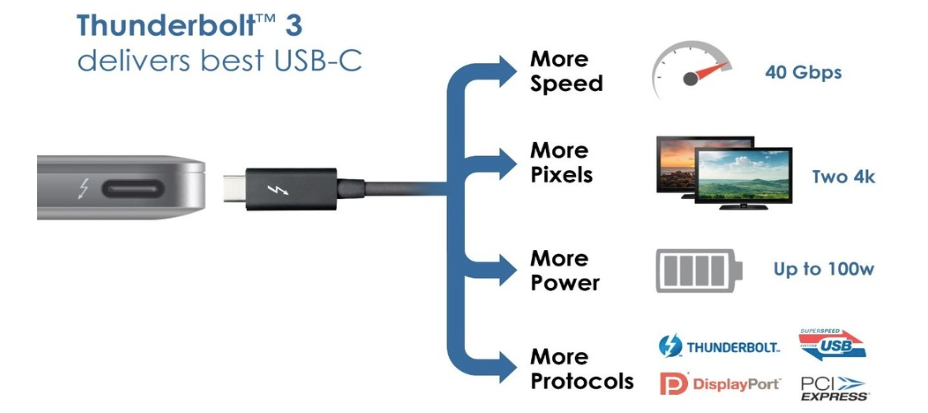
The USB-C port first introduced by Apple in the new 12-inch MacBook looks likely to be used across the MacBook range as Intel has adopted the standard for Thunderbolt 3.

Thunderbolt was developed to simultaneously support the fastest data and most video bandwidth available on a single cable, while also supplying power. Then recently the USB group introduced the USB-C connector, which is small, reversible, fast, supplies power, and allows other I/O in addition to USB to run on it, maximizing its potential. So in the biggest advancement since its inception, Thunderbolt 3 brings Thunderbolt to USB-C at 40Gbps, fulfilling its promise, creating one compact port that does it all. 

Apple was an early adopter of the Thunderbolt standard, which allowed a single port to be used for both high-speed data transfer and DisplayPort monitor connections. Intel’s integration of the two standards would allow Apple to replace the Thunderbolt port in the MacBook Pro range while still maintaining full compatibility with existing peripherals … 
Expand
Expanding
Close

Opinion: Google’s new Photos may just have won my library away from Apple

Site default logo image

Google Photos

My relationship with Apple’s hardware is simple: I’m happily locked in, and not changing platforms any time soon. But my relationship with Apple’s software is complex: I want to love it, but every time Apple decides to “throw everything away” and “start over” with an app, it’s disruptive — and for many users, unnecessary. From my perspective, users weren’t complaining that Apple’s popular photo apps iPhoto or Aperture were hopelessly broken or even deficient in major ways, yet Apple discontinued both of them last month to release Photos, a bare-bones alternative no one seems to love. On the relationship scale, I didn’t abandon Aperture; Aperture abandoned me (and a lot of other people).

So yesterday’s announcement of the free cross-platform photo and video storage app Google Photos couldn’t have come at a better time. Apple has struggled to explain why it now offers two separate photo syncing services, neither with the virtually unlimited photo and video storage Google is now giving users — notably all users, including Mac and iOS users. Moreover, Apple has offered no sign that it’s going to drop the steep fees it’s charging for iCloud photo storage. With WWDC just around the corner, Apple has a big opportunity to match Google’s photo and video initiative, thrilling its customers in the process. If that doesn’t happen, I’m moving my collection into Google Photos, and not looking back…


Expand
Expanding
Close

Following Apple partnership, IBM now offering employees Macs for the first time

Site default logo image

Apple CEO Tim Cook with IBM CEO Ginni Rometty

After inking a deal with Apple to push iOS devices and enterprise apps to its customers, IBM today started offering all employees Macs for the first time. We’ve seen the official IBM notice, and several IBM employees on Twitter are praising the decision after years of PC hell:
Expand
Expanding
Close