Latest

Disney’s new iOS keyboard puts GIFs of your favorite characters and scenes right at your fingertips

Last year iOS 8 brought with it support for custom third-party keyboards. Some of these are designed to help you type faster, but some just make it easier to inject GIFs and other media into your chats. This week the cutest keyboard landed on iOS courtesy of who else, but Disney.

Just as its name suggests, the Disney Gif app puts hundreds of GIFs right inside your iOS keyboard. Choose characters and scenes from films including Star Wars, Lion King, Aladdin, Toy Story and Frozen. Disney also included support for Inside Out, which is a no-brainer decision since its main characters — each representing a feeling — work perfectly as GIFs.

Disney Gif uses the copy and paste of iOS so it’ll work system-wide wherever that functionality is supported. It shouldn’t be too tough sifting through the bunches of GIFs because Disney has organized them by emotion and story. The main Disney Gif app is available as a free download, but there are a couple in-app purchases including Frozen Emoji.

Visually express yourself in a whole new way with Disney Gif! Whether you’re feeling happy, sassy, villainous or magical, there’s no better way to show how you feel than with your favorite characters and moments. Whatever your emotion or reaction, we have a Disney, Pixar, or Star Wars gif for that!

Check back often for new content!

Explore and share gifs from some of the most loved stories, including:
Inside Out
Frozen
Star Wars
The Lion King
Tangled
Aladdin
Beauty and the Beast
Finding Nemo
Toy Story
Up
ABC Shows

…and so many more! Happy gif-ing!

Features:
– Browse through hundreds of gifs categorized by emotion or story
– New and trending content added frequently
– Chat gifs to your friends and family straight from your Disney Gif keyboard via text, email, or any app that supports the copy and paste of images

LEGAL DISCLAIMER:
Before you download this experience, please consider that this app contains social media links to connect with others, in-app purchases that cost real money, push notifications to let you know when we have exciting updates like new content, as well as advertising for The Walt Disney Family of Companies and some third parties.

NOTE: Disney Gif requests full access so we can access the internet and you can send cool gifs. We don’t save your key strokes or compromise your privacy.

Site default logo image

HBO Now earned the most revenue of any iOS app last month following free trial period

HBO NOW iPhone iPad iPod touch 21HBO Now, the standalone subscription service for the premium network, appears to be a hit with iOS users, says new data from analytics service App Annie.

After launching on Apple TV and the App Store for iPhone, iPad, and iPod touch in early April with a 1-month free trial, the new report says the standalone service’s app “debuted at #1 on our Worldwide May iOS revenue charts” showing that the free trial converted users to paid customers.

A month after the trial ended for day one subscribers, App Annie says HBO Now sat at “#2 overall daily grossing rank in the United States” according to its data. Showtime is planning a similar standalone service that will launch next month.

App Annie

It’s also interesting to see where Spotify and Beats Music sit on App Annie’s chart ahead of Apple Music’s launch on Tuesday. Apple Music will offer a 3-month free trial period for users and will be pre-installed, but Beats Music users should convert to Apple Music customers and the company certainly hopes to steal customers from Spotify. HBO Now’s performance is also good news for the revenue outlook of Apple’s rumored web TV service as cord cutters are clearly willing to pay for content.

HBO Now is available on the App Store for $14.99/month.

Apple’s iTunes U gets 1-to-1 discussions, importing from other apps, PDF annotations, grade book, more

Site default logo image

iTunes-U-update-june-2015

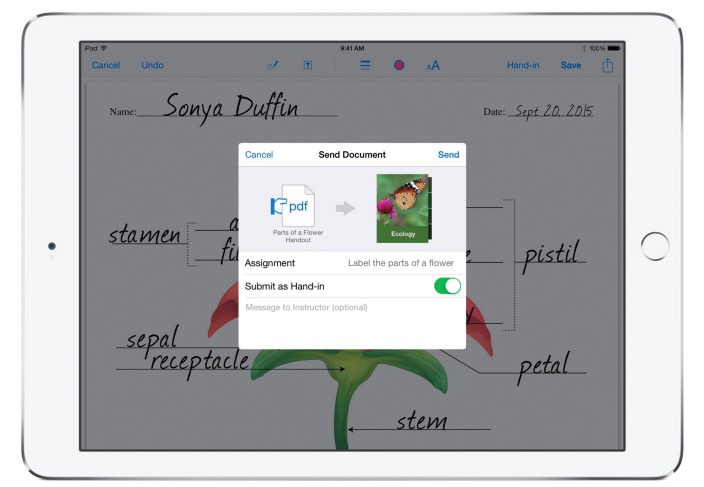
Apple’s iTunes U service, a resource for teachers to create and manage educational content for students on iPad, is today receiving a big update that brings a long list of highly requested features. Starting today, teachers and students using the platform will get access to new additions including 1-to-1 discussions, homework hand-in & grade book features, PDF annotations, and more.
Expand
Expanding
Close

Apple joins Confederate flag boycott, removes apps that use flag in offensive or mean-spirited ways [U: Statement]

Site default logo image

after

[Update: Apple has confirmed the policy with us. Statement below.]

[Update #2: Reports are now surfacing that Apple is now reinstating some apps with the Confederate flag to the App Store. The company is working with developers who use the Confederate flag, but not in a mean-spirited manner.]

[Update #3: TouchArcade specifies that affected games are able to change their app icons and App Store screenshots to avoid removal.]

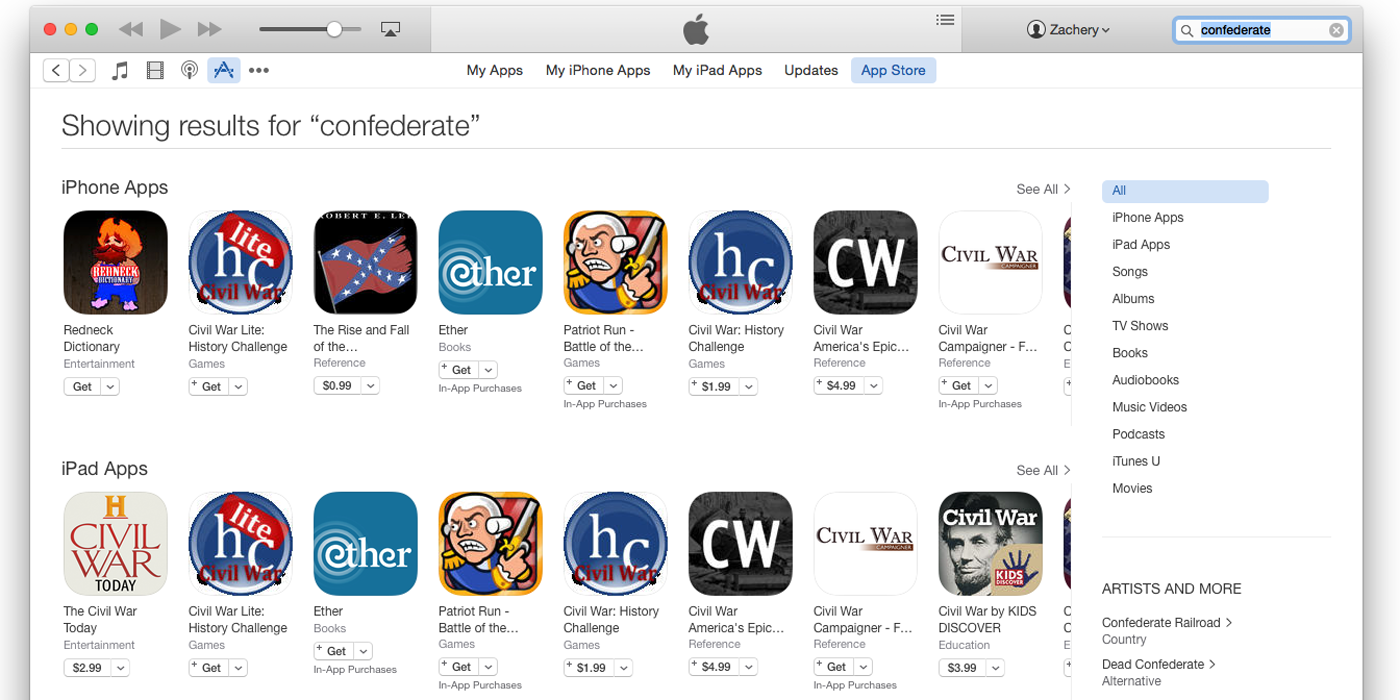
A couple of days after Zac Hall called for Apple to join large retailers like Walmart, Target, Sears, Amazon and eBay in withdrawing from selling items featuring the Confederate flag, Apple appears to be working on doing just that.

Touch Arcade noticed that many Civil War games like Ultimate General: Gettysburg and the Hunted Cow series have all disappeared. An App Store search for ‘Confederate’ on Tuesday found plenty of games featuring the flag, while the same search today appears to show only apps dealing with the history (such as the reference work shown) above. All of the games shown in Tuesday’s search (below) have been removed from the App Store … 
Expand
Expanding
Close

Site default logo image

Instagram iPhone app adds revamped Explore tab w/ trending content, improved search

Instagram-7-0

Instagram is rolling out an update today for its iPhone app bringing two major new features, including a redesigned Explore tab and improved search functionality. The company said the updates will “help connect our community to the world as it happens,” or in other words, a more real-time experience thanks to new trending Tags and Places within the Explore tab. 

With more than 70 million photos and videos posted to Instagram every day, wherever something is happening, chances are you can see it here. Whether it’s behind the scenes at the NBA Finals, on the runway with the latest fashion trend at a favorite club with a local band, people are capturing moments large and small on Instagram. But, until now, there’s never been an easy way to find these moments.

On top of the new trending tags and places in Explore, the company said it will be adding curated collections of images based on various themes, such as specific people or places, and featuring content from across the network.

The updated Explore feature is first rolling out to users in the US as part of the 7.0 update for iPhone that also adds improved search functionality:

For everyone on Instagram, we’ve dramatically improved the ability to find what you’re looking for. With the new Places Search, you can now peer in at just about any location on earth, allowing you to scout out your next vacation spot in the South Pacific, get a look inside that hot new restaurant or experience your favorite music festival — even if you couldn’t make it this year. The new Top Search also lets you search across people, places and tags all at once.

You can grab Instagram version 7.0 for iOS on the App Store now.

Site default logo image

Google Calendar for iPhone adds Drive integration, new interactive notifications, more

Google Calendar is out with an improved version for the iPhone today with version 1.1. The list of changes is short but the improvements should be welcome.

The update includes integration with Google Drive so users can connect files with events on your calendar. Interactive notifications now include the ability to open directions from alerts or respond to guests via email. Finally, users can now see week numbers next to the calendar and more entries using the week view.

Google Calendar for iPhone is available for free on the App Store. Version 1.1 follows the initial launch in mid-March. Full release notes below:
Expand
Expanding
Close

Swarm for iOS reintroduces mayorships and bragging rights

Site default logo image

Avid Foursquare junkies (myself included), rejoice – mayorships are back, just now in the Swarm app. You can become the mayor of a place by checking into it more than anyone else in the last 30 days, and only one check-in per day counts towards your rank.


Expand
Expanding
Close

Site default logo image

Tweetbot for Mac 2.0.1 brings Twitter’s new ‘quote tweet’ feature, bug fixes

Header

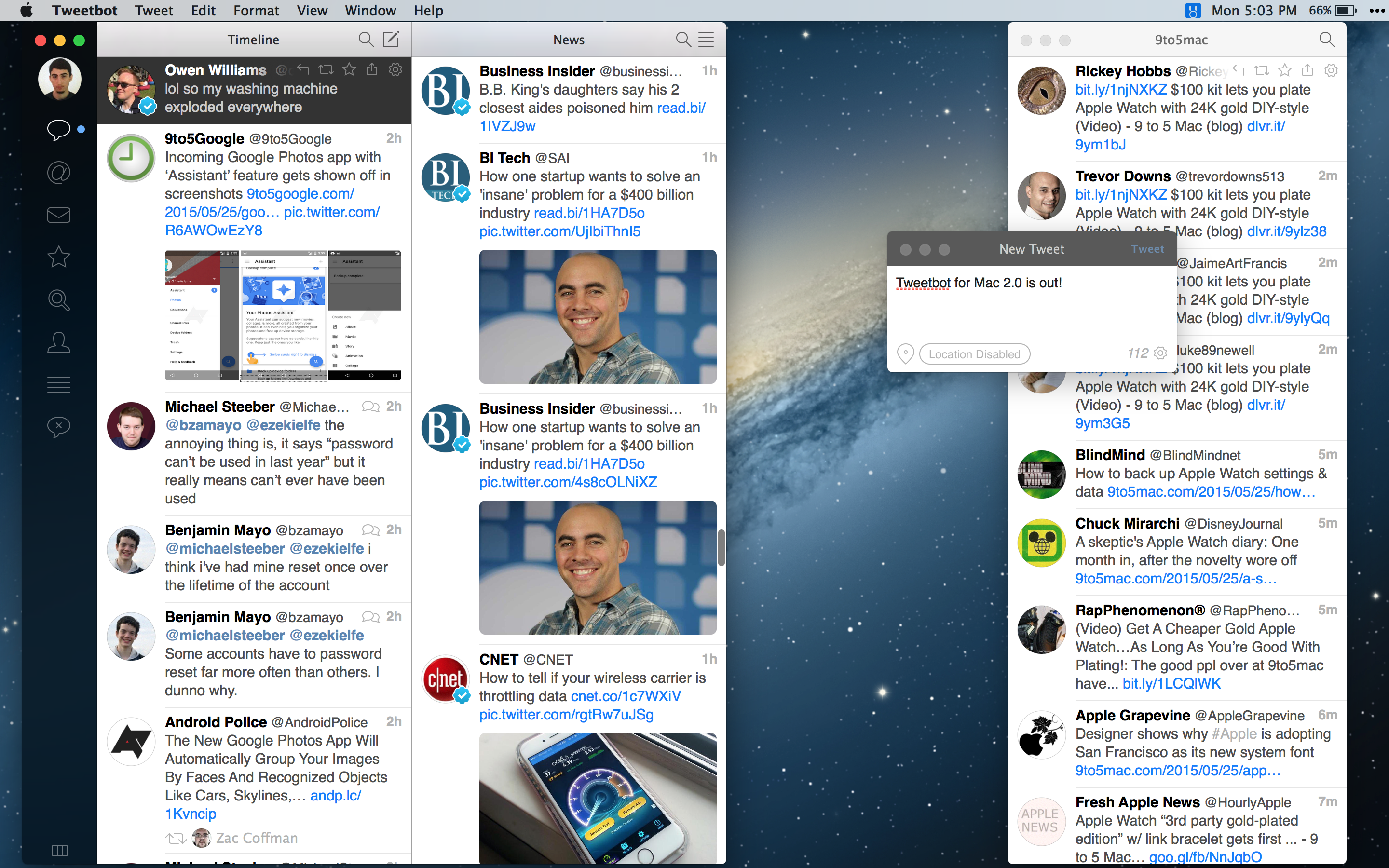
The first update for Tweetbot 2 on OS X has been released, bringing promised support for Twitter’s new “quote tweet” feature along with a bevy of bug fixes, including one for a particularly nasty bug that could crash the app while creating a new mention, and another related to uploading a profile photo.

The app also speeds up the process of changing accounts and introduces support for longer direct messages, which will be available as soon as Twitter flips the switch on that feature in the near future.

You can grab Tweetbot 2.0.1 from the Mac App Store for free if you bought an previous version of the app. For new users it’s available at the reduced price of $12.99.

Mini review: Home Radio, the Mac app that could plug the gaps in Apple Music radio (free today only)

Site default logo image

homeradio-mac-app

While we’re all expecting good things from the radio side of Apple Music, it’s going to be a curated experience, meaning we’ll get the radio stations Apple chooses to offer. If it doesn’t cover all of our favorite stations, we’re going to need another radio app to plug the gap.

For listening on the move, the free SwipeRadio iOS app is a delightfully minimalist way to do it. Developer Dataphase has now taken the same approach on the Mac, with Home Radio. The philosophy is the same: no bells, no whistles, just the radio stations you want to listen to in an extremely lightweight app.

I’ve been trying it out, and if you want to do the same, developer Noam Gordon is kindly making it free for today only (22 June) especially for 9to5Mac readers … 
Expand
Expanding
Close

MacPhun’s new Tonality 1.2 brings beautiful black & white photo tools to Apple Photos, Adobe Lightroom CC

tonalitypro-1

Even though it’s known as “black and white photography,” balanced grays are what make monochrome images striking or flat. Today, MacPhun released Tonality 1.2 ($18) and Tonality Pro 1.2 ($70), tools designed specifically for making the best possible black and white images from color photos. Both versions work with popular photo library management tools, newly including the Mac version of Apple Photos. The Pro version now plugs into Adobe’s new Lightroom CC, and adds RAW support for both new cameras and Lightroom.

Like MacPhun’s excellent noise-removing app Noiseless, Tonality uses a super-simple interface to let you preview potential changes to your images. The window’s bottom initially scrolls across 13 “Basic” presets, ranging from the intelligent “Adaptive Exposure” to the simpler “Underexposed;” 10 different categories collectively contain 150 different presets. Each preset effect starts at maximum, but can be muted using a single slider. Power users can access a right-side pane with controls for exposure, contrast, clarity, structure/micro-structure, color and tone filters, split-toning, glow, blur, vignette, and grain. Additionally, masking tools and a gradient filter let you alter specific areas of your images while leaving others untouched. The differences are so dramatic that you’ll never feel satisfied with a one-step “apply B&W filter” button again.

Tonality is currently being offered at an introductory price of $13 through the Mac App Store, with Tonality Pro at $60 through the company’s web site. Additional photo galleries of the app in action are below…


Expand
Expanding
Close

Site default logo image

Dark Sky 5 adds 24-hour forecast, pressure sensor reporting, more

Dark Sky is out with a major update to its hyperlocal weather reporting app for iPhone, iPad, and Apple Watch. Dark Sky 5 adds a number of new features including a new focus on 24-hour forecasts, the ability to share pressure data, customizable advanced notifications.
Expand
Expanding
Close

Site default logo image

Twitter is adding autoplay to GIFs, Vines, and native videos on iOS

Autoplay_videos_on_Twitter

Twitter is turning on automatic playback for certain types of media in your timeline through an update to its iOS app and its website, the social network announced.

Starting today, users will notice that native videos, GIFs, and Vines all autoplay directly in the timeline when browsing Twitter without the need to tap or click to initiate playback. Sound playback for native videos and Vines will still require tapping or clicking to play to avoid hijacking the experience. Users can also initiate full playback by rotating the iPhone to landscape mode when viewing an autoplay video.
Expand
Expanding
Close

Site default logo image

Facebook Moments app makes it easier to exchange photos with friends

Facebook Moments app

Facebook has today unveiled a new app called Moments from its Creative Labs division that makes it easier to exchange pictures amongst friends who were together at an event or place, all documenting it through their own photos. Here’s how Facebook describes the problem they’re solving:

It’s hard to get the photos your friends have taken of you, and everyone always insists on taking that same group shot with multiple phones to ensure they get a copy. Even if you do end up getting some of your friends’ photos, it’s difficult to keep them all organized in one place on your phone.

Through the use of location and facial-recognition data (both areas where Facebook has invested heavily), Moments groups photos together and then asks if you’d like to share them with the people it has recognized, and vice-versa. It’s very reminiscent of the now-defunct Color, although that app was more real-time and ephemeral (Moments allows you to collect and sync photos with friends after an event is over), and wasn’t integrated closely with Facebook’s 1 billion plus user base.

https://vimeo.com/130380325

It’s available now in the iOS App Store and on Google Play, which is useful in the event that some of your friends are on Android (gasp, I know).

Site default logo image

Apple highlights upcoming GarageBand update w/ new synths & ‘Transform Pad’ feature

GarageBand Mac

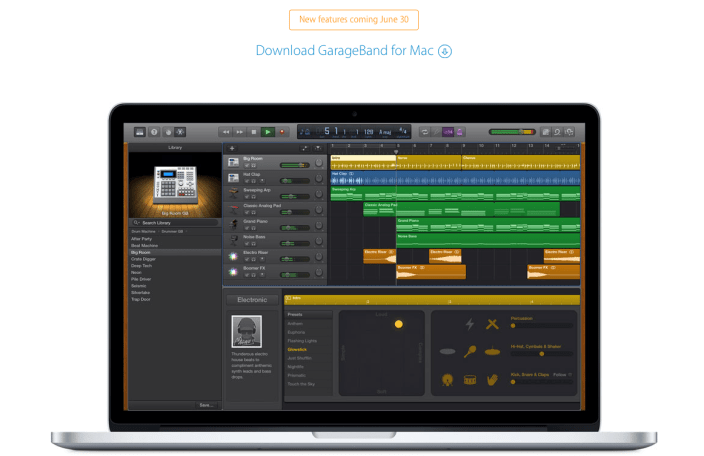
Amid the WWDC announcements last week including previewing iOS 9, OS X 10.11 El Capitan, and watchOS 2, Apple has pre-announced a small update coming to GarageBand for Mac at the end of the month. German site Apfelpage noticed the webpage that promises “new features coming June 30” above a description of additional virtual session drummers.
Expand
Expanding
Close

Bethesda brings Fallout to iOS for the first time with freemium Fallout Shelter game

Site default logo image

fallout-shelter-ios

Fans of Bethesda’s Fallout games on Xbox, PlayStation and PC got the news yesterday that Fallout 4 will be launched in November – and the company also threw in a surprise bonus in the form of an iOS game. Fallout Shelter is a kind of blend of SimCity, XCOM and FTL in which you create your own fallout shelter and try to keep its residents alive and happy.

Fallout Shelter puts you in control of a state-of-the-art underground Vault from Vault-Tec. Build the perfect Vault, keep your Dwellers happy, and protect them from the dangers of the Wasteland.

Select from a variety of modern-day rooms to turn an excavation beneath 2,000 feet of bedrock into the very picture of Vault Life. Get to know your Dwellers and lead them to happiness. Find their ideal jobs and watch them flourish. Provide them with outfits, weapons, and training to improve their abilities.

As Overseer, you get to design the shelter and take care of its residents, but you can also send them out into the Wasteland to find additional armor, weapons and other handy loot … 
Expand
Expanding
Close

Site default logo image

Twitterrific adds support for quoted tweets on iPhone & emoji + quick reply on Apple Watch

Before the launch of Apple Watch, Twitterrific for iPhone gained support for a Watch app that featured a variety of capabilities. Now, the company has updated its iPhone app and with it come new features for both the Watch and phone. Version 5.12 of Twitterrific adds support for Twitter’s new quoted tweets feature, which embeds the actual tweet instead of simply quoting it as text. To do a quote retweet with Twitterrific, simply tap and hold on the RT button.


Expand
Expanding
Close

Google Chrome aims to improve laptop battery life by intelligently pausing Flash content

Site default logo image

Chrome-Adobe-plug-in-pause

Google has been working with Adobe to improve battery life drain caused by Flash and today flipped the switch on a new Chrome feature that does exactly that. The new feature aims to detect Flash on a webpage that is actually important to the main content and “intelligently pause content” that isn’t as important. The result is to hopefully make the web experience with Flash more power efficient to improve battery life on your laptop. Here’s how it works:
Expand
Expanding
Close

Review: Tweetbot for Mac 2.0 brings a Yosemite-style coat of paint, convenient new features, and a price drop

Site default logo image

Header

Yes, you read that headline right. The long-awaited Yosemite update for Tweetbot is finally here. The application has been rebuilt with a new look and updated controls for several features that make things like creating columns and tracking down the tweet associated with an image much easier.

The main attraction for most users will be the new design, so let’s take a look at that in a bit more detail first…


Expand
Expanding
Close

Periscope for iPhone now lets you find streams by location

Site default logo image

Twitter’s live video streaming app Periscope is out with a big update today adding a key promised feature. Periscope for iPhone version 1.1 now lets you find live streams around the world based on location using a new map view from the global tab. This lets you jump into streams going on around you or watch something interesting happening on the other side of the world. In addition to adding the new maps view, Periscope has been localized in 29 more languages:
Expand
Expanding
Close

Site default logo image

Twitter for iPad adds group Direct Messaging + private Tweet sharing

https://twitter.com/twitter/status/606174512263012352/photo/1

Twitter today updated the iPad version of its app to match the iPhone app’s messaging functionality. The update brings the ability for iPad users to natively participate in group direct messaging sessions (for better or for worse), see more messaging history, and privately share links via Direct Messages with a quick share control.


Expand
Expanding
Close