Apps

See All Stories

Learn about the latest news for iOS, Mac, Apple Watch, and Apple TV apps

Apps for iOS, macOS, tvOS, and watchOS power our modern world. 9to5Mac will update you on the latest news, review, and updates for all types of apps. “There’s an App for that”.

The term came became part of our vocabulary when Steve Jobs announced The App Store as part of the iPhone 2.0 software update in 2008.

Over the years, the term has become as common as kleenex for describing applications on all of our devices. Apple’s platforms have apps for just about anything from finance, banking, sports, social media, podcasting, music, and more. We have a guide for helping you discover the best ones as well. Apps are now on everything from our TV, to our smartphones, on our laptops, and all the way down to our wrists.

As new ones are released or existing ones have major updates, the team here at 9to5Mac will bring you the latest news and reviews. If you want to follow along with video footage, be sure to follow 9to5Mac on YouTube. Scroll down below our latest updates on all things relating to applications on iPhone, iPad, Mac, Apple TV, and Apple Watch.

LinkedIn revamps messaging experience on iOS with redesigned app

LinkedIn, the popular social network for connecting business people, has announced that its messaging experience is getting a serious design overhaul from today. Unlike the previous inbox, messages will no longer follow a traditional email format. Instead, it’s turned towards a messaging app design similar to Facebook Messenger.

LinkedIn has built everything from scratch, from the ground up with a cleaner, streamlined look with a brand new chat-style user interface. You can chat with contacts individually or send group messages, and conversations are organized around the people who are important to you. What’s more, you’ll be able to send documents, images, stickers, emojis and GIFs in your messages.

Starting today, we are rolling out a new messaging experience on LinkedIn that offers an easier and more lightweight way to have professional conversations with your connections.  We know many of you have been asking for this ability and we’ve taken a thoughtful approach to reflect the evolving ways professionals are communicating with one another today, as well as, the different ways our members are interacting with each other across our international markets.

From today, the new messaging experience will by rolling out to English-speaking LinkedIn members across the globe on iOS, Android and on the web. If you have LinkedIn installed on your iPhone, check the App Store for updates and you should find one waiting for you over the coming days or weeks.

Google+ for iOS updated with ‘Collections’ feature

Google+ Collections, a feature that lets like-minded Google+ users connect in forums organized by topic, today comes to iOS devices after first rolling out for Android and web users a few months back.

Users can create Collections for topics they’re interested in and follow Collections created by other users to keep track of posts related to their interests. Google shared a few examples of popular Collections including Homebrewing, Climbing Junkie Photos, Magical, Mystical Mountains and Marine Life. It also features select Collections on a webpage here for easy searching.

When you post a Collection, Google notes that you’ll be able to customize who sees it thanks to recent improvements to the feature on Android that also come to iOS today. It also recently added the ability to add taglines to Collections and search for them on mobile devices. 

The Collections feature is available now in the updated Google+ iOS app with version 4.8.5.

9to5Toys Last Call: Retina MacBook Pro $1,280, GoPro HERO4 Silver $319, AirPrint printers from $50, more

Keep up with the best gear and deals on the web by signing up for the 9to5Toys Newsletter. Also, be sure to check us out on: Twitter, RSS Feed, Facebook, Google+ and Safari push notifications.

Today’s can’t miss deals

Last Call Updates:

Apple AirPort Express Dual-Band 802.11n Wireless Router (refurbished): $50 shipped (Orig. $99)

13-inch Retina MacBook Pro w/ Force Touch (newest) 2.7GHz/8GB/256GB: $1,280 shipped (Reg. $1,499)

13.3-inch MacBook Air (early 2014) 1.7GHz/8GB/512GB: $1,249 shipped (Orig. $1,849)

GoPro HERO4 Silver waterproof action camera: $319 shipped (Reg. $400)

All-in-One AirPrint Wireless InkJet Printers: Brother $50 shipped (Reg. $85+), Canon $68 shipped (Reg. $87)

Giveaway: $400 Belkin WeMo bundle including the new Lightify Starter Set, multiple winners

More new gear from today:

Logitech wireless Anywhere Mouse MX for Mac or PC $28 shipped (Reg. $60)

More deals still alive:

App Store Free App of the Week: Nighty Night Circus kids’ bedtime story app ($3 value)

Get a free download of the AirPano Travel Book iOS app courtesy of Apple ($3 value)

Western Digital 5TB USB 3.0 Desktop Hard Drive: $130 shipped (Orig. $200)

New products & more:

SmartHalo adds simple smartphone-connected navigation to your bike’s handlebars

Gears of War creator reveals the first gameplay footage for his new gravity-defying FPS

9to5Toys Lunch Break: 27-inch Retina iMac $1,750 w/ .edu, iPad Air 2 $380, Philips Hue Bloom $100, more

Keep up with the best gear and deals on the web by signing up for the 9to5Toys Newsletter. Also, be sure to check us out on: Twitter, RSS Feed, Facebook, Google+ and Safari push notifications.

Today’s can’t miss deals

Last Call Updates:

Western Digital 5TB USB 3.0 Desktop Hard Drive: $130 shipped (Orig. $200)

[tweet https://twitter.com/9to5toys/status/637361730033725440 align=’center’]

Best Buy 2-Day Sale: Apple 27″ 5K iMac $1,750 w/ .edu (Reg. $1,999), Beats On-Ear Headphones $250 (Reg. $313+), more

13.3-inch MacBook Air (early 2014) 1.7GHz/8GB/512GB: $1,249 shipped (Orig. $1,849)

15-inch Retina MacBook Pro (mid 2014) 2.5GHz/16GB/512GB: $1,749 shipped (Orig. $2,499)

13-inch Retina MacBook Pro (newest) 2.7GHz/8GB/128GB: $1,100 shipped (Reg. $1,299)

Apple iPad Air 2 Wi-Fi 16GB in Gold, Silver, or Space Gray $380 shipped (Reg. $499)

Philips Friends of Hue Bloom Luminaire Starter Kit: $100 shipped (Reg. $180)

App Store Free App of the Week: Nighty Night Circus kids’ bedtime story app ($3 value)

Get a free download of the AirPano Travel Book iOS app courtesy of Apple ($3 value)

Back to school gift guide: essential tech gear every student should be using

[tweet https://twitter.com/9to5toys/status/637267816425594880 align=’center’]

More new gear from today:

Bose SoundSport workout in-ear headphones (multiple colors) $80 shipped (Reg. $120)

MicroSD cards: Silicon Power 64GB $20 (Orig. $36), PNY 128GB $51 (Orig. $80), more

  • Games/Apps: Splatoon $50, Destiny $15, BADLAND $2, Kingdom Rush Origins $1, freebies, more
  • Daily Deals: HP Envy 5530 Wireless Color Printer $65, Motorola X Sol Republic DECK NFC Bluetooth Speaker $40, more
  • Timbuk2 bags, backpacks, and rollers 25% off + extra 20% off: Command Messenger Bag $89 shipped (Reg. $150)

[tweet https://twitter.com/9to5toys/status/637254636601241601 align=’center’]

More deals still alive:

VIZIO 49-inch 120Hz 4K LED Smart HDTV $600 (Reg. $720), 43-inch $548 or $528 w/ Prime (Reg. $599)

MFi Apple-Certified Lightning Cables: 6-ft. Braided Nylon $9.50 (Reg. $14), 2-ft. Retractable $9 (Reg. $13), more

New products & more:

Logitech’s new Artemis Wireless Gaming Headsets focus on features and compatibility

Samsung introduces new multi-room speakers alongside an improved Android and iOS app

Twitter introduces Music on Vine: Better audio controls and music discovery on Vine app

Last night, Vine announced that it’s bringing greater music controls to its popular video-looping app on iOS. While users have always had the ability to include audio of any kind in their Vines, this new update makes it far more precise. The biggest update is a feature called ‘Snap to Beat’ which enables users to more easily create a seamless loop, or perfect loop where you can’t tell the beginning of the audio from the end.

To get Snap to Beat working for you, choose a song by tapping on the music note in the ‘Details’ screen. Snap to Beat automatically identifies how much of the song to use to make a seamless loop, then trims the video to fit that music clip. If you don’t want it happening auto-magically, you can switch off Snap to Beat and edit the audio manually yourself. This gives the user complete control over how much sound to include in the Vine, and which part of the video it should play over.

As a part of Vine’s new-found focus on music, there’s also a new audio discovery tool within the app. First up is a new ‘Featured Tracks’ section which you can explore when you create a new Vine and tap on the music note to add a song. What’s more, you can use Vine to detect what you’re listening to while watching other Vines. If a musical note icon appears beneath a Vine, tap on it, and it’ll show you the name of the track, and the name of the artist performing.

The Music on Vine updates will be rolling out to iOS users from today and will be available to download from the App Store for free.

Square debuts new schedule booking Appointments app for iPhone

The San Francisco-based company Square has always focused on using technology to make commerce tools accessible to businesses of all sizes, and their latest app adds another resource to their growing lineup of mobile payment solutions.

Square Appointments for iOS is an iPhone-only app that lets clients book appointments and businesses manage schedules. Perks include appointment reminders for clients through push notifications and appointment history for businesses. Square highlights these specific features in their new app:

  • Manage appointments on the go: Set up and edit your appointments anywhere your business takes you.
  • Carry all your clients with you: Access and edit your client profiles.
  • Accept appointments instantly: Accept or decline appointments directly through your iPhone notifications screen.
  • Complete payments anywhere: Check clients out directly on your iPhone seamlessly through the Square app.

Businesses can use the new Appointments app even if they don’t process payments payments with Square.

Square Appointments is available for free on the App Store and joins Square Register, Cash, and Analytics.

Instagram rolls out support for portrait + landscape photos & videos

Instagram today announced that it’s rolling out two new orientations for photos and videos including portrait and landscape formats to add to the old square photo format that was previously the only option for users uploading content.

It turns out that nearly one in five photos or videos people post aren’t in the square format, and we know that it hasn’t been easy to share this type of content on Instagram: friends get cut out of group shots, the subject of your video feels cramped and you can’t capture the Golden Gate Bridge from end to end.

When users upload an image in the app, they’ll now be able to tap a new icon to get access to the new portrait and landscape orientation options. In the screenshots above, Instagram gives us a look at how the new photo orientations will appear in a user’s feed.

The company notes that “To keep the clean feel of your profile grid, your post will appear there as a center-cropped square.” And lastly, Instagram is making all filters available for videos, which previously had its own set of separate filters:

We’re especially excited about what this update means for video on Instagram, which in widescreen can be more cinematic than ever. While we’ve historically had separate filters for photos and for videos, all filters will now work on all types of moments. You can also adjust the intensity of filters on videos, too.

The new features are available in the updated iOS app, version 7.5, landing on the App Store today.

9to5Toys Last Call: Bose SoundTrue headphones $80, VIZIO 49″ 4K UHDTV $600, MFi Lightning cables, more

Keep up with the best gear and deals on the web by signing up for the 9to5Toys Newsletter. Also, be sure to check us out on: Twitter, RSS Feed, Facebook, Google+ and Safari push notifications.

Today’s can’t miss deals

Last Call Updates:

Apple 13.3-inch MacBook Air (early 2014) 1.7GHz/8GB/512GB: $1,249 shipped (Orig. $1,849)

Bose SoundTrue on-ears in black $80 (Reg. $120), Skullcandy Hesh 2 Bluetooth 4.0 $60 (Reg. $100), much more

VIZIO 49-inch 120Hz 4K LED Smart HDTV $600 (Reg. $720), 43-inch $548 or $528 w/ Prime (Reg. $599)

MFi Apple-Certified Lightning Cables: 6-ft. Braided Nylon $9.50 (Reg. $14), 2-ft. Retractable $9 (Reg. $13), more

15-inch Retina MacBook Pro (mid 2014) 2.5GHz/16GB/512GB: $1,749 shipped (Orig. $2,499)

13-inch Retina MacBook Pro (newest) 2.7GHz/8GB/128GB: $1,100 shipped (Reg. $1,299)

Back to school gift guide: essential tech gear every student should be using

Giveaway: Jaybird’s new X2 Bluetooth earbuds are the ultimate workout counterpart ($180 value)

More new gear from today:

Storage: WD 3TB portable HDD (multiple colors) $130 (Reg. $150), Samsung 850 EVO 500GB SSD $150 (Reg. $170+)

[tweet https://twitter.com/9to5toys/status/636569257086730240 align=’center’]

More deals still alive:

PS4 Batman or Last of Us Bundle w/ 3 mo. PS Plus, Madden 16 & another game $399 ($500+ value)

Get a free download of the AirPano Travel Book iOS app courtesy of Apple ($3 value)

New products & more:

Samsung introduces new multi-room speakers alongside an improved Android and iOS app

Sensel’s Morph is an ultra sensitive Force Touch Trackpad look-alike

Workflow iOS automation app puts its Today widget to work in latest version

Workflow app 2-1

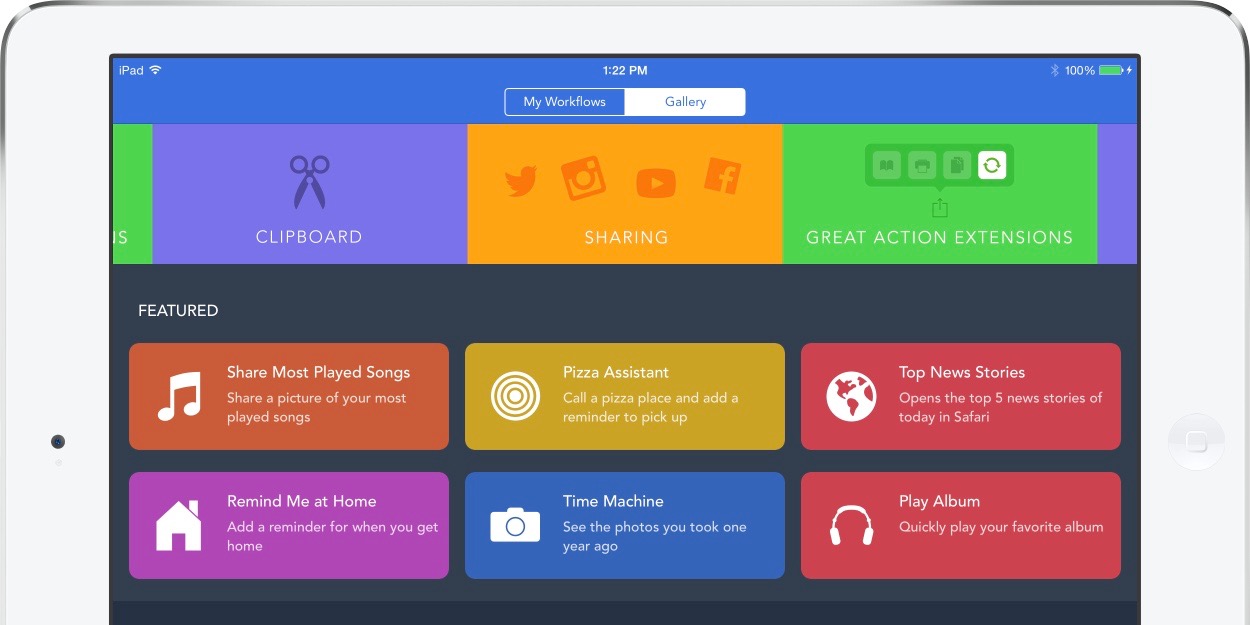
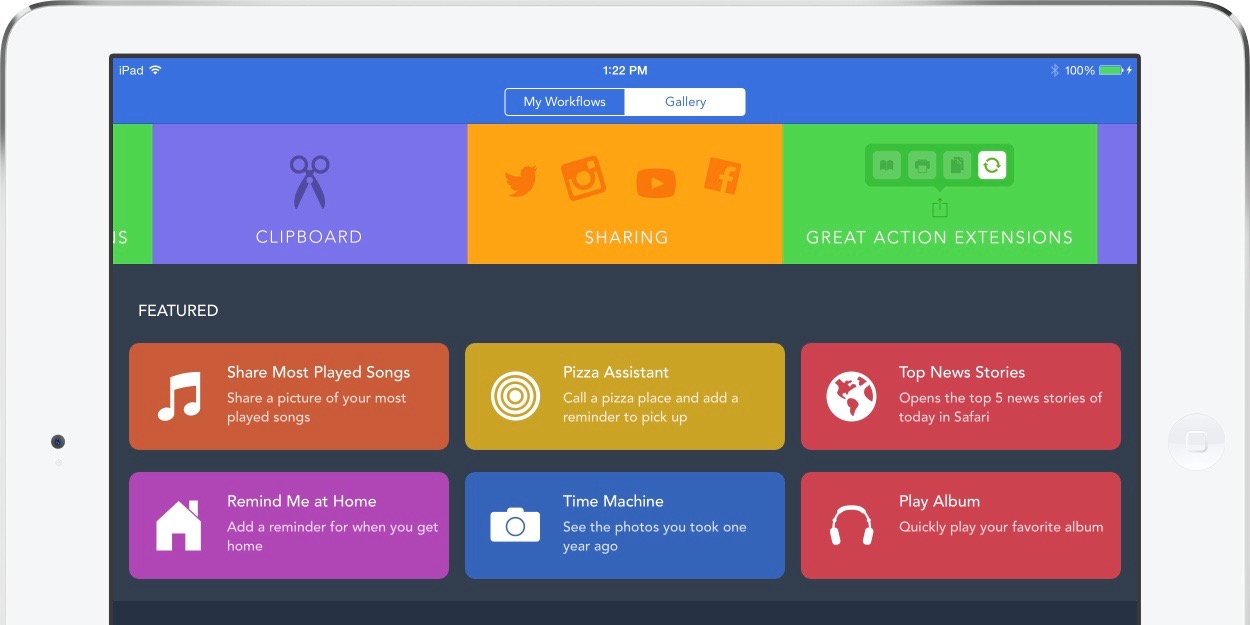
Workflow for iOS has become the go-to automation tool for iPhone, iPad, and Apple Watch users wanting to streamline actions on mobile devices, and now the latest version is ready to put its useful Today widget in Notification Center to work. Workflow originally launched last December after a number of high profile iOS 8 apps were being pulled from the App Store for doing too much with widgets newly made available in Notification Center, but Apple has clearly cooled off and decided that widgets that do more than present information are fine. Workflow’s new version highlights this as the updated widget can now run many tasks right from the swipe down Today view without launching the full app. The latest update also adds a few new actions as well as a new sync and backup service for workflows.
Expand
Expanding
Close

Evernote is taking its Food app out of service next month

PSA for the chefs and food enthusiasts: Evernote is taking its Food app completely out of service next month. Evernote Food, which used the Evernote syncing service but focused on capturing and storing recipes and photos of meals, will no longer be available for download at the end of next month.

Evernote is also stopping sync support for Food as it takes the app out of its portfolio, instead pointing users to the main Evernote app and the service’s Web Clipper feature.

If you enjoyed using Food, please give Web Clipper a spin for collecting recipes and cooking inspiration and try Evernote for capturing your favorite meal experiences. Our App Center Food Collection also features Evernote-integrated food-centric apps that you might like.

Evernote Food will stop working starting September 30th so users will need to sync their content up with the service before then. Recipes and photos within the app won’t go away, but Evernote will no longer sync it with the service. Evernote’s main app for iOS users is available from the App Store. Users affected can follow this transition guide to ensure no data is lost.

Review: Geronimo takes a new & unique approach to email on iOS + Apple Watch

Email apps are dime-a-dozen these days, and every single one claims it brings some incredible new tool to the table that will change the way you do email forever. Usually this just means you can attach images from Dropbox or some other otherwise unremarkable feature.

Geronimo is the latest in a long line of email clients for the iPhone, but unlike many others, it actually does manage to introduce a new management paradigm to the decades-old communication platform. Keep reading for details on its creative new inbox view and gesture-based management message management system.


Expand
Expanding
Close

Pocket 6.0 rolls out for iPhone & iPad with new Recommendation feature

Pocket is one of the most popular read-it-later apps available on iOS, and the service is about to get better (or perhaps worse depending on your viewpoint), with the public launch of recommendations. The feature has been tested in beta for some time, and is now officially out in the wild and will be available to users on iOS, Android and on the web. Pocket describes it as “high-quality content without the noise”.

Recommendations takes the absolute best content being saved across Pocket and tailors it to your own saving and reading habits. The result is a feed that’s completely unique and personalized to you, and is filled with the most interesting articles and videos you might have missed otherwise.

Instead of being a collation of the most viewed web pages from the web, recommendations are based on how popular stories are with people with your interests. Since they’re already curated by humans, the company hopes that helps tune out the noise. For instance, if you happen to save a lot of technology articles to read later in Pocket, you’ll be served up tech-based recommendations. What’s more, if you find a recommendation you don’t like, just press the ‘X’ and remove it from your feed.

Recommendations are currently available in English only currently, but the company states that it is working on a wider roll out in more languages. You can download Pocket 6.0 for iPhone and iPad from the App Store for free.

Adobe details ‘Project Rigel’ image retouching app after discontinuing Photoshop Touch

Ahead of its annual Max conference in October, Adobe is talking up its new photo retouching app dubbed Project Rigel that is expected to debut at the event this fall. As we learned in late May, Project Rigel is a new Adobe mobile app in development set to replace and improve the image retouching tools previously available in the discontinued Photoshop Touch iOS app. 
Expand
Expanding
Close

9to5Toys Last Call: 15″ Retina MacBook Pro (2014) 2.5GHz/16GB/512GB $1,749, Canon WiFi printer/scanner $68, more

Keep up with the best gear and deals on the web by signing up for the 9to5Toys Newsletter. Also, be sure to check us out on: Twitter, RSS Feed, Facebook, Google+ and Safari push notifications.

Today’s can’t miss deals

Last Call Updates:

VIZIO 49-inch 120Hz 4K LED Smart HDTV $600 (Reg. $720), 43-inch $548 or $528 w/ Prime (Reg. $599)

15-inch Retina MacBook Pro (mid 2014) 2.5GHz/16GB/512GB: $1,749 shipped (Orig. $2,499)

13-inch Retina MacBook Pro (newest) 2.7GHz/8GB/128GB: $1,100 shipped (Reg. $1,299)

Amazon Gold Box – Canon PIXMA Wireless Color Photo Printer w/ Scanner & AirPrint $68 shipped (Reg. $95)

Daily Deals: TDK Life on Record TREK 360 Wireless Speaker $50, M-Audio Studiophile Active Studio Monitors $99, more

Back to school gift guide: essential tech gear every student should be using

Get a free download of the AirPano Travel Book iOS app courtesy of Apple ($3 value)

Giveaway: Jaybird’s new X2 Bluetooth earbuds are the ultimate workout counterpart ($180 value)

More new gear from today:

Bluetooth Headphones: SoundPEATS In-Ear $17 Prime shipped (Reg. $30), MEElectronics Over-Ear $38 shipped (Reg. $62), more

[tweet https://twitter.com/9to5toys/status/636546841404964864 align=’center’]

More deals still alive:

Free Xbox Live Gold Games for September: Tomb Raider Definitive Edition, Battlestations Pacific, more

Free PS Plus Games for September: Grow Home, Super Time Force Ultra, Twisted Metal, more

New products & more:

Sensel’s Morph is an ultra sensitive Force Touch Trackpad look-alike

The new limited edition BIT.TRIP vinyl LP comes with free game download codes

Coin announces Coin 2.0 with NFC, faster display, thinner design, more

Coin, the company behind the innovative electronic card that aimed to consolidate your wallet into a single card, has today announced the 2.0 version of its offering. The first iteration of Coin began shipping in April 2015 and anyone who owns the first generation of the product is eligible for a free upgrade to Coin 2.0. Coin 2.0 includes a variety of enhancements, most important of which comes with the addition of NFC.


Expand
Expanding
Close

YouTube Gaming, Google’s Twitch competitor, purportedly launching tomorrow on iOS

YouTube Gaming, Google’s attempt at taking on Twitch, is allegedly set to launch tomorrow, August 26, according to TechCrunch’s sources. The site will go live at gaming.youtube.com tomorrow in the US and the UK and will act as a central hub where viewers can find and watch people live streaming their own video gameplay.

Google announced that it would be getting in to gaming live-streams a couple of months back and has been working behind the scenes to get its service ready for a public rollout. Once live it will act as a direct competitor to Twitch, an Amazon service which lets gamers stream their gameplay and offer it up to viewers to watch. It’s a huge market to get in to, and one which YouTube clearly has the infrastructure to manage. Just searching through YouTube for game walkthroughs or live-streams should be enough to convince anyone that the game-streaming market is huge.

The questions is: Will YouTube compete with Amazon’s Twitch effectively? Twitch has more than 1.5 million broadcasters and amasses over 100 million visitors every month and cost Amazon nearly $1 billion in September last year. Interestingly, Google itself was an interested party and was bidding in competition with Amazon to buy Twitch last year — at times Google was even believed to have closed the deal. YouTube Gaming will be available to download for iOS when it launches.

Etsy Local alerts iOS app users of nearby sellers when on the move

Etsy has long been an online marketplace for unique, often handmade items available directly from their creators, but a new feature of the app will connect shoppers with nearby sellers in the real world. The new Etsy Local feature, available from within the Etsy iOS app, will alert users when they are close to a seller’s real world location, including pop-up shops, flea markets, craft fairs, and local stores.

Sellers will just have to add their local store and event information in order for it to appear for app users. For users, this is how it works within the app:

When a shopper opens the Local tab in the app, recommended nearby retailers and events are tailored to their tastes, based on shops and sellers they have previously engaged with, through favoriting, purchasing, and browsing. Buyers can also discover great new places to shop by viewing local boutiques that carry Etsy merchandise — just one more way to support local communities online and off.

You’ll find the new Local feature on the app’s home page on both your iPhone and iPad, and you’ll be able to view store info and navigate to local shops and events from within the app.

You can access the new Etsy Local feature through the Etsy app for iPhone and iPad.

VMware Fusion updated to support Windows 10, but with bug in Unity mode

A week after Parallels was updated to support Windows 10, VMware has followed suit with an update to its Fusion software – but with a bug when used in Unity mode. Unity mode is where Windows apps are run alongside Mac ones.

Fusion was today updated to version 8, with performance improvements as well as Windows 10 compatibility, but the company has confirmed a bug identified by ArsTechnica in which the Windows Start screen is sometimes unavailable (above left) and at other times has the search bar covered by the Mac’s dock (above right). When unavailable, the Toggle Start Screen option is greyed-out … 
Expand
Expanding
Close

Spotify apologizes for its new controversial privacy policy

Spotify’s CEO Daniel Ek published a blog post today apologizing and attempting to clarify its recently updated privacy policy that proved to be controversial among some users and press. In the post, Ek explains that updated terms granting Spotify access to more of users’ personal information is only to further customize the Spotify experience and that giving up that data will be entirely an opt-in experience for users:

In our new privacy policy, we indicated that we may ask your permission to access new types of information, including photos, mobile device location, voice controls, and your contacts. Let me be crystal clear here: If you don’t want to share this kind of information, you don’t have to. We will ask for your express permission before accessing any of this data – and we will only use it for specific purposes that will allow you to customize your Spotify experience.

The post goes on to clarify exactly why Spotify is requesting each new type of data and for what it will be used. While most of the data is being used to personalize the listening experience for users, the caveat is that it does reserve the right to share data with advertisers, rights holders, and mobile networks:

Sharing: The Privacy Policy also mentions advertisers, rights holders and mobile networks. This is not new. With regard to mobile networks, some Spotify subscribers sign up through their mobile provider, which means some information is shared with them by necessity. We also share some data with our partners who help us with marketing and advertising efforts, but this information is de-identified – your personal information is not shared with them.

But how does that compare to other music services? Wired put together a good breakdown of exactly what user data competing music services reserve the right to access via their privacy policies. The majority of the services all request similar data, although a few differ on accessing contacts and media files and sharing with third-parties, while others don’t have much disclosure regarding location tracking.

9to5Toys Last Call: iPhone 6/Plus Screen Protector $1, Canon AirPrint Laser $90, Beats Studio Wireless $230, more

Keep up with the best gear and deals on the web by signing up for the 9to5Toys Newsletter. Also, be sure to check us out on: Twitter, RSS Feed, Facebook, Google+ and Safari push notifications.

Today’s can’t miss deals:

Last Call Updates:

Samsung SmartThings hub comes next month with Amazon Echo-powered voice control support

iPhone 6/Plus Accessories w/ Prime shipping: Anker Screen Protectors $1 (Reg. $4), TechMatte Magnetic Air Vent Mount $6 (Reg. $9)

Canon imageCLASS 3-in-1 AirPrint Wireless Laser Printer $90 shipped (Reg. $109+)

Beats Studio Wireless headphones: Titanium $230 (Reg. $380), Blue $264 (Reg. $380)

App Store Free App of the Week: Quell Memento+ puzzle game goes free for the first time ($3 value)

Apple 12-inch MacBook w/ Retina display 1.1GHz/8GB/256GB in all colors: $1,149 shipped (Reg. $1,299)

Apple 12-inch MacBook w/ Retina display 1.2GHz/8GB/512GB: $1,500 shipped (Reg. $1,599)

Tile announces a new generation of its Bluetooth tracker

LAST CHANCE! Giveaway: Blackbox Case gives your iPad or MacBook a cozy bamboo home, multiple winners

More new gear from today:

Daily Deals: up to 60% off ARRIS SURFboard Cable Modems (refurb) from $40, Jawbone UP Fitness Tracker $25, more

Aukey accessories w/ Prime shipping: Bluetooth Selfie Stick $9 (Reg. $13), Sport Bluetooth 4.1 headphones $18 (Reg. $30), more

More deals still alive:

NRGized Apple Certified MFi 3-foot braided Lightning cable w/ metal connectors $9 Prime shipped (Reg. $14)

Anker 9-foot Apple Certified MFi Lightning to USB cable (black or white): $11 shipped (Orig. $16), more

Apple iPad mini 3 Wi-Fi in all colors: 16GB $289 (Reg. $399) or 64GB $399 (Reg. $499)

Apple iPad Air 2 Wi-Fi 16GB in Gold or Silver: $380 shipped (Reg. $499)

iPad Air 2 w/ Retina display 64GB in Silver (open-box) $440 shipped (Reg. $600)

New products & more:

Quick Review: The Conway Electric Extō Dual-USB is the envy of all power strips

Beyerdynamic takes its pro-audio pedigree to the streets with these new custom headphones

SLICK’s motorized mount takes the bumps out of your GoPro videos

The coolest Apple-certified MFI Lightning cables you can buy for your iPhone, iPad and iPod