
HomeKit

See All Stories

HomeKit is Apple's home automation framework that lets you control connected accessories from your iPhone, iPad, Apple Watch, HomePod, and Siri.
Your home at your command.

What is HomeKit / Apple Home?

Along with several other new APIs for developers, Apple announced HomeKit in June 2014, which allows all home automation accessories/devices to work together in harmony with iOS. The API allows home automation developers to centralize all home automation without needing separate apps to access each device’s specific features. These devices include locks, lights, cameras, doors, thermostats, plugs, switches, and more.

HomeKit allows for secure pairing with devices and the ability to control individual devices. It also makes it possible to group several home automation devices into scenes that allow for easier control of any automation device in specific situations. One of the coolest features available with HomeKit is the ability to control any home automation accessory with Siri based on certain commands or scenes previously configured with these devices.

In 2016, Apple introduced a new Home app that came with a modern look, relatively easy-to-use controls, and access to accessories and scenes from anywhere on iOS 10. Apple’s new built-in Home app arrived on the iPhone’s Home screen, plus you can access a ton of functions from the Lock screen or anywhere on iOS from the new Control Center once you have a HomeKit accessory set up.

In 2018, Apple released the HomePod. It was a way to interact with your connected home devices through Siri using a standalone device.

In 2020, Apple announced that tvOS 14 would gain access to the Home app. iOS 14 is also bringing improvement to the Home app UI.

HomeKit Secure Video
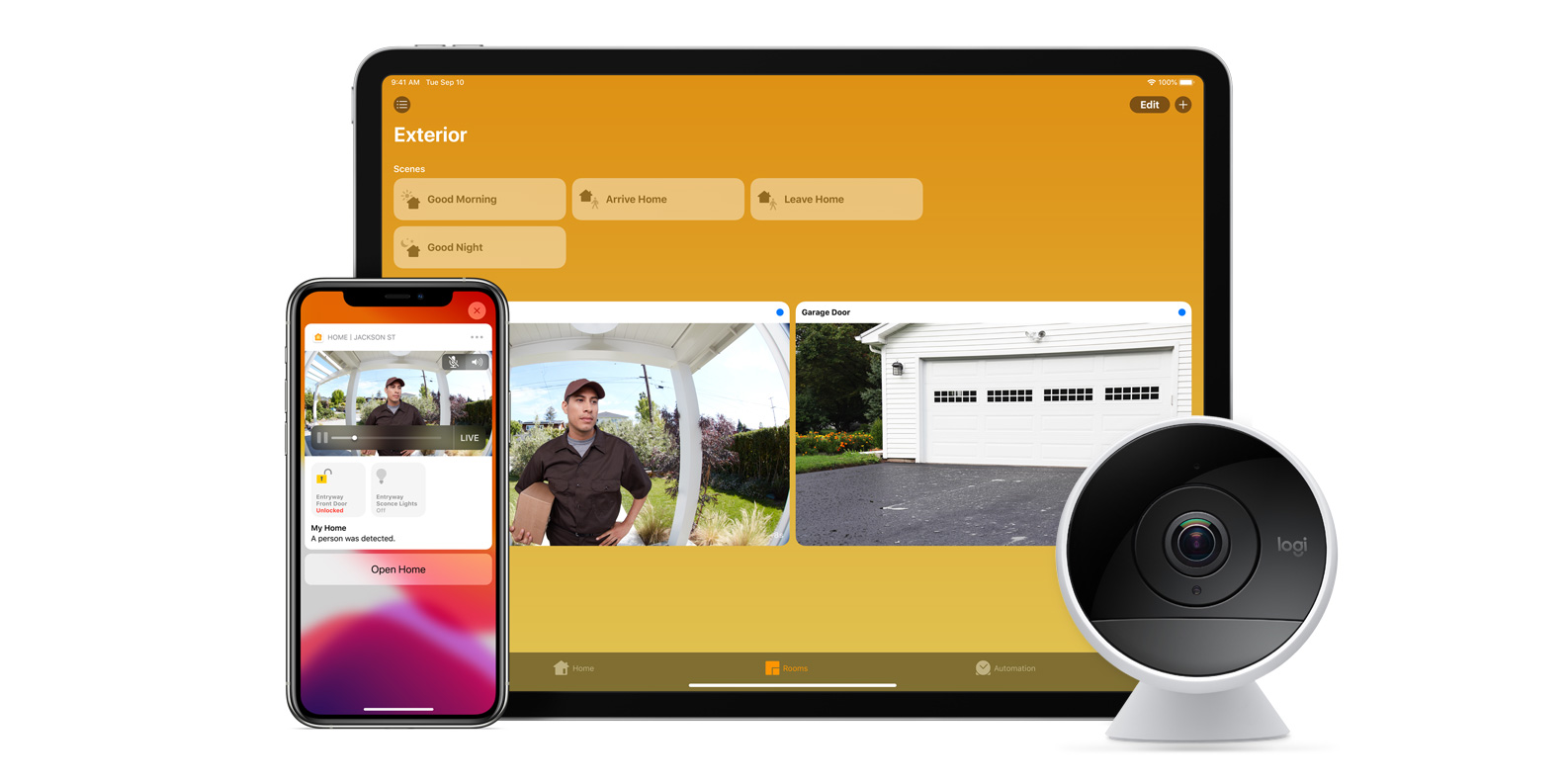
With iOS 13, Apple announced HomeKit Secure Video.

Footage from home security cameras contains your most personal and sensitive data. With HomeKit Secure Video, activity detected by supported cameras is privately analyzed by your home hub using on‑device intelligence to determine if people, pets, or cars are present. When important activity is detected, you and anyone you share your Home app with will receive a rich notification that lets you view the clip right from the Lock Screen. Recorded video is available to view for ten days from the Home app. It’s securely stored for free in supported iCloud accounts and doesn’t count against your storage limit.

While the rollout has been slow, Logitech, Arlo, Netatmo, and Eufy are among the early standouts. With recent privacy issues with Ring, HomeKit Secure Video is likely to continue to grow in popularity. One key benefit with Secure Video is that it works with your existing iCloud storage (200GB and up plan), so you don’t have an extra monthly fee for storage.

HomeKit Router
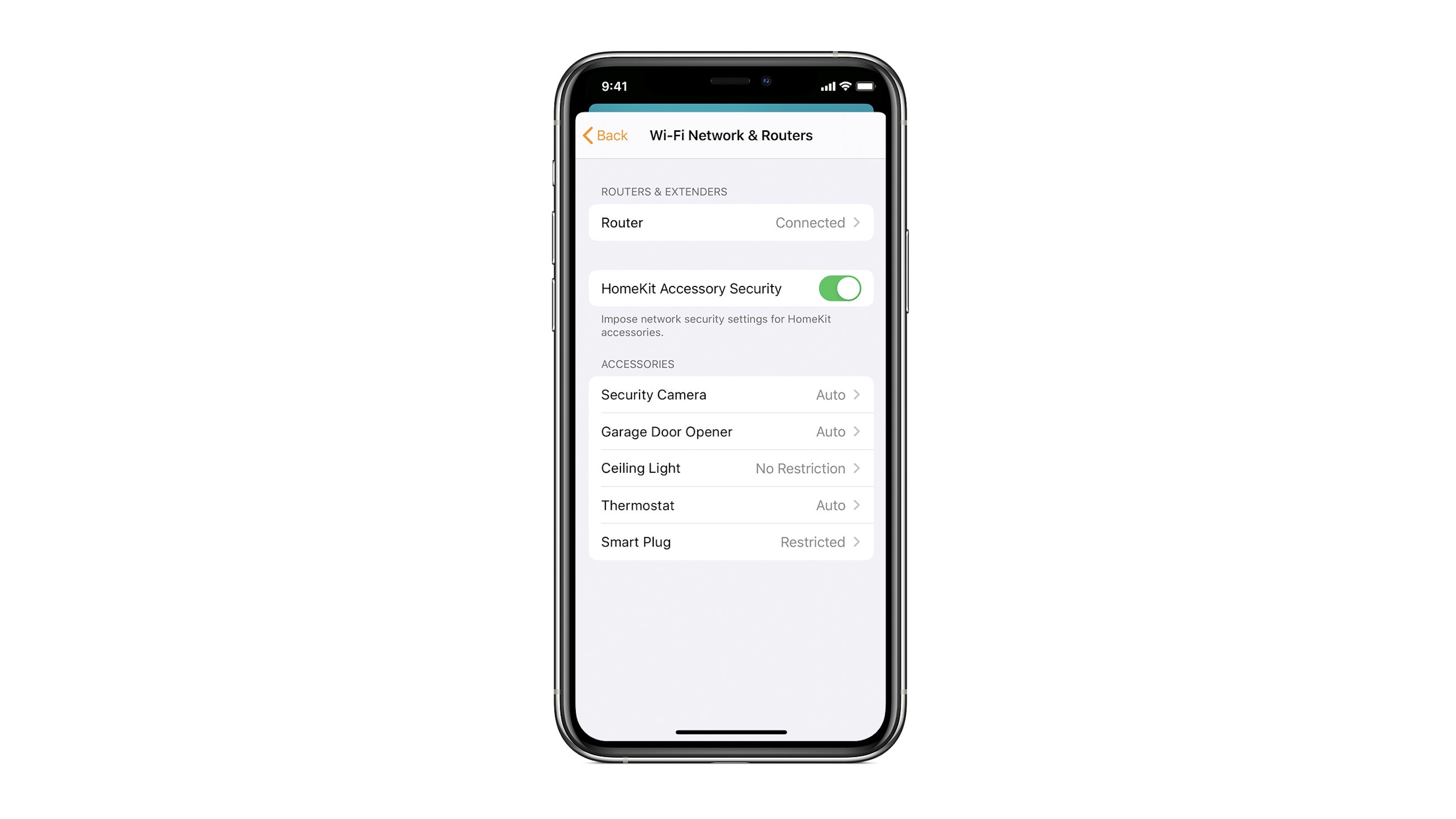
HomeKit Router was also announced with iOS 13, but it wasn’t released until early 2020. The idea behind the feature is you can give granular control to smart home enabled devices to control where on the internet they can reach.

eero was the first company to roll out support in for HomeKit Router.

With Apple HomeKit, eero gives you even more protection of your HomeKit accessories and an easy way to manage what they are allowed to communicate with in your home and through the internet.

There are three levels of security Apple offers for accessories paired with HomeKit routers:

  • Restrict to Home: Most secure. Your accessory can interact only with HomeKit through your Apple devices. The accessory won’t connect to the Internet or any local devices, so any third-party services, like firmware updates, might be blocked.
  • Automatic: Default security. Your accessory can communicate with HomeKit and connections recommended by its manufacturer.
  • No Restriction: Least secure. This setting bypasses the secure router and allows your accessory to interact with any device in your network or Internet-based service.

How Do You Use HomeKit?
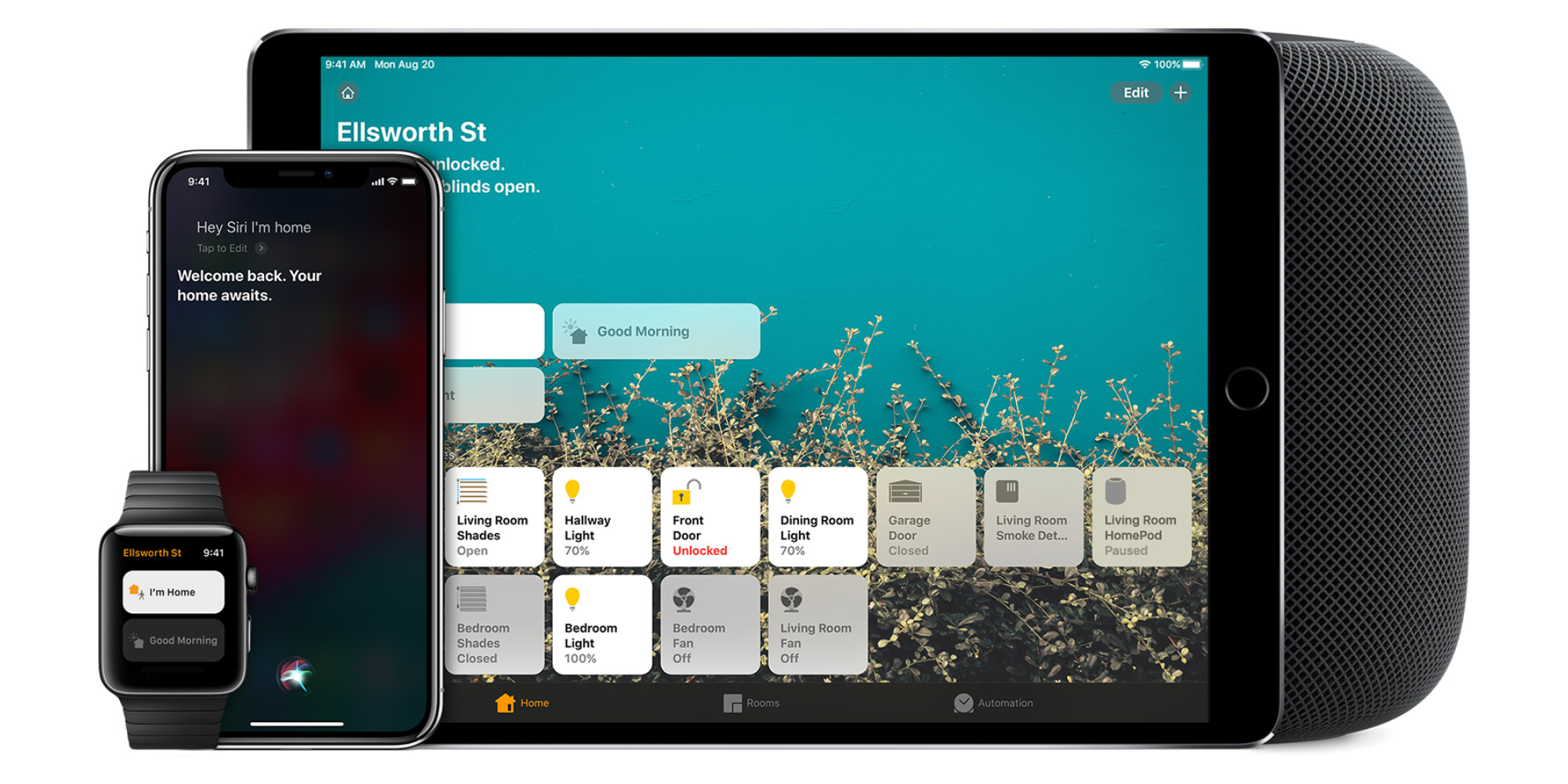
Homekit app

HomeKit devices can be controlled from iPad, iPhone, Mac, Apple Watch, and HomePod. A 4th generation Apple TV (or newer) is an essential Apple smart home device as it acts as a bridge over iCloud to allow access to your devices when away from home.

9to5Mac’s Bradley Chambers does a regular column about the “Apple Home” lifestyle in his HomeKit Weekly column.

Netatmo’s new Healthy Home Coach is a HomeKit-connected indoor climate monitor

Site default logo image

Netatmo is the maker of the handy Weather Station that provides a hyperlocal weather report to your smartphone, and now the company is introducing a new climate-related product that works with Apple’s HomeKit. Healthy Home Coach is a new indoor climate monitor that works with Siri plus Apple’s new iOS 10 Home app and uses four sensors to measure your environment.


Expand
Expanding
Close

Honeywell introduces ‘Lyric T5’ HomeKit-enabled thermostat w/ touchscreen & new design

Site default logo image

Honeywell is announcing a new HomeKit-enabled Wi-Fi thermostat today called the Lyric T5 that will cost $149.99. HomeKit support means you can control the temperature with your voice using Siri or with Apple’s new Home app on iOS 10 and watchOS 3. Lyric T5 features a highly improved design over Honeywell’s other HomeKit thermostat and a larger touchscreen display that makes it worthy of being called a smart home accessory.


Expand
Expanding
Close

Review: Lutron Caséta In-Wall Dimming Kit is the most elegant HomeKit lighting solution

Site default logo image

Apple’s HomeKit feature lets you control “smart” lights with Siri or Apple’s new Home app on iOS 10, and there are generally two ways to make your home lighting more intelligent. You can change your light bulbs to “connected” bulbs that talk to a bridge over Wi-Fi, or you can replace your light switches with “connected” switches that take the same bridge approach.

The Lutron Caséta kit takes the latter approach by replacing your existing light switches with smart switches that make your traditional light bulbs work with Siri. There are notable differences between both approaches including cost and ease-of-setup which I’ll unpack below. And if bells and whistles don’t impress you, Lutron takes the crown for having the most elegant solution to HomeKit lighting with one exception…


Expand
Expanding
Close

iOS 10: How to use the new Home app to control HomeKit devices [Video]

Site default logo image

Controlling smart home devices with your iPhone or iPad is far from a new concept, but in iOS 10, Apple is lending much more focus to home automation. It’s all thanks to the new built-in Home app that ships with iOS 10 and watchOS 3.

Resident Apple HomeKit enthusiast, Zac Hall, already wrote a thorough walkthrough of the new Home app during the initial iOS 10 beta period, but now that iOS 10 and watchOS 3 are shipping, it’s only right to give it another in-depth visit with a corresponding walkthrough.


Expand
Expanding
Close

Schlage Sense Smart Deadbolt now fully supports HomeKit with iOS 10 Home app

Site default logo image

Apple’s new Home app in iOS 10 promotes HomeKit to a built-in app with Control Center access, but a few accessories require firmware updates to fully work with the new home automation software. Schlage Sense Smart Deadbolt was previously in this camp, and today Schlage is announcing that its Sense Smart Deadbolt is fully compatible with Apple’s new Home app.


Expand
Expanding
Close

HomeKit automation no longer works with third-gen Apple TV after iOS 10 (Updated: Apple clarifies)

Site default logo image

Update: Apple has updated its documentation to reflect the fact that the third-gen Apple TV can do HomeKit remote access, but not automation.

iOS 10 includes a pre-installed Home app from Apple that lets you easily set up and manage smart accessories and automation, which previously required using third-party apps from various developers. There is one important drawback for HomeKit users on iOS 10: you can no longer use the third-generation Apple TV as a hub for automation or remote access.


Expand
Expanding
Close

Home 2.0 brings iOS 10 features and a new design to the best HomeKit app for power users

Site default logo image

Before Apple built its Home app for HomeKit in iOS 10, Matthias Hochgatterer created the best HomeKit app around with the original Home app. Apple’s Home app on iOS 10 is built-in, free, and has its own panel on Control, but the third-party Home app is still the best solution if you’re in deep with HomeKit like me. The iOS 10 version includes updated widgets, a new design, a refreshed Apple Watch app, and a temporarily discounted price to mark the launch.


Expand
Expanding
Close

Philips Hue announces new Motion Sensor automation accessory and updates to its color-changing bulbs

Philips Hue has quickly risen to the top of the food chain as far as iPhone smart home automation is concerned, with a range of HomeKit-compatible white and color lights that are controllable via WiFi. The company is now expanding its Hue range beyond lighting, to include related accessories …. a Motion Sensor. The new Motion Sensor goes on sale in October and allows users to automate parts of their lighting experience based on movement in rooms.

The box is powered by AAA batteries and can be mounted pretty much anywhere in your home. With the Philips app, lights can be triggered based off motion sensor movement and turn off automatically after a set duration. Other intelligent features include a setting to only enable lighting when the room is actually dark, conserving energy usage.


Expand
Expanding
Close

Review: Siri-controlled August Smart Lock is a key upgrade to a HomeKit house

Site default logo image

Being able to automate locking and unlocking your front door is one of the easiest ways to transform your house into a smart home and enter the age of the Jetsons. Dom reviewed the first August Smart Lock (reg. $199) last year, and August has released updated hardware with a feature Apple fans will want. The updated August Smart Lock (reg. $229) features HomeKit support and a slightly tweaked design (magnetic battery cover, lock orientation notch, grooved edges). I’ll go hands on with the new capabilities and share my take on the newest August Smart Lock below.


Expand
Expanding
Close

Download iOS 10’s HomeKit Home app wallpapers for iPhone and iPad

Site default logo image

We’ve already shared the new default wallpapers currently in iOS 10 and macOS Sierra, but there are also two additional new wallpapers that ship with iOS 10. Apple’s new HomeKit app called Home includes two house-themed images that you can set as wallpapers inside the app. 9to5Mac reader Mark Malstrom has extracted and shared both Home app wallpapers from iOS 10 for iPhone and iPad so you can use them as your Home screen and Lock screen wallpaper too.


Expand
Expanding
Close

Review: August Doorbell Cam is a modern doorbell upgrade with upcoming HomeKit support

august doorbell homekit

Smart doorbells are an interesting category of connected appliances. There’s an undeniable cool factor in bringing your home to the Jetsons era when you add a video camera, mic, and speaker to your doorbell. I’ve been testing the August Doorbell Cam ($199), which replaces your existing doorbell and lets you see and communicate with visitors from your iPhone, and it’s not just the smart doorbell features that have interested me…


Expand
Expanding
Close

iOS 10 promotes iPad to HomeKit remote access device like Apple TV, both now run automation

Site default logo image

Before now, Apple’s HomeKit platform required an Apple TV for remote access control of most accessories. If you had network-connected lightbulbs or other home automation accessories, you’d need to have a new Apple TV connected to that same network to control them with Siri when out of the house. With iOS 10, Apple is giving iPad that capability too, and it’s now using multiple remote access devices to make all of your iPads and Apple TVs work together to extend your HomeKit network.


Expand
Expanding
Close

Hands-on: iOS 10 + watchOS 3 Home app for HomeKit on iPhone, iPad, & Apple Watch

HomeKit, Apple’s smart home accessory framework, is gaining some much needed attention in iOS 10 and watchOS 3 thanks to a new built-in Home app for iPhone, iPad, and Apple Watch. Apple previously relied on third-party apps from accessory makers to control the HomeKit experience, using Siri as the only first-party controller, and various apps like the third-party Home app and Hesperus filled in the void.

Apple’s new Home app comes with a modern look, relatively easy-to-use controls, and access to accessories and scenes from anywhere on iOS 10. Check out our hands-on below to see Apple’s Home app for iPhone, iPad, and Apple Watch in action.


Expand
Expanding
Close

9to5Toys Last Call: ecobee3 Thermostat $199, iPhone Thermal Imager $199, AirPrint Laser Printer $80, more

Keep up with the best gear and deals on the web by signing up for the 9to5Toys Newsletter. Also, be sure to check us out on: TwitterRSS FeedFacebookGoogle+ and Safari push notifications.

TODAY’S CAN’T MISS DEALS:

Last Call Updates:

App Store Free App of the Week: Drop Flip puzzler goes free for the first time ever (Reg. $2)

The ecobee3 Smarter Wi-Fi Thermostat brings HomeKit to your AC this summer: $199 shipped (Reg. $250)

FLIR ONE Thermal Imager for iOS & Android has more uses than you’d imagine: $199 (Reg. $250)

Amazon’s best-selling Brother laser printer has AirPrint and is on sale for $80 shipped (Reg. $100)

Upgrade to Apple’s 15-inch MacBook Pro 2.2GHz/16GB/256GB for $1,600 shipped (Reg. $1,999)

Best Buy is taking up to $200 off Apple Watch Stainless Steel: 38mm from $349, 42mm starts at $399

Pebble Steel Smartwatch for iOS and Android $80 shipped, Apple Watches up to $200 off, more

Start your week with a $100 discount on iPad mini 4 & Air 2, priced from $300 shipped

Apple’s 12.9″ 128GB iPad Pro Wi-Fi + Cellular is all the way down to $800 (Reg. $1,079)

Get a $100 iTunes Gift Card with email delivery from PayPal for just $85 (15% off)

Rovio’s Bad Piggies for iPhone/iPad goes free for the first time in years (Reg. $1)

App Store Free App of the Week: Sago Mini Road Trip goes free for the first time in over a year ($3 value)

Here are our favorite Father’s Day gifts for the outdoorsman, chef and car aficionado in your life

MORE NEW GEAR FROM TODAY:

Easily enhance your HDTV audio by adding VIZIO’s Bluetooth Soundstage (refurb): $69 shipped (Orig. $250)


Expand
Expanding
Close

Opinion: With Apple finally showing Siri some love, have we hit ‘peak app’?

Last year, I wrote a Feature Request asking that Apple give third-party apps access to Siri, and generally work at beefing-up both the intelligence and the capabilities of its intelligent assistant. A couple of weeks ago, I wrote an opinion piece pointing to the fact that Viv is exactly what Siri should have been by now.

This week, a report suggests that I may finally be getting my wish. Apple is said to be not only planning to offer a Siri SDK to all developers, but also building an Amazon Echo/Google Home type box that will embed Siri more deeply in the home through integration with HomeKit. We will, says the report, find out more at WWDC.

If true, the implications could be profound – perhaps even meaning that we’ve hit ‘peak app’ …


Expand
Expanding
Close

Apple patent filing hints at how HomeKit and your car could soon become smarter

Site default logo image

A recent patent filed by Apple and discovered by PatentlyApple hints at ways in which Apple is planning to make its HomeKit platform smarter. The patent, published today by the U.S. Patent and Trademark Office, is for an “automated environment” in which HomeKit would be able to track the routines of users and implement automated behaviors based on those habits.


Expand
Expanding
Close

Opinion: Rumored iOS 10 HomeKit app is welcomed, but alternatives have a healthy head start

Since HomeKit was introduced with iOS 8, one major missing piece from Apple’s home automation effort has been a built-in app that provides a user interface to the underlying framework. Interacting with Siri is the only Apple-supplied HomeKit UI; users rely on third-party apps instead for all visual HomeKit management.

The downside to this approach is that there isn’t officially one HomeKit app to rule them all, and companies that make great smart home sensors and accessories don’t necessarily make great software. Compare that to Apple’s HealthKit framework which connects various App Store apps to a single dashboard in the built-in Health app. The approach isn’t perfect, but a similar effort for HomeKit would be welcomed.

The good news is Apple’s been developing a built-in HomeKit app for a while now, and a rumor surfaced over the weekend that such an app could finally be ready for iOS 10. As a close HomeKit follower, I’m very curious to see what iOS 10 may have in store for Apple’s home automation effort, but my first thought is that there are a few gems among the current crop of HomeKit apps that Apple may not compete with well even from its position as the platform owner…


Expand
Expanding
Close

Report: Apple’s standalone HomeKit app could finally arrive in iOS 10

A standalone iOS app for Apple’s HomeKit platform could finally arrive in iOS 10 as a new report claims an Apple employee on the company’s marketing team revealed plans for the launch in an online review. MacRumors found the mention (pasted below) within a product review related to HomeKit and says it confirmed the person that left the comment was indeed an Apple employee.

As I work in marketing for Apple, we test many Smart Home devices, especially for iOS HomeKit integration. […]

Some advice, there are many third party applications, most free, that offer more control and customization(s) with many Smart Home devices. “Yonomi” is a free app that I often use, “Home” is another which cost $14.99. Both offer support for many devices with more added daily (including Amazon “Echo”). The next version of iOS due this fall will have a standalone “HomeKit” app as well.

Apple has had plans for a HomeKit app on your iPhone’s home screen for quite a while as it’s developed the platform that currently only allows control of supported home automation accessories through Siri or third-party apps. We were first to detail some of the planned features for the platform and app back before the release of iOS 9, some which like the app have yet to be released.

The idea is that rather than using various apps each accessory maker builds, you could just open one “Home” app on your iPhone to manage everything. These apps already exist in the form of third-party solutions like the Hesperus app we reviewed a couple weeks back, but a solution direct from Apple would hopefully mean one of the best implementations yet and maybe some new features that third-party developers don’t have access to in the current crop of apps.

If the report is true, we could finally get our first look at the Home app at Apple’s World Wide Developers Conference in June where the company is expected to preview iOS 10 alongside its other upcoming products and developer tools.

Feature Request: How Apple’s Siri-controlled HomeKit could improve in the future

Like a lot of new technologies from Apple these days, HomeKit isn’t perfect but the parts that work well are really useful. Apple’s home automation framework connects smart accessories from various companies all under the control of Siri and HomeKit apps like Home or Hesperus. But HomeKit is relatively young still and there’s plenty of low hanging fruit in terms of ways the framework could improve with iOS 10 and beyond. Here are a few ideas I hope we see with HomeKit this year:


Expand
Expanding
Close


