iPad (2021)

See All Stories

Apple's tablet debuted in 2010. Since the original version, it's expanded into multiple screen sizes and Pro and non-Pro options.

The iPad is Apple’s base tablet model. In its ninth generation, the iPad focuses on being the perfect tool for education and people who seek a bigger screen to read and surface the web compared to the iPhone. With Apple Pencil and Smart Keyboard support, the iPad has never been better.

History

Site default logo image

The iPad is a line of tablets designed and developed by Apple. It was originally announced in 2010, three years after the first iPhone was introduced. With a 9.7-inch screen and with iPhone OS 3.2 the iPad was a success, hitting 1 million tablets sold in over three months, half the time the first iPhone took to reach this mark.

Steve Jobs then unveiled the iPad 2 in March of 2011. About 33% thinner than its predecessor and 15% lighter, the second generation used the A5 chip, twice as faster as its predecessor. The iPad 2 also introduced front and back cameras that supported FaceTime video calls.

The successor of the iPad 2 wasn’t a success at all. The third generation was introduced in March of 2012 with a Retina display and the A5X processor. The problem with this tablet it was too heavy and the battery didn’t last long enough. In October of the same year, Apple announced the fourth generation with the A6X processor, HD FaceTime camera, improved LTE capabilities, and the Lightning connector.

At this October event, Apple also introduced the first iPad mini. In 2013, Apple went with the first iPad Air and the iPad mini 2. In 2015, the company introduced the first Pro model, with two different sizes.

Site default logo image

In March of 2017, Apple announced the fifth-generation iPad with the A9 processor. It was a budget option compared to the other tablets. It was in 2018 that the company brought expressive news to the base iPad line. The sixth-generation had the A10 Fusion processor and fully supports the first-generation Apple Pencil.

A year later, the seventh generation was announced with a larger 10.2-inch display and support for the Smart Keyboard as well. It retained most of the specs of the previous model.

In September of 2020, the eighth generation was introduced alongside the fourth-generation iPad Air model. The eighth generation received an upgraded processor, now with the A12 Bionic, while keeping the same storage options: 32GB and 128GB.

In September of 2021, the ninth generation was introduced alongside a redesigned iPad mini. This iPad now features the A13 Bionic processor, True Tone support, and new storage options: 64GB and 256GB while keeping the same price.

iPad 9 Specs

Site default logo image

The ninth-generation iPad launched in September of 2021. Available in two colors, Silver and Space Gray, this tablet is made of 100% recyclable aluminum, and supports the first-generation Apple Pencil and Smart Keyboard.

With thinner bezels, the product comes with a 10.2-inch Retina display with a fingerprint-resistant oleophobic coating, and True Tone support for the first time, which adjusts screen content to the color temperature of a room.

This tablet uses the A13 Bionic chip, the same available on the iPhone 11, 11 Pro, and 11 Pro Max. It has an “all-day” battery with up to 10 hours of surfing the web on Wi-Fi or watching videos.

The iPad also comes in 64GB and 256GB storage options and Wi-Fi and Wi-Fi + Cellular versions.

Revamped cameras

Site default logo image

For the first time, this iPad shares the same FaceTime camera as the M1 iPad Pro with the Center Stage experience. With a new 12MP Ultra Wide front camera and Neural Engine, users can enjoy even more engaging video calls.

As users move around, Center Stage automatically pans the camera to keep them in view. When others join in, the camera detects them too, and smoothly zooms out to include them in the conversation. Center Stage makes video calls more natural in FaceTime as well as third-party video-calling apps.

Its main camera is the same: 8MP, f/2.4 aperture, and digital zoom up to 5x.

iPadOS 15

Site default logo image

The ninth-generation iPad comes with the iPadOS 15. Previewed during the WWDC21 keynote, the new operating system brings a redesigned Home Screen with widgets and App Library support.

On iPadOS 15, FaceTime group calls can finally appear in a grid, so it’s easier to see everyone. It’s also possible to share your screen, listen to Apple Music songs together, or watch Apple TV+, HBO Max, Disney+, and others while in a call.

In the productivity section, Apple, unfortunately, didn’t bring all the features pro users wanted to take full advantage of their new M1 iPad Pro, even though Apple made it easier to rely on multitasking features.

There’s a new multitasking menu on the top of the screen. When you click there, it’s possible to see what configurations you can use on Split View or just go to Slide Over with just a tap.

The experience with an external keyboard allows users to get more done with all-new keyboard shortcuts and a redesign of the menu bar.

With the Quick Note feature, users can use the Apple Pencil to add a quick note. They just need to slide the pencil through the bottom right corner to the center of the screen and start writing.

iPadOS 15 launched on September 20. Learn more about it here.

iPadOS 15.1 features

One month after releasing iPadOS 15, Apple released iPadOS 15.1 More notable, the company finally brought SharePlay support for the iPhone, iPad, and Apple TV. Unfortunately, Universal Control wasn’t one of the features added with this new version. Here’s what else is new:

Translate

  • Mandarin Chinese (Taiwan) support in the Translate app and for system-wide translation

Home

  • New automation triggers based on the current reading of a HomeKit-enabled humidity, air quality, or light level sensor

Shortcuts

  • New pre-built actions let you overlay text on images or gifs, plus a new collection of games lets you pass the time with Siri

iPadOS 15.2 features

apple-music-hey-siri-plays-voice-plan-9to5mac-2

Five weeks after releasing iPadOS 15.1, Apple is releasing iPadOS 15.2. It brings more features that were expected to launch alongside iPadOS 15 but, unfortunately, Universal Control is still nowhere to be seen. Here are the top features of this version:

  • Apple Music Voice Plan is a new subscription tier that gives you access to all songs, playlists, and stations in Apple Music using Siri
  • App Privacy Report in Settings lets you see how often apps have accessed your location, photos, camera, microphone, contacts, and more during the last seven days, as well as their network activity
  • Communication safety setting gives parents the ability to enable warnings for children when they receive or send photos that contain nudity
  • Digital Legacy allows you to designate people as Legacy Contacts so they can access your iCloud account and personal information in the event of your death
  • Apple TV app: Store tab lets you browse, buy, and rent movies and TV Shows all in one place

iPadOS 15.3 features

Six weeks after releasing iPadOS 15.2, Apple is releasing iPadOS 15.3. This update foregoes new features in favor of under-the-hood bug fixes and improvements. One of the most notable changes here is a fix for a Safari vulnerability that may have been leaking your browsing history and Google ID data to the websites you visited.

iPadOS 15.4 features

iPadOS 15.4 finally brings one of the most important features expected from iPadOS 15 and that got delayed: Universal Control. Here’s everything new with iPadOS 15.4:

  • Universal Control: This feature allows you to control your Mac and iPad using the same keyboard and mouse/trackpad. Universal Control needs iPadOS 15.4 and macOS Monterey 12.3;
  • New Siri voice: Siri has a fifth American voice. Apple says a member of the LGBTQ+ community recorded the voice and it’s non-binary;
  • More emoji: iPadOS 15.4 also brings new emojis. You can discover all of the new characters here;
  • Shortcuts automation: Adds support for running Personal Automations in the background without requiring a pesky banner notification.

You can learn everything new with this update here.

iPadOS 15.5 features

Different from other software updates, iPadOS 15.5 only improves the Podcast app experience, as Apple focused on Wallet changes for the iPhone this time:

  • Apple Podcasts includes a new setting to limit episodes stored on your iPhone and automatically delete older ones

iPadOS 15.6 features

iPadOS 15.6 is yet another small update for iPad users. Here’s what’s news:

  • TV app adds the option to restart a live sports game already in progress and pause, rewind, or fast-forward.
  • Fixes an issue where Settings may continue to display that device storage is full even if it is available.
  • Fixes an issue that may cause Braille devices to slow down or stop responding when navigating text in Mail.
  • Fixes an issue in Safari where a tab may revert to a previous page.

iPadOS 15.7 features

iPadOS 15.7 only brings bug fixes and some security improvements as the company readies the iPadOS 16 release.

Education

Site default logo image

Apple describes this iPad as the go-to tablet for education. For several years the company discounts this tablet up to 10%.

Apple is always promoting ways students can use the iPad to learn new things: using Augmented Reality, the Apple Pencil, and how to code with Playgrounds.

The company says the “App Store is the best place to discover apps” for education purposes:

Let your curiosity run wild with iPad. The App Store is the best place to discover apps that let you get a leg up in geometry, learn a new language, and attend virtual classes. You can even use augmented reality to learn something exciting, like watching the history of spaceflight unfold in your living room or making characters from your favorite book literally leap off the page.

Release date: When Apple will launch the ninth-generation iPad?

Apple launched the iPad 9 on September 24, 2021.

Pricing

iPad (2021) pricing starts at $329 for the 32GB storage option with Wi-Fi only. The prices can go up to $559 with the 128GB storage option and WI-Fi + Cellular. Here are the full prices of the ninth-generation tablet:

  • 32GB with Wi-Fi: $329
  • 32GB with Wi-Fi + Cellular: $459
  • 128GB with Wi-Fi: $429
  • 128GB with Wi-Fi + Cellular: $559
  • Apple Pencil (1st generation): $99
  • Smart Keyboard: $159

Lower prices may be available from Apple’s official Amazon store.

iPad (2021) Review

Site default logo image

Soon, we’ll review the ninth-generation iPad. As for now, you can watch our video review of the eighth-generation iPad, as we described it as the “best value tablet you can buy:”

“The iPad 8 was never meant to be a huge update. But even still, I think this is easily the best value tablet you can buy. For $329, this tablet has so much to offer: The performance, the great battery life, and the Apple pencil functionality. I’d highly recommend you pick up this tablet if you simply need an inexpensive tablet today that’s going to last you for three to four years with no trouble.”

iPad Deals

Over at 9to5Toys, you can find the best deals on the iPad and other Apple products. Download the 9to5Toys iPhone app to receive push notifications for new deals as well.

Rumors

As of now, Bloomberg‘s Mark Gurman said in his Power On newsletter by the end of 2021 that Apple plans a new entry-level iPad for 2022. In June 2022, 9to5Mac exclusively reported the details of the tenth-generation iPad model.

According to Filipe Espósito, this new entry-level tablet will pack the A14 Bionic chip, 5G compatibility, and, for the first time, USB-C connectivity, unlocking new experiences with the second-generation Apple Pencil. Its display will also increase, although it’s unclear whether it will have the same design as the M1 iPad Air.

This iPad could be released in October of 2022.

IFTTT’s Do Button and Do Note apps get Apple Watch, iPad support

Site default logo image

If This Then That (IFTTT), the service that lets users automate tasks from a long list of other mobile apps and web services, is about to launch two apps for Apple Watch.

Do Button, its iOS app for controlling hardware and software connected to the service with a single tap, and Do Note, a notepad app that uses IFTTT to save and share to other services like Google Calendar, Evernote, and Twitter, will both be receiving updates for Apple Watch by tomorrow.
Expand
Expanding
Close

Wikipedia for iOS updated w/ design tweaks, ability to share facts as images, more

Site default logo image

Wikipedia today has announced a major update to its app on iOS. The update adds a handful of new features to both the iPhone and iPad Wikipedia apps. First off, the update makes a few design tweaks to the appearance of articles. At the top of every article now is a large header image. Previously in Wikipedia on iOS, header images would appear smaller and below the first paragraph of text.


Expand
Expanding
Close

Feature: Why I edited a novel on an iPad (and why I Kickstarted it afterwards)

After noting that I planned and wrote a novel on my MacBook Pro 17, it might surprise you to learn that I did much of the editing on my iPad.

I began the editing on my Macs – the Pro when I was at home, the Air when I was elsewhere. At that point, I still wanted to be in Scrivener in case structural edits were needed: scenes that needed to happen earlier or later in the story.

I also used my Macs to incorporate feedback from alpha and beta readers. Alpha readers were subject-matter experts (airline pilot, aircraft engineer, software developers and so on), who could identify any technical errors or omissions. Beta readers were technothriller fans who provided more general feedback on the story itself.
Expand
Expanding
Close

Survey: 11% of teens plan to purchase Apple Watch, iPhone & iPad still most popular smartphone & tablet

Site default logo image

According to the latest data from Piper Jaffray analyst Gene Munster, interest in the Apple Watch among teens remains low. An October 2014 survey showed that only 16 percent of teenagers planned to purchase an Apple Watch, and now, a more recent survey shows that interest has dropped to 11 percent among the age group.


Expand
Expanding
Close

Review: Aukey’s 12,000mAh PB-N28 is the $25 battery that fully refills any current iPad

Last month, budget charging accessory maker Aukey released PB-N30, the first external battery with a female Lightning recharging port. For only $15, PB-N30 seemed like a steal given its 3,600mAh capacity — just right for use with any iPhone — but wasn’t capacious enough for power-hungrier iPads. So Aukey has released PB-N28 ($25) as a solution for tablet users, remarkably equipping it with over three times the power for only $10 more.

PB-N30 is an upgraded sequel to the company’s older PB-18, which stuffed a 12,000mAh battery into an iPhone 5-shaped enclosure. While the new model’s capacity is the same, PB-N30’s USB ports jump from 2.1-Amp/1-Amp charging to 2.4-Amp/1-Amp support, and it has a more neutral design that neither sticks out nor knocks off an Apple product. Not surprisingly, it cuts a corner or two to achieve its super-low price…


Expand
Expanding
Close

Beats Solo2 wireless headphones now available in iPhone/Apple Watch-matching gold, silver & space gray

Site default logo image

In addition to opening pre-order sales for the upcoming Apple Watch and launching the new 12-inch Retina MacBook, Apple has refreshed its Beats Solo2 wireless headphone lineup with three new color options: gold, silver, and space gray to match your iPhone, iPad, new MacBook, or Apple Watch…
Expand
Expanding
Close

Site default logo image

Apple releases iTunes 12.1.2 with support for Yosemite Photos app syncing, refined info window

Apple has released an update to iTunes that enables iOS users to sync their photo libraries from the new Photos app that was included in yesterday’s 10.10.3 update. Previously users could sync their iPhoto libraries to their devices, but the release of the Photos app marks the end of Apple’s support for the old software.

The iTunes update also includes “several refinements to the Get Info window,” and improves the app’s stability.

You can download iTunes 12.1.2 from the Updates tab on the Mac App Store right now.

Apple releases iOS 8.3, including new emojis with diversity, new Siri languages, more

Site default logo image

Following the release of OS X 10.10.3 to the public, Apple has also released iOS 8.3 for iPhone, iPad and iPod touch. The update, which has been in beta for several months, brings over 300 new emojis (including diversity options) as well as a new keyboard for inputting the symbols. The new keyboard features a scrolling UI, rather than the old page metaphor, to better accommodate the wider range of emojis available in the update.

iOS 8.3 also includes a whole host of new Siri languages, so more international users can benefit from Apple’s virtual personal assistant. The update adds Siri in Russian, Danish, Dutch, Thai, Swedish, Turkish and Portuguese. Siri’s voice has also been tweaked in this update.

Full change list included after the break:


Expand
Expanding
Close

Opinion: The pros & cons of existing streaming music services & what Apple’s needs to succeed

Site default logo image

Apple’s upcoming music streaming service comes at an interesting time in the industry. Jay-Z recently relaunched his own streaming music service dubbed Tidal, recruiting help from other A-list artists like Rhianna, Alicia Keys, Coldplay frontman Chris Martin, and Kanye West. There are existing services from Spotify, Beats, Google, and others. All of these offerings have their own pros and cons, but I’ve used them all and none of them accomplish streaming music perfectly. Apple now has the opportunity to take the best features of each service and offer its own competitive service.

Last week, Ben Lovejoy broke down exactly what Apple’s streaming music service would need for him to stop buying music. Even without Apple’s new service, I’ve already done that. Most of my music is streamed from Spotify. Rarely do I actually buy albums on iTunes, and I almost never buy physical CDs. The problem with this approach is no streaming music service gets it 100 percent right for me.

I’m hoping that Apple incorporates the best of each existing subscription music service into its own upcoming music service. What are those key points? Let’s discuss…


Expand
Expanding
Close

HBO NOW standalone streaming service debuts on Apple TV, iPhone & iPad with 1-month free trial

Site default logo image

HBO’s new standalone streaming service called HBO NOW has officially launched on Apple TV, iPhone, and iPad. HBO NOW allows subscribers to watch the premium network’s movies and TV shows online. The service is similar to Netflix as it’s delivered over a high-speed Internet connection rather than cable or satellite and doesn’t require long-term committments through contracts. Here’s how to get HBO NOW works:
Expand
Expanding
Close

How-To: Choose the best stand or desktop mount for Apple’s iPads and Macs

Apple currently sells more “laptop” than “desktop” Macs, but in reality, most Macs will be used substantially on flat surfaces — desks, tables, and sometimes nightstands. iPads are more lap-friendly, but also tend to get used upright, particularly for watching videos and access in the kitchen. Since I’ve spent a lot of time testing Apple device stands and mounts, I wanted to share what I’ve learned with you, so you can choose the solution that best suits your Mac, iPad, or both at the same time.

Below, I’ve hand-picked options for different types of users, starting with passive MacBook stands such as Twelve South’s BookArc for MacBook Pro ($50). Made from Mac-matching aluminum with gray rubber inserts, BookArc is designed to safely hold a MacBook Pro upright so that its ports and SD card reader are easily accessible. Twelve South also sells a smaller version of BookArc for the MacBook Air, a bigger BookArc for the Mac Pro, and an earthy version called BookArc mod for fans of wood. That’s a rarity, as most Mac and iPad stands are designed to match Apple’s products, as you’ll see inside…


Expand
Expanding
Close

Opinion: How soon is too soon for an Apple Watch 2?

Apple’s<a href="http://9to5mac.com/2015/03/29/apple-store-revamp-for-apple-watch-revealed-magical-tables-demo-loops-sales-process/" target="_blank"> upcoming retail overhaul</a> for displaying the Watch

A lot of my techie friends are saying that the entry priced-Apple Watch Sport will be their pick next month, and not because of the exterior look. The theory is that Sport is the cheapest way to experience Apple’s new product category in 2015, and since the second-gen Apple Watch will inevitably be upgraded, why pay a premium this year for nicer materials such as stainless steel and sapphire glass?

Despite the Apple Watch’s desire to marry jewelry with technology, it hasn’t lost the baggage gadgets carry, namely the reality that they’ll be outdated and replaced in a relatively short period of time. If the Apple Watch evolves anything like the original iPad did when it became the iPad 2, the differences could be dramatic.

Personally, when I think about getting more perceived value out of a higher-priced stainless steel Apple Watch rather than testing the waters with the cheaper aluminum model, I’m more concerned with how soon the Apple Watch 2 will be announced rather than how much more functional the newer device could be. No matter what happens with the first-generation model, an Apple Watch 2 will come to market. How will Apple balance keeping the Apple Watch evolutionary momentum going with keeping the first-generation model “modern” for enough time to satisfy early adopters?


Expand
Expanding
Close

Review: Griffin’s iTrip Bluetooth adds wireless iPhone music streaming to your car’s stereo

Twelve years have passed since Griffin released its first iTrip, a breakthrough FM transmitter that enabled iPods to send music wirelessly to car and home stereos. The original model, a glossy white housing that sat atop early iPods like a tube of Chapstick, effectively defined iPod accessories for an entire generation of early adopters. And it was fun, too: using an radio antenna and brilliant software, iTrip could flood an empty FM radio channel with iPod music, acting like a pocket-sized pirate radio station.

Everything changed when the FCC cracked down on FM transmitters, forcing reductions in broadcasting power that made iTrips (and numerous competitors) sound staticky, reducing their appeal. Around the same time, Apple and car companies transitioned to better-sounding solutions — Bluetooth and aux-in audio ports, respectively — leaving FM transmitters with fewer customers. But Griffin is rejuvenating the iTrip family with iTrip Bluetooth, aka iTrip Aux Bluetooth, which provides a different type of dead-simple wireless solution for cars. Priced at $50 but available online for $38, it has one purpose: to receive Bluetooth audio sent by your iPhone, iPad, or iPod, conveying it through an included 3.5mm audio cable to your car’s aux-in port…


Expand
Expanding
Close

Adobe Slate lets you publish magazine-like stories from your iPad without design expertise

Site default logo image

Adobe is out today with its latest app for content creators on the iPad. The new Adobe Slate app is available for free and joins the similar Voice app Adobe launched last May. Where Adobe Voice focused on using the iPad and later the iPhone for story telling with the spokenword backed by visual elements, the new Adobe Slate app pairs text with fluid and customizable attractive layouts that look great whether you’re a designer or not.
Expand
Expanding
Close

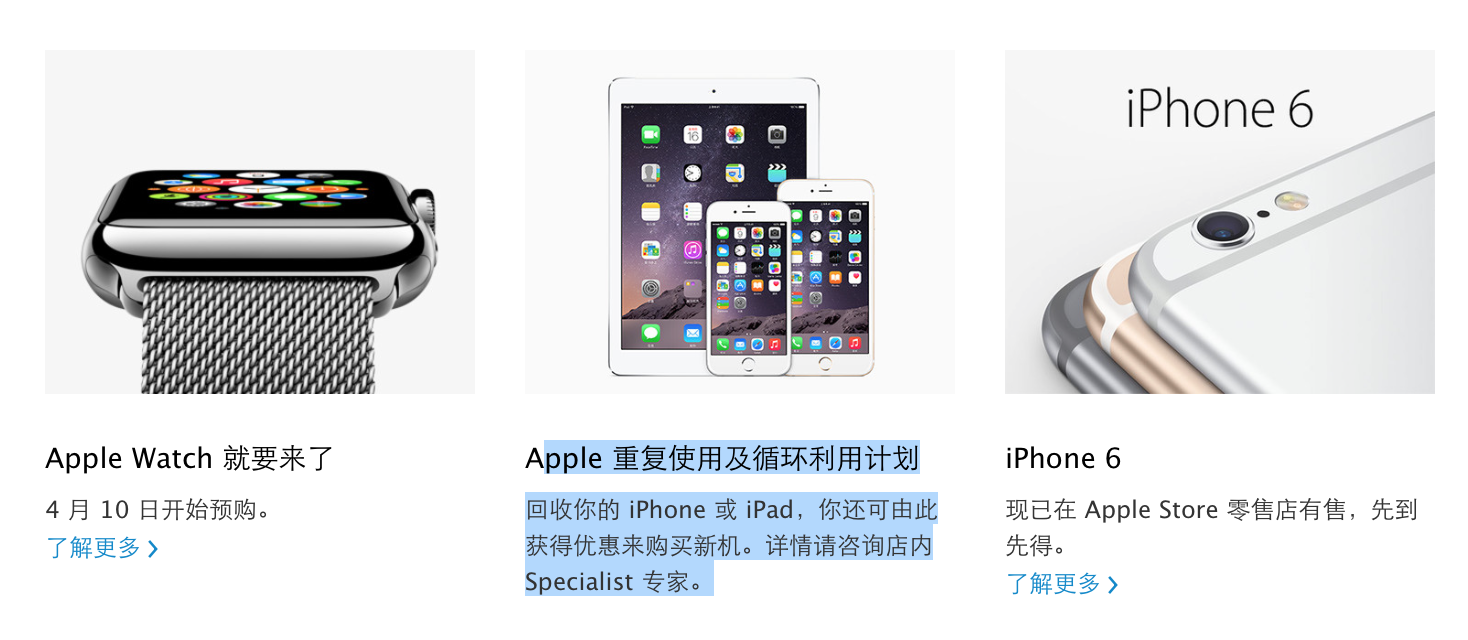
Apple launches iPhone and iPad trade-in program in China Apple Stores

Site default logo image

Apple today officially launched a version of its Apple Store iPhone trade-in program for China, as noted on the individual store pages for China’s Apple Retail Stores.

As is the case in the United States and several other countries with Apple Stores, the program allows a user to bring in an older iPhone model and trade in that device for gift card credit toward the purchase of a new iPhone; the program will most likely not allow a customer to trade in an iPhone toward the purchase of an Apple Watch. But as contrasted with the U.S., France, United Kingdom, Germany, Canada and Italy, the new China program is limited to iPhones and iPads, and will not support non-Apple smartphones.


Expand
Expanding
Close

Purported ‘iPad Pro’ dummy model dredges up age-old rumor of dual Lightning ports

Site default logo image

It’s been a while since we heard rumors that a new iPad model would sport dual connectors for hooking it up to a computer or accessories, but a set of photos circulating online is bringing that idea back to the forefront.

The photos claim to depict the back of Apple’s upcoming “iPad Pro,” a larger 12.9-inch model of its existing tablet. Not a whole lot of new details are visible in the photos, but a spare Lightning port can be spied on the side of the device. Typically the Lightning port is located on the bottom edge.


Expand
Expanding
Close

10 reasons why Apple is to blame for the decline of iPad sales

Site default logo image

KGI

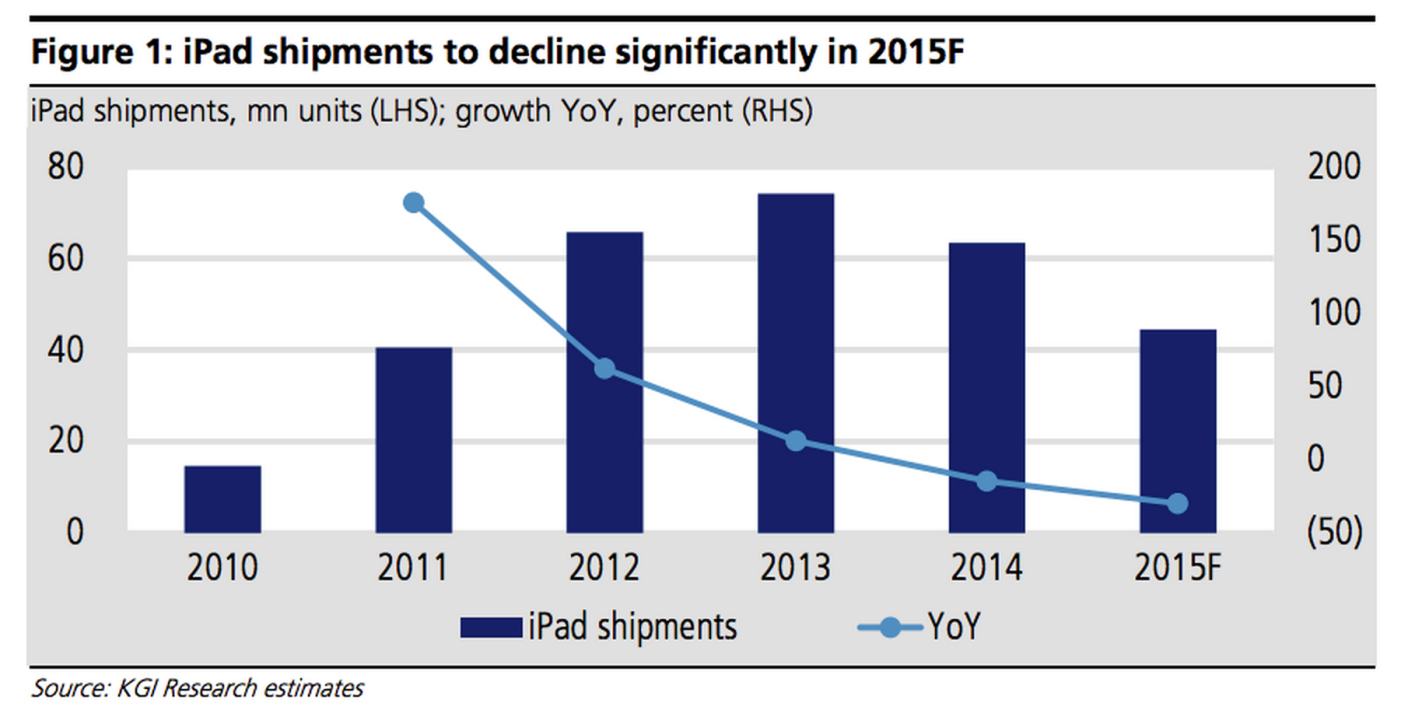
It has been a tough slough for Apple’s iPad since the height of its popularity in 2013. Facing its second straight year of negative growth, there isn’t a consensus on why iPad sales have declined. I believe the slump is attributable to a combination of factors.

Apple CEO Tim Cook called the declining iPad sales a “speed bump” last year before the launch of the 2014 models, but we haven’t seen what Apple plans to do to rejuvenate the product. From my point of view, Apple itself has done more to hurt iPad sales than any external factor, such as Microsoft or Google.

But that’s not necessarily a bad thing. Here’s a full explanation of my theory…


Expand
Expanding
Close

Apple and IBM rolling out MobileFirst iOS enterprise apps localized for Japan

Site default logo image

Following the release of the MobileFirst suite of iOS enterprise apps last year, the result of a new partnership between Apple and IBM, today the companies are rolling out the apps to the Japanese market.

The companies haven’t made an official announcement yet, but sources close to the situation say seven apps are arriving for Japanese customers today.
Expand
Expanding
Close

Review: Elgato’s Game Capture HD60 livestreams your iPad, iPhone, and console games at 1080p/60fps

Over the past decade, video gaming became social, as voice chat, multi-player matchmaking, and live game streaming enabled gamers to share their experiences with friends and strangers online. Streaming game video was the hardest, requiring so much horsepower that consoles needed computer assistance. Elgato entered the market in 2012 with Game Capture HD, which was designed to record directly from the PlayStation 3 and Xbox 360. Now there’s a more powerful version called Game Capture HD60 ($180), which offers professional-quality full 1080p HD recording support at 60 frames per second, plus one-touch live streaming to uStream, Twitch, and YouTube. It works with iPads, iPhones and iPod touches using Apple’s Lightning to Digital AV Adapter, and Xbox One, Xbox 360, Wii U and PlayStation 4 game consoles with nothing more than an HDMI cable.

Elgato has years of experience making cutting-edge video recorders: back when Macs weren’t nearly as powerful as they are today, its EyeTV DVRs could record live TV while streaming video to iOS devices. Similarly, Game Capture HD60 lets you simultaneously enjoy lag-free gaming, stream live video to the Internet, and optionally include voice commentary with automatic audio level balancing. It also does all of these things with barely any need for user involvement. And although the price was just a little too high when it debuted last year, it’s now hovering around $150 — a great price given the quality of its video output. Read on for all the details…


Expand
Expanding
Close

Site default logo image

Google Maps iOS app adds full-screen maps, improved voice search & transit directions

Google Maps for iPhone and iPad has received an update to version 4.4.0 bringing a new full-screen map view, improved transit directions and voice search, and the ability to filter search results for Zagat-reviewed restaurants.

Google notes that the new full-screen mode can be activated by “tapping an empty spot on the map,” while improved voice search brings the ability to “type, or tap the mic and say, “directions to” a place for faster results.”

The update also includes new transit line colors on maps when viewing transit directions and a Zagat filter for restaurants in search results.

The updated Google Maps app for iOS, version 4.4.0, is available on the App Store now.

What’s New in Version 4.4.0

• View a full-screen map by tapping an empty spot on the map
• See transit line colors on the map when you get transit directions
• Filter search results for Zagat-rated restaurants (where available)
• Type, or tap the mic and say, “directions to” a place for faster results
• Bug fixes

Apple execs talk developing ResearchKit: ‘there’s a strong personal connection’

Site default logo image

Apple SVP Jeff Williams announcing ResearchKit

Following the introduction of ResearchKit at this month’s Apple event, Apple executives Jeff Williams and Bud Tribble held a question and answer session with Apple employees regarding the new initiative, according to a source who provided a transcript of the conversation. Williams, Apple’s Senior Vice President of Operations, is the top executive in charge of Apple’s health engineering initiatives, including the Apple Watch, HealthKit, ResearchKit, and fitness software. Tribble is a Software Engineering Vice President with a medical background as a doctor, and he organized many of the partnerships for both HealthKit and ResearchKit…


Expand
Expanding
Close

Pixelmator 1.1 for iPad adds realistic watercolor painting, new Color Picker, more

Site default logo image

Pixelmator has today released a new update for the iPad version ($9.99) of its popular image editor. Version 1.1 includes a brand new watercolor painting feature, which can be used to create brand new pieces of art from a blank canvas or add stylistic additions to existing images and photos. Brushes overlay new colors additively with soft radiuses to create beautiful blends and shading. Pixelmator says they spoke to real artists to help design the brush strokes. It feels really nice to use.

Although watercolor painting is the headline addition, Pixelmator 1.1 also includes a new Color Picker with a swatch of previously selected colors, an updated rendering engine for better performance and much more. You have to see it in action … (video below)


Expand
Expanding
Close