Latest

Site default logo image

Google Play Movies & TV app for iOS gets offline playback support

GPlay_MoviesiOS_v07

Google just announced a nice update for users of its Google Play Movies & TV app for iOS: the ability to download both movies and television shows for offline playback without an internet connection. Google first released the app in January giving iPhone and iPad users access to its movies and TV shows streamed over WiFi. 

Google just announced the feature on Google+ and the updated app should be rolling out to the App Store any minute. Version 1.2.0 also brings bug fixes and improvements to accessibility and stability.

The Google Play Movies & TV app is available for free for iPhone and iPad.

What’s New in Version 1.2.0
* Download and play your videos anywhere, without an Internet connection
* Accessibility improvements
* Stability improvements and bug fixes

Site default logo image

Adobe updates Creative Cloud video apps w/ HiDPI support for Retina displays & much more

Adobe is announcing a number of updates for its Creative Cloud desktop apps today with the highlight being a refreshed UI across almost all of its video products. One thing in specific for Mac users caught our eye, however, and that’s HiDPI support for Macs with Retina displays:

A refreshed user-interface across all the video applications supports HiDPI displays for both Mac Retina Displays and Windows 8.1, providing a cleaner appearance enabling video professionals to stay focused on their projects. “The first thing you’ll notice when you open them, is the cleaner look to all of the video apps,” said Bill Roberts, senior director of product management. “We’ve modernized and simplified the user interface so that it doesn’t compete with the content. The point is to allow video pros to focus more on their content, and less on the widgets.”

In addition, there is a long list of other improvements for the apps including some major enhancements to Adobe Premiere Pro and Adobe Anywhere for video. A full list of what’s new is available here.

Adobe, which announced the new features at IBC 2014, says the updates are coming soon.

Revealing Next Wave of Innovation for Adobe Video Desktop Apps

At IBC 2014, Adobe will showcase new video technology that streamlines video workflows for video professionals, broadcasters and media companies. Key updates include:

Support for cutting-edge hardware and standards is accelerated via Adobe Creative Cloud, enabling the company to respond quickly to new hardware and software standards. Key updates extend native file support, with the addition of AJA RAW. Performance enhancements include accelerated Masking & Tracking; and new GPU-optimized playback that delivers better performance when viewing extremely high resolution 4K and UltraHD footage from Phantom Cine, Canon RAW and RED R3D files.

A refreshed user-interface across all the video applications supports HiDPI displays for both Mac Retina Displays and Windows 8.1, providing a cleaner appearance enabling video professionals to stay focused on their projects.

Powerful new media and project management features, including Consolidate & Transcode; Search Bins; and Multiproject workflows offer more ease and flexibility, at the project level, so Adobe Premiere Pro CC users can complete tasks more efficiently. Adobe Media Encoder now includes Destination publishing with preset options so users can render, deliver and share projects to multiple locations such as FTP sites and their Creative Cloud folder, automating the delivery process. Additionally, Extended Match Source support now includes added support for the QuickTime and DNxHD formats, simplifying the workflow for users who are transcoding or rendering content.

Streamlined workflows and ongoing refinements make everyday tasks easier and faster inside Adobe CC video apps, including Timeline Views in Adobe Premiere Pro CC; Curve adjustments and Look Hover previews in Adobe SpeedGrade CC; and Rough Cut Dissolves and keyboard shortcuts for tagging in Adobe Prelude CC.

Site default logo image

Spotify app to offer 30 mins of ad-free listening if you watch a 15-30 second video ad first

spotify

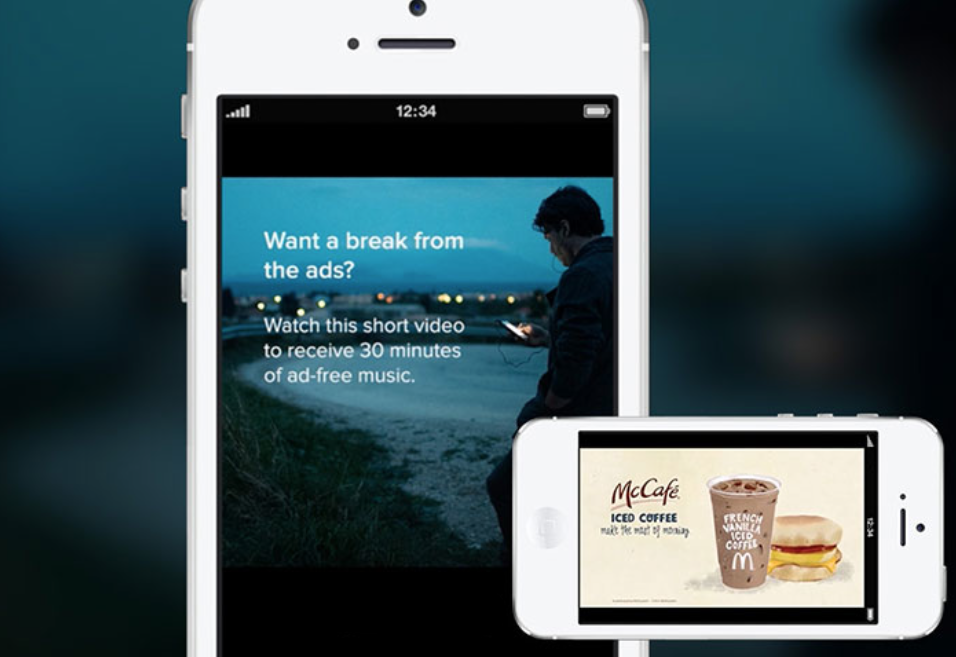
Spotify currently offers you a choice: pay ten bucks a month to listen without ads, or listen for free but have your music interrupted by audio ads. Those using the iOS or Android app will be offered a third option later this year: watch a 15-30 second video ad in return for 30 minutes of ad-free listening.

Known as Sponsored Sessions, the idea is that advertisers get the ability to run video ads for the first time, while the experience is made relatively painless for consumers by guaranteeing 30 minutes of uninterrupted listening afterwards.

Spotify began pitching the option to advertisers back in June, and Ad Age reports that a number of major advertisers have now signed-up.

Spotify will start testing the video ads in the fourth quarter with a limited number of brands and plans to extend them to all advertisers in the first quarter of 2015.

Coca-Cola, Ford, McDonald’s and Universal Pictures have signed on as the ads’ first global buyers. Kraft Foods, Target and Wells Fargo will be the U.S.-only launch advertisers.

The Spotify app is a free download from the App Store.

Via Engadget

Apple Store app redesigned, gains upcoming events feature, synchronized shopping

Site default logo image

Screenshot 2014-09-04 16.54.31

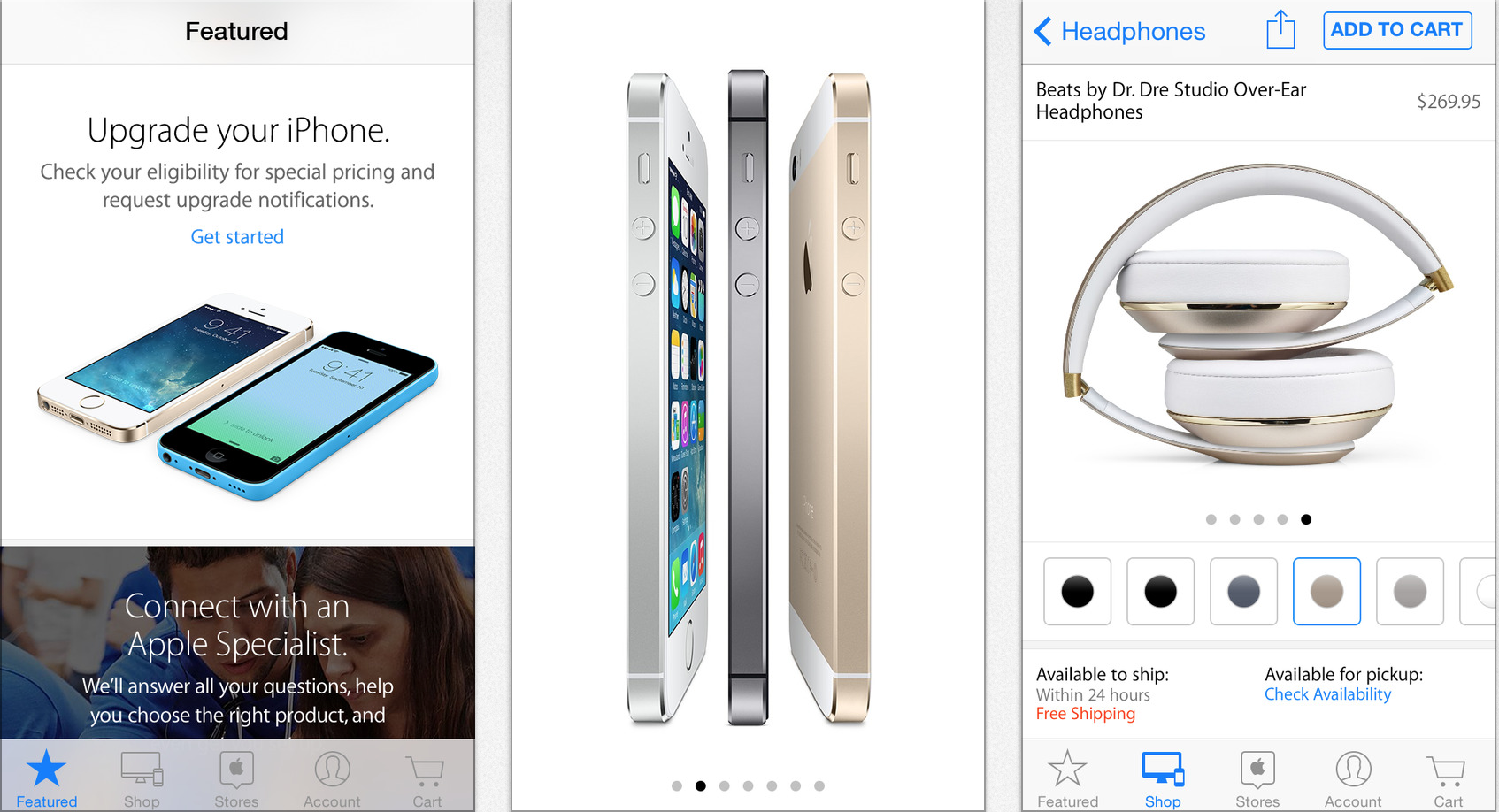
Ahead of its major media event next week, Apple has issued a significant update to its Apple Store shopping iOS app. The first addition is a complete redesign for the iPhone and iPod touch application’s interface. The new design is more in-line with the recently released iPad variant. Speaking of the iPad version, the tablet-optimized layout is now a universal bundle (single download) with the iPhone/iPod touch version, and it has also gained support for making Apple Store One to One reservations. The app also has a new Stores section to search for upcoming events at local Apple Stores. There is also a new icon. Perhaps the most significant new feature is support for synchronizing shopping between iOS devices and desktop computers. For example, you can start shopping on your Mac and continue via the app on your iPhone. Apple (rightfully so) doesn’t want to a miss a single iPhone 6 or iWatch/iBand sale.


Expand
Expanding
Close

Site default logo image

Skype 5.4 adds ability to host group audio calls from iPhone

It’s not quite group video calling, but Skype is rolling out an update to its iPhone app to support hosting group audio calls in the latest feature addition to its redesigned iPhone app.

For existing groups (and for new groups) we’ve placed a new call button in the bottom navigation bar. Simply tap it to start your call. We support up to four people on a group audio call in this first release, but you can expect to hear further news on this in the near future.

Once a group audio call has started, the number of participants will be displayed in the top bar. Tap the navigation bar to see the active participants on the call. You can also see any contacts that are in the group but not on the call. Furthermore, as the host, you can also selectively take people off the call without ending the current call.


Expand
Expanding
Close

Rdio preps revamped music streaming app with a focus on free stations

Site default logo image

The Rdio music streaming service is preparing to release an updated version of its mobile app later today will place a new focus on its free “stations” feature as competitors like Spotify, Pandora, and Apple’s one-two punch of iTunes Radio and Beats Music crank up the pressure on the service.

Rdio claims its free music library is as much as fifteen times bigger than those of competing apps. Like other online radio services, the new Rdio will automatically create playlists and stations from that library based on a user’s music preferences. Curated stations from musicians and other celebrities will also be available, much like in iTunes Radio.


Expand
Expanding
Close

Site default logo image

Expedia redesigns its iPad app with combined flight and hotel search

Combined Search-New Expedia Tablet App

Travel booking website Expedia has revamped its iPad application with a new, tablet-optimized look and improved search. Expedia says that its app is faster at helping you book travel than apps from the competition because of its combined search feature.

You just enter your destination and the app will provide results for both hotels and flights in one panel. The app has a handful of other helpful features, according to Expedia:

  • Single Search Box: To eliminate hefty search interfaces, the new tablet app offers a single search box to do the lifting. When a traveler enters a city] name, landmark, or airport code, the app will surface hotels and flights relevant to that query – no dates or specific details are required at the start.
  • First-Ever Combined Hotel & Flight Travel Search:For the first time in the industry, combined search has arrived for the travel market. Rather than searching for trips in a rigid, linear progression of flights then hotels, or hotels then flights, Expedia is introducing one combined search that provides both hotel and flight results simultaneously, available all in one glance.
  • Collections:Expedia presents various themed travel destinations to spark interest in future journeys. Collections offer customers the opportunity to explore vacation destinations they may not have otherwise considered. Beautiful locations come to life in a particularly compelling way on tablet devices. Collections offer a rich combination of design, mobility and travel research. Content is catered to various regions and will be updated based on traveler feedback.
  • Integrated Trip Planning, Booking, & Data, Shared Across Devices:Earlier this year, Expedia introduced Scratchpad in certain markets around the globe. Scratchpad is an easy way to keep track of your travel searches. When a traveler is signed into an Expedia app, trips researched on a tablet device will appear on the desktop or mobile Scratchpad. This allows travelers to begin their travel planning from where they left off – on any device.

A new version for Android tablets is also available. Expedia also has an iPhone version , and both apps are a free universal download on the App Store.


Expand
Expanding
Close

Site default logo image

Google Drive for iOS updated w/ syncing speed boost & upload progress

It’s been a few months since Google released version 3.1 of its Drive app for iOS, and today an update in the form of Google Drive 3.2 is available for users. The changes are slim but something users will likely appreciate.

In the latest version, Google says Drive is now faster at syncing data, and uploading files now shows a progress indicator as well as the destination for the file.

The update follows the recent release of Google Slides for iOS after it shipped Docs and Sheets earlier this year.

Drive users can find the latest version on the App Store for iPhone and iPad.


Automatic smart driving assistant brings its dashboard to the web

Site default logo image

Automatic Dashboard Web

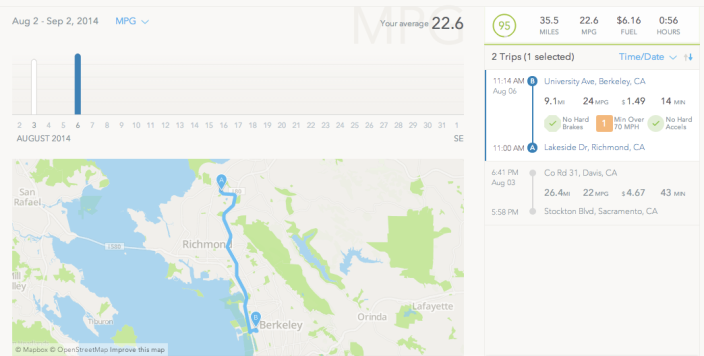
The smart driving assistant Automatic is getting even more capable this morning with the roll out of a new dashboard interface made specifically for the web. You will probably recognize the interface (seen above) if you have used the Automatic app, which connects to a Bluetooth accessory in your car to give you data on driving efficiency and more.

The dashboard presents trip history mapped out alongside information including distance, miles-per-gallon, fuel cost, and duration just like the iPhone app. In addition to being able to access data captured by Automatic on the web for the first time, the new dashboard also features filtering and exporting capabilities.
Expand
Expanding
Close

Site default logo image

Apps & updates: Yahoo Screen adds Vevo, Amazon Cloud Drive adds AirPlay, eBay updates UI and more

In a flurry of updates today, Amazon Cloud Drive and Sony’s Music Unlimited service have received updates for their respective streaming services. Amazon Cloud Drive adds AirPlay support for photo and video streaming to Apple TV, as well as exposing more metadata information in the UI. You can now also rename albums, although this is iPhone only for reasons unknown.

Sony has given its Music Unlimited app a big overhaul. The app has been modernized with iOS 7’s aesthetics, featuring sharp imagery and flat iconography. The team have also dedicated significant time in improving performance, to minimize the sluggishness customers complained about in previous versions. You can also edit playlists right from the app, a critical improvement for a music app.
Expand
Expanding
Close

Site default logo image

Microsoft now offering monthly in-app subscriptions in Office iPad apps

Following updates today for Microsoft’s Office suite of apps for iPad, users can now purchase monthly subscriptions to Office 365, the service required for access to full editing features.

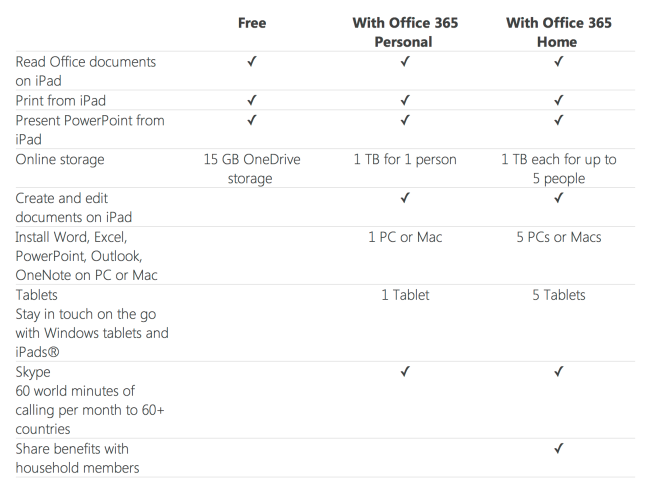
So starting today, you can buy a monthly subscription to Office 365 from within Microsoft Word, Excel, and PowerPoint for iPad. You can choose between Office 365 Personal and Office 365 Home. Office 365 Personal is designed to help individuals who want to use Office on one PC or Mac and one tablet, while Office 365 Home is for households with up to five PCs or Macs, plus five tablets.

The monthly subscriptions are now available to purchase directly in the app for $6.99/month for the Personal plan and $9.99/month for Home. Microsoft added that “if you buy a monthly subscription on your iPad, you can switch to an annual subscription from your iPad, or from iTunes on your PC or Mac.” Yearly subscriptions to Office 365 offer savings over the monthly plans and are available for $69/year (Personal) and $99/year (Home).

Microsoft offered a chart showing what each of the plans get you within the Office apps vs free features:

Screen Shot 2014-09-02 at 1.23.18 PM

The updated Microsoft Word, Excel, and PowerPoint apps for iPad are available on the App Store now.

Cultured Code previews Things system extension for iOS 8

Site default logo image

Cultured Code’s task management app Things has yet to receive an update on iPhone or iPad to fit in with Apple’s design direction introduced with iOS 7 as a major new version has long been in development, but it looks like users of Things will soon get a bit of relief in the form of an iOS 8 system extension.

A preview of the iOS 8 extension for Things has been added to the company’s status board for the app and shows text being copied and pasted from a website on Safari directly into a new entry on Things without leaving the web browser.


Expand
Expanding
Close

Netflix for iOS now lets you privately recommend content to select Facebook friends

Site default logo image

Netflix today announced a new way to recommend movies and TV shows to your friends from your iPhone or iPad. The recommendation feature works using Facebook, but it’s selective and private so you don’t end up spamming everything with the embarrassing movie you just watched that you and two of your friends may like but others not so much. The feature allows you to connect your Facebook friends list to your Netflix account, then recommend videos you just watched to specific friends from Facebook.


Expand
Expanding
Close

Site default logo image

Adobe updates Photoshop Mix for iPad with undo/redo support, Dropbox support, and more

Adobe has updated its Photoshop Mix iPad app with several new features and tweaks. Version 1.1 of the app includes undo and redo support for quickly rolling back edits up to three levels.

The update also introduces support for exporting a JPEG or masked PNG to the iPad’s camera roll. You can also import images to edit from Dropbox. Foregrounds and background layers can now be switched using the Image Swap feature. Other miscellaneous performance enhancements have also been made to allow for faster project loading.


Expand
Expanding
Close

CloudApp 3.0 arrives with support for screen recording, teams, Google Apps, and more

Site default logo image

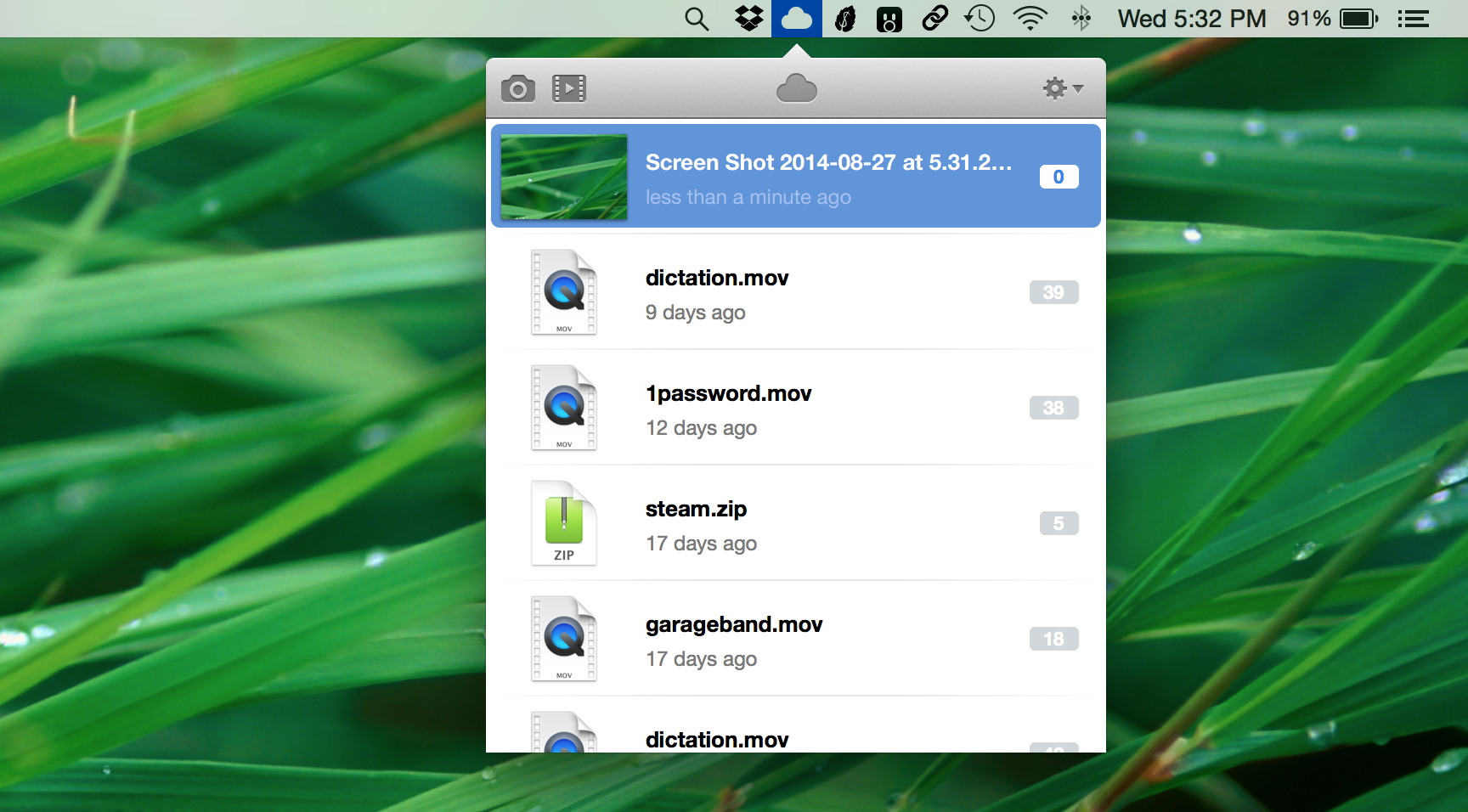
Screen Shot 2014-08-27 at 5.32.28 PM

File sharing software CloudApp has gotten a significant update with today’s launch of version 3.0 of its Mac client. The software already supported features like private and public sharing links, live view counters, and automatic screenshot uploads, but today it adds even more tricks to its bag.

The biggest addition to the application is support for something called CloudApp Motion. This handy feature will allow you to quickly capture all or part of your screen, then automatically upload the captured footage to the web as a sharable animated GIF. At the moment the GIF output is a bit choppy, so don’t expect buttery smooth playback, though the company has promised that high-fidelity GIFs are coming soon.


Expand
Expanding
Close

Contrast debuts Contact Center, a simpler Launch Center Pro focused on keeping in touch

Site default logo image

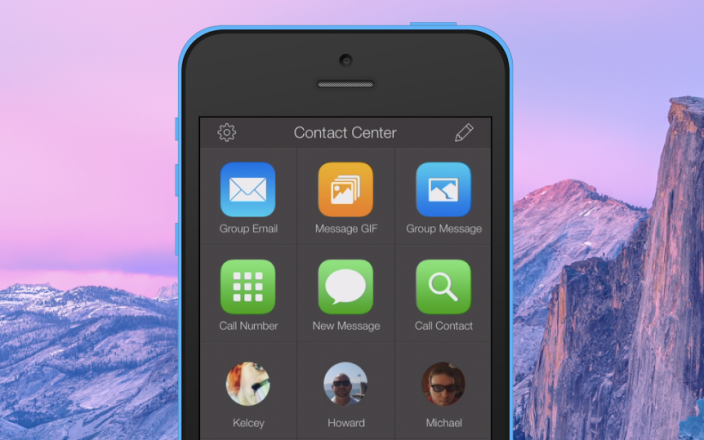
Contact Center

If you’re familiar with Launch Center Pro, the iPhone and iPad app we’ve covered that enables powerful automation on iOS, then you may recognize Contrast’s new iPhone app debuting today called Contact Center. While its name sounds like it could be an alternative address book, it’s actually a simpler, easier to learn version of Launch Center Pro focused on staying in touch with your favorite contacts.

Contrast describes Contact Center as allowing you to “automatically paste your clipboard into an email or message, jump right to a contact in WhatsApp, automatically paste your clipboard into an email or message” and more; below we’ll take a look at the new app.


Expand
Expanding
Close

Site default logo image

Xbox One SmartGlass app adds gameplay recording, TV streaming & more as it expands into new markets

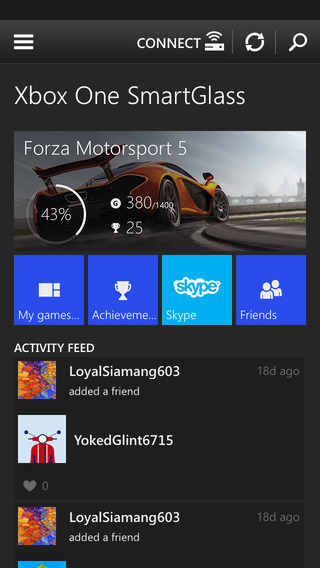
Xbox-Smartglass-iPhoneMicrosoft updated its Xbox One SmartGlass companion app today with new features as the app and some of its flagship features expand into new markets. After first rolling out the features in beta, which include TV streaming and OneGuide features in certain markets, the updates are now available to all through the iOS app.
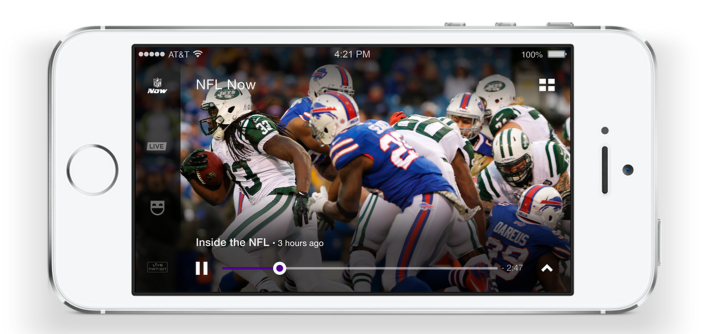

The update brings the ability to stream live TV from Xbox One to the SmartGlass app, but the company originally said the feature would slowly roll out to certain markets with 29 new markets arriving in the weeks to come.

The other big feature included in the app update is gameplay recording via a new Game DVR record button directly in the app. Threaded conversations and other tweaks round out the update rolling out today for iPhone and iPad.

The updated Xbox One SmartGlass app is available now on the App Store. A full list of what’s new is below:

What’s New in Version 2.9

• Share and post activity feed items
• Post status updates to your activity feed
• See your activity feed on your profile
• Display messages in a new conversations view
• Record game clips
• In-app display of release and feature notes
• Expanding to new markets
• TV and OneGuide available in new markets

BioShock for iOS brings the classic console shooter to the small screen

Site default logo image

[youtube https://www.youtube.com/watch?v=savBvN9Jz5g]

Earlier this month, 2K Games announced that it would be bringing its landmark horror-shooter BioShock to the iPhone and iPad. Tonight, the game finally arrived on the App Store in most of its original glory. The story, game mechanics, level design, and audio have all be ported to the mobile devices, though the graphics have been toned down to make it run on phones and tablets.

BioShock is set in the underwater would-be utopia of Rapture, which has been overrun by its own psychotic, drug-addled citizens on one especially-unfortunate New Years Eve. Players take on the role of Jack, who arrives in Rapture after a plane crash that leaves him stranded in the middle of the Atlantic, and must utilize a selection of upgradable weapons and genetic enhancements to track down Andrew Ryan, the madman running what’s left of the city.


Expand
Expanding
Close

Site default logo image

Yahoo Screen app for iOS adds personalized video feed of NFL Now content

Yahoo-Screen-NFL-

Yahoo announced a new partnership with the NFL today that brings content from the recently launched NFL Now network to Yahoo apps on the web, iPhone and iPad.

Earlier this month Apple added the NFL Now channel to the Apple TV and before that dedicated apps for iPhone and iPad launched on the App Store. Yahoo is hoping its experience through the Yahoo Screen mobile app (and later the Yahoo Sports app) will offer a better way to view the content:

With NFL Now, each morning you’ll receive a free, personalized video feed based on your favorite teams and up-to-the minute news. As a lifelong (tortured) Washington fan, I log in every morning on my way to work to stay up to date on RG III and Alfred Morris news, along with preseason highlights.

The feature is already available in the Yahoo Screen app for iPhone and iPad following an update earlier today and will soon come to the Yahoo Sports app as well.

Site default logo image

Square Cash now lets you send money over text messages, add notes to payments, more

Square launched its app Cash last fall making the process of sending money from your bank to other people over email, and today the company is introducing the next major version of its app. Square Cash 2.0 introduces a list of new features including the ability to now send a transaction over text messaging in addition to email and attach notes to payments for adding context to a transaction. Below you can see the full list of changes in the new version.

What’s New in Version 2.0

Everything is better in Cash 2.0!

• Send cash to any mobile phone number via text message.
• Faster, optimized sending interface.
• Import your address book for quick contact selection.
• Add a note to your payments.
• Pick a profile picture.
• Choose push notifications, text messages, or email notifications.
• Manage all of your email addresses and phone numbers in one place.
• Quickly approve incoming requests from a push notification or text message.
• Invite friends via text message and get $1 when they join.

Square Cash 2.0 is available for free on the App Store.


Instagram introduces Hyperlapse to stabilize and speed up your video

Site default logo image

Instagram HyperlapseFacebook-owned Instagram is introducing a new video capturing app for iPhone and iPad (and Android soon) called Hyperlapse. The photo (and video) sharing social network recently soft launched a new app called Bolt in Singapore, South Africa, and New Zealand that focused on quickly photo messaging friends, but Hyperlapse is more like an advanced feature that could have been found within Instagram. Hyperlapse offers up a unique way to capture and edit video using processor smarts to make panning shots smoother and  add a time-lapse effect similar to the iOS 8 camera app.


Expand
Expanding
Close

Review: Parallels Desktop 10 brings even tighter OS X/Windows integration, overall performance improvements

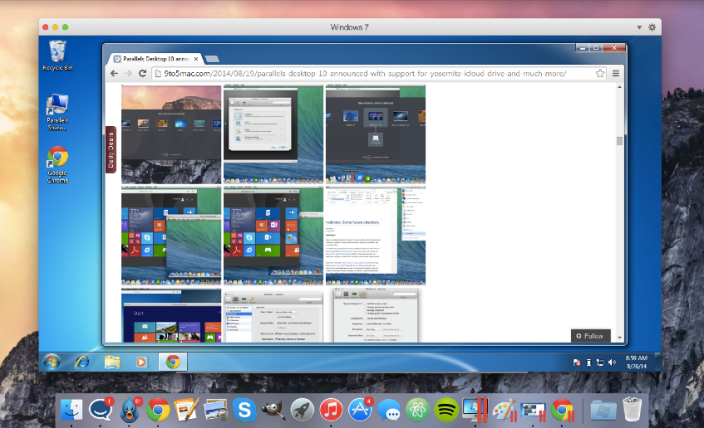
2014-08-26 08-59-52 2014-08-26 09-00-07Last week, Parallels launched the upgrade to v10 of their software and today, you can now get the full version online.

Parallels Desktop has long been one of the go-to applications for using your Mac to virtualize a wide variety of operating systems, and many considered its previous version 9 as more than sufficient for getting this job done. While the software shining point has always been its ability to run Windows truly parallel to the standard Mac OS X desktop, this version of Parallels Desktop 10 for Mac takes multiple strides forward, making it even easier than before to incorporate Windows-only applications—or applications from other x86 operating systems including Android, Chrome, Linux, etc.—into your Mac-based workflow.

Perhaps most importantly, Parallels again ups the ante in speed both in launching and runtime, turning virtualization into a native-feeling experience.


Expand
Expanding
Close

Site default logo image

Dropbox for iOS updated w/ search support within Word and PowerPoint documents, larger GIF support, more

A minor update to Dropbox for iPhone and iPad is out today bringing a few new features and enhancements.

With Dropbox version 3.3, the app now supports search within Microsoft Word and Microsoft PowerPoint documents. Dropbox says this improvement is due to “new, higher fidelity previews” available in this version. The latest update also adds larger animated GIF support and “smarter caching” which users with low storage availability will appreciate.

The latest version of Dropbox is rolling out now on the App Store.