Latest

Estimote introduces iBeacon power management tools for extending battery life

Site default logo image

Estimote iBeacon beacon screen grab

Estimote, the company behind the iBeacons I tested in my Launch Center Pro 2.3 coverage and used by easyJet in select European airports, is introducing a round of improvements to its beacon product line and corresponding software today. The primary focus of the improvements deals with power management and how Estimote’s iBeacons consume battery. In short, Estimote’s iBeacons are getting smarter about how they connect and stay powered by adding two beacon power modes including Basic and Smart…


Expand
Expanding
Close

Review: Wiper encrypted messaging/calling app with neat erase feature (and iOS 8 update details)

Site default logo image

Yes, another secure and ephemeral messaging app. There’s Wickr, Snapchat, Confide, so what makes Wiper Messenger different? I’ve had the chance to play around with the new free chatting app on iOS, and it seems to act as a fusion of WhatsApp, Snapchat, and Wickr. The app prompts you for your email address or phone number in order to create your account, and then you are brought to a fairly simple interface with three tabs across the bottom: Chats, Contacts, and More. Let’s go tab-by-tab:


Expand
Expanding
Close

Site default logo image

Google Maps for iOS adds mapped search results and Gmail appointments, more

Google today updated its Maps application for iPhone and iPad to version 3.2 introducing new features and improvements.

The latest version of Google Maps now supports viewing search results with descriptions directly on the map view. Gmail users will notice appointments and reservations with addresses will now appear the map view as well. The update supports changing between the map view of results and the list view of results and features an explore view for discovering new locations to try out.

Google Maps 3.2 for iPhone and iPad is out today on the App Store.

Site default logo image

Adobe updates Photoshop Express for iOS with blemish removal tool, RAW importing, more

Adobe has actively been rolling out new and powerful tools for the iPhone and iPad in recent months including Lightroom Mobile for iPad followed later by Lightroom Mobile for iPhone and Photoshop Mix as well as Adobe Voice for creating storytelling from iPad.
Expand
Expanding
Close

Site default logo image

MLB.com gets All Star update allowing subscribers to watch Home Run Derby, Stream All Star Game, Breaking news and more

Screen Shot 2014-07-10 at 10.31.00 AM

MLB.com at Bat’s iOS application today received a significant update in line with the league’s All Star Game. Today’s update brings live video coverage to the app along with notable breaking news alerts:

  • All-Star Week 2014 events support with live coverage
  • Watch the All-Star Futures Game and Home Run Derby live from Target Field
  • MLB.TV Premium subscribers can watch the live stream of the 85th All-Star Game
  • Breaking news live alert integration into news reader
  • Overall usage improvements

MLB is also starting phase 2 of its iBeacon roll-out with new features through the At the Ballpark app at the upcoming All Star Game:

Fans attending All-Star events at Target Field with At the Ballpark on their iPhone (iOS 7 required) will be able to use iBeacon when visiting these attractions, offering a unique mobile perspective through original content automatically delivered to their iPhone. The locations in Target Field are: The Golden Glove; Twins Digital Clubhouse; 2 Gingers Pub; Target Field Ballpark Model; 573 and Herb Carneal Pressbox; Kirby Puckett Atrium; Rod Carew Atrium; The Townball Tavern; and Target Plaza.

The free update, which is available for the iPad, iPhone, and iPod touch, is now available on the App Store. Subscriptions to the service cost $9.99 per year or $2.99 per month. 


Expand
Expanding
Close

Site default logo image

LinkedIn reimagines its Contacts app debuting LinkedIn Connected for iPhone

LinkedIn has steadily been iterating on its Contacts app for iPhone since it debuted just over a year ago, and today the business-focused social network is rebranding that app as LinkedIn Connected. The focus on rethinking its approach to contacts comes after LinkedIn shut down its Intro feature on iPhone after a rather short run.

LinkedIn says the new version of its app focuses on actively strengthening your relationships with your contacts rather than just managing your contacts list passively. The social network says its LinkedIn Connected app presents important information about your connections like changes in job status, work anniversaries, birthday, and more. LinkedIn describes one benefit of its new Connected app as having access to “pre-meeting intelligence” as a way to make a better impression and start better conversations.

LinkedIn Connected 2.0, which replaces LinkedIn Contacts for iPhone, is available today on the App Store. LinkedIn Connected joins the dedicated LinkedIn app, LinkedIn Pulse, LinkedIn Job Search, and LinkedIn Recruiter.

Site default logo image

Minecraft Pocket Edition gets biggest update yet w/ infinite worlds & much more

Minecraft Pocket Edition, the iOS version of the popular Minecraft PC game, is getting what developer Mojang says is the app’s biggest update yet today. Version 0.9.0 introduces a number of new features carried over from the original game including infinite worlds, much improved caves, wolves, new items, and much, much more.

In addition, Mojang is bringing over new biomes from the PC version of the game with mesas, jungles, swamps and extreme hills, and you’ll also notice abandoned mineshafts, villages and “new feature generation, including lakes, vines and monster rooms.” That doesn’t even include a fraction of what’s actually included in today’s update. A full list of new features from new blocks to new and updated features for biomes, mobs, AI and feature generation is below.

The game also receives some welcomed UI tweaks in the update including a new “interaction” button that Mojang hopes will cut down on accidental sheep punches.

Infinite worlds!
Caves!
Loads of new blocks and items including Monster Eggs and huge mushroom blocks.
Wolves! Tame a loyal companion.
Loads of new flowers! So pretty.
New mobs, including the spooky endermen and less spooky Mooshrooms.
New biomes from the PC version, including mesas, jungles, swamps and extreme hills.
Abandoned mineshafts, villages, and many other cool places to explore.
A brand-new “interaction” button. Never accidentally punch a sheep again!
New feature generation, including lakes, vines and monster rooms.
Many bugs fixed, and possibly a few added.

The updated Minecraft Pocket Edition version 0.9.0 is available now on the App Store for iPhone and iPad.

The full huge list of what’s new via Mojang is below:

New features

  • Unlimited worlds!
  • New culling algorithm
  • New culling of clouds
  • Tile entities are saved differently
  • New falling mechanics for gravel and sand
  • New insta ticking of water and lava

New blocks

  • Podzol
  • Mycelium
  • Huge mushroom blocks
  • Cocoa
  • End portal frame
  • Double plants
  • More stairs/slabs for new wood types
  • New log types (savanna tree and dark oak)
  • New leafs (savanna tree)
  • Monster egg
  • Stained clay
  • Waterlily
  • New flowers
  • Red sand
  • Hardened clay
  • End stone
  • Granite
  • Diorite
  • Andesite
  • Emerald block
  • Emerald ore
  • New leveldb based saving format
  • New entity handling
  • New crafting screen
  • Remade network code (mostly the same packages but new system).
  • New interact button (to make the game easier for new players)

New mobs

  • Slimes
  • Endermen
  • Wolves
  • Mooshrooms
  • Silverfish

New and updated biomes

  • Deserts
  • Extreme hills
  • Forests
  • Redwood taiga
  • Roofed forests
  • Frozen
  • Jungle
  • Savanna
  • Mesa
  • Mushroom island
  • Taiga
  • Deep ocean
  • Swamps

New world feature generation

  • Sand
  • Boulders
  • Ice patch
  • Ice spike
  • Spike
  • Lake
  • Double plants
  • Ground bushes
  • Fancy oaks
  • Jungle tree
  • Mega jungle tree
  • Mega pine tree
  • Savanna tree
  • Swamp tree
  • Huge mushroom
  • Tallgrass
  • Waterlily
  • Vines
  • Melons
  • Pumpkin
  • Dead bush
  • Monster rooms
  • Desert well
  • Fallen logs
  • Emerald ore

Tweaks to caves

  • Lava at the bottom of caves
  • Caves in desert and mesa
  • Strongholds
  • Villages
  • Villagers
  • Abandoned mine shafts
  • Flat world generation
  • Limited world generation
  • “New” mob spawning
  • Updated light generation
  • Grass color for different biomes
  • Foliage color for different biomes
  • Water color for swamps

New AI

  • Spiders
  • New leaf rendering
  • Added more spawn eggs in Creative Mode
  • Added immersive mode for Android
  • Added drip particles for water and lava
  • Updated create world screen

Tweaks and bug fixes

  • Correct name for stairs, slabs and spawn eggs
  • Beds no longer gives full health in normal difficulty
  • Smooth lighting added for:
  • Beds
  • Fences
  • Walls
  • Cobwebs
  • Chests
  • Leaves
  • Smooth lighting removed for:
  • Glowstone
  • Glass
  • Jack ‘o’ lanterns
  • Improved performance of TNT
  • Prettier clouds
  • The fog is darker underground

Known Bugs

  • The block highlight flickers (z-fights) when more than 10k blocks distant from spawn
  • Changing the view distance while in a world might crash the game
  • If players walk too far from each other in multiplayer, they can’t see each other

Known bugs requiring attention

  • Multiplayer is a bit fragile. Please test it and report all issues to us!
  • The LevelDB save format + upgrading of old maps. Please report any data corruption!
  • Crashes in general – uncommon and random crashes might still happen

Capo touch brings music learning to iOS, Mac version adds iCloud Sync and more

Site default logo image

Capo touch

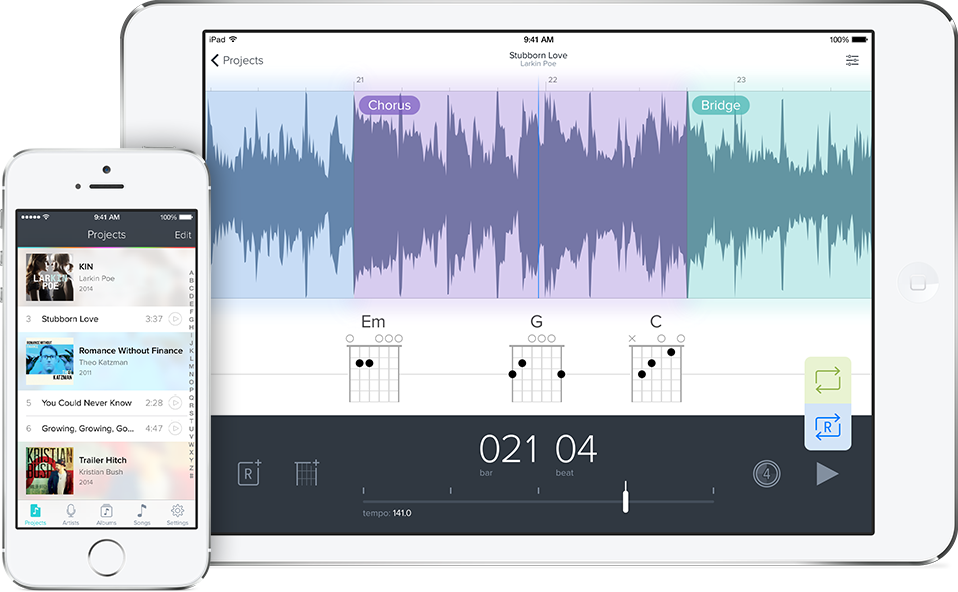
Earlier this year we showed you Capo, the software that turns your iTunes library into songs you can learn to play on guitar, when version 3.0 of the music learning software for Mac was released. Today SuperMegaUltraGroovy is releasing the first mobile version of that powerful software for iPhone, iPad, and iPod touch, and the developers are updating the Mac version with brand-new features as well.

Using Capo touch on iOS is as simple and easy as you would expect featuring super fast access to music stored locally on your device with cool features like the ability to speed up and slow down music as well as suppress the vocals of a song to focus on the music.
Expand
Expanding
Close

Site default logo image

Google releases AdWords Express app for iPhone and iPad

Google today released an iOS app for its AdWords Express advertising service. The app, which is available for only Google’s automated AdWords Express advertising service aimed at small businesses, allows users to view stats from advertisements created with the service, edit the advertisements, adjust budgets, and get notifications related to campaigns directly from within the iPhone or iPad app:

AdWords Express helps you reach new customers on Google. Create your ad in less than 15 minutes, and only pay when potential customers click your ad to visit your website or give you a call. Stay connected to how your ad is doing — all from your mobile device.
– See how many calls, clicks and views your ad is getting
– Edit your ad text or adjust your budget anytime
– Get notified with important messages in your account
– Have questions? Call us at 1-855-235-8904 for free setup help
The app is free to download, but you’re required to enter billing information to pay for your ads.

Google already had an AdWords Express app available for Android users, but it doesn’t yet have mobile apps for its full-fledged AdWords service. On the flip side of the AdWords business, last year publishers got an official AdSense iPhone app from Google for monitoring advertising and revenues.

The Google AdWords Express app is available on the App Store now for iPhone and iPad users in the US.

iPad screenshots below:

Fleksy keyboard for iOS 8 set for fall release with support for over 40 languages

Site default logo image

fleksy

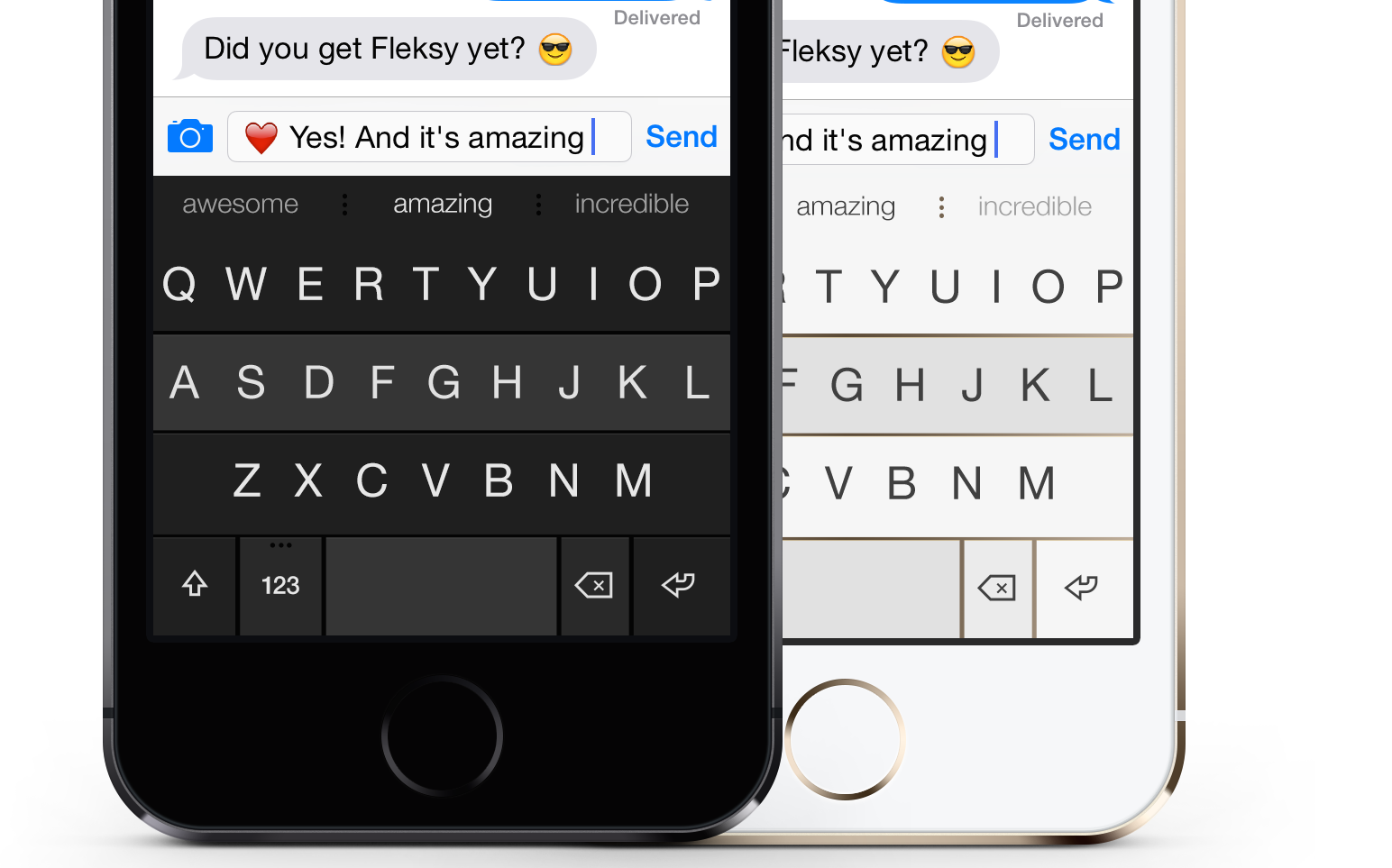
The popular Fleksy keyboard for Android will be making its way to iOS 8 this fall, according to the company behind the software. While the keyboard isn’t quite ready for a public beta, the developers say it will be ready by the release of the next-generation mobile OS.

Keeping in line with today’s update for the Android version, the iPhone version is on schedule to ship with support with over 40 languages.

The Fleksy keyboard has been available on iOS in the form of a standalone app for some time now, but with iOS 8’s support for third-party keyboards, it will finally be available systemwide. The native keyboard has already been demoed by the Fleksy developers earlier this year.

Site default logo image

MapQuest navigation app updated with improved ETAs, baseball guides, airport maps and more

maps

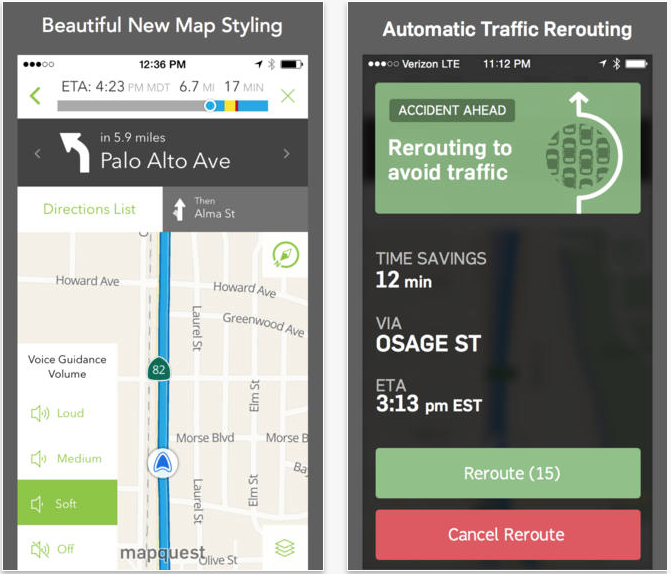
Navigation app MapQuest has been updated to version 4.4, offering more accurate ETAs thanks to better traffic data; an app-specific volume control that allows you to set the voice navigation volume independently of other apps; Ballpark Guides to MLB stadiums and airport maps; and GrubHub integration to allow you to order food from take-out restaurants before the app navigates you there to collect it.
Expand
Expanding
Close

Site default logo image

European airline easyJet rolling out iBeacon support to select airports

Since Apple introduced iBeacon functionality alongside iOS 7, several different use cases have popped up allowing various retailers, sporting venues, and others to interact with visitors’ devices using the technology. Deploying iBeacon support enables iPhone users to receive relevant information through apps based on very specific location without taking a major hit to the device battery.
Expand
Expanding
Close

Site default logo image

Google Play Music for iOS updated w/ gapless playback, ability to download subscribed playlists, more

Google this afternoon started rolling out an update to its Play Music app on iOS with a handful of new features. The update bumps the app to version 1.3.0.2190. Firstly, the update finally adds support for gapless playback, which means that there is no pause between the end of one song and the beginning of another. The update also adds the ability to download subscribed playlists in one tap, allowing you to listen to them without a data connection.


Expand
Expanding
Close

Skype 5.2 for iPhone brings back missing voice message support

Site default logo image

Skype rolled out a major redesign from the ground up to its iPhone app last month with feature improvements like in-app banner notifications and greatly improved message statuses across versions of the software, but regular Skype users were quick to note that the update initially lacked support for voice messages. Voice messages simply could not be accessed from the iPhone version. When Skype released version 5.1 quickly after the initial launch, users voiced more concerns that the feature was still absent with the only solution being to access voice messages on another platform using Skype.

Today in a blog post, Microsoft has announced that Skype 5.2 adds the useful feature back to the iPhone version of the app with voice messages showing up in line from other users. In addition to voice message support returning, the latest version also adds a new way to view contact information and add contacts into existing message threads.
Expand
Expanding
Close

Site default logo image

Sunrise Calendar announces new Mac client with offline mode, third-party app integration

Just a few weeks after rolling out a major update its iOS apps, Sunrise Calendar today announced the first version of Sunrise for Mac. Sunrise for Mac includes a variety of features and capabilities, many of which are similar to what you’d find in the company’s iOS apps. On OS X, the app takes almost all of its design cues from the iOS client with color-coded events, although the team notes that the Mac client was built “specifically for the desktop.”


Expand
Expanding
Close

Facebook Messenger finally arrives on iPad, complete with calling and stickers

Site default logo image

Facebook today updated its Messenger for iOS app finally adding a full iPad version. The iPad version works like the version found on the iPhone and iPod touch but takes advantage of the much larger display by showing more content like message threads while in other messages. The iPad version also features the same calling features found on the iPhone and iPod touch versions. Facebook’s various supported sticker packs are also featured on the messaging app for iPad.
Expand
Expanding
Close

Site default logo image

iMovie for Mac updated with stability improvements and bug fixes

screen800x500

Apple updated iMovie for Mac today with fixes for bugs that could cause the app to crash. This is only the fourth update to the app since it was redesigned last year, but so far this seems to be the smallest. Most of the other updates have included new features or at least listed which bugs were being fixed.

You can grab the update for free if you already own iMovie 10.0, or buy the app for $14.99 from the Mac App Store.

What’s New in Version 10.0.4

• Improves stability and resolves issues that could cause iMovie to quit unexpectedly

Site default logo image

Tweetbot for Mac updated to view and upload multiple images on Twitter’s native photo service

screen800x500

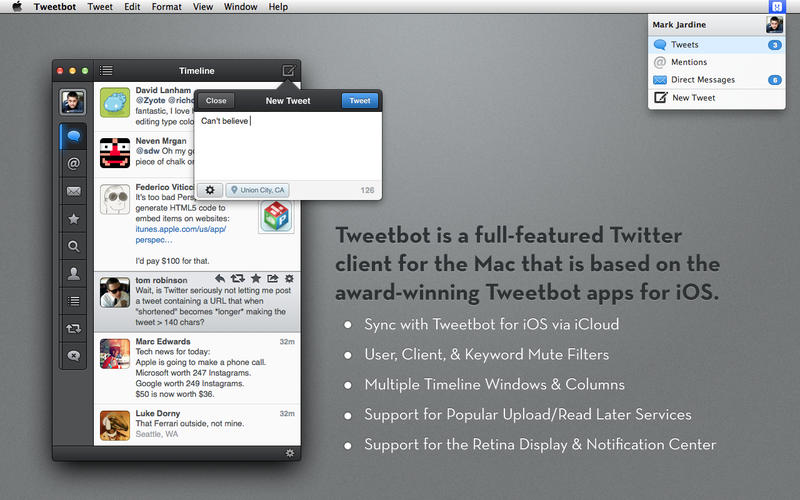
Tweetbot for Mac, the popular desktop Twitter client from Tapbots, has been updated to version 1.6 today. The update introduces support for viewing and uploading multiple images on Twitter’s native photo sharing service. The new version also includes a “play” icon on Instagram videos to better differentiate them from photos on the same network. You’ll also find “various bug fixes” in this version.

Tweetbot for iPhone got support for multiple images in its last update, so this once again brings the two apps in-line, feature-wise. The full change log for Tweetbot for Mac 1.6 is below:

What’s New in Version 1.6

– Support for viewing/posting multiple twitter images (multiple images won’t show up in search or streaming timeline until Twitter enables it in the future)
– Instagram videos now marked with play icon
– Various bug fixes

Site default logo image

Yahoo brings its personalized Mail experience to iPad, adds filter support

Earlier this year Yahoo introduced a new version of its Mail app for iPhone that added additional content like web search, sports scores, weather information, and news events to the email client making the experience more like the web experience in terms of consuming content. Today Yahoo released an updated version which extends the web-like experience to the iPad version as well:
Expand
Expanding
Close

Site default logo image

Pebble smartwatch updated with improved Bluetooth and notification management

Pebble has updated its smartwatch software and iOS app to bring various improvements, including improved Bluetooth LE connectivity and quick notification management. The notification improvements are shown in the brief video clip above. Here are the release notes:

Pebble Firmware 2.3 (Release Notes)

  • Improved Bluetooth LE connectivity.
  • Added the ability to skip to the next notification with a double-click of the Down or Up buttons.
  • Bug fixes and stability improvements.

iOS Pebble App 2.2.2 (Release Notes)

  • Enabled more new JavaScript apps to be downloadable in the Pebble appstore (Pebble apps included in this latest bundle will no longer say “Coming Soon” for iOS users).
  • No other major changes  from version 2.2.

The updated Pebble software is available via the Pebble app’s software update function and you can grab the latest Pebble for iOS via the App Store for free.


Expand
Expanding
Close

Apple announces iTunes U update with iPad Course Creation, Student Discussions & more

Site default logo image

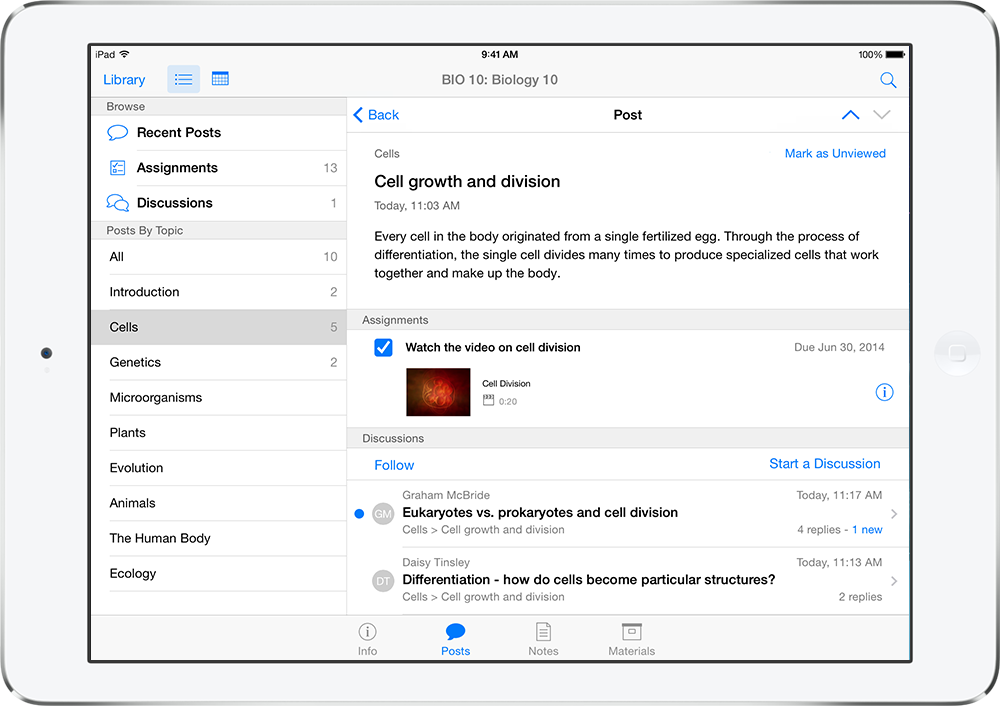
iPad_itunesu_Postbiology2

Screenshot showing new iTunes U “Student Discussions” feature

Apple today announced an update to its iTunes U educational app that includes a number of new features for iPad including course creation tools, a Student Discussions feature and improved management tools for teachers.

“Education is at the core of Apple’s DNA and iTunes U is an incredibly valuable resource for teachers and students,” said Eddy Cue, Apple’s senior vice president of Internet Software and Services. “iTunes U features an amazing selection of academic materials for everyone around the world. Now, with the ability to better manage and discuss educational content, learning becomes even more personalized on iPad.”

The new features will begin rolling out July 8 with the ability for teachers to create and manage previously uploaded lessons directly from the iPad. Apple says the course creation features will let teachers grab content from iWork, iBooks Author or “any of the over 75,000 educational apps available for iPad.” It will also let teachers use the iPad’s camera to include shots and video of real-world items in courses. The course creation feature will be available to educators in all 69 with the materials they create distributed in up 155 countries. 

As for students, a new Discussions feature will bring a social element to the app allowing students and teachers to easily interact with one another: With Discussions in the iTunes U app, students can automatically follow classroom discussions and join conversations on new topics, or set up push notifications for when new topics are started or replies are added to active exchanges. Teachers can participate in forums too, and have the ability to moderate discussions by removing any off-topic messages or replies.

In its press release, Apple said “nearly 30,000 Multi-Touch™ books have been created by independent teachers and publishers worldwide.”


Expand
Expanding
Close

Apple releases updates for Final Cut Pro, Motion, Compressor, and MainStage

Site default logo image

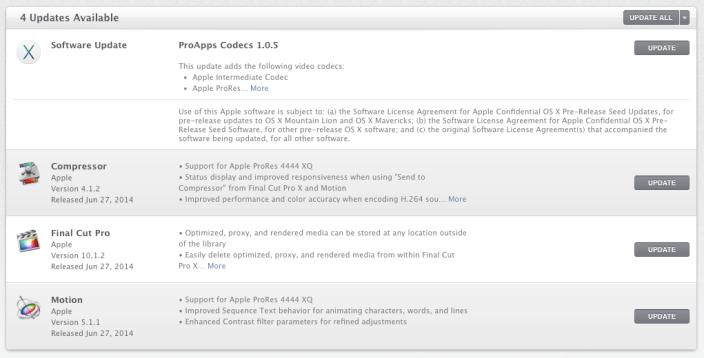
Screen Shot 2014-06-27 at 12.58.55 PM

Shortly after announcing that its pro photography app Aperture is being discontinued, Apple released a number of updates to its remaining professional desktop applications. Final Cut Pro, Motion, Compressor, and MainStage on OS X all received updates via the Mac App Store today. See the changes for each professional desktop application below:
Expand
Expanding
Close

Site default logo image

Opera Mini for iOS gets redesign, themes, QR code reader & much more

Opera Mini, the mobile version of Opera’s desktop web browser, today gets updated to version 8 with a brand new UI and much more.  On top of a completely redesigned UI that makes the app fit in nicer with iOS 7, the update also introduces enhanced options for Opera’s power saving and compression modes that offers data savings:

Opera Mini 8 lets you choose from three different modes of exploring the vast world of the web:

* Opera Mini mode offers huge compression of web traffic, up to 90%, and data savings. In areas with poor coverage and tough network conditions Opera Mini saves both time and money.

* Opera Turbo mode saves slightly less data than Opera Mini mode, but offers better website compatibility, making it the ideal browsing mode for most users.

* Data savings off is a no-compression, straight-to-the-source option, that ensures maximum website compatibility.

Also new in the updated version of Opera Mini is a new and improved customizable Speed Dial page, a Discover tab that serves up content from your favorite sources, and a new tab gallery. The app also makes it easier to switch between search sources, offers the ability to share URLs via QR codes, and introduces customizable themes.

The app is available on the App Store now for both iPhone and iPad. Screenshots of the iPad app are below: