Latest

Adobe unveils Document Cloud w/ Acrobat Mobile and Fill & Sign apps for iOS

Site default logo image

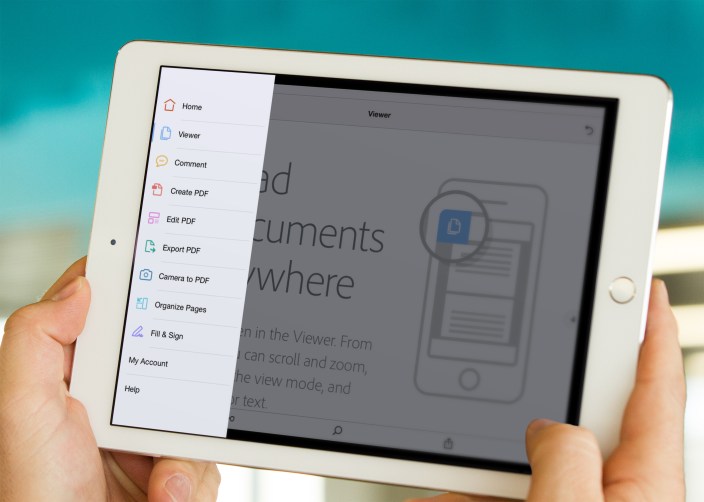
Acrobat DC Mobile App Tools View On iPad

Adobe is taking its document strategy to the cloud with its latest service. Taking the same approach as its Creative Cloud Suite of apps for creators, Adobe is revealing its new Document Cloud service alongside two new apps for iOS: Acrobat Mobile and Fill & Sign. The new service aims to make handling PDFs and other documents much more flexible, and the new iOS apps can bring paper documents into the Adobe Document Cloud for work on the go…
Expand
Expanding
Close

Site default logo image

Tado smart thermostat gets IFTTT channel and API, can now control other devices

tado

Tado, the smart thermostat system I reviewed back in 2013, now has an IFTTT channel and an API, allowing it to control other home automation devices.

Tado° users will soon be able to connect their tado° Smart Thermostat to other appliances via IFTTT. This will enable the use of the tado° geolocation feature for purposes other than smart heating or cooling. In the very near future, when a tado° user leaves the house, not only will the heating automatically go to savings mode, but simultaneously the lights switch off, the alarm system activates, the garage door locks and landline calls reroute to their mobile.

The company says that the API will allow developers to integrate Tado into other home automation apps. The company is also working on HomeKit support.

IFTTT introduced three simplified apps last month to make the service more accessible to non-technical users, while rebranding its full-fat app as IF.

Ending! $40 Mac Bundle: Things, ScreenFlow, Typed, Civ, ExpanDrive, Aftershot Pro 2, more

Site default logo image

Mac-software-bundleUpdate: Ending in 24 hours

9to5Toys Specials has put together a really impressive bundle of 8 Mac apps including the latest versions of Screenflow and Things (which are $100 and $49 at the Mac App Store by themselves!).

Using the coupon code ULTRAMAC5 at checkout, 9to5 readers can get an extra $5 discount over at Specials.9to5Toys.com to buy the whole bundle for $39.99 – that’s 91% off from the $470 retail price. 

Every app’s latest version is included, none of which has ever been in a bundle before (except AfterShot Pro 2). In fact, 6 of the apps cost more by themselves than the whole bundle(!!)

Here’s what’s in the goodie bag:

  1. ScreenFlow 5 ($99.99) – The best screen recording tool for Mac. Version 5 was released in October and has never been in a bundle before.
  2. Things 2 ($49) – Award-winning task management app that’s never been in a bundle before.
  3. Civilization: Beyond Earth ($49.99) – The latest in the epic Civilization series.
  4. ExpanDrive 4 ($49.95) – Slick utility app.
  5. ProSoft Data Rescue 4 ($99.99) – Market leader in data recovery. This is the new version 4.
  6. AfterShot Pro 2 ($79.95) – A very solid photo editor, and the only app included that’s been in a bundle before.
  7. Typed ($24.95) – A new text editor that has gotten a lot of hype and acclaim out the gate.
  8. Snapselect ($24.99) – Handy new photo app from MacPhun.

In all, the value is almost $470, and with the coupon code “ULTRAMAC5” 9to5 readers can grab it for $39.99 (91% off). You have 24 hours left. 

Site default logo image

Oddworld: Stranger’s Wrath comes to Mac, syncs game progress over iCloud with iOS version

Oddworld-stranger-wrath-Mac-01

After a remastered release of critically acclaimed console game ‘Oddworld: Stranger’s Wrath’ on iOS devices last year, today the title officially arrives for Mac users via the Mac App Store.

New for the Mac version of the game: iCloud integration so you can save and continue playing on iOS, gamepad support and fully mappable keyboard/mouse controls, Game Center achievements/leaderboards, and support for all Mac resolutions including Retina displays and the new 5K iMac.

The 20+ hour game developed by Oddworld Inhabitant is one of the latest releases in the popular Oddworld series despite having first launched around 10 years ago on the original Xbox. The well-received game ditched the classic Oddworld scrolling puzzler gameplay and instead offers a half first-person shooter, half third-person platformer with lots of the usual Oddworld exploration and a theatrical soundtrack.

Oddworld: Stranger’s Wrath is available for $9.99 on the Mac App Store now. Launch trailer below:

[youtube=https://www.youtube.com/watch?v=ZlxbXSXeHfU]

Site default logo image

Starbucks expanding iPhone app ordering/payment to 650 more locations

Starbucks announced today that it’s expanding a pilot for its iPhone app that allows customers to both order and pay for items on their mobile device.

Originally started as a test in Portland in December, the expansion will bring the feature to 650 Starbucks locations in the Pacific Northwest, including: Washington, Idaho, Oregon and Alaska. Starbucks also said it would continue a national roll out of the service to other locations throughout 2015:

Mobile Order & Pay represents a significant opportunity for Starbucks to continue its leadership position in mobile commerce and customer loyalty. Starbucks plans to continue a national rollout throughout 2015.

You can expect the additional 650 locations to go live later this month on March 17.

The Starbucks iPhone app is available for free on the App Store.

Site default logo image

Amazon Game Studios announces four games coming soon to iOS

Amazon Game Studios announced today that it’s bringing four games to iOS devices starting with two previously released only on Android and two new titles coming soon.
Expand
Expanding
Close

Site default logo image

CNN app gets a Notification Center widget, sports section on iOS

IMG_0058

CNN today pushed out an update to its iPhone, iPad, and iPod touch application with a pair of features that some users will find significant: a Today widget for iOS 8’s Notification Center and a sports section. The widget is populated with the latest top stories from CNN, while the sports section sources its content from Bleacher Report, which has a dedicated App Store app (iPhone, iPad). CNN also says this version includes various bug fixes, like every app update that has come before it.


Expand
Expanding
Close

Site default logo image

Google Docs, Sheets, & Slides iOS apps now let you ‘Make a copy’, copy links to clipboard, more

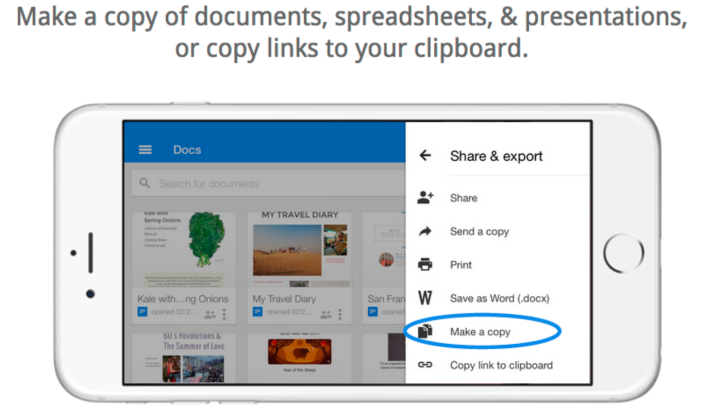
Google-Docs-Sheets-Slides-01

Google is rolling out updates to its Google Docs, Sheets, and Slides apps for the iPhone and iPad today bringing the ability to make a copy of a document and more.

In addition to the new “Make a copy” function for documents, spreadsheets, and presentations across all three apps, you’ll also now be able to copy links to your device’s clipboard. Sheets and Slides also receive a new “accessibility settings menu when VoiceOver is enabled.”

The updated apps also arrive with bug fixes and a few other minor enhancements.

The latest version of Google Docs, Sheets, and Slides will be hitting the App Store today.

What’s New in Version 1.2.6936

* Make a copy of a document
* Bug fixes and performance improvements

Site default logo image

Gmail for iOS updated w/ share sheet support, ability to archive & reply to email via notifications

Google this morning has released a major update for Gmail on iOS. The update bumps the app to version 4.0 and packs a handful of new features. First off, Gmail on iOS now supports the ability to archive and reply to messages directly from a notification, a feature many have been requesting since iOS 8 launched.


Expand
Expanding
Close

Back to the Mac: Microsoft releases redesigned Office for Mac 2016 Preview w/ Retina support, collaboration, more

Site default logo image

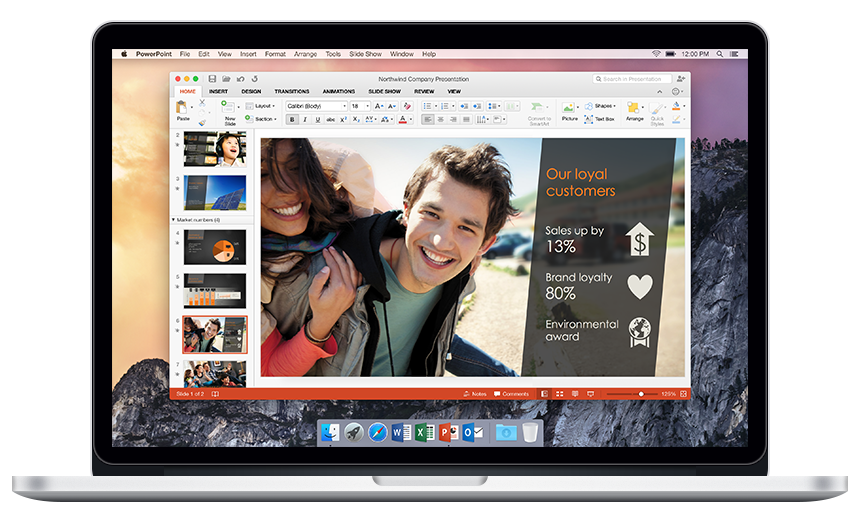
PowerPoint 2016

Before today, the latest versions of Word, PowerPoint, and Excel for OS X came with Office for Mac 2011, a suite of productivity apps which you can tell from the name included dated software without many modern features Mac users expect. Office for Mac 2011 was actually first released in October 2010. A lot has changed since then.

Microsoft moved Office from a paid upgrade approach to a cloud subscription model, saw its CEO Steve Ballmer retire and buy a basketball team, appointed Satya Nadella as head of the company, and even released Office for iPad and iPhone.

For the Mac, though, the most capable versions of Word, PowerPoint, and Excel have only been available as Web apps—not native—until now. As promised, Microsoft is today releasing the public beta of Office for Mac 2016 including all new versions of the company’s go-to productivity apps.
Expand
Expanding
Close

Numerous will put number tracking on your wrist with upcoming Apple Watch app (Photos)

Site default logo image

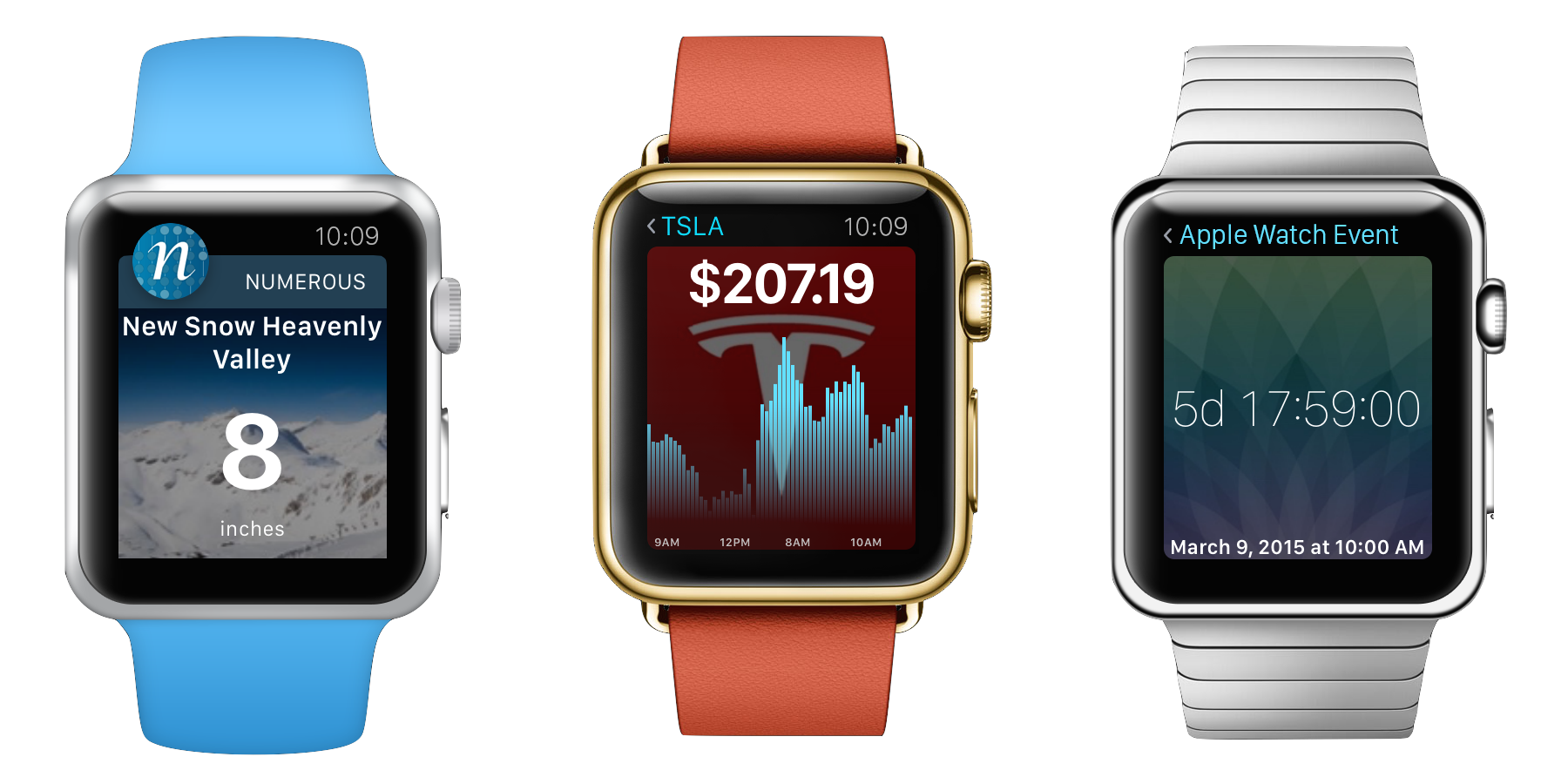
Numerous Apple Watch II

The Apple Watch is expected to take stage on Monday ahead of its aniticipated debut next month, and with it will come a whole new class of apps based on the iPhone that present information on the wrist. Today we got the first look at what Numerous, my favorite number tracking app for iOS, has planned for the Apple Watch as soon as it starts shipping.
Expand
Expanding
Close

Site default logo image

RadPad now lets you easily split rent with roommates using Apple Pay

roommate_launch1RadPad, an app we told you about back in November when it launched as one the first to let you pay rent using Apple Pay, now lets you easily split rent with roommates.

Pay with RadPad Roommates makes it really, really easy for renters who have roommates to pay their rent together, using their own credit, debit card or Apple Pay… A roommate signs up and invites their other roommates to pay rent together: RadPad sends invites to each roommate, via text and email. The roommate receives the invite, accepts it and then enters in their credit or debit card or elects to use Apple Pay. That’s it!

You’ll also be able to see when your roommates are slacking with status information on their half of the rent.  The app allows up to four roommates to split the rent and sends a check to the landlord on behalf of the tenants. You can even setup rent payments to your landlord through the app if they aren’t using RadPad.

RadPad tells us it’s expecting to process $14M in annual rents this year after launching in October.

The RadPad app is available on the App Store for free.

Site default logo image

Intuit’s Mint app adds new bill reminder features, accessibility improvements, more

The popular Intuit-owned Mint finance management app updated to version 4.1 today adding new bill reminder features, more accessibility support, and general improvements all around.

Highlighted in the new version is the ability to manage bill reminders right from the app. For the iPhone version, bill reminders can be created, edited, and managed from the latest version of the app. A change to the Overview tab wraps all this together.

Mint has also enhanced the newly added Updates view to show upcoming bill due dates. The new Upcoming Bills Card will present any bills with a due date within the next seven days.

In terms of accessibility, Mint has added support in a number of areas of the app. This includes the login, signup, split transactions and transaction detail pages.

Mint 4.1 for iPhone and iPad is available for free on the App Store.

Site default logo image

Sonos Controller app updated w/ quick Rooms access, new iPad UI, improved search, more

Sonos is today rolling out version 5.3 of its Sonos Controller app for iOS to introduce a few new features and a tweaked user interface. 

The feature being highlighted above others in the update is easier access to controlling the app’s Rooms feature: Effortlessly move your music around your home with a more accessible ROOMS menu available by tapping the top of any screen in the Sonos app. Group and ungroup rooms from the ROOMS menu to play music in perfect synchrony throughout your home.

Also new in the update is an updated user experience for iPad users that offers new, separate views for currently playing music and discovery features:

  • More engaging browse experience for tablets. Version 5.3 provides separate views for music discovery and what’s currently playing.
  • Last browsed on a phone or tablet. Quickly return to the last place you browsed.
    • Touch to view the last place you browsed. On your phone, you can also go back to the last place you browsed by swiping down on the Now Playing screen.
    • Touch the collapsed Now Playing screen at the bottom of the screen to return to full-screen view.

Sonos highlighted a few other new features including more readily available search and a new playback progress slider.

The updated app, version 5.3, is available on the App Store now.

What’s New in Version 5.3

SIMPLER ROOM CONTROL AND FASTER ACCESS TO ALL YOUR MUSIC.

Effortlessly move your music around your home with a more accessible Rooms menu available by tapping the top of any screen in the Sonos app.

A more engaging browse experience for tablets with dedicated screens for what’s playing and music discovery.

Simplified track progression bar, just below the album art in the Now playing screen. Drag it to whatever point in the song you want to play. This is only applicable for music sources that allow this.

Switch between screens by swiping down from the Now Playing screen to go back to browsing your music. Then swipe from far left to right to show all your music sources.

Search is now more readily available so you can quickly find and play music.

Site default logo image

Microsoft continues its iOS app acquisition spree with Prismatic, a news reader startup that Apple eyed

Prismatic

Since Satya Nadella took the reins from Steve Ballmer just over a year ago, Microsoft has been on an aggressive acquisition spree of cross platform apps and services. Most recently, the company bought the iOS email app Acompli then relaunched it as Outlook for iOS. Microsoft also bought Sunrise, the popular calendar software with an iOS app.

Aside from Microsoft and Apple, other interested buyers include or included Facebook, Google, and Yahoo (anyone missing?). Competing with Apple’s TestFlight acquisition last year, Microsoft even bought the beta distribution service Hockeyapp at the end of last year.

Adding to its list of recent mobile app acquisitions, TechCrunch reports that Microsoft is now eyeing Prismatic, a social recommendation network with apps for both iOS and Android. Prismatic describes itself as a personalized and social news reader.
Expand
Expanding
Close

Apple & IBM partnership delivers 3 new enterprise iOS apps

Site default logo image

Apple IBM Advisor Alerts

Apple and IBM today unveiled three new enterprise apps developed for iOS as part of their ongoing ‘IBM MobileFirst for iOS’ partnership. The new apps include Advisor Alerts, Passenger Care, and Dynamic Buy. The three apps, a combination of both iPhone and iPad software, join the original set of 10 announced last year and another new app recently announced bringing the collection of apps announced under the deal to 14 total across eight industries including retail, banking, and transportation.


Expand
Expanding
Close

Site default logo image

Launch Center Pro is coming to the Apple Watch

B_Bpw-ZVIAAXckN

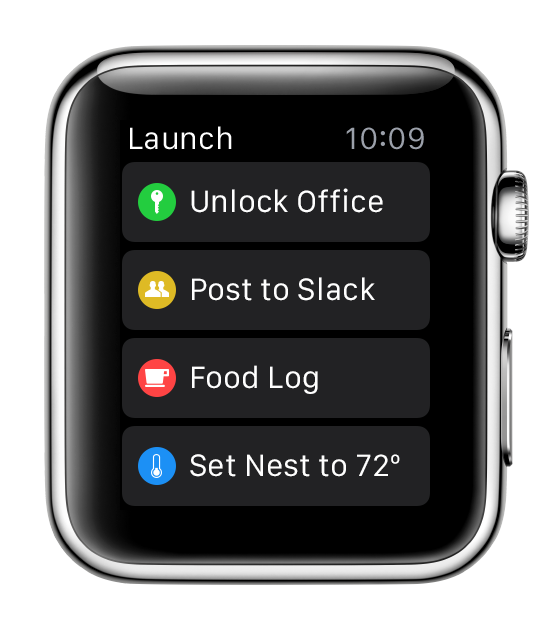
David Barnard, CEO of Contrast, has today announced that they will be bringing a slimmed down version of Launch Center Pro to the Apple Watch. You can see how the app has been transformed from the grid appearance of the iOS version to a simple list, to optimise screen real estate on the Watch’s much smaller display. This means users can initiate quick actions from their wrist, rather than digging their phones out of their pockets.

The company will ‘hopefully’ have the app available in the App Store when the Watch ships sometime in April.

Another tweet indicates that the company is working on more WatchKit apps as well.


Expand
Expanding
Close

Site default logo image

Vesper note-taking app adds first iPad version, landscape support for iPhone

Q Branch is out with a big update to Vesper, the alternative note-taking app for iOS.

Vesper 2.005 adds landscape support to the app for iPhone so you can now browse, manage, and create notes outside of portrait orientation.

The 2.005 update also includes Vesper for iPad, the first time the note-taking app has been available with a version optimized for the tablet. Vesper for iPad features the same support for landscape use as the iPhone, and Q Branch’s syncing feature keeps notes between both apps up-to-date.
Expand
Expanding
Close

VLC for iOS back on the App Store, OS X app updated alongside massive cross-platform release

VideoLAN - Official page for VLC media player, the Open Source video framework! 2015-02-27 09-32-14

VideoLAN has today launched several updates to VLC across its apps on iOS, Android, OS X, and every other platform where the app is available, marking the first time that the company has pushed such a massive coordinated release and the re-release of the iOS app. The new versions (with the main app numbered 2.2.0), include several features across the various platforms, and VLC says it took more than a year of volunteer work to put them together…


Expand
Expanding
Close

Google Maps for iOS adds POI quick facts, upcoming events for select venues, more

Site default logo image

Google is packing even more useful information into the latest version of its Maps app for iOS. Google Maps 4.3.0 for iPhone and iPad adds several contextual data points to locations like nearby businesses for address searches, quick facts for notable locations, and even event information for select venues.
Expand
Expanding
Close

Site default logo image

Pages, Numbers, & Keynote apps arrive on iCloud.com for users without Apple devices

iWork-iCloud-beta-01

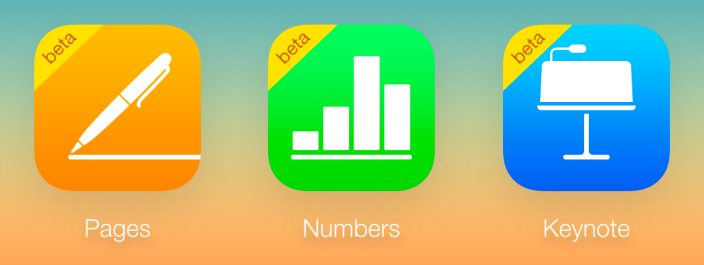
Apple has opened access to its Pages, Numbers, and Keynote apps at iCloud.com to all, even those without an Apple device (via TechCrunch). Earlier this month Apple opened the apps to those without an Apple device while offering 1GB of free storage (an iCloud account with an Apple device has free access to 5GB). However, previously access to the apps for those without an Apple device was limited to the iCloud beta site at beta.icloud.com where Apple frequently tests new iCloud features before launching them to the primary site. Today they move to the main site at iCloud.com.

While the apps themselves remain in beta mode, they are now accessible to all through iCloud on the web. 

Apple has a new FAQ with all the details regarding web-access to iCloud and the Pages, Numbers, and Keynote apps on its website.

Site default logo image

Tapbots aiming to release major Tweetbot updates for iPhone & iPad before June, Tweetbot 2 for Mac coming next


Screen Shot 2015-02-26 at 20.32.38

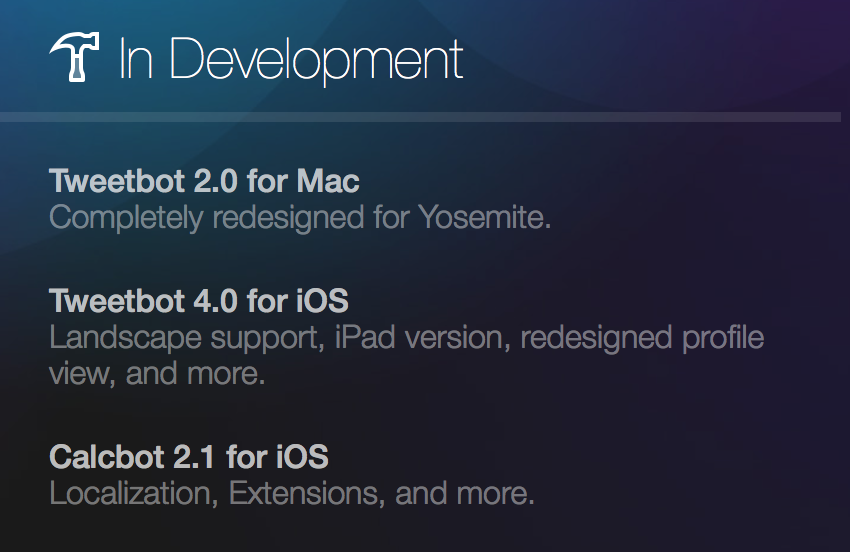
Tapbots has announced on its website that it is officially discontinuing some of its apps to focus on Tweetbot and Calcbot, for the time being. Convertbot’s features have been built into Calcbot, as we covered last week, so it’s not surprising that app is going away. Pastebot and Weightbot have also been discontinued. Although Pastebot is getting pulled, Weightbot is now free on the App Store for “sentimental value” as it is the app that started Tapbots as a company. The blog post says that the company may return to Pastebot in the future.


Expand
Expanding
Close

First Hollywood film edited with Final Cut Pro X hits theaters this week

Site default logo image

Final Cut Pro X Focus Directors

It’s no secret that Final Cut Pro X, the overhauled follow up to Apple’s widely used video editing software, wasn’t exactly a hit with its users when the app was first released in 2011.

A comprehensive change in the way the software functioned and a lack of legacy features from the prior version gave the app a reputation for being “iMovie Pro” rather than a true professional desktop video editor. Soon after its launch, Apple addressed the flood of criticism with an FAQ site and a promise that more features would slowly become available in the new version.

Nearly four years later, the first Hollywood film edited in Final Cut Pro X is set to be released. To showcase the movie debut and FCPX’s role in the film, Apple has launched a microsite detailing the production.
Expand
Expanding
Close

Site default logo image

Skype 7.5 for Mac adds 14 new languages, several performance improvements

Skype for Mac v7.0 launch.02

Microsoft is releasing the latest version of Skype for Mac today adding support for over a dozen additional languages and performance improvements for users. Beginning with Skype 7.5 for Mac, the communication app will now feature localization for the following languages: Hindi, Turkish, Czech, Ukrainian, Greek, Hungarian, Romanian, Indonesian, Catalan, Croatian, Slovak, Vietnamese, Thai and Malay
Expand
Expanding
Close