HomeKit

See All Stories

HomeKit is Apple's home automation framework that lets you control connected accessories from your iPhone, iPad, Apple Watch, HomePod, and Siri.
Your home at your command.

What is HomeKit / Apple Home?

Along with several other new APIs for developers, Apple announced HomeKit in June 2014, which allows all home automation accessories/devices to work together in harmony with iOS. The API allows home automation developers to centralize all home automation without needing separate apps to access each device’s specific features. These devices include locks, lights, cameras, doors, thermostats, plugs, switches, and more.

HomeKit allows for secure pairing with devices and the ability to control individual devices. It also makes it possible to group several home automation devices into scenes that allow for easier control of any automation device in specific situations. One of the coolest features available with HomeKit is the ability to control any home automation accessory with Siri based on certain commands or scenes previously configured with these devices.

In 2016, Apple introduced a new Home app that came with a modern look, relatively easy-to-use controls, and access to accessories and scenes from anywhere on iOS 10. Apple’s new built-in Home app arrived on the iPhone’s Home screen, plus you can access a ton of functions from the Lock screen or anywhere on iOS from the new Control Center once you have a HomeKit accessory set up.

In 2018, Apple released the HomePod. It was a way to interact with your connected home devices through Siri using a standalone device.

In 2020, Apple announced that tvOS 14 would gain access to the Home app. iOS 14 is also bringing improvement to the Home app UI.

HomeKit Secure Video
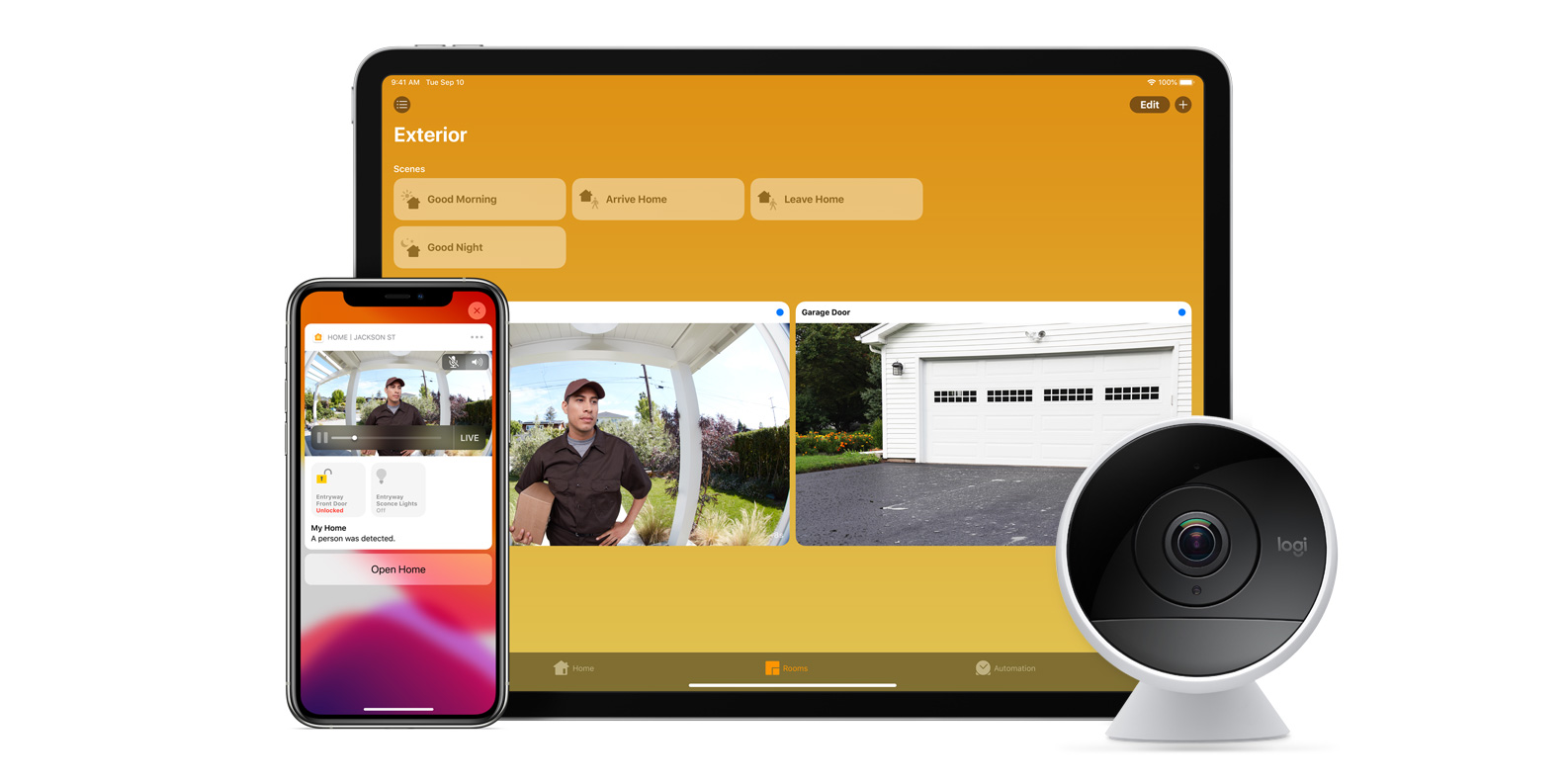
With iOS 13, Apple announced HomeKit Secure Video.

Footage from home security cameras contains your most personal and sensitive data. With HomeKit Secure Video, activity detected by supported cameras is privately analyzed by your home hub using on‑device intelligence to determine if people, pets, or cars are present. When important activity is detected, you and anyone you share your Home app with will receive a rich notification that lets you view the clip right from the Lock Screen. Recorded video is available to view for ten days from the Home app. It’s securely stored for free in supported iCloud accounts and doesn’t count against your storage limit.

While the rollout has been slow, Logitech, Arlo, Netatmo, and Eufy are among the early standouts. With recent privacy issues with Ring, HomeKit Secure Video is likely to continue to grow in popularity. One key benefit with Secure Video is that it works with your existing iCloud storage (200GB and up plan), so you don’t have an extra monthly fee for storage.

HomeKit Router
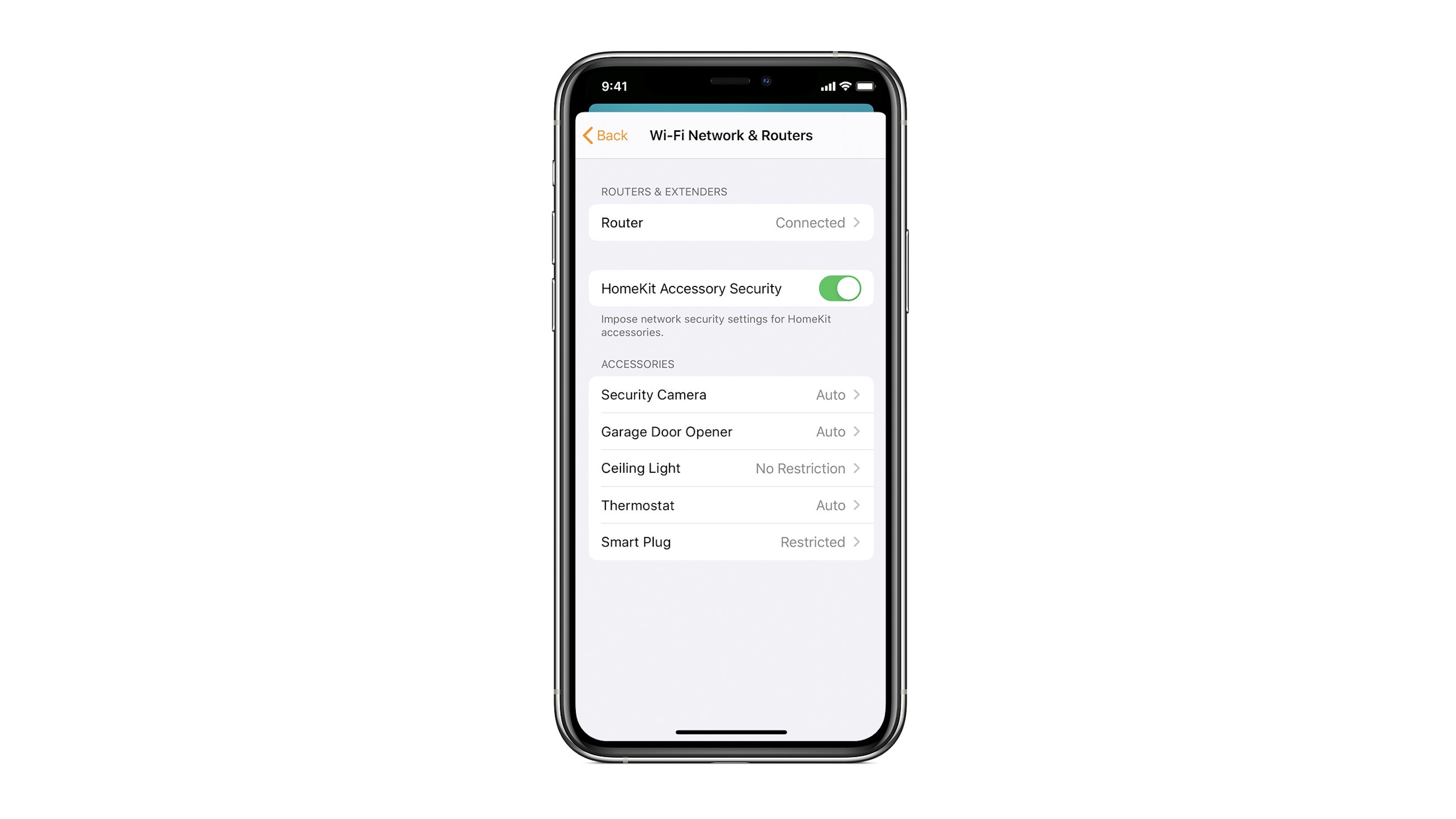
HomeKit Router was also announced with iOS 13, but it wasn’t released until early 2020. The idea behind the feature is you can give granular control to smart home enabled devices to control where on the internet they can reach.

eero was the first company to roll out support in for HomeKit Router.

With Apple HomeKit, eero gives you even more protection of your HomeKit accessories and an easy way to manage what they are allowed to communicate with in your home and through the internet.

There are three levels of security Apple offers for accessories paired with HomeKit routers:

  • Restrict to Home: Most secure. Your accessory can interact only with HomeKit through your Apple devices. The accessory won’t connect to the Internet or any local devices, so any third-party services, like firmware updates, might be blocked.
  • Automatic: Default security. Your accessory can communicate with HomeKit and connections recommended by its manufacturer.
  • No Restriction: Least secure. This setting bypasses the secure router and allows your accessory to interact with any device in your network or Internet-based service.

How Do You Use HomeKit?
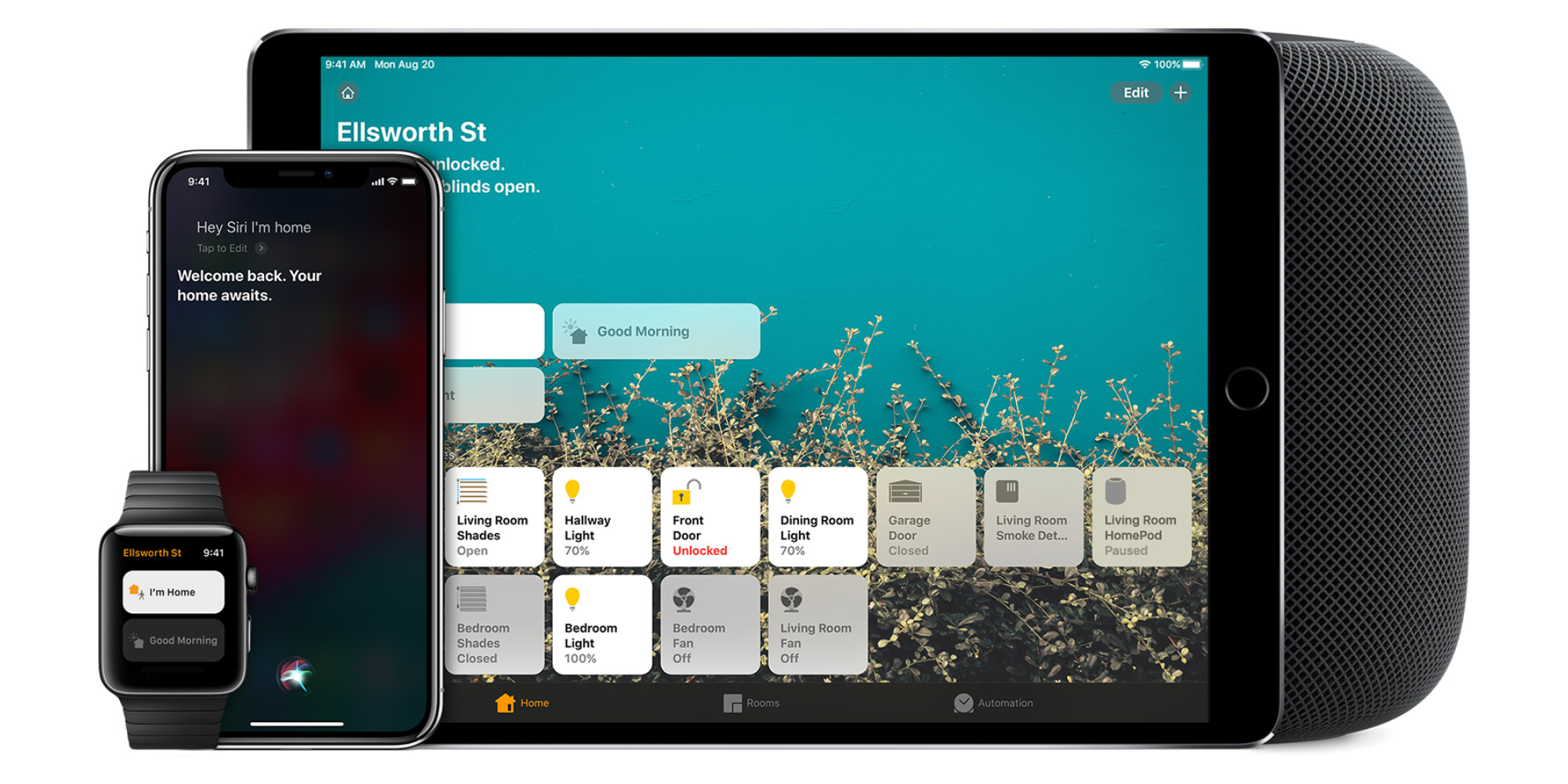
Homekit app

HomeKit devices can be controlled from iPad, iPhone, Mac, Apple Watch, and HomePod. A 4th generation Apple TV (or newer) is an essential Apple smart home device as it acts as a bridge over iCloud to allow access to your devices when away from home.

9to5Mac’s Bradley Chambers does a regular column about the “Apple Home” lifestyle in his HomeKit Weekly column.

Opinion: With Apple finally showing Siri some love, have we hit ‘peak app’?

Last year, I wrote a Feature Request asking that Apple give third-party apps access to Siri, and generally work at beefing-up both the intelligence and the capabilities of its intelligent assistant. A couple of weeks ago, I wrote an opinion piece pointing to the fact that Viv is exactly what Siri should have been by now.

This week, a report suggests that I may finally be getting my wish. Apple is said to be not only planning to offer a Siri SDK to all developers, but also building an Amazon Echo/Google Home type box that will embed Siri more deeply in the home through integration with HomeKit. We will, says the report, find out more at WWDC.

If true, the implications could be profound – perhaps even meaning that we’ve hit ‘peak app’ …


Expand
Expanding
Close

Apple patent filing hints at how HomeKit and your car could soon become smarter

Site default logo image

A recent patent filed by Apple and discovered by PatentlyApple hints at ways in which Apple is planning to make its HomeKit platform smarter. The patent, published today by the U.S. Patent and Trademark Office, is for an “automated environment” in which HomeKit would be able to track the routines of users and implement automated behaviors based on those habits.


Expand
Expanding
Close

Opinion: Rumored iOS 10 HomeKit app is welcomed, but alternatives have a healthy head start

Since HomeKit was introduced with iOS 8, one major missing piece from Apple’s home automation effort has been a built-in app that provides a user interface to the underlying framework. Interacting with Siri is the only Apple-supplied HomeKit UI; users rely on third-party apps instead for all visual HomeKit management.

The downside to this approach is that there isn’t officially one HomeKit app to rule them all, and companies that make great smart home sensors and accessories don’t necessarily make great software. Compare that to Apple’s HealthKit framework which connects various App Store apps to a single dashboard in the built-in Health app. The approach isn’t perfect, but a similar effort for HomeKit would be welcomed.

The good news is Apple’s been developing a built-in HomeKit app for a while now, and a rumor surfaced over the weekend that such an app could finally be ready for iOS 10. As a close HomeKit follower, I’m very curious to see what iOS 10 may have in store for Apple’s home automation effort, but my first thought is that there are a few gems among the current crop of HomeKit apps that Apple may not compete with well even from its position as the platform owner…


Expand
Expanding
Close

Report: Apple’s standalone HomeKit app could finally arrive in iOS 10

A standalone iOS app for Apple’s HomeKit platform could finally arrive in iOS 10 as a new report claims an Apple employee on the company’s marketing team revealed plans for the launch in an online review. MacRumors found the mention (pasted below) within a product review related to HomeKit and says it confirmed the person that left the comment was indeed an Apple employee.

As I work in marketing for Apple, we test many Smart Home devices, especially for iOS HomeKit integration. […]

Some advice, there are many third party applications, most free, that offer more control and customization(s) with many Smart Home devices. “Yonomi” is a free app that I often use, “Home” is another which cost $14.99. Both offer support for many devices with more added daily (including Amazon “Echo”). The next version of iOS due this fall will have a standalone “HomeKit” app as well.

Apple has had plans for a HomeKit app on your iPhone’s home screen for quite a while as it’s developed the platform that currently only allows control of supported home automation accessories through Siri or third-party apps. We were first to detail some of the planned features for the platform and app back before the release of iOS 9, some which like the app have yet to be released.

The idea is that rather than using various apps each accessory maker builds, you could just open one “Home” app on your iPhone to manage everything. These apps already exist in the form of third-party solutions like the Hesperus app we reviewed a couple weeks back, but a solution direct from Apple would hopefully mean one of the best implementations yet and maybe some new features that third-party developers don’t have access to in the current crop of apps.

If the report is true, we could finally get our first look at the Home app at Apple’s World Wide Developers Conference in June where the company is expected to preview iOS 10 alongside its other upcoming products and developer tools.

Feature Request: How Apple’s Siri-controlled HomeKit could improve in the future

Like a lot of new technologies from Apple these days, HomeKit isn’t perfect but the parts that work well are really useful. Apple’s home automation framework connects smart accessories from various companies all under the control of Siri and HomeKit apps like Home or Hesperus. But HomeKit is relatively young still and there’s plenty of low hanging fruit in terms of ways the framework could improve with iOS 10 and beyond. Here are a few ideas I hope we see with HomeKit this year:


Expand
Expanding
Close

Home, one of the best HomeKit apps for iOS, gains 3D Touch shortcuts + design tweaks

Apple doesn’t include a Home app for HomeKit like it does a Health app for HealthKit, but Matthias Hochgatterer’s Home app is a worthy solution for anyone diving into Apple’s Siri-controlled home automation platform. In testing various HomeKit-compatible smart accessories, Home for iOS has been a critical piece of the puzzle in making everything work correctly and reliably.

Siri controls HomeKit, but third-party apps from various accessory makers are needed for creating scenes and triggers that really make home automation come to life. Eve does the best job of making one app for all HomeKit accessories, but a dedicated HomeKit app with excellent support for all accessories is ideal. Home, which costs $14.99 but is available for iPhone, iPad, and Apple Watch, is a rather essential purchase for having a good experience with Apple’s HomeKit.

Last week we shared the latest HomeKit app on the market, Hesperus, which features an approachable design and customization options at no cost but lacks iPad and Apple Watch apps and Notification Center widgets for now. I mentioned Home for iOS, which is obviously pricier up front, and noted how its Settings-like design can feel cold in comparison. Over the weekend, however, Home for iOS reached version 1.6, which includes tweaks to how accessories are organized plus some nice iconography that I think really enhances the overall design.


Expand
Expanding
Close

Hesperus is a free, easy-to-use and customizable HomeKit app for iPhone

Early adopters of Apple’s HomeKit home automation framework tend to notice one thing early on: there’s no real UI beyond Siri. HomeKit helps bridge functionality between various smart home accessories which tend to each have their own connected apps using Siri, but Apple hasn’t released a Home app in the same way it made Health for HealthKit.

Instead, users rely on a folder full of third-party apps from accessory makers, some of which are better than others, or a highly functional but somewhat pricey third-party app called Home to give HomeKit the UI it needs. Today there’s a new app on the market called Hesperus, which is free to use and has a friendly, customizable interface.


Expand
Expanding
Close

Review: Honeywell Lyric Round Wi-Fi Thermostat matches HomeKit smarts with traditional style

Site default logo image

If you’re looking to upgrade your home appliances and add Siri control, then HomeKit is a key feature you’ll want to look for when buying new hardware. The number of HomeKit-compatible smart thermostats is continuing to grow with Honeywell’s Lyric Round Wi-Fi Thermostat (2nd-gen) as the latest to hit the market.

Among competing thermostats, the basic premise is the same: Wi-Fi connectivity lets you remotely control heating and cooling from mobile apps, and intelligence using location and the Internet let you add some home automation. The pay off is potentially a lower energy bill and the cool factor of controlling the temperature with Siri.

Having recently reviewed the ecobee3 HomeKit thermostat as well, I’ll be using it as a comparison below to highlight what makes Honeywell’s Lyric Round smart thermostat different.


Expand
Expanding
Close

Review: HomeKit-enabled ecobee3 Wi-Fi thermostat w/ remote sensors is perfect for Siri fans

Site default logo image

A smart thermostat that you can control from your iPhone is nice, but if you’re a fan of Siri then HomeKit-compatibly is a must. The ecobee3 Wi-Fi thermostat can be controlled using Siri on your iPhone, iPad, or Apple Watch, and it uses remote sensors to determine temperature and presence around your home to be smarter about automating your HVAC system. Overall, the thermostat itself is rather slick and the software experience behind it holds up well. If you’re curious about HomeKit and in the market for a smart thermostat, the ecobee3 just might be the best option yet …

Expand Expanding Close

Elgato expands its HomeKit lineup with new Eve Energy sensor for U.S. customers

Site default logo image

Elgato already makes several smart sensors for the home, and today it’s adding the Eve Energy accessory for U.S. customers to its lineup. Eve Energy works similarly to other smart plugs: connect it to the wall socket, then power appliances on and off using your smartphone. Eve Energy also doubles as a power meter, however, and there’s HomeKit support as well …


Expand
Expanding
Close

First Alert unveils HomeKit-enabled safe, environment monitor, and thermostat coming this year

Joining the onslaught of HomeKit-enabled tech we’ve seen so far at the Consumer Electronics Show, First Alert has just taken the wraps off of some more tech that uses Apple’s connected home platform. Last year at CES, First Alert announced its OneLink Smoke and Carbon Monoxide detector, and this year it’s building on that announcement with a new HomeKit-enabled safe, an environment monitor, and a thermostat.


Expand
Expanding
Close

CES 2016 Roundup: The best iPhone, iPad, Mac, & Apple Watch accessories on show this week

While Apple doesn’t make a public appearance at the Consumer Electronics Show in Las Vegas, most of the companies building products for Macs and iOS devices do. That’s why we have most of the team at CES 2016 this year covering the new and notable for Apple related products as the show officially kicks off tomorrow.

It can be a little much to go through day by day with announcements already happening by the hour, so we’re compiling the best of the best here to give you one quick and easy place to check out all of the best new iPhone, iPad, Mac and Apple Watch accessories on show this week.
Expand
Expanding
Close

iDevices adds new Siri-controlled wall outlets, switches and light sockets to its HomeKit lineup

Site default logo image

We’ve already seen some interesting new HomeKit accessories out of CES 2016 including the first Siri-controlled ceiling fans, and now iDevices is expanding its current lineup of HomeKit-compatible products with four new gadgets that make home automation even easier. The Apple accessory maker is showing off its new Socket, Wall Switch, Dimmer Switch, and Wall Outlet which will let you control and automate standard light bulbs and other appliances using iOS and Siri. iDevices already offers a HomeKit Switch and Outdoor Switch (plus Thermostat), and today’s newly announced gear includes hard-wired solutions and ways to turn any lightbulb into a smart lightbulb.


Expand
Expanding
Close

Hunter Fan Company announces two HomeKit-enabled ceiling fans launching this spring

Hunter Fan Company, one of the top manufacturers of ceiling fans, has today taken the wraps off of its foray into the HomeKit market. The company has announced a pair of connected ceiling fans that are WiFi enabled and support Apple’s HomeKit platform for communication. The ceiling fans are named Symphony and Signal and come in at $329 and $379 respectively.


Expand
Expanding
Close

Site default logo image

Honeywell announces HomeKit-enabled Lyric thermostat, available for preorder now

Honeywell has today announced the second-generation version of the Honeywell Lyric thermostat. The first version (currently discounted ahead of the new hardware) was labelled with HomeKit advertising in various places, but that support never materialized. Honeywell has clarified that interested customers will have to buy the new $249 hardware to use the Lyric with HomeKit, currently available for preorder from the Honeywell website.

If you don’t want to wait, check out the ecobee3 system. You can buy a comprehensive thermostat and remote sensor smart home system with full HomeKit support through ecobee today.


Expand
Expanding
Close

Jeremy’s 5: Apple and Accessories at CES, Siri Remote Loop, Akinator + F2P Games

Welcome to the latest edition of Jeremy’s 5, my latest quick roundup of 5 interesting little things that aren’t big enough for full articles, but are still worth sharing with you.

My first edition of 2016 looks at two separate topics related to this week’s 2016 CES: first, Apple’s continued absence from the show, and second, the annual event’s seemingly declining interest to Apple fans. I also wanted to share some additional thoughts on Apple’s Remote Loop for the new Apple TV’s Siri Remote, the classic (but ever-evolving) iOS app Akinator the Genie, and the continued scourge of free-to-play games…


Expand
Expanding
Close

Smart Home Combo Review: HomeKit Elgato Eve temperature / air quality sensor and Avea Flare mood light

The Elgato Avea Flare is an egg-shaped mood light with an iPhone and Watch app available to control the scene and colors displayed. It sits in the corner of a room or garden and discreetly glows. I tested the standalone unit, but you can also buy the Avea Bulb which is the same concept in a different form. The Elgato Eve Room ($78) is an indoor climate detector — it measures air quality, humidity and temperature. This data can then be reviewed through an iPhone app to act upon or using your voice with Siri questions. The Eve sensor (pictures below) is meant to be tucked away and out of sight, on a shelf or wall, silently checking up on your interior air quality.

These two products are from the same manufacturer, but they sit at opposite ends of the spectrum in terms of smart home gear; one has a clear functional purpose and the other is a ‘smart’ whimsical decoration. Both integrate with iOS via an iPhone app and both make cool additions to your life. I’ve been using both for a few weeks; read on for my full review of these smart home devices from Elgato …


Expand
Expanding
Close

Philips Hue blocks access to ‘untested’ third-party bulbs due to ‘interoperability issues’ [U: U-turn]

Site default logo image

Update: Philips has done a U-turn, stating that it “under-estimated the impact this would have on a small number of customers who use lights from other brands” and has decided to reverse the upgrade. It said that it is “working on the reversal of the upgrade and will shortly confirm when this will be available.” The Friends of Hue program will continue, with Bosch, Logitech and Samsung SmartThings having joined so far, adding to existing partnerships with Apple and Nest.

An update to the Philips Hue system has blocked access to some third-party bulbs, including GE Link LED (above) and Cree Connected LED, citing ‘interoperability issues.’ While existing bulbs already linked to the Philips Hue Bridge will continue to work for now, the system is not currently allowing additional bulbs to be added, and Philips says there are no guarantees that this won’t change in future updates.

We are seeing an increasing number of interoperability issues with these untested third party products, which are causing increasing confusion for our installed base. They are also hampering our ongoing development and damaging the consistency of experience for the Philips Hue ecosystem. Next to confusing differences in setup and resetting, we’ve encountered a number of such issues over the years including 3rd party lights which do not turn off when we fade them to off, lights which do not react correctly to scene recalls and lights which stop proper functioning of our Wireless Dimmer Kits.

This will disappoint many, as one of the promises of the Hue system was support for third-party bulbs. All is not yet lost, however …


Expand
Expanding
Close

9to5Mac Holiday Gift Guide: Benjamin’s favorite iPhone and iPad accessories and gift picks

In my last gift guide, I did a themed roundup of the best HomeKit gear to deck out your home this holiday season. This post is about my personal favorite items and accessories across all of iOS and Mac ecosystems, most of these products I use every day for work and for fun. My picks include the Gorillapod tripod, the Philips Hue HomeKit lights, Rock Jaw earbuds, MH30 earphones, MarsBox Bluetooth speaker, the latest Apple TV, an MFI game controller, some Elgato smart home gear and an iPad Pro. I love technology but I consciously refrain from buying too much stuff and have a relatively slim personal gadget portfolio, so these products are carefully chosen.

Read on after the break to see why I selected these ten items specifically …


Expand
Expanding
Close

9to5Mac Holiday Gift Guide: Zac’s picks to unlock hidden iPhone features

The iPhone is an amazing device. It fits in a pocket, yet it’s an incredibly powerful computer that connects us to the world, entertains us wherever we go, and captures quality photos and videos.

However, some of the iPhone’s tricks are hidden until you connect it to specific accessories. Did you know, for example, that you can save energy on your Christmas lights using your iPhone? Or improve the quality of your sleep with an iPhone-connected sensor? Or turn your car into a giant Siri-controlled entertainment and communications system? These accessories range in price from affordable to expensive, making them perfect gifts for iPhone users who want to unlock new capabilities. Read on to discover these hidden features, as well as the accessories you should grab or put on your wish list to unlock them…

Expand
Expanding
Close

ConnectSense Smart Outlet lets Siri control two HomeKit Wi-Fi wall sockets, USB charge iPads

Leapfrogging the one-device HomeKit “smart plugs” previously released by iHome, ConnectSense has debuted the Smart Outlet with Apple HomeKit ($80), which combines two Siri-controlled wall power outlets with a 2.4-Amp USB port. Using Wi-Fi, the Smart Outlet lets you separately monitor and control each of the three-prong outlets, while the side-mounted USB port has enough power to refuel any iPad — including the iPad Pro — or iPhone at full speed.

Designed with a subtle light bar running across the top, bottom, and front, the Smart Outlet easily replaces a single three-prong outlet, plugging in and covering the existing wall plate with no need for special wiring. ConnectSense notes that Apple’s HomeKit provides end-to-end security for its monitoring and control features, enabling you to safely use Siri or a free app for iPhone, iPad, or iPod touch to turn off lights or activate connected devices from afar. When paired with other accessories, HomeKit also enables you to create “scenes,” simultaneously turning off your lights, locking your door, closing your garage door, and setting your thermostat. A gallery is below…


Expand
Expanding
Close