iPad (2021)

See All Stories

Apple's tablet debuted in 2010. Since the original version, it's expanded into multiple screen sizes and Pro and non-Pro options.

The iPad is Apple’s base tablet model. In its ninth generation, the iPad focuses on being the perfect tool for education and people who seek a bigger screen to read and surface the web compared to the iPhone. With Apple Pencil and Smart Keyboard support, the iPad has never been better.

History

Site default logo image

The iPad is a line of tablets designed and developed by Apple. It was originally announced in 2010, three years after the first iPhone was introduced. With a 9.7-inch screen and with iPhone OS 3.2 the iPad was a success, hitting 1 million tablets sold in over three months, half the time the first iPhone took to reach this mark.

Steve Jobs then unveiled the iPad 2 in March of 2011. About 33% thinner than its predecessor and 15% lighter, the second generation used the A5 chip, twice as faster as its predecessor. The iPad 2 also introduced front and back cameras that supported FaceTime video calls.

The successor of the iPad 2 wasn’t a success at all. The third generation was introduced in March of 2012 with a Retina display and the A5X processor. The problem with this tablet it was too heavy and the battery didn’t last long enough. In October of the same year, Apple announced the fourth generation with the A6X processor, HD FaceTime camera, improved LTE capabilities, and the Lightning connector.

At this October event, Apple also introduced the first iPad mini. In 2013, Apple went with the first iPad Air and the iPad mini 2. In 2015, the company introduced the first Pro model, with two different sizes.

Site default logo image

In March of 2017, Apple announced the fifth-generation iPad with the A9 processor. It was a budget option compared to the other tablets. It was in 2018 that the company brought expressive news to the base iPad line. The sixth-generation had the A10 Fusion processor and fully supports the first-generation Apple Pencil.

A year later, the seventh generation was announced with a larger 10.2-inch display and support for the Smart Keyboard as well. It retained most of the specs of the previous model.

In September of 2020, the eighth generation was introduced alongside the fourth-generation iPad Air model. The eighth generation received an upgraded processor, now with the A12 Bionic, while keeping the same storage options: 32GB and 128GB.

In September of 2021, the ninth generation was introduced alongside a redesigned iPad mini. This iPad now features the A13 Bionic processor, True Tone support, and new storage options: 64GB and 256GB while keeping the same price.

iPad 9 Specs

Site default logo image

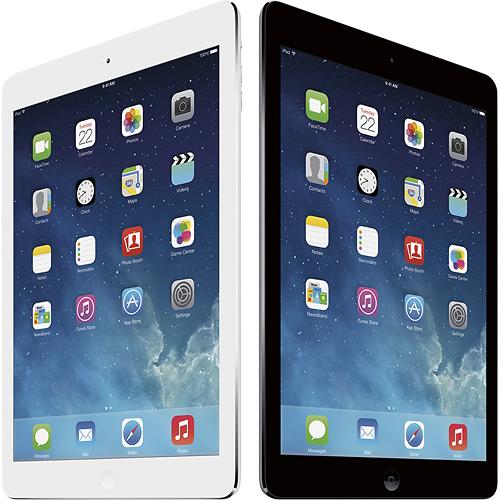
The ninth-generation iPad launched in September of 2021. Available in two colors, Silver and Space Gray, this tablet is made of 100% recyclable aluminum, and supports the first-generation Apple Pencil and Smart Keyboard.

With thinner bezels, the product comes with a 10.2-inch Retina display with a fingerprint-resistant oleophobic coating, and True Tone support for the first time, which adjusts screen content to the color temperature of a room.

This tablet uses the A13 Bionic chip, the same available on the iPhone 11, 11 Pro, and 11 Pro Max. It has an “all-day” battery with up to 10 hours of surfing the web on Wi-Fi or watching videos.

The iPad also comes in 64GB and 256GB storage options and Wi-Fi and Wi-Fi + Cellular versions.

Revamped cameras

Site default logo image

For the first time, this iPad shares the same FaceTime camera as the M1 iPad Pro with the Center Stage experience. With a new 12MP Ultra Wide front camera and Neural Engine, users can enjoy even more engaging video calls.

As users move around, Center Stage automatically pans the camera to keep them in view. When others join in, the camera detects them too, and smoothly zooms out to include them in the conversation. Center Stage makes video calls more natural in FaceTime as well as third-party video-calling apps.

Its main camera is the same: 8MP, f/2.4 aperture, and digital zoom up to 5x.

iPadOS 15

Site default logo image

The ninth-generation iPad comes with the iPadOS 15. Previewed during the WWDC21 keynote, the new operating system brings a redesigned Home Screen with widgets and App Library support.

On iPadOS 15, FaceTime group calls can finally appear in a grid, so it’s easier to see everyone. It’s also possible to share your screen, listen to Apple Music songs together, or watch Apple TV+, HBO Max, Disney+, and others while in a call.

In the productivity section, Apple, unfortunately, didn’t bring all the features pro users wanted to take full advantage of their new M1 iPad Pro, even though Apple made it easier to rely on multitasking features.

There’s a new multitasking menu on the top of the screen. When you click there, it’s possible to see what configurations you can use on Split View or just go to Slide Over with just a tap.

The experience with an external keyboard allows users to get more done with all-new keyboard shortcuts and a redesign of the menu bar.

With the Quick Note feature, users can use the Apple Pencil to add a quick note. They just need to slide the pencil through the bottom right corner to the center of the screen and start writing.

iPadOS 15 launched on September 20. Learn more about it here.

iPadOS 15.1 features

One month after releasing iPadOS 15, Apple released iPadOS 15.1 More notable, the company finally brought SharePlay support for the iPhone, iPad, and Apple TV. Unfortunately, Universal Control wasn’t one of the features added with this new version. Here’s what else is new:

Translate

  • Mandarin Chinese (Taiwan) support in the Translate app and for system-wide translation

Home

  • New automation triggers based on the current reading of a HomeKit-enabled humidity, air quality, or light level sensor

Shortcuts

  • New pre-built actions let you overlay text on images or gifs, plus a new collection of games lets you pass the time with Siri

iPadOS 15.2 features

apple-music-hey-siri-plays-voice-plan-9to5mac-2

Five weeks after releasing iPadOS 15.1, Apple is releasing iPadOS 15.2. It brings more features that were expected to launch alongside iPadOS 15 but, unfortunately, Universal Control is still nowhere to be seen. Here are the top features of this version:

  • Apple Music Voice Plan is a new subscription tier that gives you access to all songs, playlists, and stations in Apple Music using Siri
  • App Privacy Report in Settings lets you see how often apps have accessed your location, photos, camera, microphone, contacts, and more during the last seven days, as well as their network activity
  • Communication safety setting gives parents the ability to enable warnings for children when they receive or send photos that contain nudity
  • Digital Legacy allows you to designate people as Legacy Contacts so they can access your iCloud account and personal information in the event of your death
  • Apple TV app: Store tab lets you browse, buy, and rent movies and TV Shows all in one place

iPadOS 15.3 features

Six weeks after releasing iPadOS 15.2, Apple is releasing iPadOS 15.3. This update foregoes new features in favor of under-the-hood bug fixes and improvements. One of the most notable changes here is a fix for a Safari vulnerability that may have been leaking your browsing history and Google ID data to the websites you visited.

iPadOS 15.4 features

iPadOS 15.4 finally brings one of the most important features expected from iPadOS 15 and that got delayed: Universal Control. Here’s everything new with iPadOS 15.4:

  • Universal Control: This feature allows you to control your Mac and iPad using the same keyboard and mouse/trackpad. Universal Control needs iPadOS 15.4 and macOS Monterey 12.3;
  • New Siri voice: Siri has a fifth American voice. Apple says a member of the LGBTQ+ community recorded the voice and it’s non-binary;
  • More emoji: iPadOS 15.4 also brings new emojis. You can discover all of the new characters here;
  • Shortcuts automation: Adds support for running Personal Automations in the background without requiring a pesky banner notification.

You can learn everything new with this update here.

iPadOS 15.5 features

Different from other software updates, iPadOS 15.5 only improves the Podcast app experience, as Apple focused on Wallet changes for the iPhone this time:

  • Apple Podcasts includes a new setting to limit episodes stored on your iPhone and automatically delete older ones

iPadOS 15.6 features

iPadOS 15.6 is yet another small update for iPad users. Here’s what’s news:

  • TV app adds the option to restart a live sports game already in progress and pause, rewind, or fast-forward.
  • Fixes an issue where Settings may continue to display that device storage is full even if it is available.
  • Fixes an issue that may cause Braille devices to slow down or stop responding when navigating text in Mail.
  • Fixes an issue in Safari where a tab may revert to a previous page.

iPadOS 15.7 features

iPadOS 15.7 only brings bug fixes and some security improvements as the company readies the iPadOS 16 release.

Education

Site default logo image

Apple describes this iPad as the go-to tablet for education. For several years the company discounts this tablet up to 10%.

Apple is always promoting ways students can use the iPad to learn new things: using Augmented Reality, the Apple Pencil, and how to code with Playgrounds.

The company says the “App Store is the best place to discover apps” for education purposes:

Let your curiosity run wild with iPad. The App Store is the best place to discover apps that let you get a leg up in geometry, learn a new language, and attend virtual classes. You can even use augmented reality to learn something exciting, like watching the history of spaceflight unfold in your living room or making characters from your favorite book literally leap off the page.

Release date: When Apple will launch the ninth-generation iPad?

Apple launched the iPad 9 on September 24, 2021.

Pricing

iPad (2021) pricing starts at $329 for the 32GB storage option with Wi-Fi only. The prices can go up to $559 with the 128GB storage option and WI-Fi + Cellular. Here are the full prices of the ninth-generation tablet:

  • 32GB with Wi-Fi: $329
  • 32GB with Wi-Fi + Cellular: $459
  • 128GB with Wi-Fi: $429
  • 128GB with Wi-Fi + Cellular: $559
  • Apple Pencil (1st generation): $99
  • Smart Keyboard: $159

Lower prices may be available from Apple’s official Amazon store.

iPad (2021) Review

Site default logo image

Soon, we’ll review the ninth-generation iPad. As for now, you can watch our video review of the eighth-generation iPad, as we described it as the “best value tablet you can buy:”

“The iPad 8 was never meant to be a huge update. But even still, I think this is easily the best value tablet you can buy. For $329, this tablet has so much to offer: The performance, the great battery life, and the Apple pencil functionality. I’d highly recommend you pick up this tablet if you simply need an inexpensive tablet today that’s going to last you for three to four years with no trouble.”

iPad Deals

Over at 9to5Toys, you can find the best deals on the iPad and other Apple products. Download the 9to5Toys iPhone app to receive push notifications for new deals as well.

Rumors

As of now, Bloomberg‘s Mark Gurman said in his Power On newsletter by the end of 2021 that Apple plans a new entry-level iPad for 2022. In June 2022, 9to5Mac exclusively reported the details of the tenth-generation iPad model.

According to Filipe Espósito, this new entry-level tablet will pack the A14 Bionic chip, 5G compatibility, and, for the first time, USB-C connectivity, unlocking new experiences with the second-generation Apple Pencil. Its display will also increase, although it’s unclear whether it will have the same design as the M1 iPad Air.

This iPad could be released in October of 2022.

Apple reports $57.6B revenue for Q1 2014: 51M iPhones, 26m iPads, 4.8m Macs, 6m iPods

Site default logo image

As expected, Apple just announced its fiscal year 2014 first quarter results for the all-important holiday quarter. It’s Q3 report only included less than a month of sales for the new iPhone 5s, 5c and revamped MacBooks, making today’s report the first to include a full three-month period of sales for the new devices on top of the expected boost in revenue leading into the holidays. It’s also the first report since Apple shipped the new Retina iPad mini, iPad Air, and Mac Pro.

Apple reported record quarterly revenue of $57.6 billion, which lands between its guidance for the quarter of $55-$58B and estimates by analysts averaging approximately $58.1B. It also reported net quarterly profit of $13.1 billion, or $14.50 per diluted share. Those numbers compare to the revenue of $54.5 billion and net profit of $13.1 billion reported in the same quarter last year.

Break down of device sales for Q1 2014 include 51 million iPhones, 26 million iPads (both all-time quarterly highs), 6 million iPods and 4.8 million Macs. Prior to today’s report the consensus from an average of analyst estimates predicted Apple would sell approximately 55M iPhones, 25M iPads, and 4.6M Macs.
Expand
Expanding
Close

AAPL returns to growth, predict analysts, as we await quarterly earnings call

Site default logo image

When Apple reports its quarterly earnings later today, the news will be good, according to the consensus view of 47 Apple analysts compiled by Fortune.

Analysts are expecting the company to report earnings of $58.1B for the final quarter of last year (Apple’s fiscal quarter 1), representing 4 percent earnings growth over the same quarter last year. This would be right at the top end of Apple’s guidance of $55-58B, and the first time in a year that Apple would have reported year-on-year growth … 
Expand
Expanding
Close

While everyone is looking back, the analysts look forward to Monday’s Mac numbers

Site default logo image

While there’s plenty of looking back going on todayFortune has gathered together analyst forecasts of the Mac numbers we can expect Apple to reveal at its earnings call on Monday. This follows earlier forecasts for iPhone and iPad.

The average prediction is for 13 percent year-on-year growth, predicting that Apple sold 4.6 million Macs in the final quarter of 2013 (Apple’s fiscal Q1). This is slap bang in the middle of the growth predictions for iPads (10 percent) and iPhones (16 percent) … 
Expand
Expanding
Close

Apple continues Mac’s 30th birthday celebrations with special window displays

Site default logo image

A tip we’ve received from an Apple Store employee indicates that Apple will be putting up celebratory LED window displays at Apple Stores, showing a stylised ‘3’ and a ‘Happy birthday, Mac’ message. iPhones and iPads in the window will reportedly be removed. The graphic came via special SD card.

Boxes of special t-shirts have arrived for the occasion (photo below the fold) … 
Expand
Expanding
Close

Falling in love with the Macintosh 128K back in 1984

Site default logo image

Ok, I admit it: I’m officially old. Old enough, in fact, to have bought the very first Macintosh in 1984: the Macintosh 128K.

Computers in those days had green screens and were controlled by typing arcane commands. Bold and italics did not appear on-screen, instead you saw ^Bthis is bold^B and ^Ythis is italics^Y (CTRL-Y for italics because CTRL-I was tab, for reasons no-one understood but didn’t question). You never had to worry about what typeface to use because computers could neither display nor print them.

And then came the Macintosh … 
Expand
Expanding
Close

Site default logo image

Apple silently removes Keynote Remote from the App Store, recommends users update to Keynote 2.1 for iOS

Coinciding with today’s update to Keynote for Mac and iOS, Apple has silently removed the old Keynote Remote application from the App Store. Although a direct link to the application still works, some readers are reporting that they are no longer able to download the app, and it no longer appears in search results.


Expand
Expanding
Close

Apple begins teasing its first Brazil Store with colorful signage

Site default logo image

Last year, we reported that Apple plans to open up its first Apple Store in Brazil between February and March of 2014. This store would be located inside of the popular Village Mall in Rio de Janeiro:

Apple currently plans to expand its retail store presence to Rio de Janeiro, Brazil early next year, according to information provided by a source. This person says that Apple is targeting a store opening between February and March 2014, but delays due to construction and staffing are always possible.

Now, the Instagram account for Village Mall has published a photo of the space in which the Apple Store will be housed. The store is blocked by colorful Apple logo signage that is not too different from the teases shown before the recent opening of Apple’s new flagship store in Brisbane, Australia…


Expand
Expanding
Close

Apple responds to complaints about iOS 7 crashes, says fix incoming

Site default logo image

Besides the more colorful and flatter design and several features, iOS 7 introduced plenty of bugs to the iPhone, iPad, and iPod touch. Several bugs have been squashed over the course of software updates issued in the past few months, but the recurring bugs have been application crashes and random rebooting. After months of complaints, Apple has finally responded by saying that it is aware of the issue and that a fix is coming:


Expand
Expanding
Close

Analysts estimate iPad sales up 10 percent year-on-year, to 25M last quarter

Site default logo image

A couple of days after Fortune did its roundup of analyst estimates of iPhone sales, it has now done the same for the iPad, with the average forecast coming out at 25M sales in the final quarter of last year (Apple fiscal Q1) – up 10 percent from the previous year.

iPads were a more challenging market to forecast, observes Fortune‘s Philip Elmer-Dewitt:

The iPad Air didn’t ship until Nov. 1, missing one third of the quarter; the new iPad Mini (with Retina display) showed up 12 days later and was in short supply all the way through Christmas … 
Expand
Expanding
Close

Site default logo image

Using your own iPhone at work? Watch that it doesn’t get wiped when you leave …

Employees who use their own electronic devices at work under a Bring Your Own Device (BYOD) arrangement may have unwittingly authorised their employer to remotely wipe their device when they leave the company, reports the WSJ.

In early October, Michael Irvin stood up to leave a New York City restaurant when he glanced at his iPhone and noticed it was powering off. When he turned it back on again, all of his information—email programs, contacts, family photos, apps and music he had downloaded—had vanished […]

It wasn’t a malfunction. The device had been wiped clean by AlphaCare of New York, the client he had been working for full-time since April. Mr. Irvin received an email from his AlphaCare address that day confirming the phone had been remotely erased.

A survey found that 21 percent of companies perform a remote wipe of employee-owned devices registered on the company network, with employees ostensibly agreeing to this when they connect to the company network.

Many employers have a pro forma user agreement that pops up when employees connect to an email or network server via a personal device, he added. But even if these documents explicitly state that the company may perform remote wipes, workers often don’t take the time to read it before clicking the “I agree” button.

The legality of the practice has reportedly not yet been tested in court.

In principle, an iCloud or iTunes backup should allow wiped iPhones to be restored, but you may want to pay a little more attention to the small-print next time one of those corporate messages pops up on your screen, to find out what it is you’ve been agreeing to …

Update: Several readers have pointed out that the remote wipe would be performed via the company’s Exchange servers, so removing the Exchange account the day before you leave would be a good precaution.

Apple gets more favourable rulings against Samsung ahead of trial in March

FOSS Patents is reporting that Apple received two more favourable rulings in their ongoing battle against Samsung in the courts. These judgements increase the chance of Apple winning the March patent trial “not hugely but significantly”, according to Mueller.

In a judgement filed yesterday, Samsung was found to infringe on one of Apple’s asserted patents and one of its own patents in the case was invalidated.


Expand
Expanding
Close

Site default logo image

Feedly for iOS updated w/ speed reading feature, redesigned iPad UI, night theme, more

Feedly has just updated its iOS app to version 18.0.5 with a handful of new features. For those unfamiliar, Feedly is a service that aggregates conent from a variety of sources, including news sites, YouTube, RSS feeds, and more. The biggest feature in this update according to the developers is a new speed reading functionality. The feature allows users to quickly move from one inlined article to the next by simply tapping on the edge of the interface.

Also new in this update is a redesigned iPad interface, focused on speed and stability, as well as a new night theme that essentially changes all the white interfaces to a darker color. The full change log is below:

Spotlight feature:

  • Speed reading

Other new features:

  • New iPad design
  • New night theme
  • Faster image processing
  • New mark all as read card with reading stats.
  • Crash fixes

The Feedly update is available now on the App Store.

Opinion: What approach will Apple take to deliver a larger-screen iPhone 6?

Site default logo image

Concept image: Nikola Cirkovic

I wrote in an earlier opinion piece that 2014 is the year when I expect Apple to finally give in and opt for a larger iPhone display. Assuming I’m right, the question then becomes: what approach will Apple take?

There are two ways of increasing the size of a display. First, you can keep the resolution the same and simply use larger pixels. That’s what happens when a manufacturer makes a 1080P HD TV in both 40- and 50-inch sizes, for example. Both have 1920×1080 pixel displays, it’s just that the 50-inch display has larger pixels.

That would be by far the simplest approach for Apple to take. Provided it keeps the aspect ratio the same as the iPhone 5/c/s, then it can continue to use an 1136×640 display. All existing apps continue to work as-is, developers don’t have to do any work to support the larger display and everyone is happy . Or are they… 
Expand
Expanding
Close

Google Play app arrives on iOS to stream movies and shows over WiFi

Site default logo image

Today, Google has released a new application for iPhone, iPad, and iPod touch to allow Google Play users to stream purchased movies and TV shows. You cannot rent or purchase content via this application: you must download it from Google Play on Android or the web and then the purchased titles will be available to stream via this app. The application is only supported in the United States, Japan, and the United Kingdom. WiFi is currently required for streaming. The app also allows streaming to the ChromeCast.


Expand
Expanding
Close

LA Board of Education approves $115-million deal to bring iPads to classrooms

Site default logo image

In an ongoing effort to equip more classrooms with tablets and computers, the Los Angeles Board of Education has green lighted a plan to distribute and integrate iPads in nearly 40 campuses throughout the school district, the Los Angeles Times reports. The deal which was approved allots $115 million for deploying between 40,000 and 70,000 tablets to classrooms for use by students and teachers used especially for spring-scheduled standardized testing.


Expand
Expanding
Close

Site default logo image

Stealing €70,000 of Apple products out of the back of a truck…at speed on a German highway

The video screenshot above is a re-enactment from Romanian TV

Some “James Bond” thievery was reported in Germany yesterday. According to the story, thieves pulled up behind a moving truck carrying Apple products on its way to the Czech Republic. They then got out and climbed onto the hood of the SUV, broke open the truck’s door and removed about 160 iPads and iPhones, all while the truck driver was unaware and unable to see anything happening.

The Google translation is almost as entertaining as the video re-enactment:

How hurrying officials of the police station Kassel-east and the staff of the forensic noted the perpetrator had the security lock of the tarp apparently cracked with a bolt cutter and stole a total of seven loaded pallets of electronics products high quality Apple products worth a total of around 70,000 euros.

The loot includes according to the police 125 iPads, four iPad mini, “probably” 30 iPhones and two keyboards of the Californian cult group. In the further investigation, the suspicion compacted that the cargo thieves had apparently slammed unnoticed while driving on the highway.

Makes those German smash and grabs seem boring

Review: Lacie Fuel, the wireless portable drive for all your iDevices

Site default logo image

[youtube=http://www.youtube.com/watch?v=M9HTQybOxcI]

Wireless drives have been around for a little while now. There’s the Seagate GoFlex Satellite, and the Kingston W-Drive SSD, for example. They generate their own wifi networks, and you can then stream content from them to either a Mac or, more usefully, an iOS device.

Lacie has taken that concept a stage further, by adding the ability to upload content from iPhones and iPads also, and with 1TB capacity, you’re unlikely to find yourself running short of space.

I tested it with a MacBook Air, iPad and iPhone, and was generally impressed …


Expand
Expanding
Close

The smartphone’s physical keyboard makes a last stand

Site default logo image

The Wall St. Journal today covers two different physical keyboard attachments for iPhone, the $100 (aptly-named?) ‘Typo’ and the Solomatrix Spike. The TL;DR is that both of these keyboards are OK (Joanna Stern seems to prefer the Typo) but have fatal flaws that push them towards edge cases – people who’ve recently just shifted away from a Blackberry, have sausage fingers, or suffer from some other problem with getting data into their phone via a screen.

Their real problem is that iOS on the iPhone isn’t designed for a physical keyboard. It is designed to flip back and forth, from landscape to portrait depending on the use and the app. It was designed from the very beginning to be agile and portable and with that portability, the ultimate sacrifice was made to the smartphone physical keyboard.

To this day, I don’t think I am faster at typing and multitasking  on an iPhone as I was on the physical keyboard of the 2007 Danger Sidekick that it replaced. But the wealth of other keyboard options and the ability to be both portrait and landscape more than make up for the speed.


Expand
Expanding
Close

Total Apple device sales will equal Windows PCs this year, predicts analyst

Site default logo image

The total number of Apple devices sold will equal the number of Windows PCs by some point this year, predicts Asymco’s Horace Dediu in an interesting piece of analysis.

The dark shaded area compares all Apple hardware – Mac plus iPad plus iPhone – with Windows PCs, and shows that by last year there were only 1.18 more Windows PCs than Apple devices. It’s of course a somewhat artificial comparison, as Dediu is including iPhones while excluding Windows Phones and tablets, but given the very limited success of Windows mobile devices to date, correcting that wouldn’t change the patterns too much.

What’s particularly interesting here, as John Gruber notes, is that the dramatic reversal kicked in well before the launch of the iPhone. Dediu and Gruber between them put forward a number of theories for this, and of these I think three are likely key …


Expand
Expanding
Close

Site default logo image

Poll: What do you think about Apple’s “Your Verse” iPad Air ad?

Continuing its “Life on iPad” campaign, Apple released its new “Your Verse” iPad Air ad yesterday featuring a motivational voiceover of Robin Williams from the film “Dead Poets Society”. While the ad has been largely received well, it has not been without some criticism by many citing its tone and some extreme use cases for the iPad. What do you think? Does the “Your Verse” ad inspire you to do more with the iPad? Does it miss the pitch by using extreme edge cases or does it fall flat altogether? Let us know in our poll below:

Apple touts iPad’s abilities in new poetry-themed ad, ‘What will your verse be?’ website

Site default logo image

[youtube=http://www.youtube.com/watch?v=jiyIcz7wUH0]
Apple certainly isn’t shying away from using the iPad as a camera anymore.

Airing today is a brand-new TV advertisement touting the abilities of the iPad. The ad is in a serious tone and is voiced over by a quote from the film Dead Poet’s Society. Re/Code has the text from the advertisement:

We don’t read and write poetry because it’s cute. We read and write poetry because we are members of the human race. And the human race is filled with passion. And medicine, law, business, engineering — these are noble pursuits and necessary to sustain life. But poetry, beauty, romance, love — these are what we stay alive for.

To quote from Whitman,

“O me, O life of the questions of these recurring.
Of the endless trains of the faithless. Of cities filled with the foolish. What good amid these, O me, O life?
Answer: that you are here. That life exists and identity. That the powerful play goes on, and you may contribute a verse.”

“That the powerful play goes on, and you may contribute a verse.”

What will your verse be?

To go along with the TV ad, Apple has also posted a new webpage with the ad’s theme. This new page shares stories of the iPad being used in film-making, sports, and education. Original from movie below:


Expand
Expanding
Close

CES 2014: iPhone/iPad Bluetooth accessories for the home & body dominate the show

Site default logo image

While it’s been years since Apple made an appearance at CES in any official capacity, accessories that pair with its iOS devices have for several years dominated the show floor. This year was no different with most of the big trends–  fitness and health tracking wearables, Bluetooth controllers, and home automation products–  all designed and developed with the iPhone, iPad, and Mac in mind.  Below we’ve put together a roundup of the most interesting wearables, cases, controllers and more that we found for iOS devices. 
Expand
Expanding
Close

Review: SteelSeries ‘Stratus’ Made for iPhone/iPad/iPod Bluetooth game controller

Site default logo image

I previously reviewed the first two Apple authorized game controllers to hit the market under Apple’s new Made for iPhone/iPad/iPod touch program from Logitech and Moga. Both used Apple’s form-fitting design that docks an iPhone or iPod touch directly into the controller via a Lightning connector. However, Apple’s program also allows another breed of standalone controllers that connect over Bluetooth and therefore also work with iPad and Mac. Unveiled at CES, this week I’ve put one of the first Bluetooth, non-form-fitting designs to the test with the new Stratus wireless controller from SteelSeries.
Expand
Expanding
Close