HomeKit

See All Stories

HomeKit is Apple's home automation framework that lets you control connected accessories from your iPhone, iPad, Apple Watch, HomePod, and Siri.
Your home at your command.

What is HomeKit / Apple Home?

Along with several other new APIs for developers, Apple announced HomeKit in June 2014, which allows all home automation accessories/devices to work together in harmony with iOS. The API allows home automation developers to centralize all home automation without needing separate apps to access each device’s specific features. These devices include locks, lights, cameras, doors, thermostats, plugs, switches, and more.

HomeKit allows for secure pairing with devices and the ability to control individual devices. It also makes it possible to group several home automation devices into scenes that allow for easier control of any automation device in specific situations. One of the coolest features available with HomeKit is the ability to control any home automation accessory with Siri based on certain commands or scenes previously configured with these devices.

In 2016, Apple introduced a new Home app that came with a modern look, relatively easy-to-use controls, and access to accessories and scenes from anywhere on iOS 10. Apple’s new built-in Home app arrived on the iPhone’s Home screen, plus you can access a ton of functions from the Lock screen or anywhere on iOS from the new Control Center once you have a HomeKit accessory set up.

In 2018, Apple released the HomePod. It was a way to interact with your connected home devices through Siri using a standalone device.

In 2020, Apple announced that tvOS 14 would gain access to the Home app. iOS 14 is also bringing improvement to the Home app UI.

HomeKit Secure Video
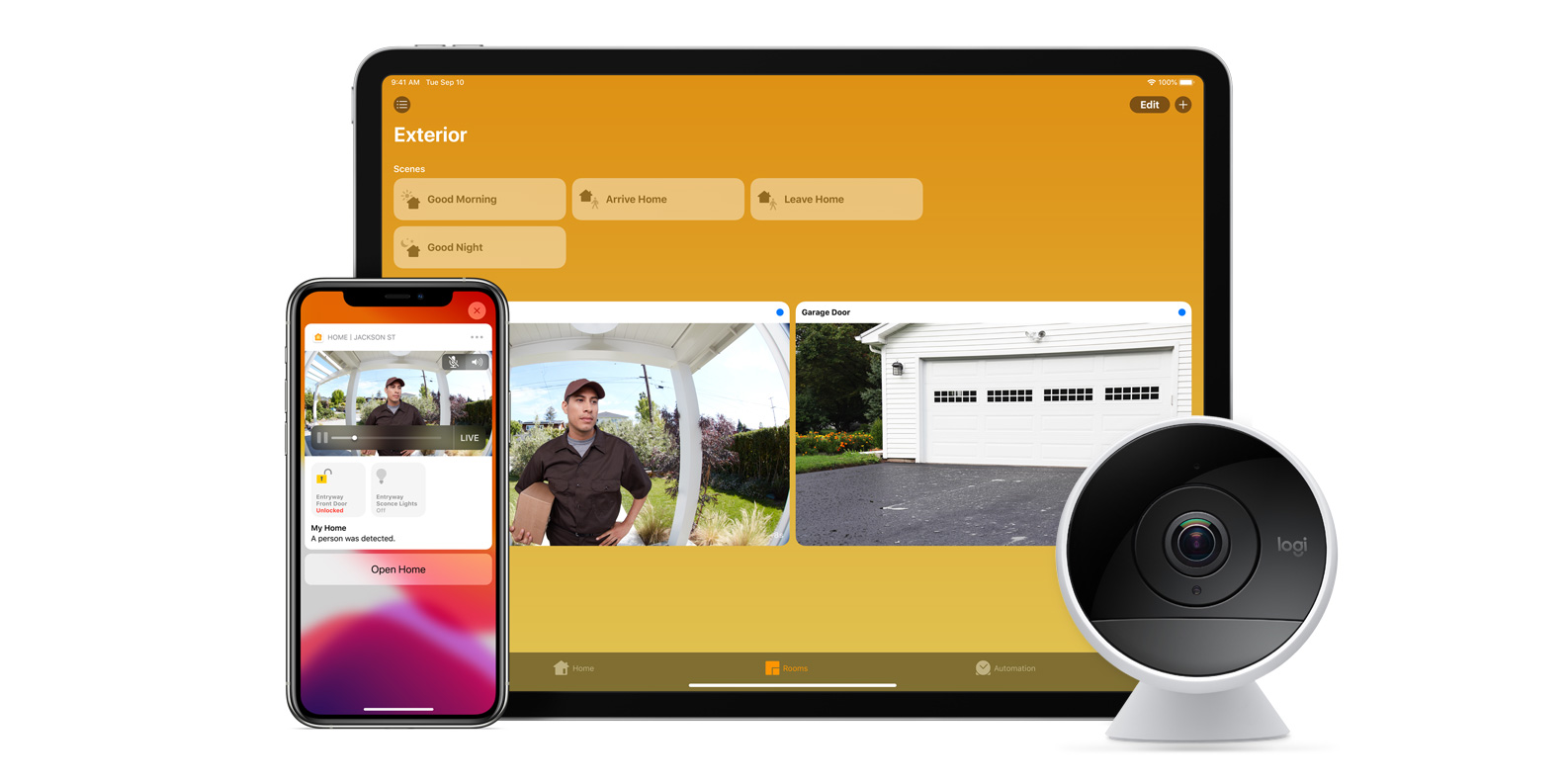
With iOS 13, Apple announced HomeKit Secure Video.

Footage from home security cameras contains your most personal and sensitive data. With HomeKit Secure Video, activity detected by supported cameras is privately analyzed by your home hub using on‑device intelligence to determine if people, pets, or cars are present. When important activity is detected, you and anyone you share your Home app with will receive a rich notification that lets you view the clip right from the Lock Screen. Recorded video is available to view for ten days from the Home app. It’s securely stored for free in supported iCloud accounts and doesn’t count against your storage limit.

While the rollout has been slow, Logitech, Arlo, Netatmo, and Eufy are among the early standouts. With recent privacy issues with Ring, HomeKit Secure Video is likely to continue to grow in popularity. One key benefit with Secure Video is that it works with your existing iCloud storage (200GB and up plan), so you don’t have an extra monthly fee for storage.

HomeKit Router
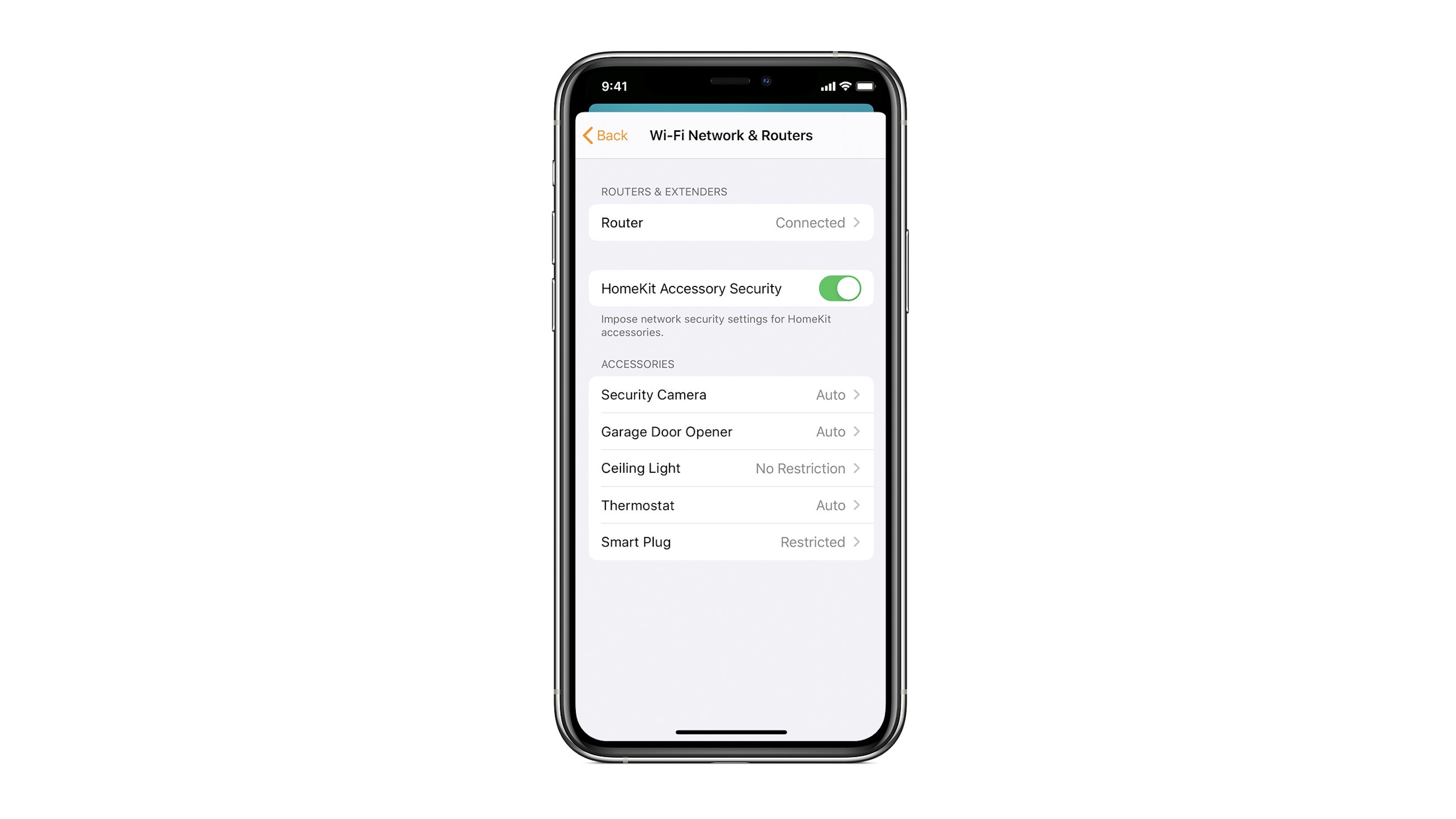
HomeKit Router was also announced with iOS 13, but it wasn’t released until early 2020. The idea behind the feature is you can give granular control to smart home enabled devices to control where on the internet they can reach.

eero was the first company to roll out support in for HomeKit Router.

With Apple HomeKit, eero gives you even more protection of your HomeKit accessories and an easy way to manage what they are allowed to communicate with in your home and through the internet.

There are three levels of security Apple offers for accessories paired with HomeKit routers:

  • Restrict to Home: Most secure. Your accessory can interact only with HomeKit through your Apple devices. The accessory won’t connect to the Internet or any local devices, so any third-party services, like firmware updates, might be blocked.
  • Automatic: Default security. Your accessory can communicate with HomeKit and connections recommended by its manufacturer.
  • No Restriction: Least secure. This setting bypasses the secure router and allows your accessory to interact with any device in your network or Internet-based service.

How Do You Use HomeKit?
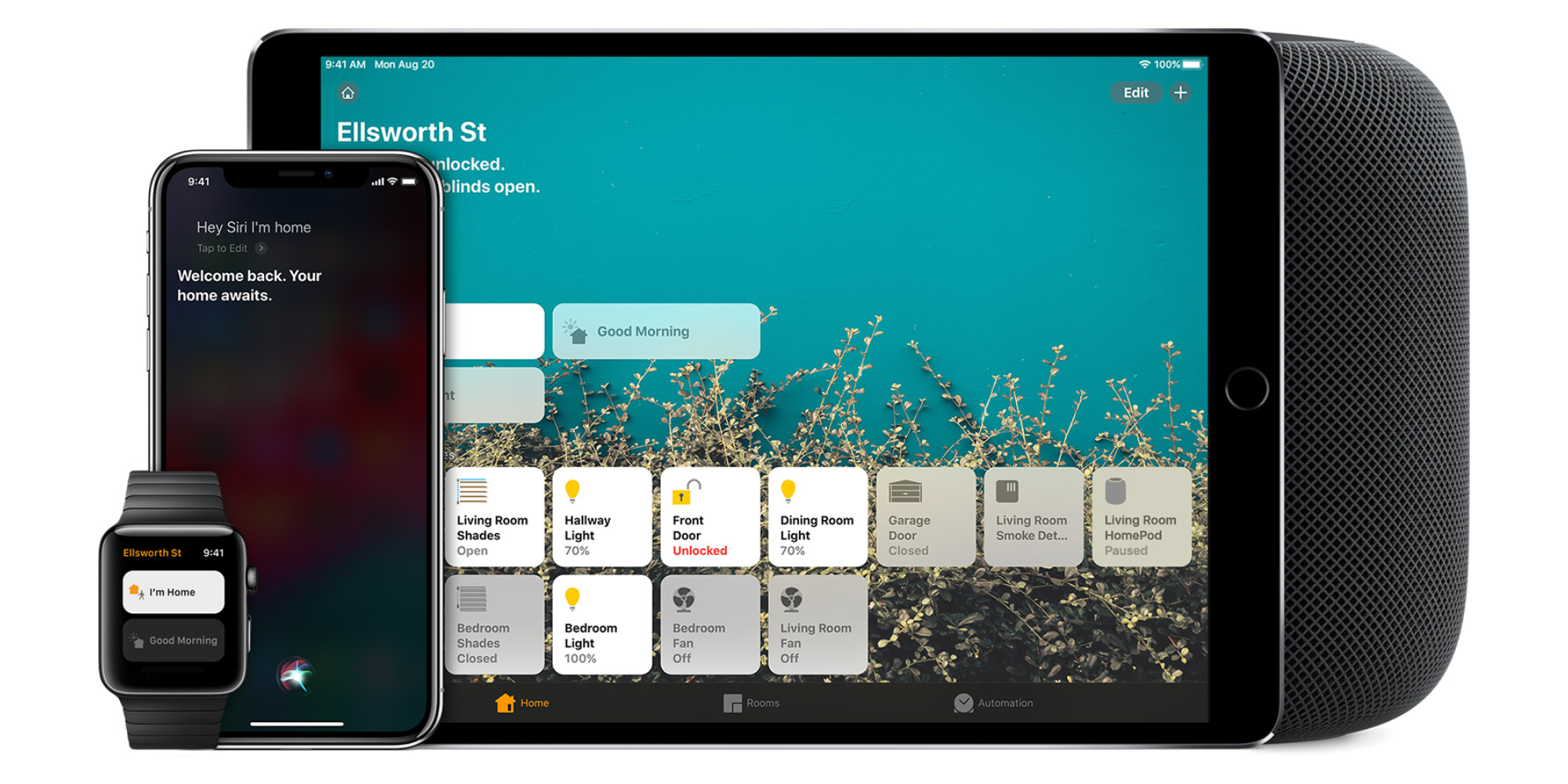
Homekit app

HomeKit devices can be controlled from iPad, iPhone, Mac, Apple Watch, and HomePod. A 4th generation Apple TV (or newer) is an essential Apple smart home device as it acts as a bridge over iCloud to allow access to your devices when away from home.

9to5Mac’s Bradley Chambers does a regular column about the “Apple Home” lifestyle in his HomeKit Weekly column.

Rachio 3 smart sprinkler system adds HomeKit and Siri integration with free software update

rachio smart sprinkler homekit no response

Elgato’s smart hose attachment led the way (reviewed) with sprinkler integration in HomeKit earlier this year. Today, Rachio is announcing the first smart sprinkler controller ($229) with HomeKit integration.

After a simple set up process, users can control their sprinkler through the Home app or using their voice with Siri. You can now ask your iPhone or even your HomePod to turn on your sprinklers.


Expand
Expanding
Close

HomeKit Weekly: If it doesn’t work with Siri, it’s just not a smart home

HomeKit Weekly

HomeKit Weekly is a series focused on smart home accessories, automation tips and tricks, and everything to do with Apple’s smart home framework.

This column is typically used to share recommendations and advice around using HomeKit, but this week I want to zoom out and talk specifically about why you should choose HomeKit.

There are a lot of “smart home” platforms on the market and plenty of connected accessories with iPhone apps, but I actively avoid products that don’t work with Siri. If you’re deep in the Apple product ecosystem, non-HomeKit smart home products can be a serious frustration.


Expand
Expanding
Close

Smart Home Diary: An update to our blinds revealing that Alexa is no smarter than Siri

I’ve played around a bit with Alexa, and even considered buying an Echo Dot or two before the launch of HomePod, but in the end decided to wait it out.

However, while Hunter Douglas is still promising HomeKit support for our Luxaflex Duette blinds, and was expecting to get there by now, certification has been delayed until later in the year. In the meantime, it’s gone ahead with the launch of the new bridge which brings voice control to the blinds – but so far only for Alexa and Google Home …


Expand
Expanding
Close

New self-powered Philips Hue wall switches on the way, in US and Europe

Philips currently offer two types of wall switch for their Hue devices. There’s the Smart Dimmer Switch, with a form factor close to a standard US wall switch, and the Tap – a self-powered four-button device, with no need for a battery. It’s powered by the kinetic energy generated by pressing the buttons.

It seems that a kind of hybrid version of the two is currently in the works …


Expand
Expanding
Close

HomeKit devices getting more affordable as Lenovo announces Smart Home Essentials line

HomeKit offers two big advantages over generic smart home devices. First, it enables Siri control; second, Apple’s security requirements add a great deal of reassurance at a time when smart homes are beginning to make an attractive target for hackers.

But HomeKit-compatible devices do tend toward the more expensive end of the price range, a problem Lenovo has set out to tackle with its upcoming Smart Home Essentials line …


Expand
Expanding
Close

HomeKit Weekly: Controlling smart shades with Siri, automation, and the Home app

HomeKit Weekly

HomeKit Weekly is a series focused on smart home accessories, automation tips and tricks, and everything to do with Apple’s smart home framework.

This week we’re checking out one of the most convenient but costly HomeKit areas: windows. Apple lists four compatible accessories in this category — two announced and two available. We’ll be working with the Serena Motorized Shades by Lutron. Check out our hands-on experience below.


Expand
Expanding
Close

Eve Room HomeKit air quality monitor redesigned with display, built-in battery

Elgato announced earlier this summer that it would rebrand as Eve and go all-in on HomeKit as it sold its gaming division to Corsair. Now HomeKit-focused Eve is out with its latest Siri-friendly smart home accessory: the second generation Eve Room air quality monitor. The new version is a significant upgrade over the original for a few reasons.


Expand
Expanding
Close

HomeKit Weekly: Hyperlocal temperature and humidity with Siri and the Home app

HomeKit Weekly

HomeKit Weekly is a series focused on smart home accessories, automation tips and tricks, and everything to do with Apple’s smart home framework.

Capturing and checking hyperlocal temperature and humidity with Siri and the Home app is one of my favorite HomeKit tricks. Weather apps that show your city’s current conditions and forecast are great, but knowing the actual temperature right outside your front door in real-time is neat. This can work with both outdoors or with specific rooms inside using the right sensors and configuration.


Expand
Expanding
Close

Philips Hue adds rigid light strips for vertical and horizontal use

If you’re using Philips Hue lightstrips to add accent lighting behind an entertainment console or desk but want to throw more light onto your wall, a new product announced today looks like it could fit the bill: the Philips Hue Play.

A second product – a kind of rigid, vertical lightstrip called the Signe lamp (above) – provides a neat way to throw color lighting up a wall or into the corner of a room …


Expand
Expanding
Close

Will Apple add AirPlay 2 to AirPort Express?

UPDATE: Apple released a firmware update on August 28 that added AirPlay 2 support!

AirPlay 2 has been out for a few months now and it has generally been well received, but there’s one mystery left for Apple’s upgraded audio streaming feature: will AirPlay 2 support come to the AirPort Express? There’s both reason to be hopeful and skeptical…


Expand
Expanding
Close

Feature Request: iBeacon-based locations in the home for smarter HomeKit control

The Next Web has an interesting piece talking about what Jeff Powers refers to as ‘Class 2 smarthomes.’

With today’s tech – Class 1 – we do have things liked timed automations, but a lot of the time we’re controlling things manually. Class 2 smarthomes would, he argues, be truly smart, and figure out a lot more things on their own.

Some of what he proposes would be pretty complex, but there’s one idea in there which Apple could fairly easily implement, and which would make HomeKit a lot friendlier for non-techies …


Expand
Expanding
Close

Review: Lifx Tile is a fun but flawed HomeKit accent lighting accessory

One thing is for sure: accessory makers are pulling out all of the stops when it comes to decorative HomeKit lighting accessories. Back in May, we took a look at the Lifx Beam accessory, which offers smart lightning in a neon tube-like format.

Now, Lifx is back with its Tile accessory, which is seemingly its more direct competitor to the Nanoleaf Aurora. Unfortunately, where the Aurora excels, the Lifx Tile often seems to fail…


Expand
Expanding
Close

HomeKit Weekly: Four ways to control cooling with fans and air conditioners

HomeKit Weekly

HomeKit Weekly is a series focused on smart home accessories, automation tips and tricks, and everything to do with Apple’s smart home framework.

We’re halfway through August, but summer doesn’t feel anywhere near like letting up: it’s hot outside! Luckily there are lots of ways to keep cool indoors — including four methods that work with HomeKit and Siri. Controlling cooling with HomeKit doesn’t have to be expensive either.


Expand
Expanding
Close

‘Controller for HomeKit’ app lets you back up and restore Home configurations

Apple lets you backup your HomeKit configuration with iCloud and iTunes backups, but you can’t easily save multiple configurations and you can’t restore a configuration without a full iOS restore. ‘Controller for HomeKit’ is an iPhone and iPad app that introduced a new feature today that wants to remedy Apple’s omission.


Expand
Expanding
Close