Mac

See All Stories

Apple’s Mac lineup consists of MacBook, MacBook Air, MacBook Pro, iMac, Mac Pro, and Mac Mini. The Mac runs macOS for its operating system.

Mac lineup

History

The Mac is Apple’s lineup of computers, and it can be considered the company’s oldest product. The name “Mac” comes from the original Macintosh, which was introduced in 1984 and is also considered the first personal computer for the masses to have a graphical user interface. The first Macintosh hit the stores on January 24, 1984, costing $2,945.

Among all these years, Apple has introduced many different Mac models, ranging from desktops to laptops to professional tower machines. The current lineup consists of the MacBook Air, MacBook Pro, Mac mini, iMac, and Mac Pro. However, there have been other Mac models were discontinued, such as the eMac, MacBook, and iMac Pro.

The history of modern Macs began in 1998, a year after Steve Jobs returned to Apple. Apple had dozens of Macintosh computers at that time, but Steve decided to rethink the entire lineup. In 1998, Apple announced the iMac G3, which ditched the floppy disk and serial ports in favor of USB connectors.

Macintosh and iMac G3.

Unlike the Macintosh, the first iMac was considered a huge success — not only for its technology, but also for its unique design with colorful translucent plastic. Apple quickly expanded the Mac lineup with other models, which included the iBook and PowerBook (which became the MacBook and MacBook Pro) and the PowerMac, which is now the Mac Pro.

macOS

What makes a Mac the Mac is the macOS operating system, which has also had a long history since the introduction of the first Macintosh. Initially called Mac OS, the operating system was rebuilt when Steve Jobs returned to Apple.

The first version of Mac OS X was released on March 24, 2001 with a new interface that is still present in some ways in current versions of macOS. Apple’s desktop operating system comes with many free applications such as Pages, Keynote, Numbers, iMovie, and GarageBand.

With macOS, users also have access to deep integrations with other Apple devices. For instance, you can answer calls and send SMS from your iPhone using your Mac. Handoff lets you switch from one device to the other and pick up where you left off. Apple Watch users can unlock their computer without entering a password, and you can even copy and paste between devices.

macOS Sonoma

Apple’s desktop operating system is also integrated with services offered by the company, such as iCloud, Apple Music, and Apple TV+.

The current version of macOS is Sonoma (version 14), which features new slow-motion screen savers, widgets on desktop, camera effects on FaceTime and other apps, web apps, passkey sharing, improved PDF support, and Game Mode. The update also comes with a new API that lets developers easily port Windows games to macOS.

Architecture Transitions

The Mac has had three major architecture transitions in its history. Apple’s first computers ran on Motorola processors, but the company decided to migrate to the new PowerPC platform in 1994. While this brought benefits at the time, the PowerPC processors were not delivering what Apple expected.

It was in 2005 that Apple confirmed the transition from PowerPC to Intel. Intel processors had become faster and more efficient than PowerPC, which enabled the development of new Mac computers that were more powerful and also more compact. Developers have been given access to a Developer Transition Kit running Mac OS X Tiger with Intel Pentium 4 to update their apps before the transition begins.

Power PC, Mac OS X, and Intel processor.

Apple said that the transition would begin in June 2006 and be finished by the end of 2007. However, the transition to Intel was fully completed in August 2006 when the company replaced the PowerMac with the new Intel Mac Pro.

As the years went by, Apple once again felt the need to have more powerful and efficient processors for its computers. This time, the company was already working on its own chips for the iPhone and iPad. In June 2020, Apple confirmed that it was changing the architecture of the Mac, now from Intel to ARM chips, which are called Apple Silicon.

Apple offered a Mac mini DTK running on the same A12Z Bionic chip as the 2020 iPad Pro. This way developers could once again update their apps ahead of the transition. In addition to being more powerful and energy efficient, the ARM architecture of Apple Silicon chips has enabled Macs to run iOS apps for the first time.

Apple M1 chip | Mac

The first Apple Silicon Macs were released in November 2020 with the M1 chip. The company later introduced more powerful variants of the M1 chip, called M1 Pro, M1 Max, and M1 Ultra. Macs with Apple Silicon have become known for being more powerful while consuming much less power, which has resulted in MacBooks with extended battery life.

In June 2022, Apple introduced the M2 chip, which is around 20% faster than the M1 and also supports more RAM. M2 also has more powerful variants: M2 Pro, M2 Max, and M2 Ultra.

Apple unveiled the M3, M3 Pro, and M3 Max chips in October 2023. The main highlight of this generation is the 3 nanometer technology, the same as the A17 Pro chip. The M3 family also features better GPUs with support for hardware-accelerated ray-tracing.

Current Mac lineup

Apple currently sells a variety of Mac computers, which includes MacBooks, Mac mini, iMac, and Mac Pro. While some of the Macs have already been updated with an Apple Silicon chip, others remain with Intel processors.

MacBook Air

The MacBook Air is Apple’s most affordable laptop and it has become popular for its light, compact design. The 2022 version is powered by the M2 chip and is offered with 8GB, 16GB, or 24GB of RAM. Plus, it has a new, edge-to edge 13.6-inch Retina display.

The laptop features Touch ID and has two Thunderbolt 3 compatible USB-C ports, a MagSafe connector for charging, and a headphone jack. Prices start at $1099 in the US. It’s offered in silver, space gray, starlight, and midnight.

M2 MacBook Air.

A year later, Apple introduced the first 15-inch MacBook Air. It has essentially the same hardware as the smaller version with a similar design, but with a larger display. Prices start at $1299 in the US.Apple is still selling the M1 MacBook Air for prices starting at $999.

MacBook Pro

The 2023 MacBook Pro is available in multiple versions, and customers can choose between 14-inch and 16-inch screen sizes. For the first time, Apple has introduced a less expensive version of the 14-inch MacBook Pro with the base M3 chip. This version has the same design and display as the high-end versions, except that it only has two USB-C ports instead of three.

M3 MacBook Pro

The most expensive versions of the MacBook Pro are equipped with the more powerful M3 Pro and M3 Max chips. The laptop can be configured with up to 128GB of RAM and 8TB SSD. These versions also come in a new Space Black color.

Unlike the MacBook Air, the MacBook Pro comes with an HDMI port and an SD card reader. It also features MagSafe and Touch ID on the keyboard. Apple no longer sells MacBooks with the Touch Bar. Prices start at $1,599 in the US.

Mac mini

Mac mini is the cheapest Mac currently available since it’s basically a desktop without a built-in display or other peripherals. The base model with the M2 chip features one Ethernet port, two USB-C/Thunderbolt 4 ports, HDMI 2.0, two USB-A ports, and a headphone jack.

Apple sells a more powerful version of the Mac mini with the M2 Pro chip, which also comes with four USB-C ports instead of two. Mac mini can be configured with up to 32GB of RAM and up to 8TB of storage. Customers can also opt for a 10 Gigabit Ethernet port. The Apple Silicon Mac mini is only available in silver, while the now discontinued Intel model was available in space gray.

Apple Silicon Mac mini.

Prices for the Mac mini start at $599 in the US. Again, it’s worth noting that it doesn’t come with a keyboard or mouse in the box – you need to buy them separately or use your current ones.

Mac Studio

Mac Studio represents a new category between Mac mini and Mac Pro. It features a design based on the Mac mini, but with a taller body to support the more powerful hardware and also a better cooling system.

The new Mac Studio is targeted at professional users who work with demanding tasks such as video editing, 3D rendering, and machine learning. 

Embraced by creative pros everywhere, Mac Studio now delivers next-generation power in the form of the lightning-fast M2 Max and the boundary-breaking M2 Ultra. It packs outrageous performance and extensive connectivity in an unbelievably compact form, putting everything you need within easy reach and transforming any space into a studio.

By default, Mac Studio already comes with the M2 Max chip, 32GB of RAM, and 512GB SSD storage. A more expensive option lets users customize Mac Studio with M2 Ultra. While M2 Max has a 12-core CPU and a 30-core GPU, M2 Ultra doubles all of those specs. The new chip has a 24-core CPU and a 60-core GPU.

Mac Studio can also be configured with up to 192GB of RAM and 8TB of SSD storage. The machine offers up to six Thunderbolt ports, 10 Gigabit Ethernet, headphone jack, two USB-A ports, and one HDMI port.

Mac Studio

Apple has been rumored to be working on new versions of this machine with the M3 Max and M3 Ultra chips. However, these versions may not be ready until 2025. Bloomberg’s Mark Gurman said in November last year that the M3 Ultra chip “hasn’t yet gone into broad testing” inside Apple.

In the US, prices for the Mac Studio with M2 Max chip start at $1999. The M2 Ultra chip version starts at $3999. Just like the Mac mini, Mac Studio doesn’t come with a keyboard and mouse in the box. You can find accessories for your Mac Studio here.

iMac

iMac is Apple’s most popular desktop computer with an all-in-one construction. It features a 4.5K display in its 24-inch version and a 5K display in the 27-inch version. At the same time, Apple still sells an entry-level iMac with a regular 1080p display.

The 24-inch iMac is the first to feature the M1 chip, the same as in the Mac mini, MacBook Air, and MacBook Pro. This allowed Apple to introduce a completely redesigned model with a slimmer design, which is also offered in seven new colors. Customers can customize the new 24-inch iMac with up to 16GB of RAM and 2TB of storage.

Site default logo image

The company ships the 24-inch iMac with Magic Mouse and Magic Keyboard, plus a Lightning cable for recharging accessories. Prices in the US start at $1299. Apple has discontinued its old 21.5-inch iMac and the 27-inch iMac 5K.

Mac Pro

Mac Pro is a computer built for professional users who depend on extremely powerful hardware. Available in tower and rack versions, it has a completely modular design. That means users can replace RAM, SSD, GPU, and other internal components.

By default, it features four USB-C/Thunderbolt 3 ports, two USB-A ports, and two 10Gb Ethernet ports. However, the ports can be expanded using the PCI Express slots. Apple also ships the computer with a Magic Mouse and Magic Keyboard, but it does not come with an external monitor included.

All models feature Intel Xeon W processors, which are the most powerful processors offered by Intel. Consumers can configure Mac Pro with up to 28-core processor, 1.5TB RAM, and 8TB of SSD storage. In addition to supporting multiple dedicated GPUs, Apple also offers the Afterburner card — which accelerates the decoding of ProRes videos.

The company recently updated the Mac Pro with new graphics card modules, which include Radeon Pro W6800X and Radeon Pro W6900X.

Site default logo image

Mac Pro prices start at $5999 in the US.

Rumors about upcoming Macs

Top stories about the Mac

Review: Fantastical 2 for Mac graduates to a full calendar replacement w/ Yosemite widget+extension, much more

Site default logo image

Fantastical’s ability to parse natural language input and create detailed appointment entries on your calendar has always been the primary reason to use it instead of or in addition to Apple’s own Calendar app on the Mac. Apple Calendar has picked up some language parsing smarts in recent updates, too, but it still doesn’t match Fantastical’s control and real-time appointment preview.

Still, I say in addition to because Fantastical for Mac has lived in the menu bar next to your clock, WiFi status, and other utilities where you can quickly access it for reference or adding an appointment from anywhere in the OS. The menu bar app includes a compact month view calendar above a streamlined, scrollable list view of appointments and reminders, but sometimes it’s nice to stretch out and view your schedule in a different context.

So when Fantastical first debuted on iPad almost a year ago putting the efficient list view next to a larger full calendar, I wrote optimistically that “the iPad’s app design could spill over into a future version of the Mac app (maybe as a dock app rather than a menu bar app).”

What Fantastical 2 for Mac actually became is even better: the same menu bar calendar users know and love (but new and improved!), and a full-sized calendar app with an optional dock icon. Both have been designed with the aesthetics of OS X Yosemite in mind and loads of under-the-hood features and improvements including the ability to actually change which calendars you see based on your location.
Expand
Expanding
Close

Site default logo image

Pro Tools 12 now available with new subscription models

After first announcing and showing off new licensing plans with Pro Tools 12 in January, today the latest version of Pro Tools has arrived at last alongside the new subscription plans on Avid’s online store.

Highlights for Pro Tools 12 include a new “Avid Cloud Collaboration” feature that lets users collaborate in real-time from different locations using built-in chat and other collaboration features, and a new “Avid Marketplace” for finding talent and accessing apps, plug-ins and third-party content.

For the first time, Avid is making Pro Tools, with version 12, available through license subscriptions starting at $29.99/month. An annual update is available for $199 (the one-time price of Apple’s competitive Logic Pro X), while the annual subscription plan will go for $299. Lastly, Avid has perpetual licenses starting at $899.

(via The Loop)

Apple releases latest OS X 10.10.3 build w/ Photos apps for developers & public beta testers, Yosemite Recovery Update 3.0 for devs

Site default logo image

Apple has released an updated build of the OS X 10.10.3 beta for both developers and public beta testers. The latest build is the same for both: 14D113C. Developers, however, also have access to Yosemite Recovery Update 3.0. OS X 10.10.3 includes the brand new Photos app which replaces both iPhoto and Aperture with support for iCloud Photo Libraries and an overhauled design. The first public beta for OS X 10.10.3 launched earlier this month, while registered developers have been testing the update due out this spring since early last month.
Expand
Expanding
Close

Refreshed Apple Wireless Keyboard w/ backlit keys appears on Apple’s website

Site default logo image

Update: It looks like Apple removed the images of the refreshed keyboard after we published this story.

A refreshed version of the Apple Wireless Keyboard appears to be on the way as an updated model was spotted today on Apple’s Czech Republic online store (via letemsvetemapplem.eu).

While Apple appears to have let the image of the new keyboard leak early, it hasn’t updated the accompanying description for the product to mention new features. We can, however, make out a few changes including new buttons on the F5 and F6 keys indicating the new model may feature backlit keys. Apple also switched the CD eject button, which is all but useless for most people at this point, and replaced it with a power button the same as the keyboards on its MacBooks in recent years.
Expand
Expanding
Close

Site default logo image

Apple discontinues Boot Camp support for Windows 7 on latest MacBook models

Apple’s latest MacBook Pro and the upcoming MacBook will not support running Windows 7 through Boot Camp according to a support document for the software. Starting on the newest machines, users will need to upgrade to Windows 8 or later in order to take advantage of the Mac’s dual-boot capabilities.

Of course, for users who still rely on Windows 7, there are solutions that allow you to run the operating system on your Mac. Both Parallels Desktop 10 and VMWare Fusion 7 Pro support versions of Windows back to XP and feature an integrated experience designed for the latest version of OS X.

Microsoft recently announced that it would be taking a page from Apple’s playbook and allowing existing Windows 7 and 8 users to upgrade to the upcoming Windows 10 for free, giving those stuck on older versions a chance to update to a Boot Camp-compatible system.

Force Touch features in iMovie illustrate the power of ‘bumpy pixels,’ says haptics pioneer

Site default logo image

Haptic feedback features found in a recent iMovie update illustrate the power of Apple’s new Force Touch trackpad to provide feedback, not just as an input device, says one of the pioneers of the technology.

Freelance film editor Alex Gollner first noticed Apple was using the trackpad to provide tactile feedback in a recent update to iMovie.

When dragging a video clip to its maximum length, you’ll get feedback letting you know you’ve hit the end of the clip. Add a title and you’ll get feedback as the title snaps into position at the beginning or end of a clip. Subtle feedback is also provided with the alignment guides that appear in the Viewer when cropping clips.

Apple showed-off the Force Touch feature when announcing the new 12-inch MacBook, also adding it to the 13-inch MacBook Pro with Retina display. The WSJ recently claimed that Apple also plans to introduce the feature to the touchscreen on the next generation of the iPhone … 
Expand
Expanding
Close

Site default logo image

Apple releases security update for Yosemite 10.10.2, iPhoto update to improve transition to Photos

Apple has released a new security update for OS X Yosemite, and a separate version of the update for Macs released in early 2015, including the new 13″ MacBook Pro with Force Touch trackpads and the upcoming MacBook.

The update is available for users running OS X 10.10.2 in the Updates tab of the Mac App Store, or as a standalone installer at the links above. Users on the public beta of OS X 10.10.3 apparently do not need the update, since the newer operating system likely already includes fixes for the problems addressed by this release.

Apple has not yet released the update notes to explain what has been fixed.

iPhoto has also been updated to improve compatibility with the upcoming Photos app that replaces it:
Expand
Expanding
Close

Review: Eyefi’s new Mobi Pro brings improved durability, capacity to wireless SD cards for iOS photographers

As a photographer, I’ve been thrilled to see iPhones become compelling replacements for standalone point-and-shoot cameras. Our world has improved in both measurable and immeasurable ways from widespread, immediate access to quality photography; the images documenting our lives are more compelling and numerous than ever before.

But professional photographers toting DSLRs now struggle to stand out from amateurs with iPhones. The Chicago Sun-Times infamously fired its entire photography department in favor of using images from iPhones and wire services, a move mocked by other newspapers but embraced by some broadcast journalists. Fixed-lens, small-sensor iPhones can’t match standalone cameras in image quality, particularly in dark settings, but they’re hard to beat in speed and convenience.

The question is how to combine the immediacy of iPhone photography with the quality offered by superior cameras. For me, the answer has been Eyefi‘s SD cards, which wirelessly transfer a standalone camera’s photos to an iPhone or iPad for rapid editing and sharing. (See my How-To on transferring, editing, and sharing DSLR/point-and-shoot photos with an iPhone or iPad for more details.)

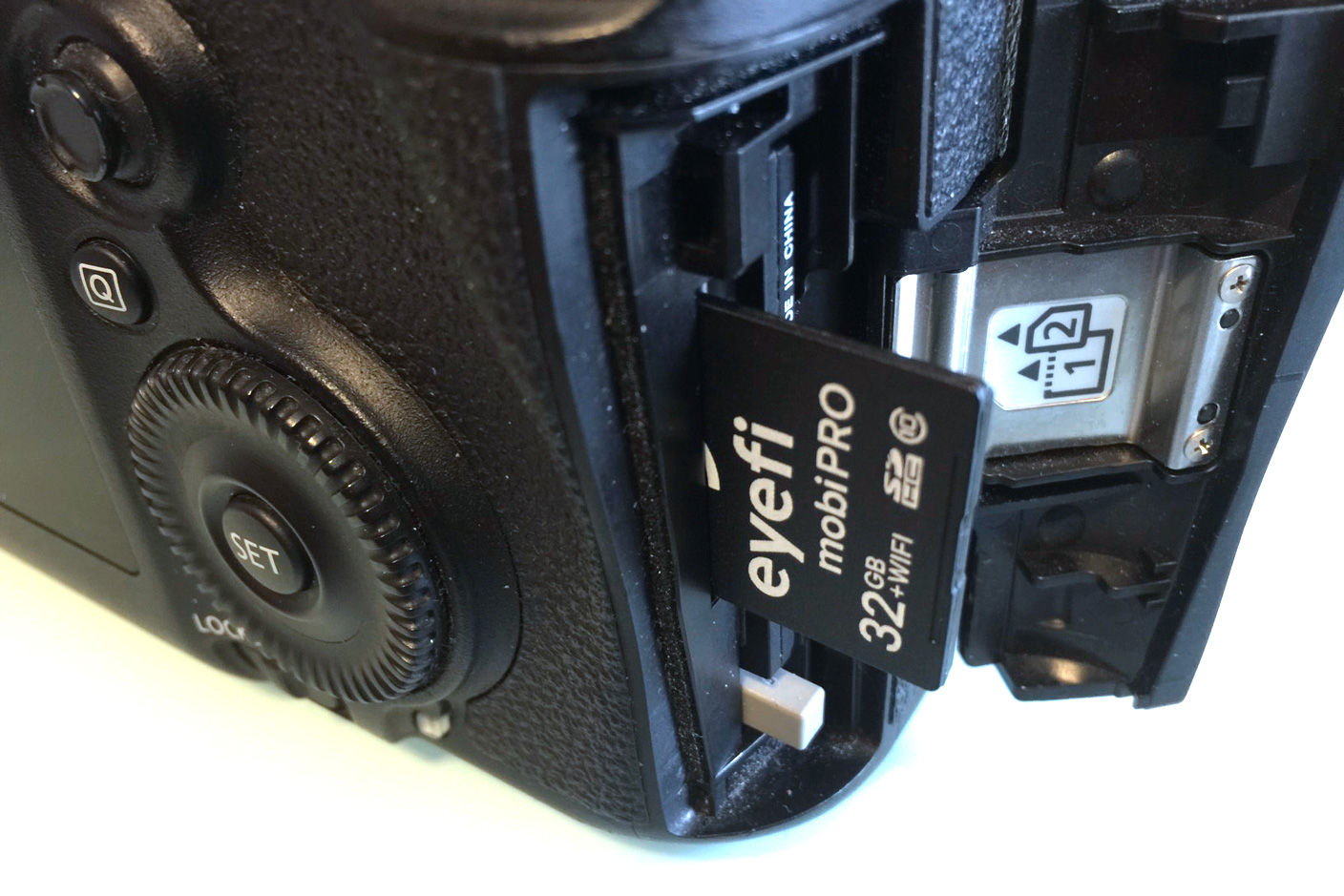
Eyefi’s first $100 card contained 2GB of flash memory and a Wi-Fi chip; since then, every Eyefi card has improved on the same concept, so the brand-new 32GB Mobi Pro ($100) isn’t so much a surprise as the culmination of everything the company has done before. It has the highest storage capacity, broadest file support, and easiest workflow of any Eyefi card I’ve tested. Most importantly, it brings a more durable enclosure that I wouldn’t hesitate to recommend to any potential reader, originally introduced in Eyefi’s more affordable non-Pro Mobi cards. Read on for all the details…


Expand
Expanding
Close

Pixelmator 1.1 for iPad adds realistic watercolor painting, new Color Picker, more

Site default logo image

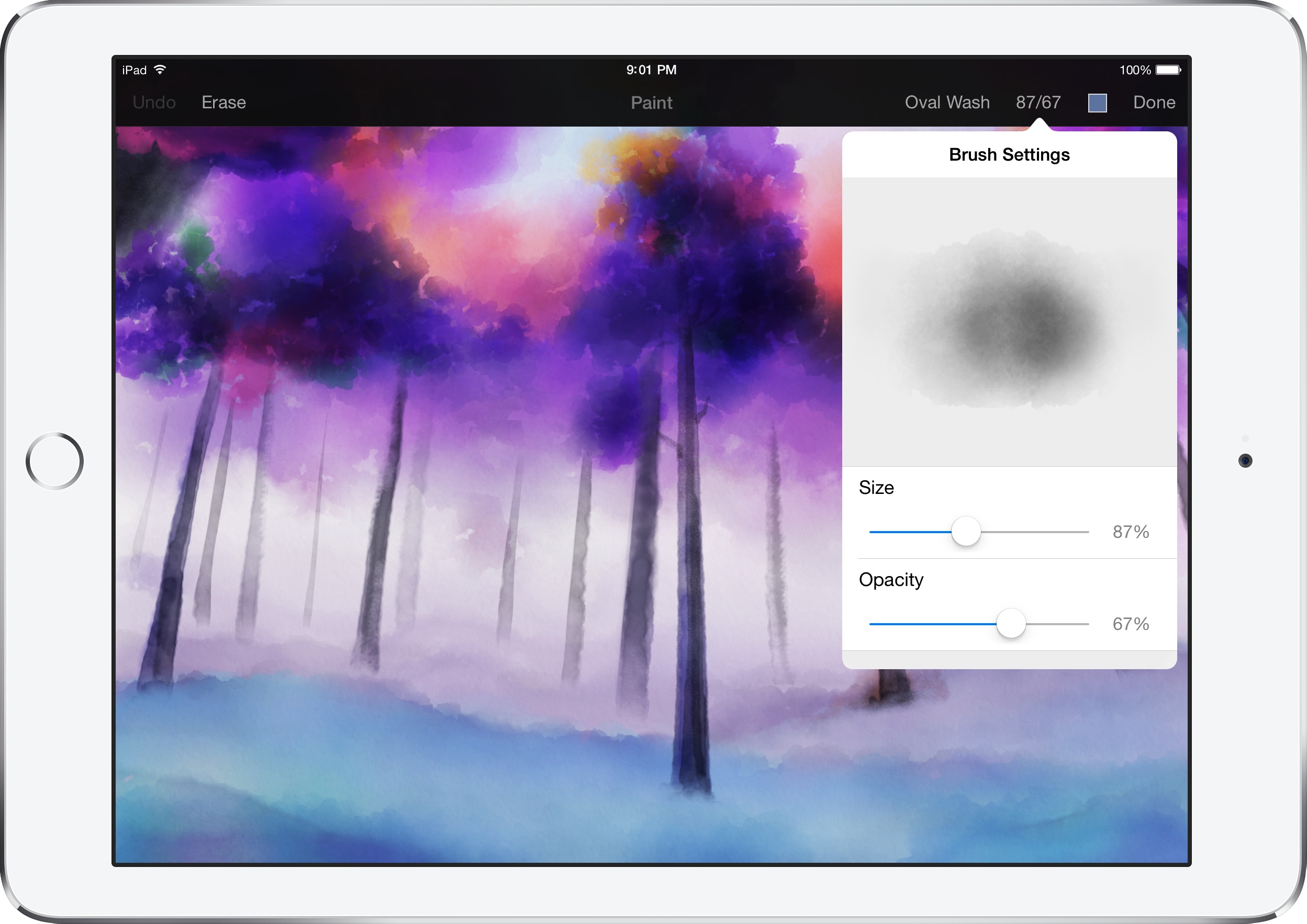
Pixelmator has today released a new update for the iPad version ($9.99) of its popular image editor. Version 1.1 includes a brand new watercolor painting feature, which can be used to create brand new pieces of art from a blank canvas or add stylistic additions to existing images and photos. Brushes overlay new colors additively with soft radiuses to create beautiful blends and shading. Pixelmator says they spoke to real artists to help design the brush strokes. It feels really nice to use.

Although watercolor painting is the headline addition, Pixelmator 1.1 also includes a new Color Picker with a swatch of previously selected colors, an updated rendering engine for better performance and much more. You have to see it in action … (video below)


Expand
Expanding
Close

Opinion: My cable subscription woes and the appeal of an ‘Apple Cable’ service

Site default logo image

My cable provider is pretty terrible. I don’t need to name any names because this likely applies to your cable provider as well. They are all horrible. I often experience drops on popular channels, get bonus filler channels that no one wants, and see indiscriminate additional subscription fees and charges without any real reason. This Onion article, though it is satire, doesn’t stray too far from the truth.

For a very casual TV watcher, it’s not a great experience – to put it mildly.

So the prospect of an Apple web TV service with a price tag of around $40, as the WSJ and others reported last night, is highly appealing to me if it means I can catch the few shows I watch now without the hassle of my cable subscription. I’ll still be tied to the monopolies for Internet service which isn’t terrific, but the theoretical ‘Apple Cable’ service has the potential to fix a number of problems for me.

Apple started off its March event with the announcement that HBO Now, the premium network’s new $15/month web service, will be available with 3-month exclusivity on the App Store and Apple TV at launch next month. While we’ve heard for quite some time that Apple is developing a web TV service, and the upcoming HBO Now channel seems to be the best taste of what that could offer. I’m hopeful that the potential ‘Apple Cable’ can solve my cable subscription woes. Here’s how:


Expand
Expanding
Close

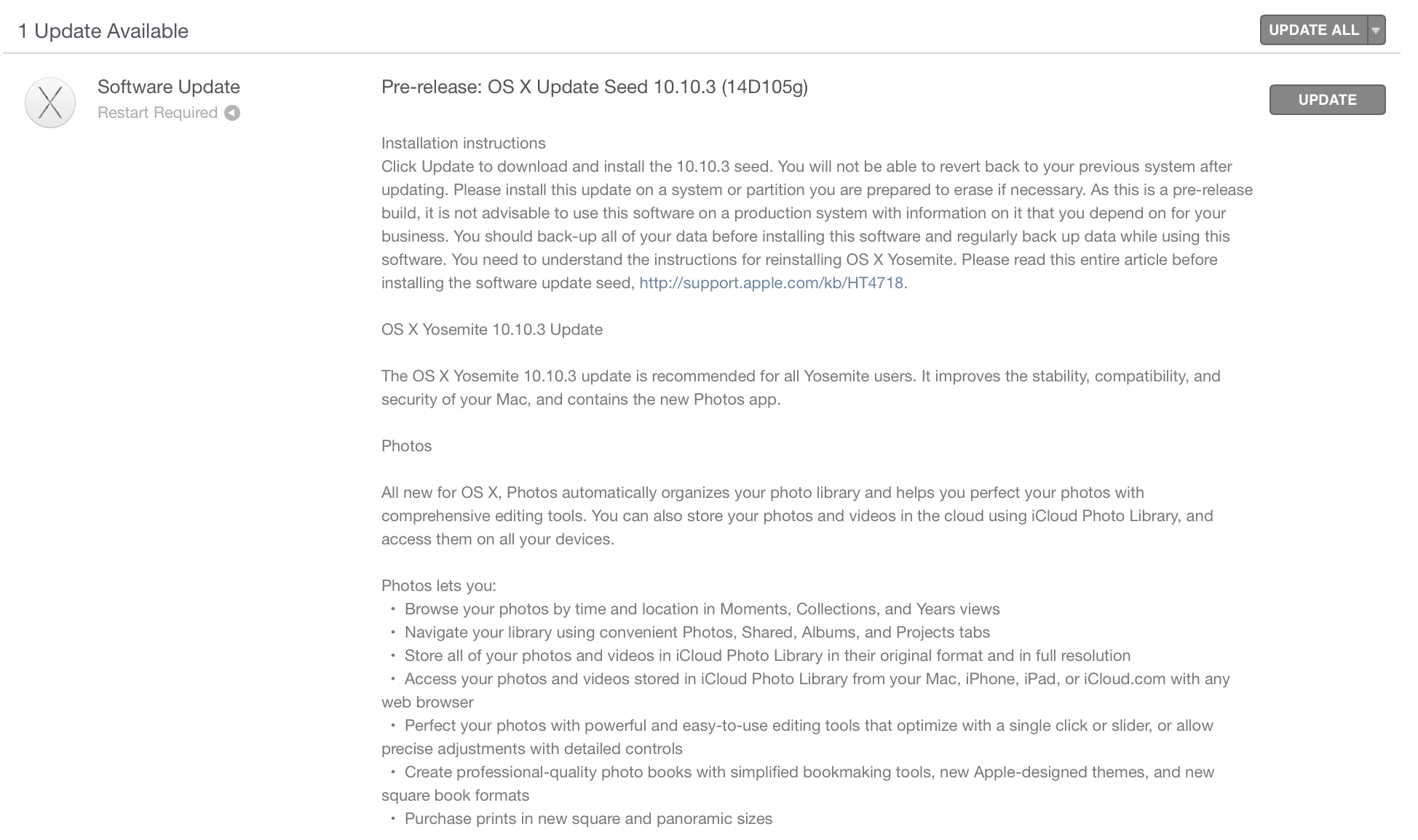
Apple seeds OS X 10.10.3 build 14D105 to developers and Public Beta users

Site default logo image

Less than a week following the previous seed, Apple has released build 14D105 of the upcoming OS X Yosemite 10.10.3 to both developers and users of the Public Beta. Apple has not yet said when 10.10.3 will be released to all OS X Yosemite users, but the increase in seeds in recent weeks likely indicates that a wider launch is fast approaching. As we’ve previously detailed, 10.10.3 will include the all new iCloud-based Photos app for the Mac, developer APIs for the new Force Touch Trackpad on the MacBook and MacBook Pro with Retina display, and a new Emoji picker across the system.


Expand
Expanding
Close

Brace yourself – Core M benchmarks illustrate likely low-end performance from new MacBook

Site default logo image

Lenovo’s Yoga 3 Pro convertible laptop–which uses the same Broadwell Core M processor as Apple’s new ultraportable MacBook–has provided the first look at its likely performance. AnandTech‘s numbers show that in overall performance terms, the Yoga 3 Pro was delivering a little over 90% of the performance of the early 2014 MacBook Air which has far fewer pixels than the Retina MacBook…


Expand
Expanding
Close

Apple’s 2015 MacBook Pro and Air models now at US retailers Amazon, Best Buy, MacMall, B&H and others

Refreshed 2015 MacBook Air and Pro models are now available at major US retailers following their announcement at Apple’s Spring Forward event on March 9th.

Currently, Amazon has all of the new MacBook Air models in stock and ready to ship, from $899. The new MacBook Pro models are also listed on Amazon as well, although supply is currently more limited. 2014 versions are discounted.

B&H offers $5 off and no tax at the time of purchase outside of New York on the new MacBook Airs and MacBook Pros as well as a free copy of Parallels. 2014 versions are discounted.

MacMall also offers $5 off the new MacBook Airs and Pros and tax only in a few states. 2014 models discounted.

Meanwhile if you want to get your hands on one today, Best Buy offers free site to store on the new MacBook Pro/Airs which will have stock varied by location. 2014 models discounted.

If you want to save some real money, 2014 models are seeing deep discounts at 9to5toys. At the Apple Refurb store you can pick up some heavy discounts on previous models while extraordinary savings are available at B&H and Best Buy on 2014 models including a student deal that chops the 2014 models down to $750 .


Expand
Expanding
Close

Top 15 hidden Force Click features on the new 2015 MacBook (Video)

Apple’s 2015 MacBook and 13-inch Retina MacBook Pro are both equipped with a new Force Touch trackpad that adds new features within certain apps on OS X. If you’re not familiar with Apple’s new Force Touch trackpad, it’s completely pressure sensitive and can detect a hard press from a soft press. With this, you now have the ability to Force Click (a click with a continued press) on specific items to perform different actions.

We’ve spent the last 24 hours searching through OS X on Apple’s new 13-inch MacBook Pro with Retina Display to find all of the hidden Force Click features that Apple has yet to mention. There are a good amount of uses for Force Click, but these 15 happen to be our favorite…


Expand
Expanding
Close

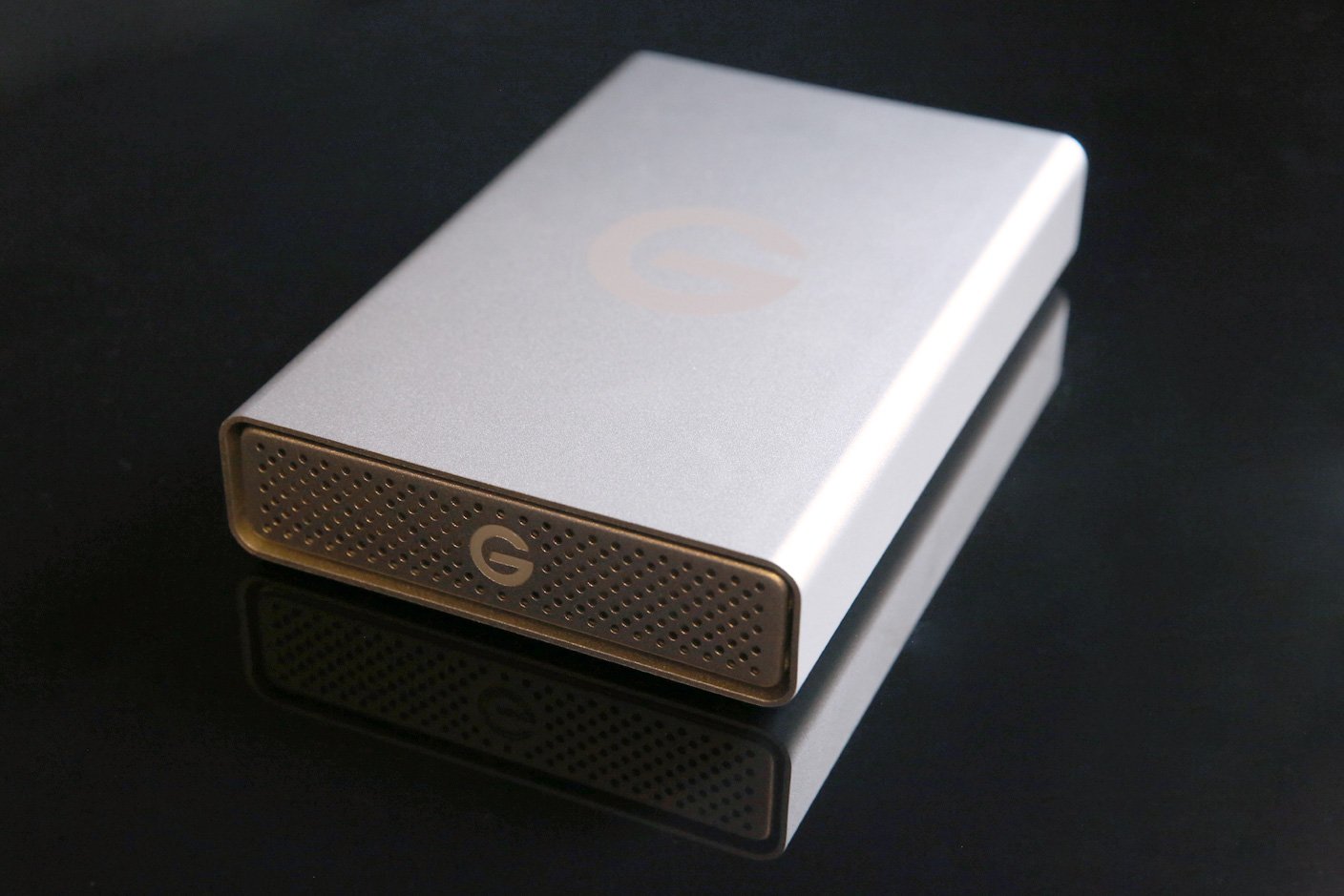
How-To: Choose the best external hard drive for your Mac (or iOS device!)

I feel old saying this, but having used computers since before external hard drives existed, I can say with certainty that buying a hard drive is easier today than it’s ever been before. For traditional drives, prices are low, options are numerous, and capacities are so high that your only choices are “enough space,” “more than enough space,” and “way more than enough space.” I could point you towards a gigantic 5-Terabyte $139 Seagate USB 3.0 hard drive right now and end this article without another paragraph. Since Apple doesn’t even sell a Mac with that much disk space, you could back up five (or more) computers to that drive without running out of room. Or you could store a decade worth of digital photos alongside a giant media library. For $139!

But buying an external hard drive isn’t necessarily that simple. There are a bunch of factors worth considering before making a purchase, including everything from reliability to portability, design, capacity, speed, and connectivity. Some hard drives are really cheap but have a higher chance of failing after a year or two of heavy use. So in this How-To, I’m going to discuss the big issues you need to consider, and guide you towards the best external hard drive for your needs…


Expand
Expanding
Close

Poll: Which MacBook are you? Space Gray, Silver or Gold

Site default logo image

If you are like us, probably the toughest decision you are facing this year is figuring out which new Retina MacBook color you will be getting. The buying process otherwise is more like buying an iPad than a Mac with only 2 speed/storage models.

Will you match your Space Gray iPad and iPhone and now Apple Watch? Or, will you sport the same silver of the Macs that actually do some real work? Will you go off the grid and show your lawyer/banker colleagues who is boss with the gold model?

It is a tough and important call because you WILL be judged – you can’t just embarrassingly hide a MacBook in a wallet case like my Gold iPhone.  You’ve had a few days to mull it over. So what’s it going to be?

Apple supply chain buyers, this ^^^ data is on us. Feel free to send any leftover MacBooks as compensation.
Expand
Expanding
Close

Belkin and Google debut USB-C cables, including low-priced Ethernet, DisplayPort, HDMI and micro-USB adapters

Coinciding with today’s announcement of the dual USB-C port-equipped Chromebook Pixel 2 laptop, Google and Belkin today announced separate collections of new USB-C cables and adapters. These new options go well beyond Apple’s upcoming USB-C accessory lineup for the 12″ MacBook, while also including some familiar options at lower-than-Apple prices. They’re amongst the first USB-C accessories to be announced by major manufacturers, as inexpensive USB-C cables from smaller companies are beginning to make their way onto Amazon for pre-order…


Expand
Expanding
Close

iFixit dismantles the early 2015 MacBook Airs, finds small changes to past designs

iFixit has just dismantled the refreshed early 2015 11-inch and 13-inch MacBook Air models that Apple unveiled earlier this week, featuring new Intel Broadwell CPUs, improved graphics and other minor tweaks. Although the models mostly remain the same apart from the spec bumps Apple announced on stage, iFixit gives us its usual rundown on changes it discovered…
Expand
Expanding
Close

USB-C cable gallery, compare to Lightning and Micro-USB, specs and Apple’s future

Site default logo image

Lightning vs. <a href="http://www.amazon.com/Aukey-Hi-speed-Reversible-Connector-Supported/dp/B00RGNJXD4/ref=sr_1_1?amp;amp;qid=1421386415&amp;amp;sr=8-1&tag=thepartim-20&ie=UTF8&amp;amp;peasin=B00RGNJXD4&amp;amp;keywords=B00RGNJXD4&amp;amp;pebp=1421386732649">USB-C cable from Aukey</a>

We’ve been poring over Apple’s change to the 8.4mm by 2.6mm USB Type C standard since we got tipped the design of the new MacBook late last year. It is a big change for Apple and puts the future of longstanding technologies like Thunderbolt and MagSafe into questionable status.  Even Lightning seems a whole lot more vulnerable when an adapter that is marginally bigger, but has the whole industry behind it, shows up in Apple’s future flagship laptop.

Some quick, fun facts on USB Type C that make it pretty amazing:
Expand
Expanding
Close

WaterField Designs shows off ultra-slim Zip Brief bag for Apple’s new 12-inch Retina MacBook

Site default logo image

Now that the 12-inch MacBook we first unveiled in January has been officially announced, we’re starting to see new accessories designed especially for Apple’s redesigned notebook. San Francisco-based WaterField Designs has a brand new ultra-slim bag fitted specifically for Apple’s new Retina 12-inch MacBook…
Expand
Expanding
Close

Site default logo image

Oddworld: Stranger’s Wrath comes to Mac, syncs game progress over iCloud with iOS version

After a remastered release of critically acclaimed console game ‘Oddworld: Stranger’s Wrath’ on iOS devices last year, today the title officially arrives for Mac users via the Mac App Store.

New for the Mac version of the game: iCloud integration so you can save and continue playing on iOS, gamepad support and fully mappable keyboard/mouse controls, Game Center achievements/leaderboards, and support for all Mac resolutions including Retina displays and the new 5K iMac.

The 20+ hour game developed by Oddworld Inhabitant is one of the latest releases in the popular Oddworld series despite having first launched around 10 years ago on the original Xbox. The well-received game ditched the classic Oddworld scrolling puzzler gameplay and instead offers a half first-person shooter, half third-person platformer with lots of the usual Oddworld exploration and a theatrical soundtrack.

Oddworld: Stranger’s Wrath is available for $9.99 on the Mac App Store now. Launch trailer below:

[youtube=https://www.youtube.com/watch?v=ZlxbXSXeHfU]