iOS

See All Stories

The world’s most advanced mobile operating system

iOS is Apple’s mobile operating system that runs on iPhone, iPad, and iPod touch. Historically, Apple releases a new iOS version once a year, the current version is iOS 13.

In 2007, Steve Jobs introduced the iPhone and iPhone OS. During the event, Jobs referred to the operating system as OS X because it shared a similar Unix core compared to the Mac. When Apple launched the iPhone SDK a year later, they officially changed the name to iPhone OS.

In the summer of 2008, Apple added the App Store to iPhone OS with version 2.0, and this set the stage for the “app economy” that we still enjoy to this day.

Version 3.0 was released in 2009, and it included copy/paste, MMS support, Spotlight, mobile tethering, and push notifications for 3rd party apps.

In version 4, Apple finally renamed iPhone OS to iOS (with the iPad sharing the same software). The major features were multitasking and FaceTime.

iOS 5.0 introduced Notification Center, iMessage, Siri, and iCloud.

iOS 6.0 removes Google Maps in favor of Apple Maps and added the Passbook app (now known as Wallet).

Version 7.0 brought a dramatic redesign of iOS with a new font, flatter icons, a and new Photos app. The redesign was led by Jony Ive.

Version iOS 8.0, Apple finally allowed third-party keyboards and the ability to share files from different apps.

Version 9.0 included Apple Maps, an overhauled Notes app, and multitasking for iPad.

Version 10.0 included an SDK for Siri, Maps, and iMessages.

Version 11.0 included a new iPad Dock, Customizable Control center, drag and drop on iPad, and the Files app with third-party integration.

Version 12.0 added Screen Time features for managing your time on devices, the Shortcuts app, ARKit 2.0, and Memoji.

iOS 13 added Dark Mode, swipe-style typing, a redesigned share sheet, made app downloads 50% smaller, 2x faster app launch speed, Memoji Stickers and Memoji Makeup, HomeKit-enabled routers and HomeKit Secure Video, a new “Sign in with Apple” option for logging into third-party services, all-new Apple Maps, and much more.

Compatible Devices with iOS 13

  • iPhone 11
  • iPhone 11 Pro
  • iPhone 11 Pro Max
  • iPhone XS
  • iPhone XS Max
  • iPhone XR
  • iPhone X
  • iPhone 8
  • iPhone 8 Plus
  • iPhone 7
  • iPhone 7 Plus
  • iPhone 6s
  • iPhone 6s Plus
  • iPhone SE
  • iPod touch (7th generation)

Site default logo image

Time it: Apple Watch boots up in about 60 seconds (Video)

Enis Younsi has sent in this video of a demo Apple Watch in the Apple Store. It shows the watch going from fully off to booted to the clock face, which takes just over a minute. Although it’s not really fair to make such comparisons, due to the differences in the software, modern iPhones take about 30 seconds to launch to the lock screen.
Expand
Expanding
Close

Ex-Apple SVP Scott Forstall is now a producer on a Broadway musical

Site default logo image

Less than 24 hours after a report surfaced revealing Scott Forstall began serving as an advisor to Snapchat last year, the former iOS chief has announced via his Twitter account an unrelated project: a Broadway musical.

I’m thrilled to be co-producing the Broadway musical Fun Home opening this Sunday. Bravo to the phenomenal team!

The announcement is especially notable as it marks the first time the former Apple executive has surfaced in public since his ousting at Apple under current CEO Tim Cook in late 2012.
Expand
Expanding
Close

Site default logo image

Twitterrific adds Apple Watch app & actionable notifications

Twitterrific today has been updated with support for the Apple Watch. The update comes on the heels of Yelp also being updated with support for Apple’s latest product. The Twitterrific update bumps the app to version 5.11 and also includes actionable notifications. You can now reply to, favorite, and retweet tweets directly from the notification.


Expand
Expanding
Close

Apple Maps partner Yelp announces Apple Watch app with local listings and reviews

Site default logo image

Yelp today has joined the long list of companies that have debuted apps for Apple Watch. In a blog post this evening, the popular ratings and reviews app shared the first screenshots of its Apple Watch app. The Yelp app for Apple Watch provides the majority of the information you’re used to seeing in the company’s other iOS apps, just on your wrist.


Expand
Expanding
Close

Ex-iOS chief Scott Forstall became Snapchat advisor in Jan. 2014, Sony leak reveals

Site default logo image

Jobs and Forstall (Image via Getty)

According to a leaked email from the Sony Pictures hack, Snapchat has given former Apple executive Scott Forstall a 0.11 percent stake of its company for being an advisor. According to the email, Forstall was given his stake in early 2014 with his advisory occurring in January of that year.


Expand
Expanding
Close

Apple announces CarPlay availability in five new countries

Site default logo image

After expanding the feature to five new countries earlier this month, Apple today has again rolled out CarPlay to new countries. As noted on Apple’s iOS 8 Feature Availability page, CarPlay is now supported in Denmark, Netherlands, New Zealand, Russia, and Sweden. CarPlay is available in 25 countries total with today’s additions.


Expand
Expanding
Close

Site default logo image

Yahoo shows off apps for Apple Watch: Weather, Sports Fantasy, & two News apps

Yahoo today announced its plans to bring four of its apps to Apple Watch in time for the device’s April 24th launch date.

Yahoo is planning to update its Yahoo Weather, Yahoo Sports Fantasy, Yahoo News Digest, and Yahoo News Hong Kong apps with support for Apple’s new wearable, today giving a first look at the experience. 

The company provided a breakdown of what you can expect to see on your Apple Watch with each of the apps:

  • Yahoo Weather App on Apple Watch will feature morning updates and evening forecasts through notifications. With a Glance, users can find out if it’s a t-shirt or sweater day with Yahoo’s new “feels like” feature, or learn more about the conditions outside by tapping into the app.
  • With the Yahoo Sports Fantasy App, users can see what’s going on in their matchups or check on their lineup for injuries with a Glance. They can even talk smack with their league using the Apple Watch dictation feature.
  • Yahoo News Digest brings users in the U.S. the most important story on the hour, every hour so they are always up-to-date. Enjoy new microsummaries, visual atoms such as a map, stock ticker or infographic that bring the story to life, and a brand new speed reading feature to get you in-the-know in seconds.
  • With the Yahoo News Hong Kong App, users in Hong Kong will receive breaking news delivered to their wrist and enjoy the top 10 headlines of the hour with a Glance.

Here’s a look at the News Digest and News Hong Kong apps:

You can expect updates to the Yahoo Weather, Yahoo Sports Fantasy, Yahoo News Digest, and Yahoo News Hong Kong apps by April 24th.

Site default logo image

Astropad gains support for FiftyThree’s Pencil stylus with latest update

Popular graphic design iPad app Astropad has today announced a new partnership with FiftyThree, the company behind the Paper app and accompanying Pencil stylus. Astropad has revealed that version 1.1 of its iPad app adds deep support for the Pencil stylus by FiftyThree. With support for Pencil, users will be able able to draw from their iPad directly into Photoshop and other apps on the Mac.


Expand
Expanding
Close

Purported 12-inch ‘iPad Pro’ cases show stereo speakers, iPhone rumored to use same 7000 Series aluminum as Apple Watch Sport

Site default logo image

Sonny Dickson has today posted images of an iPad Pro case that reiterates previous manufacturing renders and reports. Like a render seen in January, the case has holes for stereo speakers situated on top and bottom of the device.

The ‘iPad Pro’ has been widely reported to be in development for some time, featuring a larger 12.3 – 12.9 inch display. It is unknown if the new case images offer any new information — they could have been conjured up based on the previously leaked renders. Chinese case manufacturers have offered mixed indications of future Apple product plans. The iPhone 6 design was widely leaked through cases appearing online, but other instances have not been as fruitful.

Today, there has also been a rumor around the next iPhone’s materials …


Expand
Expanding
Close

Site default logo image

Google updates iOS Google Docs app with improved editing features, faster loading

Google has updated its iOS for editing Google documents on the move. The Google Docs app now allows you to accept, reject or comment on suggestions, as well as edit tables and track changes and comments in Word files; move, resize and delete spreadsheets; and reorder objects on slides.

Google said that PowerPoint presentations will also be faster to load and scroll.

A previous update back in January allowed password-protected documents using Touch ID. Google Docs is a free download from iTunes.

Apple adds new Apple Watch video guided tours for Phone, Siri, Maps & Music

Site default logo image

Update: Apple just uploaded the four new guided tours to its YouTube channel, as well. They are embedded below.

Apple has now updated its Apple Watch Guided Tour page with four more videos, featuring Phone Calls, Siri interactions, Maps navigation and the Music app. Apple began this series earlier in the month.

The videos demonstrate different Apple Watch features, such as taking a phone call, asking Siri for directions, getting navigation turn-by-turn directions in Maps or controlling music playback in the Music app.


Expand
Expanding
Close

IFTTT’s Do Button and Do Note apps get Apple Watch, iPad support

Site default logo image

If This Then That (IFTTT), the service that lets users automate tasks from a long list of other mobile apps and web services, is about to launch two apps for Apple Watch.

Do Button, its iOS app for controlling hardware and software connected to the service with a single tap, and Do Note, a notepad app that uses IFTTT to save and share to other services like Google Calendar, Evernote, and Twitter, will both be receiving updates for Apple Watch by tomorrow.
Expand
Expanding
Close

Wikipedia for iOS updated w/ design tweaks, ability to share facts as images, more

Site default logo image

Wikipedia today has announced a major update to its app on iOS. The update adds a handful of new features to both the iPhone and iPad Wikipedia apps. First off, the update makes a few design tweaks to the appearance of articles. At the top of every article now is a large header image. Previously in Wikipedia on iOS, header images would appear smaller and below the first paragraph of text.


Expand
Expanding
Close

Samsung reportedly has new 200 employee team exclusively working on screens for Apple

Site default logo image

In a new report by Bloomberg, Samsung apparently has created an independent group of about 200 people that work solely on screens for Apple products. Bloomberg claims this is part of a plan to “strengthen business ties” between Apple and Samsung, which obviously have had a shaky history since the lawsuits over iPhone technology.

The patent disputes between Apple and Samsung were dropped in mid 2014, which led many to speculate that relations between the two companies may improve. This report by Bloomberg suggests exactly that.


Expand
Expanding
Close

Workflow bringing over 200 automated actions to your Apple Watch

Site default logo image

Workflow for iOS was initially released back in December with a plethora of capabilities thanks to iOS 8. Now, the app has been updated to version 1.2 with support for Apple Watch. Workflow, similar to Automator on OS X, allows users to create more than 200 automated actions with a mix and match interface on the iPad and iPhone. With Apple Watch, users will be able to view and download workflows designed for Apple Watch instantly from their wrist.


Expand
Expanding
Close

Apple’s open source ResearchKit framework for medical researchers is now available

Site default logo image

Apple announced today that its new ResearchKit platform is now available to medical researchers as an open source framework. Apple first unveiled ResearchKit on stage last month during the March event, promising that it would be available as an open source framework for developers and medical researchers this month. The framework enables the medical community to use the iPhone to distribute actual medical and health research through ResearchKit-enabled apps.
Expand
Expanding
Close

iOS 8.4 beta moves audiobooks to iBooks app, dedicated CarPlay app

Site default logo image

In redesigning the iOS Music application for iOS 8.4, Apple removed support for audiobooks from the app, electing to move it to the iBooks app. iBooks itself has gained an all-new audio player with support for swiping gestures to fast forward or rewind, view a chapter list, and more.


Expand
Expanding
Close

WWDC 2015 announced for June 8-12 to unveil “the future of iOS and OS X”

Site default logo image

Apple has just officially announced its annual Worldwide Developers Conference for this year. The conference will take place in San Francisco as usual in early June. WWDC will officially kick off on June 8th and run through June 12th. Developers interested in attending the conference can apply for tickets starting today with applications open through Friday at 10 am PT/1 pm ET.

Like last year, available tickets will be distributed at random to a portion of applicants due to size constraints of the venue, Moscone West, although Apple says select sessions will actually be streamed live while most sessions will be available online after each day. Apple will announce ticket availability after the random selection process on Monday, April 20th, at 5 pm PT/8 pm ET.

Apple’s WWDC opening keynote serves as the unveiling stage for the next versions of iOS and OS X. Apple’s press release for the conference (below) teases the announcement of “the future of iOS and OS X” as we would expect.
Expand
Expanding
Close

Hands-on: Apple’s all-new Music app in iOS 8.4

Site default logo image

With the release of the first developer beta of iOS 8.4 this evening, Apple gave us the first look at the oft-rumored redesign of the Music app. With the expected announcement of Apple’s streaming music service happening in June, the Music app redesign has been expected for several months now. The newly introduced Music app offers a handful of new features in the first beta of iOS 8.4, as well as a redesigned interface that’s similar to iTunes on the Mac. Let’s take a brief look…


Expand
Expanding
Close

Apple previews revamped Music app with iOS 8.4 beta ahead of WWDC streaming service launch

Site default logo image

Apple has just released the first iOS 8.4 beta, which includes Apple’s upcoming revamped Music app. The seed for developers is available via the Apple Developer Center website.

As we reported earlier this year, iOS 8.4 includes an all new Music application. The new software design is present in this beta, while Apple is expected to announce the streaming service component in June at WWDC.

Here are the release notes from Apple for the new app:

– All-New Design. Music app has a beautiful new design that makes exploring your music collection easier and more fun. Personalize playlists by adding your own image and description. Enjoy stunning pictures of your favorite artists in the Artists view. Start playing an album right from the album list. The music you love is never more than a tap away.

– Recently Added. Albums and playlists you’ve recently added are now at the top of your library, making it effortless to find something new to play. Simply tap play on the artwork to listen.

– Streamlined iTunes Radio. Discovering music with iTunes Radio is easier than ever. You can now quickly return to your favorite stations in Recently Played. Choose from a selection of hand-curated stations in Featured Stations, or start a new one from your favorite artist or song.

– New MiniPlayer. With the new MiniPlayer, you can see what’s playing and control playback while browsing your music collection. To open Now Playing, just tap on the MiniPlayer.

– Improved Now Playing. Now Playing has a stunning new design that showcases your album artwork the way it was meant to be. In addition, you can begin wirelessly streaming your music using AirPlay without leaving Now Playing.

– Up Next. It’s now simple to find out which songs from your library will play next — just tap the Up Next icon in Now Playing. You can even reorder, add, or skip songs whenever you like.

– Global Search. You can now search from anywhere in the Music app — just tap the magnifying glass. Search results are conveniently organized to help you quickly find that perfect song. You can even start an iTunes Radio station right from Search.

iOS 8.4’s Music application includes revamped search, the UpNext and MiniPlayer features from iTunes on the desktop, improved iTunes Radio functionality, a new Recently Added page, and more on top of the new design. On the iPad, there’s a new split-screen interface on the iPad, as seen in the screenshots below. On the iPhone, the landscape interface has been removed entirely. The icon for the app remains the same, however. We have a hands-on gallery of several more screenshots below:


Expand
Expanding
Close

Apple’s iOS 8.3 update blocks access to apps from desktop file managers like iExplorer

Site default logo image

Apple has seemingly moved to block desktop apps that allow users to manage files on their iOS devices in its recent iOS 8.3 update, as noted by MacRumors. Many popular file transfer apps, such as iFunBox, iTools, iExplorer, iBackupBot and PhoneView, have experienced the issue that prevents users from accessing file directories for apps on iOS devices. The apps were previously a popular way for users to install software on iOS devices that Apple does not allow in the App Store, like game emulators.
Expand
Expanding
Close

Report estimates almost 1 million Apple Watch preorders on the first day in the US

Site default logo image

A study by Slice Intelligence estimates that Apple recorded 957,000 Apple Watch preorders on Friday in the US, the first day the device was available to order. On average, customers bought 1.3 watches which means that many customers ordered two or more units. The Sport model was the most popular choice, making up 62% of orders. As the Watch debuted in nine countries, it is possible that total orders were much greater than the 1 million number which only totals US orders. Significant supply constraints may have dampened initial orders however.

The most popular model purchased was the Space Grey Sport, followed by the normal stainless steel Apple Watch, then the Silver Sport. The Space Black Apple Watch model captured just 3% of orders although it was in limited supply (4 – 6 weeks) from the beginning of preorders and is also the most expensive model of Apple Watch. The report ignores sales data for the Apple Watch Edition in its calculations.


Expand
Expanding
Close

Site default logo image

iOS 8.3 How-to: Type like a Vulcan

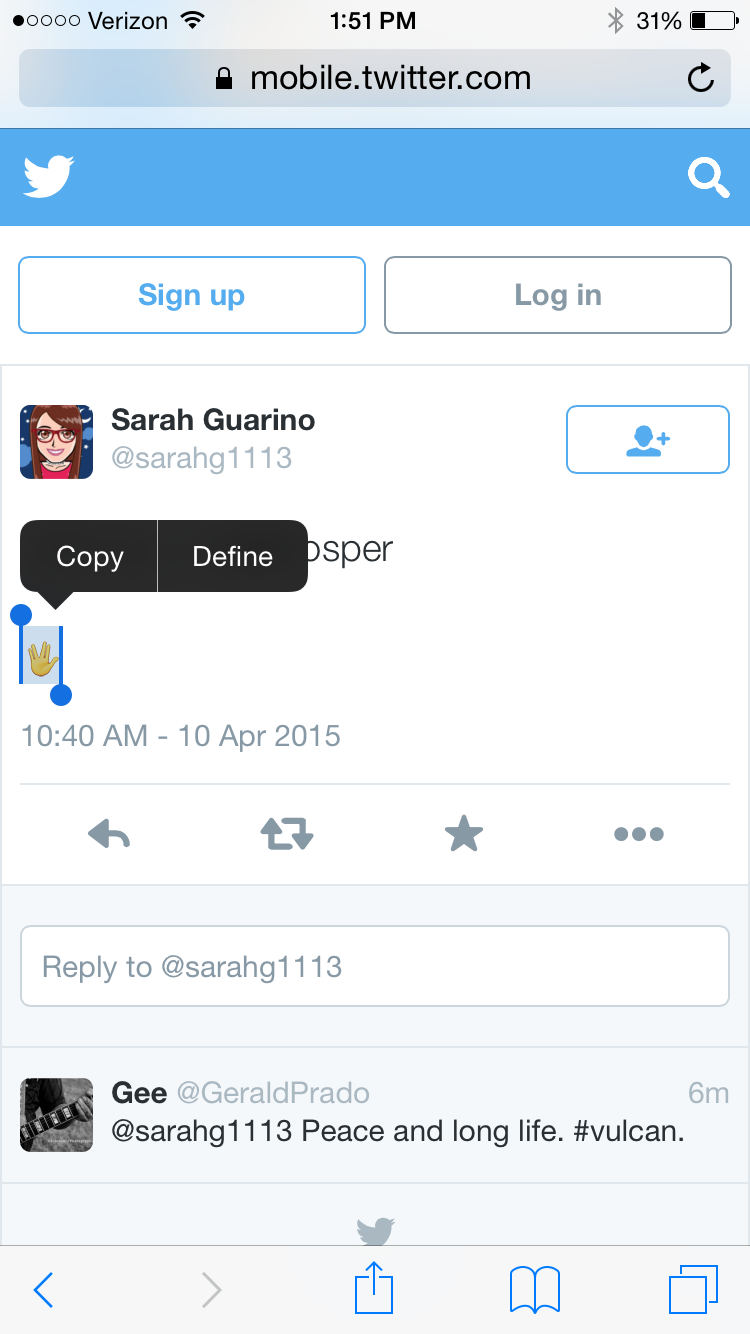
With Apple’s release of iOS 8.3 and OS X 10.10.3, there are now over 300 new emojis including diversity options. Apple uses the unicode emoji set, which includes Spock’s Vulcan salute. However, Apple hasn’t added the Vulcan salute — or “raised hand with fingers separated between the ring and the middle finger” symbol as it’s officially named — to the emoji keyboard, so you cannot type it without creating a workaround. There is a trick, however, that can be done by creating a keyboard shortcut.

Open up this tweet on your iOS device. Then you are going to copy the emoticon by tapping and holding on it. Then press Copy.

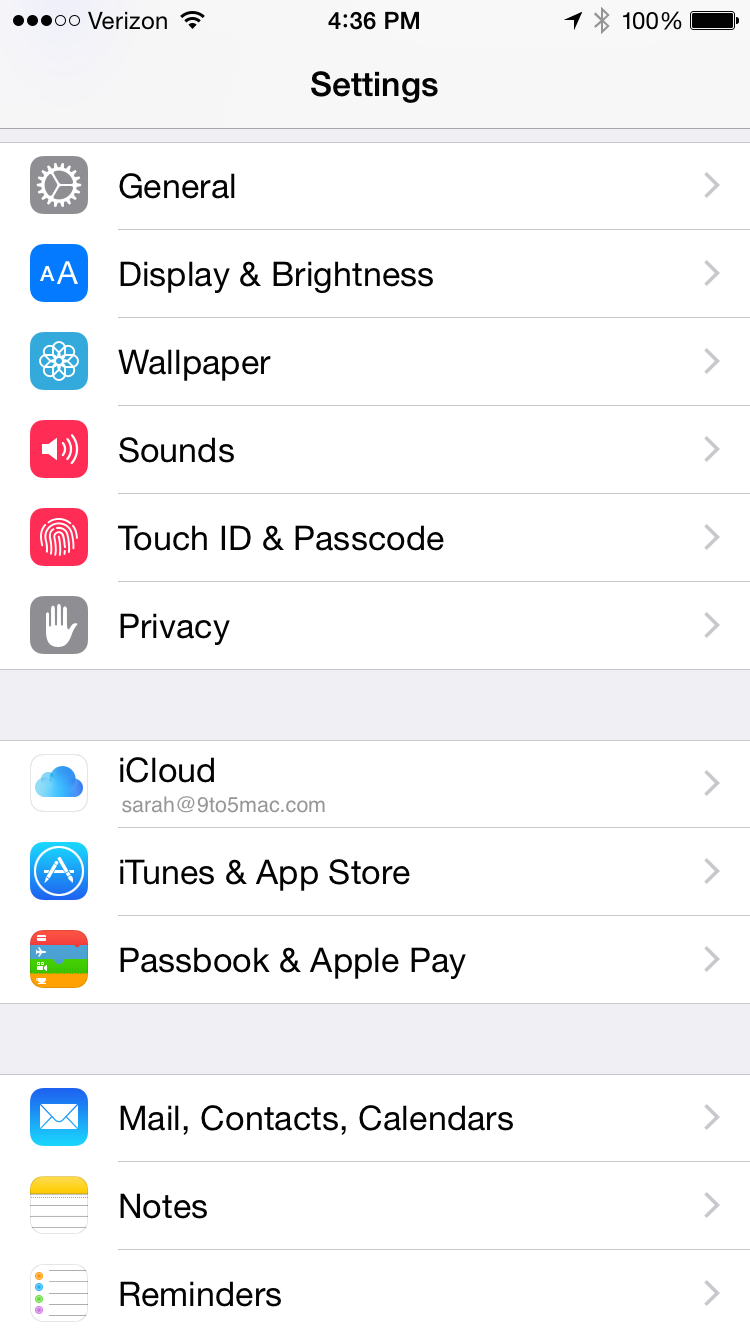
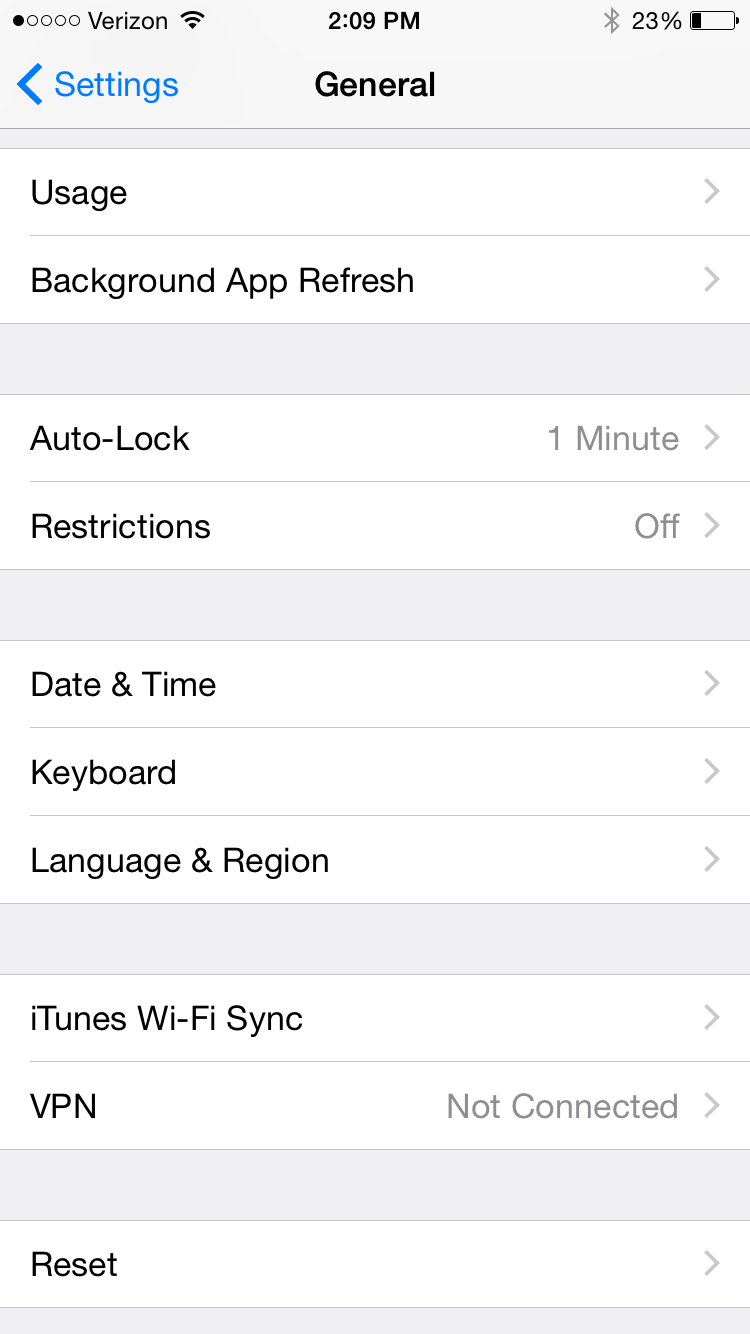
Since we copied Vulcan salute emoji, we can now create the text shortcut. Open up Settings, and then select General.

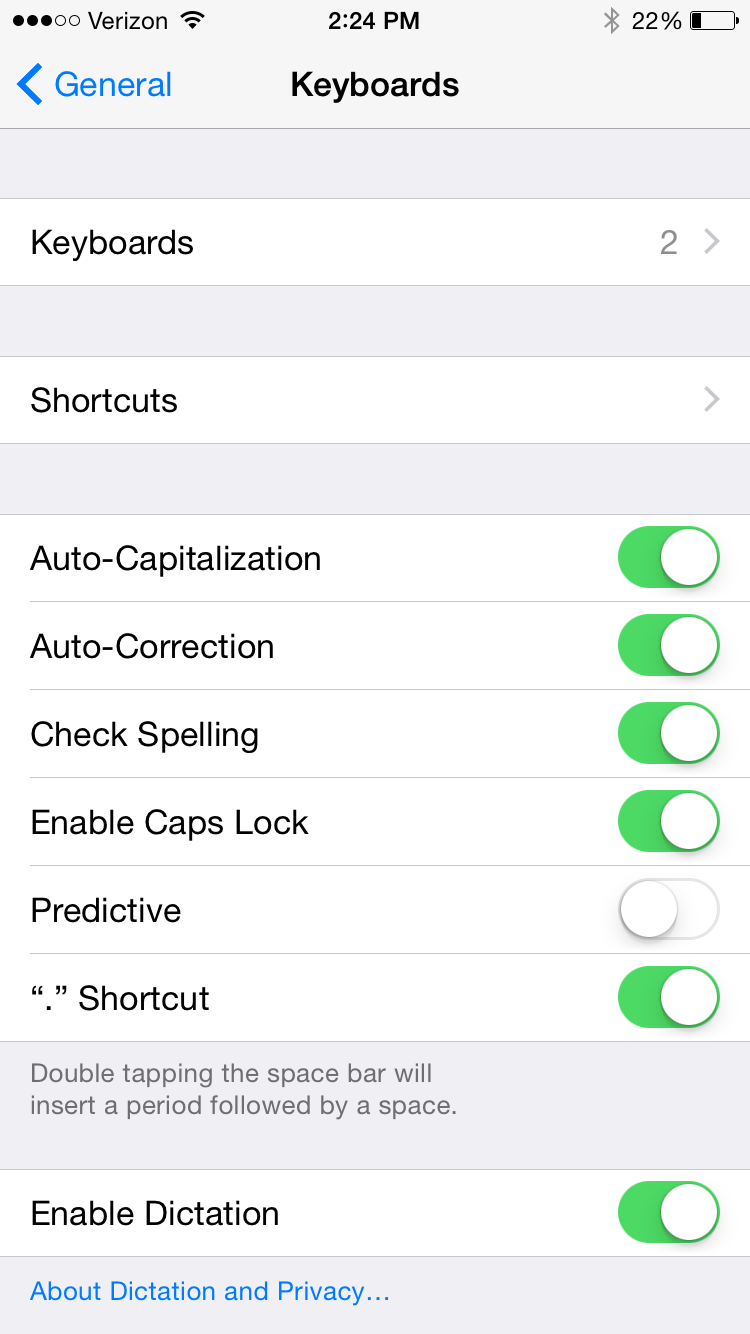
Scroll down and select Keyboard.

Then select Shortcuts.


Expand
Expanding
Close