iOS 13

See All Stories
iOS 13 public beta

iOS 13 Features

During its WWDC 2019 keynote, Apple officially unveiled iOS 13 for iPhone. While we had a good idea of what to expect, Apple still offered some surprises. There’s a new swipe-style keyboard called QuickPath, the Photos app has received notable new features and changes with smart clutter reduction software, a new editing experience, and a new “Photos” tab, while Siri Shortcuts has become more capable with new multi-step and suggested automations. The update also brings a new Siri feature that allows users to instantly reply to messages.

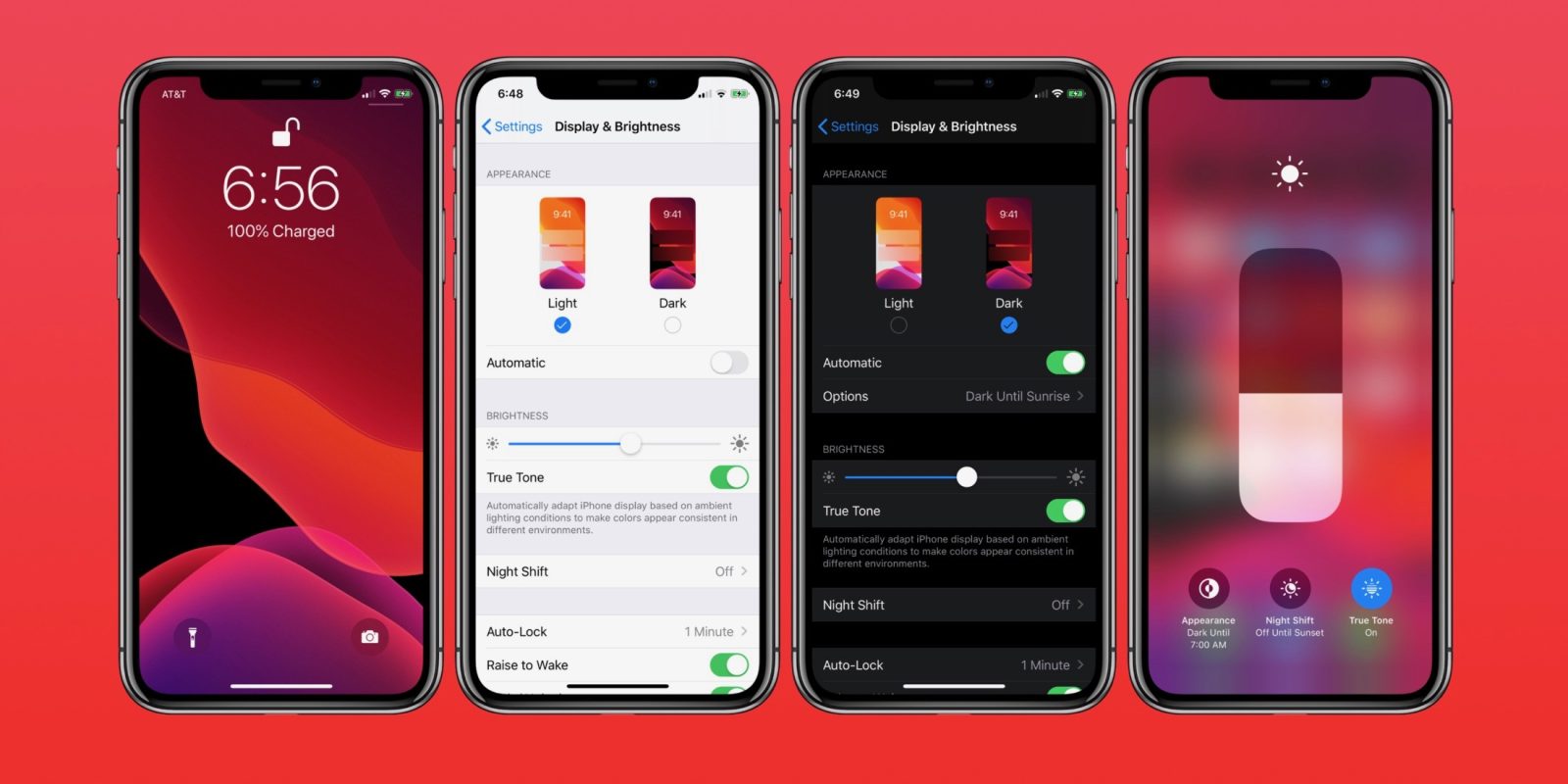
As for one of the most anticipated features, the system-wide Dark Mode has officially arrived on iOS. Apple showed off the new dark theme with the tagline “iOS now lives in the dark.”

https://www.youtube.com/watch?v=E5Jg4Wm9b7o

Many other improvements and changes coming this fall include a redesigned share sheet, app downloads are 50% smaller, 2x faster app launch speed, Memoji Stickers and Memoji Makeup, HomeKit-enabled routers and HomeKit Secure Video, a new “Sign in with Apple” option for logging into third-party services, all-new Apple Maps, and much more.

If you want to go in depth on some of the minor changes, check out 65+ features that Apple didn’t announce during its Keynote.

iOS 13 Release Date

iOS 13 was released on September 19th, 2019 for all comaptible devices.

iOS 13 Device Support

These are the devices that will be supported:

  • iPhone XS
  • iPhone XS Max
  • iPhone XR
  • iPhone X
  • iPhone 8
  • iPhone 8 Plus
  • iPhone 7
  • iPhone 7 Plus
  • iPhone 6s
  • iPhone 6s Plus
  • iPhone SE
  • iPod touch (7th generation)

Top Stories

PencilKit lets devs easily implement Apple’s low latency & new dynamic Pencil tools

Apple introduced PencilKit at WWDC 2019 this week for much easier implementation of Apple Pencil experiences in third-party apps. The new framework will allow devs to tap into the same low latency and the new Apple Pencil tool palette and “markup anywhere” features that Apple itself uses for drawing and annotating in its own apps.


Expand
Expanding
Close

Apple details how offline location works in ‘Find My’ app, will require you own two Apple devices

Find My unifies Find my iPhone and Find my Friends

One of the most intriguing changes in iOS 13 and macOS 10.15 is a merged Find My Friends and Find My iPhone application. The new app converts all of your Apple devices into Bluetooth beacons, enabling you to locate an offline device based on its proximity to any other Apple device. Now, Apple is offering up a bit more detail about the security features for the Find My application.


Expand
Expanding
Close

iOS 13 includes new Accessibility features for motion sensitivity and color blindness

iOS 13 accessibility color blindness

This week during Apple’s WWDC sessions for developers the company showed off some new features for accessibility coming to iOS 13. These include new settings to improve app interactions for users with various motion sensitivity and color-blindness disabilities. The new features will be available in Apple’s own apps starting with iOS 13 and in third-party apps via new APIs for developers.

Head below for full details on the new features:


Expand
Expanding
Close

iOS 13: 3D Touch’s features come to all devices, but 3D Touch itself is on the way out

iOS 13 3D Touch

There have been rumors for a while that the iPhone 11 will not include a pressure-sensitive 3D Touch screen. iOS 13 certainly supports that direction as 3D Touch gestures in iOS 13 are effectively non-existent.

The good news is that the features provided by 3D Touch, like Peek and Pop or Home Screen Quick Actions, are now available with long-press gestures. The bad news is that owners of 3D Touch phones, i.e. all iPhones since the iPhone 6s apart from the SE and the XR, lose out on functionality that existed in previous OS versions.


Expand
Expanding
Close

Opinion: My take on everything Apple announced at WWDC 2019

My verdict on everything Apple announced at WWDC 2019

We’ve already rounded up everything Apple announced at WWDC during the keynote presentation – and it was a lot!

I’d normally write one or two comment pieces on the things that most interested me, but there were so many interesting announcements yesterday that a single piece providing my take on all of it seemed the best approach.

Let’s start with what I saw as the headline on the software side …


Expand
Expanding
Close

iOS 13 includes references to Apple’s Tag device for tracking personal items

iOS 13 Apple tag device

As 9to5Mac has previously reported, Apple is developing a Tile-like device that can be used to track a user’s personal items using the new “Find My” app introduced at WWDC yesterday. The product is known only as “B389” by the people involved in its development.

Now, the first beta of iOS 13 includes an asset package for a device with the product type “Tag1,1”. This type of asset package is used for pairing devices by proximity, the same way as AirPods and HomePod can be paired to a user’s device. The reference was first spotted by Steve Moser and confirmed by 9to5Mac.


Expand
Expanding
Close

iOS 13 brings detailed street view imagery to Apple Maps

As part of iOS 13, the new Maps app includes better organization of favorite places. It also adds support for what Apple calls ‘Look Around’, an Apple take on the popular Google Maps Street View feature.

You can jump into this mode by tapping a binoculars button in the Maps app. The binoculars only appear when Apple has imagery for the current area — right now the easiest way to find somewhere to try this is to search for the Columbus Tower in San Francisco.


Expand
Expanding
Close

Apple releases first developer betas of iOS 13, iPadOS 13, watchOS 6, macOS 10.15, and tvOS 13

Apple has just released the first developers betas of iOS 13, iPadOS 13, watchOS 6, macOS 10.15 and tvOS 13. The updates are available through the developer portal, for members of the Apple Developer Program. Currently, the iOS 13 beta must be installed using an IPSW through iTunes, we’ll update the post if a profile is made available.


Expand
Expanding
Close