HomeKit

See All Stories

HomeKit is Apple's home automation framework that lets you control connected accessories from your iPhone, iPad, Apple Watch, HomePod, and Siri.
Your home at your command.

What is HomeKit / Apple Home?

Along with several other new APIs for developers, Apple announced HomeKit in June 2014, which allows all home automation accessories/devices to work together in harmony with iOS. The API allows home automation developers to centralize all home automation without needing separate apps to access each device’s specific features. These devices include locks, lights, cameras, doors, thermostats, plugs, switches, and more.

HomeKit allows for secure pairing with devices and the ability to control individual devices. It also makes it possible to group several home automation devices into scenes that allow for easier control of any automation device in specific situations. One of the coolest features available with HomeKit is the ability to control any home automation accessory with Siri based on certain commands or scenes previously configured with these devices.

In 2016, Apple introduced a new Home app that came with a modern look, relatively easy-to-use controls, and access to accessories and scenes from anywhere on iOS 10. Apple’s new built-in Home app arrived on the iPhone’s Home screen, plus you can access a ton of functions from the Lock screen or anywhere on iOS from the new Control Center once you have a HomeKit accessory set up.

In 2018, Apple released the HomePod. It was a way to interact with your connected home devices through Siri using a standalone device.

In 2020, Apple announced that tvOS 14 would gain access to the Home app. iOS 14 is also bringing improvement to the Home app UI.

HomeKit Secure Video
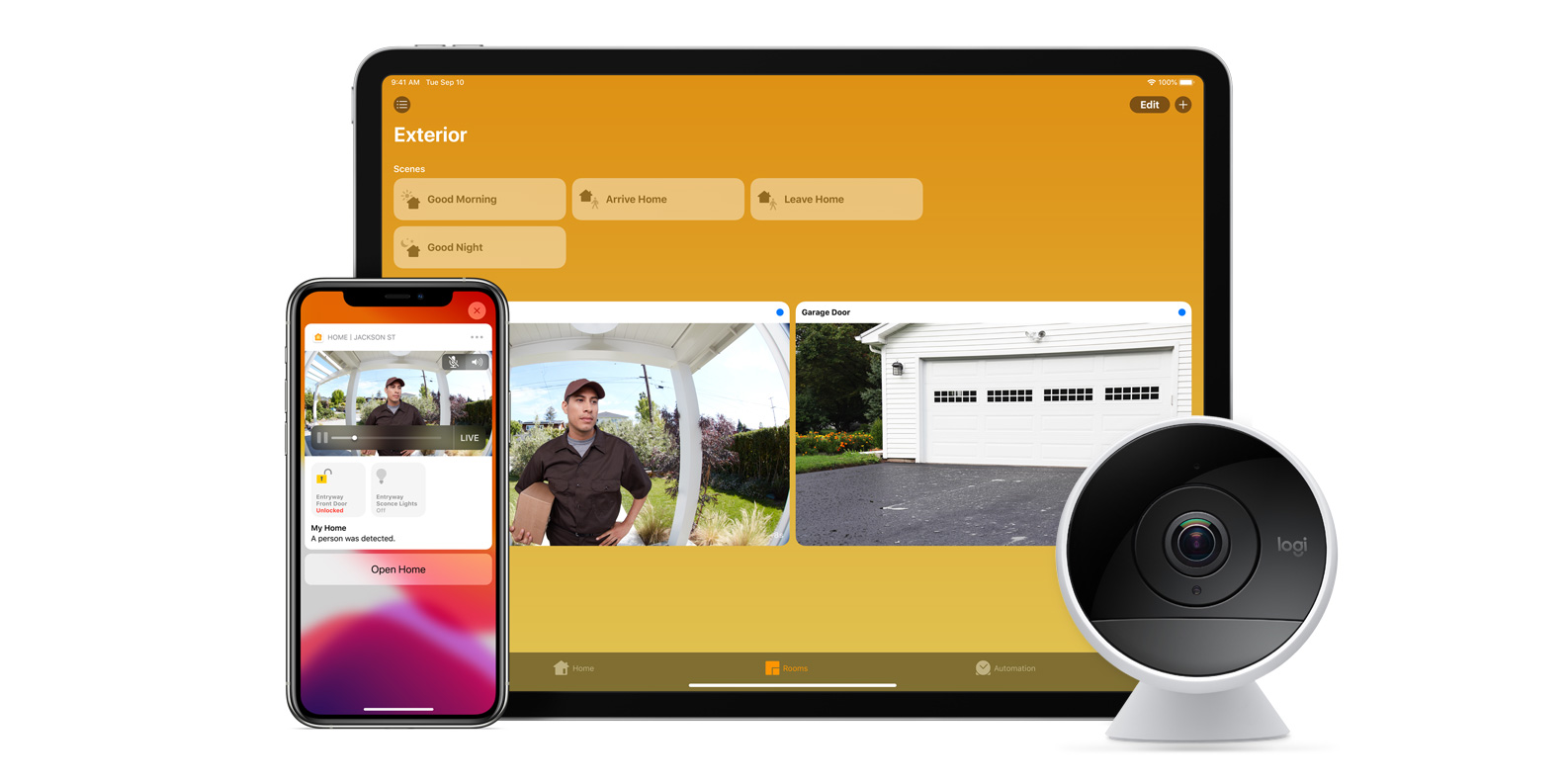
With iOS 13, Apple announced HomeKit Secure Video.

Footage from home security cameras contains your most personal and sensitive data. With HomeKit Secure Video, activity detected by supported cameras is privately analyzed by your home hub using on‑device intelligence to determine if people, pets, or cars are present. When important activity is detected, you and anyone you share your Home app with will receive a rich notification that lets you view the clip right from the Lock Screen. Recorded video is available to view for ten days from the Home app. It’s securely stored for free in supported iCloud accounts and doesn’t count against your storage limit.

While the rollout has been slow, Logitech, Arlo, Netatmo, and Eufy are among the early standouts. With recent privacy issues with Ring, HomeKit Secure Video is likely to continue to grow in popularity. One key benefit with Secure Video is that it works with your existing iCloud storage (200GB and up plan), so you don’t have an extra monthly fee for storage.

HomeKit Router
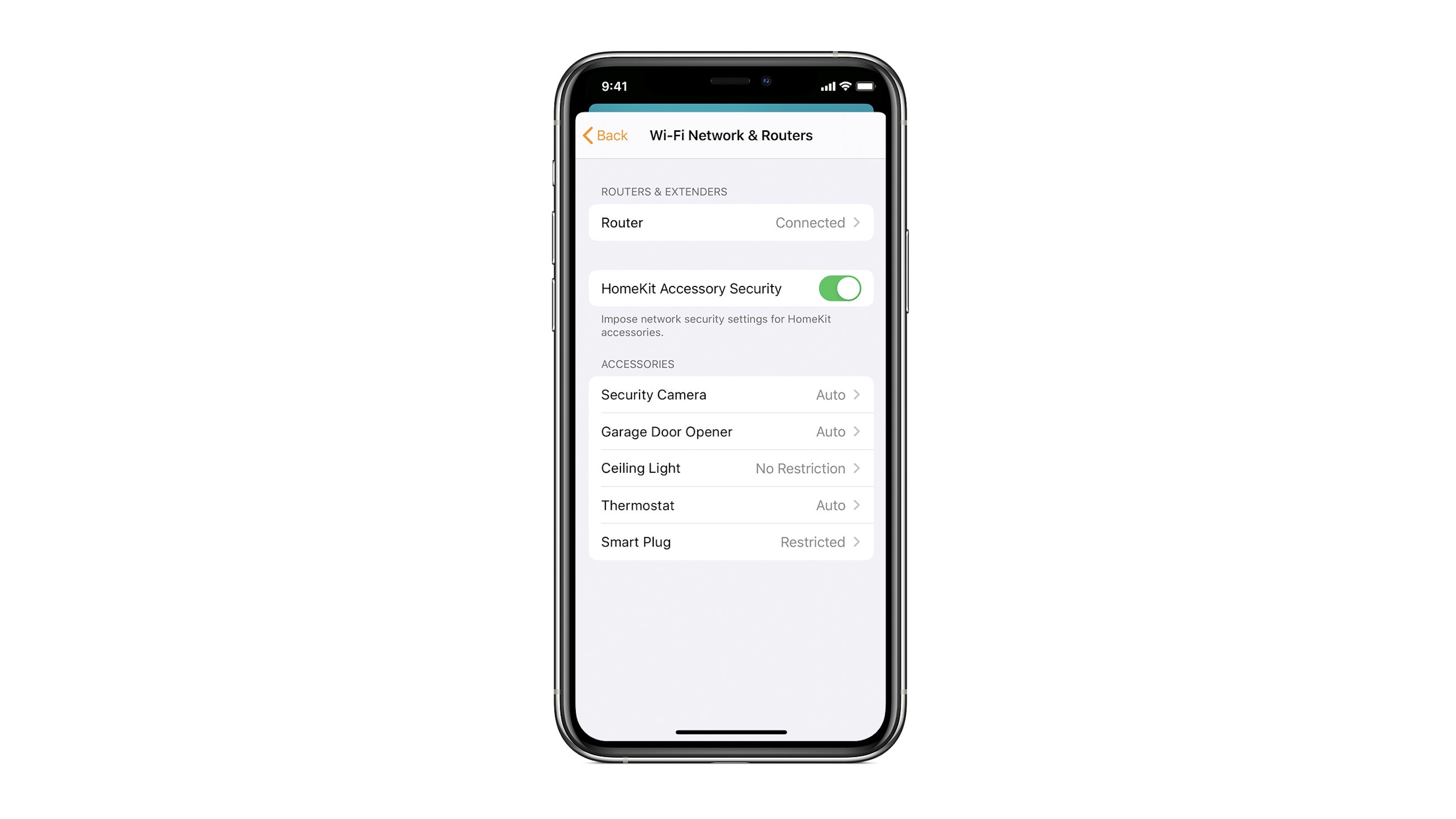
HomeKit Router was also announced with iOS 13, but it wasn’t released until early 2020. The idea behind the feature is you can give granular control to smart home enabled devices to control where on the internet they can reach.

eero was the first company to roll out support in for HomeKit Router.

With Apple HomeKit, eero gives you even more protection of your HomeKit accessories and an easy way to manage what they are allowed to communicate with in your home and through the internet.

There are three levels of security Apple offers for accessories paired with HomeKit routers:

  • Restrict to Home: Most secure. Your accessory can interact only with HomeKit through your Apple devices. The accessory won’t connect to the Internet or any local devices, so any third-party services, like firmware updates, might be blocked.
  • Automatic: Default security. Your accessory can communicate with HomeKit and connections recommended by its manufacturer.
  • No Restriction: Least secure. This setting bypasses the secure router and allows your accessory to interact with any device in your network or Internet-based service.

How Do You Use HomeKit?
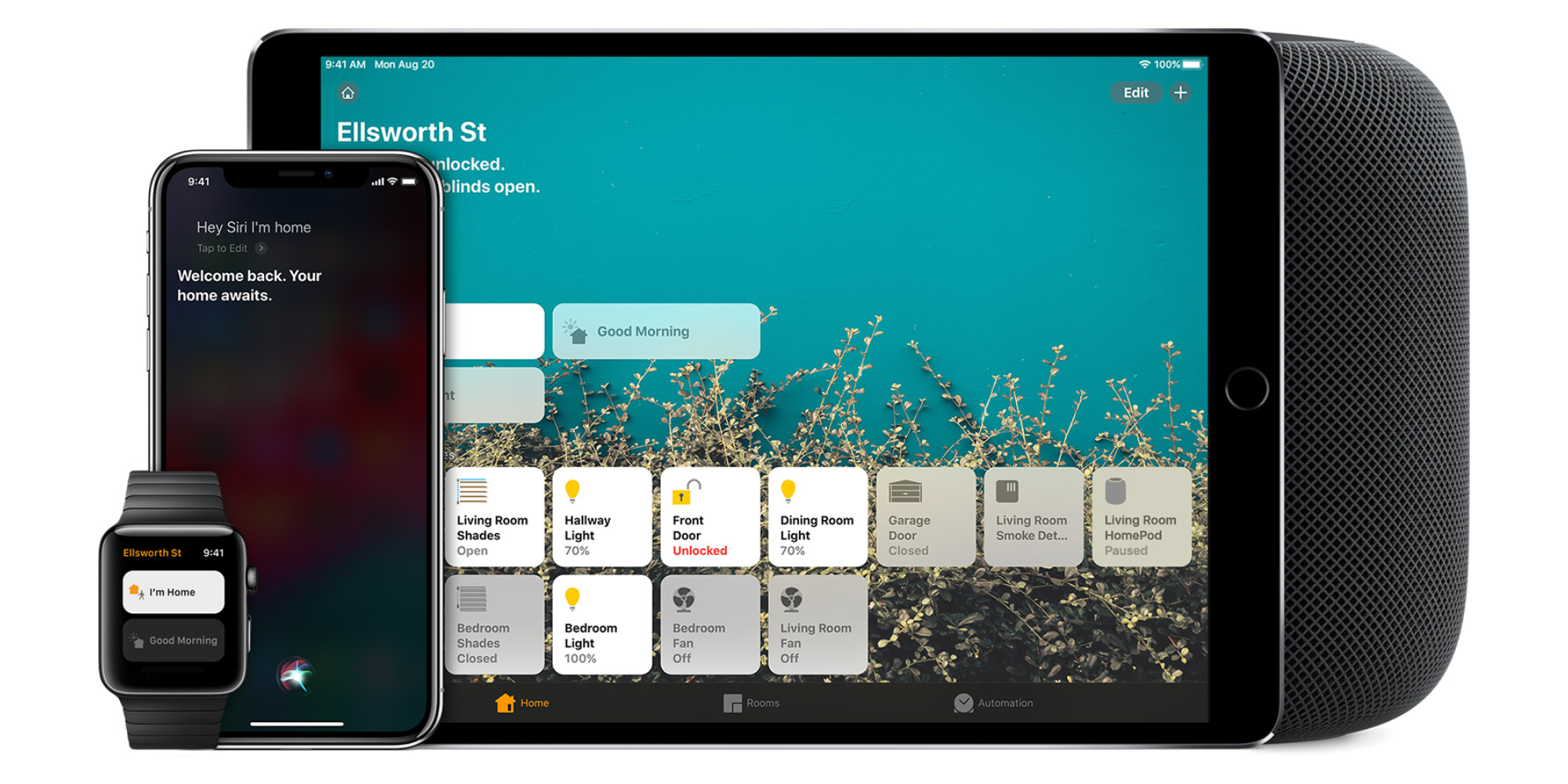
Homekit app

HomeKit devices can be controlled from iPad, iPhone, Mac, Apple Watch, and HomePod. A 4th generation Apple TV (or newer) is an essential Apple smart home device as it acts as a bridge over iCloud to allow access to your devices when away from home.

9to5Mac’s Bradley Chambers does a regular column about the “Apple Home” lifestyle in his HomeKit Weekly column.

Feature Request: Many more HomeKit icons for easier at-a-glance control

Zac wrote a really helpful piece earlier this week about a HomeKit feature that had somehow entirely passed me by: the ability to customize your light icons.

The default icon for all lights is a lightbulb. But HomeKit offers you the ability to choose between four icons:

  • Lightbulb
  • Floor lamp
  • Ceiling light
  • Desk lamp

Zac mentioned that it would be useful to have more options, and I wanted to give this greater visibility by making it a feature request …


Expand
Expanding
Close

Smart home company Abode promises summer release of Iota HomeKit security system following acquisition

The Iota gateway was billed at a DIY HomeKit security system when it was first introduced at 2018’s CES in Las Vegas. We brought you news of the product’s introduction in January, where manufacturer Abode Systems set a target shipping date of late Q1. Today, the company has announced that is has received a majority stake investment from home automation brand Nice S.p.A. and will continue developing HomeKit products. 


Expand
Expanding
Close

HomeKit Weekly: Automating outdoor lights on and off based on sunset/sunrise and time

HomeKit Weekly

HomeKit Weekly is a new series focused on smart home accessories, automation tips and tricks, and everything to do with Apple’s smart home framework. 

As a HomeKit enthusiast, I find myself playing around with a lot of different automations. Some stick because they’re actually useful while others are just neat proofs of concept that prove less practical. There is one set of automations that I absolutely love and recommend every HomeKit user copy: automating outside lights on and off based on time and sunset.


Expand
Expanding
Close

HomeKit Weekly: Using Automation to put sensors to work

HomeKit Weekly

HomeKit Weekly is a new series focused on smart home accessories, automation tips and tricks, and everything to do with Apple’s smart home framework. 

In our third installment of HomeKit Weekly, we’re going to explore how to make HomeKit-enabled sensors more useful through automation in Apple’s Home app. 9to5Mac has also teamed up with FIBARO to offer a HomeKit bundle giveaway, so this week we’ll highlight ways to put those products to work.


Expand
Expanding
Close

Review: Yale’s Assure Lock SL is an awesome HomeKit-enabled smart lock with room to grow [Video]

When it comes to HomeKit devices, our own Zac Hall is the resident expert around these parts, but I’m doing my best to come up to speed with the plethora of options available. I recently took my first stab at installing a smart lock, the 3rd gen August Smart Lock, only to later find out that it wasn’t HomeKit compatible. It’s primarily my fault, because I wasn’t diligent enough with my research, but August, with its somewhat confusing nomenclature should take a portion of the blame as well.

Needless to say, I wasn’t keen on the idea of having a smart lock installed without HomeKit support. That would mean that I couldn’t unlock my door with Siri commands, couldn’t use the Home app to control the lock, and couldn’t use HomeKit automation to trigger other HomeKit-enabled devices. In other words, a smart lock without HomeKit support is just not something that appeals to me.

That’s not to say that the third-generation August Smart Lock is a bad product, because that certainly isn’t the case. It’s actually a decent product that’s inexpensive and easy to install. It’s just not for those who are knee-deep in the Apple/HomeKit ecosystem.

I reached out to Yale Real Living to inquire about reviewing its Assure Lock SL, which recently landed support for HomeKit via its iM1 network module. What I discovered was a modestly-featured smart lock with a fair amount of advanced controls. In fact, I’m strongly considering the purchase of another one.
Expand
Expanding
Close

HomeKit Weekly: Turning your old garage door into a Siri-controlled entrance

HomeKit Weekly

HomeKit Weekly is a new series focused on smart home accessories, automation tips and tricks, and everything to do with Apple’s smart home framework. 

Getting into HomeKit can be a very costly endeavor when you start replacing locks, lights, and other accessories with connected versions. Fortunately, turning your old garage door opener into a Siri-connected entrance doesn’t require replacing your existing garage door opener. Instead you can upgrade your existing garage door opener from $70-$170 depending on your needs. Here’s how to get started:


Expand
Expanding
Close

HomeKit Weekly: Getting started with Apple’s Home app on iPhone, iPad, and Apple Watch

HomeKit Weekly

HomeKit Weekly is a new series focused on smart home accessories, automation tips and tricks, and everything to do with Apple’s smart home framework. 

In our inaugural edition of HomeKit Weekly, we’re starting with the basics: becoming familiar with Apple’s Home app to control HomeKit. Apple’s Home app is a lot more polished than smart home control in Amazon’s Alexa app, but the Home app can feel foreign to new users despite its name. That was certainly my experience on day one of running iOS 10, but you can overcome the learning curve with experience.


Expand
Expanding
Close

Alexa-equipped ecobee Switch+ with HomeKit now available for pre-order, ships March 26

After being teased last summer, ecobee has officially announced pricing and availability for its new Switch+ smart home accessory. Switch+ is available for pre-order starting today and ships on March 26 for $99 in the US and $119 in Canada. Like other smart light switches, Switch+ includes Alexa integration as well as HomeKit support for controlling lights  — but Switch+ takes integration with Amazon’s voice assistant a step further by building it in to the light switch.


Expand
Expanding
Close

HomePass for iOS is a helpful HomeKit app for storing all those important setup codes 

Deciding how to manage all of those eight-digit setup codes is one challenge every HomeKit enthusiast faces. Accessory makers warn that misplacing codes can make it impossible to set up devices again in the future, and not all accessories include a copy of the code on devices.

HomePass is a brand new iPhone and iPad app designed to solve that problem by easily storing all of those eight-digit codes for you, and creating new entries in the app is super easy.


Expand
Expanding
Close

Review: VOCOlinc’s smart power strip is an affordable way to add HomeKit to 3 devices

Adding HomeKit to your house can be expensive, but as the technology progresses, more affordable options have been making their way to market that make HomeKit a viable choice for more consumers.

A couple of weeks ago, Zac reviewed Hong Kong-based VOCOlinc’s HomeKit-enabled LED light strips, noting that the price almost seemed too good to be true for a HomeKit product with no bridge required. Intrigued by the company, I decided to try out their smart power strip with HomeKit support.

How does it work? Read on to find out…


Expand
Expanding
Close

How to create a smart home in a smart way

Those of you who’ve been following my Smart Home Diary series will know that I’ve learned a number of lessons – some of them the hard way. But I thought it would be useful to distill these into a single piece offering my best advice for anyone planning to create a smart home from scratch today.

And that advice begins with considering whether or not creating a smart home is a smart choice for you …


Expand
Expanding
Close

Feature Request: How HomeKit could improve with CarPlay

CarPlay isn’t expected to gain any major features this year according to recent reporting, but that doesn’t mean we can’t dream. One simple change I would love to see in some future update is support for HomeKit alerts through CarPlay. Going a step further, a dedicated Home app for CarPlay with a few key features could be very beneficial.


Expand
Expanding
Close

Netgear ships first HomeKit baby monitor with app-updated Arlo Baby Camera

Lots of companies promise HomeKit support for existing products then fail to follow through for one reason or another, but Netgear’s Arlo has proven to be an exception to that trend. After promising HomeKit support for its Arlo Baby Camera line, Netgear has released an app update that makes the baby monitor cameras work with Apple HomeKit.


Expand
Expanding
Close

Smart Home Diary: Adding HomePod, smart(ish) heating and Nanoleaf Rhythm

I explained in my first HomePod Diary piece that there was one smart home issue we needed to address: while I’m happy to use Siri to control everything from my Apple Watch or iPhone, my partner would often find that she wanted to switch lights on or off while her phone was in another room. We’d partially addressed this with Hue dimmer switches, but wanted more flexibility.

Some kind of smart speaker was the obvious solution to this, and the HomePod would have the advantage of being able to act as a HomeKit hub too.

In my HomePod Diary, I’ve been focusing mostly on music, but I’m also happy to report that the smart speaker has also passed the Steph Test …


Expand
Expanding
Close

Canary home security cameras now work with Amazon Alexa, no update on HomeKit support

Canary has announced that its home security camera system now works with Amazon Alexa devices with screens including Echo Spot and compatible Fire TVs. Alexa support lets you use voice to view live video from connected cameras. While the company is shipping Echo integration, Canary is still not offering a clear roadmap for when Apple HomeKit support may be coming.


Expand
Expanding
Close